I ran into a strange and surprising PHP error today. I’m working on a little PHP application which has a login page. The login script calls session_start() to start or resume a PHP session. It was working OK so I decided to decorate the page a little (I was working in Eclipse). I like to try a variety of tools, so I ran up Microsoft’s Expression Web, added an image, then re-ran the script to see how it looked.
The answer was not good, because I now had an error:
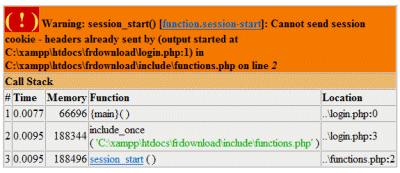
Warning: session_start(): Cannot send session cookie – headers already sent
I puzzled over this for some time. The error was in line 0 of my login page. I couldn’t see anything that was different from before, except the static image that meant nothing to PHP.
Eventually I worked it out. Eclipse (running on Windows) created the PHP files using ANSI. On saving, Expression Web silently changed them to UTF-8. That in itself was no bad thing – it’s usually a better choice – though I reckon it should ask. The bigger problem was that Expression also added a BOM (byte order mark) to the beginning of the file. This is actually optional for UTF-8, and most non-Windows editors do not add it. It happens to flummox PHP, which interprets them who-knows-how and sends some output to the browser, preventing session_start from working.
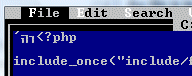
This is particularly painful to debug since most editors do not display the BOM; they simply use it to confirm the character set in use. So you can have file A which works, and file B which does not, and they are character-by-character identical.
One way to see and remove the BOM is to open it with Edit.com, which does not understand it at all:
I guess both Expression and PHP could do better here. The bit that puzzles me is that I can’t be the first to run into this. Doesn’t Microsoft know that its UTF-8 BOM breaks PHP files, at least on the two versions I tried (XAMPP on Windows and PHP 5.2.1 on Linux)? I can’t even see a preference in Expression that would prevent it being written. And if you remove it, and then re-edit in Expression, it carefully writes it back. Unlike Adobe’s Dreamweaver, which leaves well alone.
PS if you want to know all about BOMs, see here.
Update: See comments – apparently this was fixed in Expression Web 2.0. Tina Clarke discusses the problem here.
Tim-
Are you using Expression Web 1? That issue was fixed in Expression Web 2 (as well as adding PHP intellisense and a PHP preview server). If you are using 2, please send an email. Expression Web 2 should save files with PHP extensions using ANSI without a BOM.
Steve
Steve,
It’s 12.0.6211.1000 SP1 MSO 12.0.6320.5000
I guess that’s version 1. Glad to hear it’s fixed.
Tim
Yours was the only solution that actually fixed the problem for me. All the other solutions spoke of only “white space” at the beginning or end of the .php file. A BOM is of course not white space.
Thanks again!!!!