After trying out Adobe’s new Dreamweaver CS5.5 for building a PhoneGap app for Google Android, I was keen to try the same for Apple iOS. In particular, I wanted to see if the performance problems with jQuery Mobile and PhoneGap on Android were also an issue on iOS.
This turned out to be more complex than I had imagined. Bear in mind that I have not done a lot of previous iOS development; but I reckon that makes me a good test case for Adobe’s market here. Ideally you should be able to use Dreamweaver alone to build your app and make a fortune on Apple’s popular app store.
I installed Dreamweaver CS5.5 without any issues and copied my Calculator example from PC to Mac. I am not going to repeat the steps that were the same as for Android; read my earlier post. I will mention that I puzzled over the setting for the IOS Developer Tools Path. After trying various sub-directories I eventually discovered that simply entering /Developer here works. One of the issues I have with this stuff is that clicking Help generally does not help. I resorted to watching one of Adobe’s videos and checking out the screen there.
My app worked fine though and I was able to run it up in the iPhone simulator. However I really wanted to test it on the device itself. The problem: this is all you get in Dreamweaver in terms of application settings:
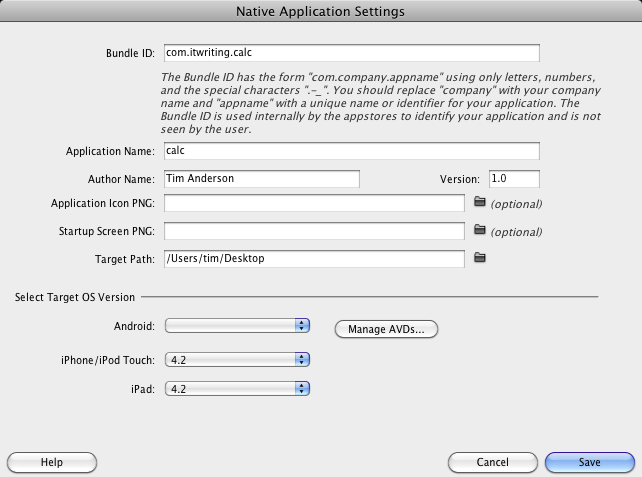
I have not yet found any documentation from Adobe concerning what to do once your PhoneGap app is ready for on-device testing, though there may be some somewhere.
My solution was to download a separate install of PhoneGap, picking the latest version which is 0.9.5. Then I downloaded Xcode 4 and the latest iOS SDK; I had not previously installed this as I have only just signed up for Apple’s paid developer program.
I might have been better sticking with Xcode 3.x, as it turns out that PhoneGap’s support for Xcode 4 is still work in progress. I used Shazron Abdullah’s script which creates an Xcode 4 PhoneGap project from the command line. Then I copied my Calc application and the jQuery mobile directory into the project and opened it in Xcode 4.
Nothing worked and I had to do a number of things to get it to build. Most problems were solved using this guide by Cameron Perry and the comments which follow. Here’s what I recall doing:
- I removed a red link to PhoneGapLib.xcodeproj and added it back from ~Documents/PhoneGapLib
- I added i386 to the list of Valid architectures in build settings, for both the PhoneGapLib and my Calc project
- I added an entry for PHONEGAPLIB to the Xcode 4 Source Trees, set to /Users/username/Documents/PhoneGapLib/ using the full path and not the ~Documents abbreviation.
- I obtained an ID for my app from Apple’s developer portal and pasted into the project as the Bundle identifier (info section).
At this point the project almost built but I still got two Apple Mach-O Linker errors relating to PhoneGapDelegate:
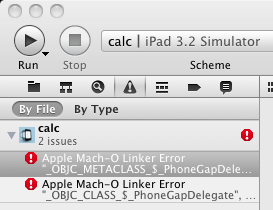
I tried a couple of things to fix this. I added the PhoneGapLib project as a target dependency for Calc, which did no harm but was not a fix. Then I went to the Link Binary with Libraries section of Build Phases and added a reference to libPhoneGapLib.a
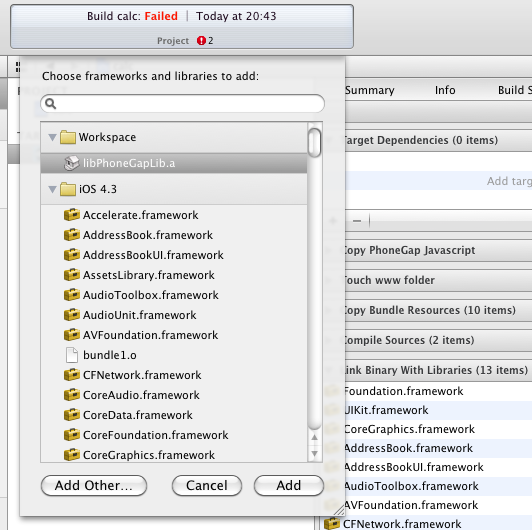
The odd thing is that libPhoneGapLib.a now appears in my project in red, suggesting something missing, but the project now builds fine; I am sure an Xcode 4 guru can advise.
So here is my app running on a real iPhone 4:
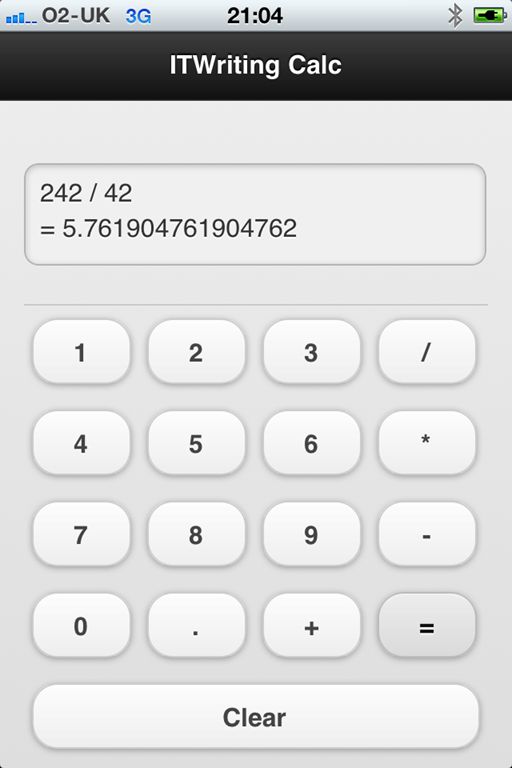
I slightly modified the design to fit the iPhone 4 screen.
Now for the bad news: performance is still not really good enough. To be clear, the problem is a slight pause between tapping a button and the number being entered. One bad symptom is that if you are in a hurry and tap several numbers quickly, some may not register. The iPhone 4 runs the app slightly better than my HTC Desire, but I would still not be happy releasing it with this performance – leaving aside the fact that a better calculator app comes free with the iPhone.
I tried specifying a release build in Xcode 4 but it made little difference. I suspect performance could be improved either by not using jQuery mobile, or by configuring it to reduce the richness of the buttons it creates.
Leaving that aside, it seems to me that Adobe has some work to do in making it easier to get from a Dreamweaver project running in the emulator, to an app that you can test on a device and deploy to the app store. Although the steps I took seem arduous, it is not really so bad once you get it working. You could create a much more complex app entirely within Dreamweaver, and then the work involved in moving it to Xcode would be pretty much the same as I had to do for my simple calculator. So I am not going to say that the PhoneGap integration is no use, just that it needs better documentation. Maybe in the next version we will get fuller integration that will do device build and deploy as well as building for the simulator.
Now that PhoneGap 1.0 is out, you might try this again. Also, maybe try something other than DreamWeaver and see if the performance changes.
I converted a Dashcode Web app to PhoneGap. Except for the initial load time of the JS files, the runtime performance is not too bad even on a 2nd gen iPod touch, although the transitions and touch responsiveness is not quite the same as a native ObjC app, nor should one expect it to be.
http://web.me.com/macpgmr/ObjP/MacXPlatform_Part9.html
I would guess that not all JS UI frameworks are created equal – particularly if they were designed with desktop performance in mind.
Thanks.
-Phil
Hi, I’m not sure that can I place question here. Why can I select the IOS Developer path in Dreamweaver>configure Application Framework, even I’ve installed the Xcode 4.1 & PhoneGap 1.1. Anything I missed? Anyone can advice!
Hi
I too was annoyed at the 300ms delay onclick in an ios web app – this is across the board too, jquery/native js/ phonegap – they all seem to have this ‘click delay’
Found out this to be something apple made happen on purpose. (grrr)
Not sure if youve seen this but There is a great solution to this on cubiq.org, a way to make clicking seemingly ‘instant’