Tim Anderson’s ITWriting

Tech writing blog

February 23rd, 2009

Squeezebox and Napster – the perfect combination?

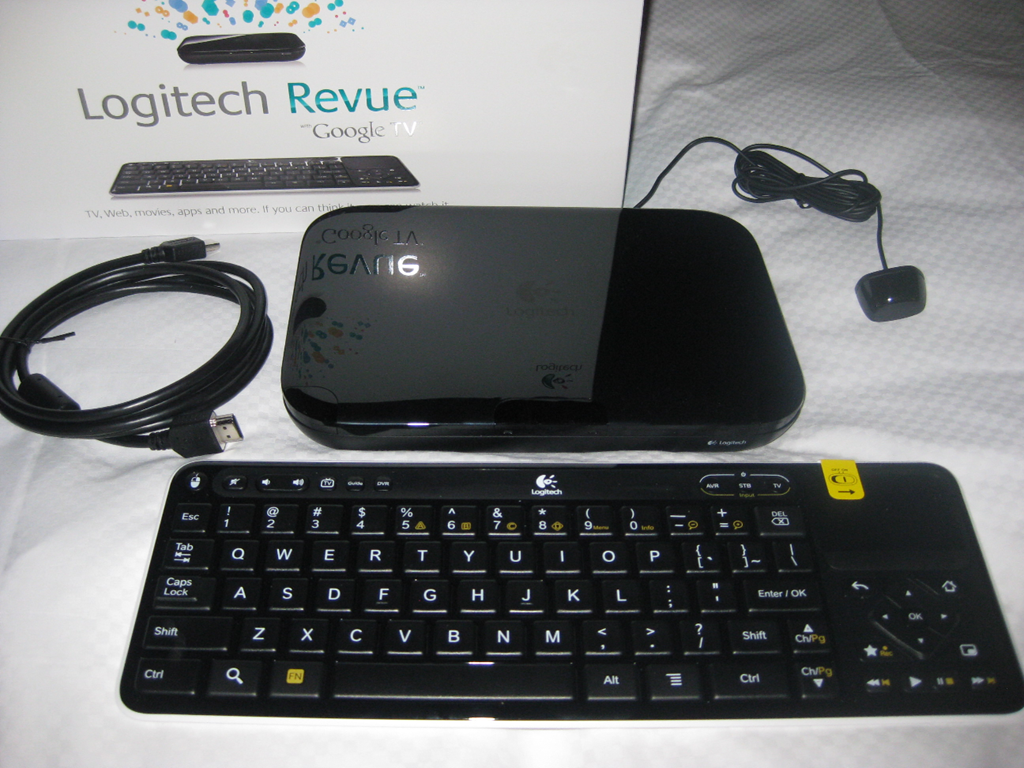
I’ve just posted a review of the Squeezebox Boom, a lovely device that once set up is perfect for hiding all the computer gunk and letting you enjoy the music wherever you are in the house. During the review I noticed that Logitech’s Squeezenetwork, which aggregates a number of Internet radio stations and music services for use with Squeezebox, announced Napster support last week.

I tried this, and it is amazing, though you do need to subscribe to Napster; trial accounts are available. If I want to play any song or album in Napster’s vast library, I select Squeezenetwork as the music source on the Boom, select the Napster music service, search the Napster library, and play the music. No computer has to be running for this to work. Sound quality is good though noticeably worse than locally-streamed lossless FLAC; more radio than hi-fi.

I’ve also been spending time with Spotify. Like Napster, this makes a huge library available, plus it has a couple of advantages. Performance is better, with near-instant search results and playback; and best of all it is free, if you can tolerate occasional advertisements. Unfortunately Spotify does not integrate with Squeezebox yet, though users are clamouring for it.

The Squeezebox is a schizophrenic product with one foot in the old world of local media storage, and one foot in the new world of Internet streaming via Squeezenetwork. Squeezebox plus Napster is great; Squeezebox plus Spotify would be even better. Either one makes Apple’s iTunes purchase-and-download model look dated.

Technorati tags: , , ,
May 19th, 2008

Why we don’t talk about Zune

Brandon LeBlanc comments on last week’s Guardian article on DRM and says:

What is interesting to me is the article neglects to look at what Microsoft is doing with Zune in regards to DRM. Just like Apple and Amazon – the Zune Marketplace also offers DRM-free music.

According to this page on the Zune Marketplace:

Browse over three million songs you can preview and download—most are now available as MP3s that’ll play on your Zune device or any other MP3 player. Or get an instant music collection: Zune Pass gets you millions of downloads for just $14.99 a month.

Answering LeBlanc, one reason is that Microsoft has not made Zune available internationally, so its visibility in the UK is rather minimal. Nevertheless, the Zune developments are interesting. In fact, the Zune now has pretty much the business model many expect Apple’s iTunes and iPod/iPhone to have in the future – all-you-can-eat subscription, with a premium download option.

Still, Microsoft has a marketing problem with Zune. First, it’s perceived as a me-too answer to iTunes/iPod. Second, the branding is focused firmly on the Zune device, which has only a small market share. Amazon on the other hand makes great play of the iPod compatibility of its MP3 store. How can Microsoft promote Zune marketplace as a source for DRM-free iPod music, without undermining the whole Zune concept in which device and store are tied tightly together?

Technorati tags: , , , , ,
January 13th, 2008

Great anecdote in the Economist about the decline of the CD

The Economist has a report on change in the music industry, which kicks off with this anecdote:

IN 2006 EMI, the world’s fourth-biggest recorded-music company, invited some teenagers into its headquarters in London to talk to its top managers about their listening habits. At the end of the session the EMI bosses thanked them for their comments and told them to help themselves to a big pile of CDs sitting on a table. But none of the teens took any of the CDs, even though they were free. “That was the moment we realised the game was completely up,” says a person who was there.

November 26th, 2007

Camera, Flash, Action: review of the LG Viewty

I’ve reviewed LG’s new camera phone here. I found this an interesting device because it has a Flash UI, one that for the most part works very well. It also has an excellent camera. No wi-fi, which is a shame.

The Viewty is bound to be compared to the iPhone, because both have touch screens. The Viewty is cheaper and has more features (though it is missing a few as well), but to my mind its biggest handicap is that it lacks the polish and attention to detail which typifies Apple’s products.

Back in 2004 I reviewed the iRiver H140, a great MP3 player that was superior to Apple’s iPod in several respects. It had both digital input and output. It had a better battery. It had FM radio. It had a remote with controls and an LCD display. It had a built-in microphone and a mic input – I still use it for recording today.

The H140 was a modest success, but nothing in comparison to the mighty iPod. Why? It wasn’t just the marketing, or the looks, though both were factors. Another issue was that the H140 and its successor the H320 have perplexing controls that almost seem designed to catch you out. The iRiver also came with PC software that didn’t seem to do anything at all, though in fact it inserted some right-click options into Windows Explorer. It was a far cry from the slick iTunes/iPod integration.

The Viewty pays more attention to usability than the H140, but there are enough niggles – like the dangling stylus holder, the awkward jog wheel, or the error-prone LG PC Suite – that you wonder if these lessons have been learned.

On the positive side, the Viewty is an excellent phone, camera, and portable entertainment device. It proves that the Flash UI concept works, and that the day will come when I no longer need to take a standalone camera to conferences and the like – paying attention, Canon?

PS does anyone know how to take screen grabs from the Viewty? If I can figure it out, I’ll post some examples of the UI.

Technorati tags: , , , , ,
September 17th, 2007

iPod database successfully hacked – for now

A couple of days ago I blogged about the database hash in new iPods, which prevents their use with song management software other than iTunes. There is no iTunes for Linux.

The good news is that apparently the hash has been cracked, “using a debugger on Windows.”

Miguel de Icaza goes on to observe:

Breaking the hash is not really a long-term solution, as they can keep making the process harder every time. The long-term solution is for iPods to have a standard interface that third parties can communicate with.

Indeed. Of course, if iTunes and iPod communicated through a standard API, and if Apple would license its DRM or support alternatives, then any hardware vendor could sell iPod-compatible hardware, any software vendor could come up with substitutes for iTunes, and any online music store could compete with Apple’s official one.

Commoditization. Something Apple will do anything to avoid.

Technorati tags: , , , , ,
September 15th, 2007

New iPod locked more tightly to iTunes, will not work with Linux

Apple has apparently made some changes to the iPod that make it increasingly difficult to use with anything other than iTunes. Since iTunes does not run on Linux, this affects Linux users more than anyone.

I wrote a piece a while back on Linux multimedia, and was impressed at how well my old iPod Photo works with Amarok on Linux. I have this iPod formatted for the Mac, since iTunes seems to work better on OS X. The only change I needed was to turn off journalling on the HFS+ file system. So what’s happened now?

According to this post, Apple has encrypted the iPod’s database. If you write to the database other than with iTunes, the iPod firmware will report that it is empty.

How about replacing the firmware completely, say with Linux? Bad news there as well – Apple has encrypted the firmware too. See ipodlinux.org for more details. In consequence, you can only hack the firmware on older models.

The change to the song database is more significant. Only a tiny geek minority would be willing to replace their firmware, but there are more people who like the the iPod but not iTunes. This may be damaging for third parties like J River, which offers iPod-compatible media center software.

See also Mike Elgan’s article on Is Apple the New Microsoft; and also note how the piece has over 1000 “Do not Recommend this story” votes from enraged Apple enthusiasts.

There is also a discussion on slashdot.

Update: more commentary from Miguel de Icaza (of GNOME, Mono fame) and Cory Doctorow – the usual suspects, I guess. “This has nothing to do with preventing piracy — this is about preventing competition with the iTunes Store,” says Doctorow.

Technorati tags: , , , , ,
August 27th, 2007

In praise of SlimServer

I’ve been playing with SlimServer, the software developed to serve music to the Slim Devices Squeezebox, and I’m impressed. Don’t have a Squeezebox? Read on, because you don’t need one to benefit from SlimServer. In fact, I’ve not yet tried the Squeezebox itself, only the software. SlimServer is written in Perl, and is both free and open source. There are installers for Windows, Mac OS X and Linux.

Here’s how it works. First, you install SlimServer on a PC. It does not need to be particularly powerful, but it does need plenty of disk space, depending of course on how much music you want to store and what format it is in. If you are installing on Linux, you may have the choice between a package specific to your distribution, or one that you download from the Slim Devices site. I installed on Ubuntu using the Debian packages direct from Slim Devices; instructions are here.

Once installed, you can open a web browser anywhere on the network and navigate to http://yourserver:9000, where “yourserver” is the name or IP number of the machine where SlimServer is running. Select Server Settings, and check or amend where SlimServer looks for music files. You can also change the look and feel of the Web UI, using the Interface settings. I use the skin called Fishbone.

Next, copy your music files to the SlimServer. What format should they be in? Most of the common ones will work, provided they are not DRM-protected, but there can be complications depending on what operating system you use for the server, and which player you use. There are two obvious choices: MP3 if you want to use lossy compression to save space, or FLAC if you prefer a lossless format. An excellent feature of SlimServer is that it can transcode on the fly. This means you can store music as FLAC, but play it as streaming MP3, which is better supported.

Personally I like to store music in a lossless format. Even if you think the best lossy-compressed files sound equally good, the lossless format is more future-proof. Let’s say at some future date you fall for a system that requires AAC, or WMA. All you need is a batch file to convert your lossless files, and you are done. By contrast, converting from one lossy format to another quickly degrades the sound quality.

Playing the music

Now you need one or more players on your network. On PCs and Macs you can use Softsqueeze, a Java player with native support for FLAC, MP3, WAV and AIFF. When I first tried Softsqueeze I thought it was fiddly to use, because searching for a song takes ages if you use its virtual remote. That’s because I misunderstood how it works. The best way to control the player is through the SlimServer Web UI. There, you can easily perform searches, scroll through results, and create playlists. Through SlimServer, you can select music, play, pause, skip, and control volume for the player.

What if you have more than one player? No problem, just use SlimServer’s drop-down list to select the player you want to control. SlimServer will happily serve different music to different players simultaneously.

Now imagine you have a real Squeezebox installed in your blissfully computer-free living room. Are you stuck with the fiddly remote? Not necessarily. If you have a wireless device with a web browser, such as a wireless PDA, or the end-of-line Nokia 770 Internet Tablet that is now being sold off cheaply, you can use it as a smart remote. This is where the web UI skins are a great advantage – there is a skin for handhelds, and another specifically for the Nokia 770. Another twist is that you can actually play music directly on the Nokia 770, by using the SlimServer to stream MP3.

Developer? SlimServer is open source and here’s the code. Check out the TCP protocol it uses to communicate with players. At a higher level, you can use one of several APIs. Just install SlimServer, then follow the link to Help – Technical Information. There’s a Web API, a command-line API, and a plug-in API – plenty of scope for customizing SlimServer.

Integration with other media software

This is where it gets a bit ugly. What can you do if you need iTunes for your iPod and iTunes Music store downloads, or if you use Windows Media Center? Can these integrate with SlimServer?

First, buying that DRM-protected music was really a mistake. SlimServer cannot play purchased iTunes music (unless it was one of the few DRM-free tracks), or WMA DRM-protected files.

If that’s not a problem, there are several possibilities. You can point iTunes or Windows Media Center (or Player) at the same shared directory used by SlimServer. This works well for MP3, but FLAC is problematic – iTunes will not play them, WMP needs a plug-in. However, you can use iTunes to manage your SlimServer library. And both iTunes and WMP will play SlimServer tracks streamed to MP3.

Unrealised potential

There is an active SlimServer community, but I think there is unrealised potential here. I’d like to see some more software players, and/or better support for SlimServer in existing music players.

Simply, any device on the network that can play music should be able to play it from your music server. The industry giants seem slow to implement this rather obvious feature. For example, I’ve got Windows Media Center, and a brand new Windows Mobile 6.0 device with a fast wireless connection. Can it play music stored in Media Center? Sorry, no, not without third-party assistance. I can’t even use it as a smart remote for Media Center, at least not without custom coding. SlimServer may be the answer.

August 23rd, 2007

Recreating iTunes in Silverlight

Browsing through Codeplex I came across this project to recreate iTunes as a Silverlight application. What’s remarkable is that author Jose Fajardo has kept a kind of developer’s diary on his blog, complete with YouTube videos here, here and here showing how he is recreating Apple’s music app as a Silverlight/Ajax web application.

The videos are not exactly gripping unless you are interested in the nitty-gritty of how to create a control in Microsoft’s Expression Blend and integrate it into a Silverlight application. If you are, then this sort of hands-on demo gives a great picture of real-world use. It’s a also an intriguing example of how to replicate another company’s expensive design efforts with just a few minutes in a suitable tool.

It looks like Fajardo is having a lot of fun with Silverlight, though if he completes the project I’m not sure what Apple will make of it. How’s the DRM piece coming along?

May 4th, 2007

Linn Records adopts FLAC for hi-res downloads

I was interested to see that Linn Records now offers FLAC downloads in its music download store. This is a download store done right – no DRM, no lossy compression (unless you specifically choose MP3).

It’s still something of a struggle finding a file format to please everybody. Linn now has three: MP3, lossless WMA, and FLAC. MP3 is no hassle. WMA is tiresome for Mac users. FLAC won’t play in Windows Media Player without an add-on. It’s even worse when it comes to high-res (typically 96/24) files. Linn says that high-res WMA won’t play at all in iTunes on the Mac, and that high-res FLAC won’t play in Windows Media Player.

Personally I shall choose FLAC if I buy any of these, as I have done with Robert Fripp’s DGM download store.

It’s great to see a small but highly regarded label adopting an open-source format for its downloads. How about it Apple?


Technorati tags: , , , , , ,
April 9th, 2007

MP3 device runs .NET – but in Mono guise

I’ve long been interested in Mono, the open-source implementation of Microsoft .NET. It seems to be maturing; the latest sign is the appearance of an MP3 player using Linux and Mono. Engadget has an extensive review. Miguel de Icaza says on his blog:

The Sansa Connect is running Linux as its operating system, and the whole application stack is built on Mono, running on an ARM processor.

I had not previously considered Mono for embedded systems; yet here it is, and why not?

The device is interesting too. As Engadget says:

… you can get literally any music in Yahoo’s catalog whenever you have a data connection handy

This has to be the future of portable music. It’s nonsense loading up a device with thousands of songs when you can have near-instant access to whatever you like. That said, wi-fi hotspots are not yet sufficiently widespread or cheap for this to work for me; but this model is the one that makes sense, long-term.

I wonder if iPhone/iTunes will end up doing something like this?

Technorati tags: , , ,