One especially memorable Microsoft bug was in Word 97. You would be typing away, and then Clippy popped up with a balloon saying “It looks like you’re writing a letter.” Invariably you were not. The phrase is referenced over 9,000 times on the Internet according to Google, proving that this blunder has indeed passed into tech folklore.
I guess some team put considerable effort into Clippy and thought it was making life easier for non-technical users.
I was reminded of this when I noticed Vista had decided that my Documents folder contained music. I’ve fixed this folder now, but I found another one to illustrate this blog. I promise I did not configure this manually; Vista did it all on its own:
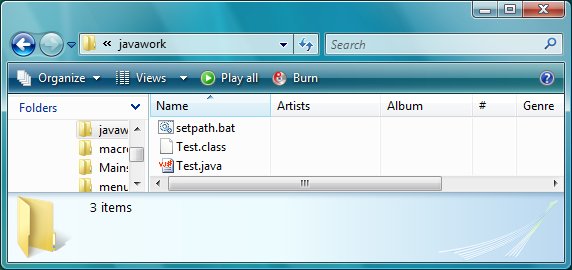
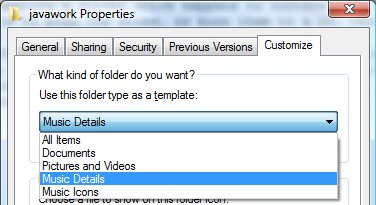
As you can see, Vista’s Explorer is presenting a folder which happens to contain some Java code as if it were a music folder. There are options to play the files, or burn them to a CD, though I don’t suggest you try. It is actually fairly annoying. When I first hit this problem, I wanted to see the file sizes and dates. I realized it was a View problem, so I hit the View dropdown. I set it to Details, no joy. I tried Organize – Folder and Search options. Lots of options, none any use. The solution is to right-click one of the files and choose Customize this folder. Then you get a dropdown where you can set the folder type. All Items works fine for me.
Just an annoyance, no big deal. It’s disappointing though. Two obvious questions:
- Why is Vista automatically setting folders as Music when they don’t contain any playable files?
- Why doesn’t the View menu help me to view the files differently?
It reminds me of Clippy because it is another example of software trying to be over-helpful, and ending up obstructing rather than improving the user experience.
In closing, let me say that I prefer Vista to XP for all sorts of reasons, and software compatibility is proving less of a problem than I’d expected. And good user interface design is very, very difficult. So take this in that context.