Ever seen this guy?
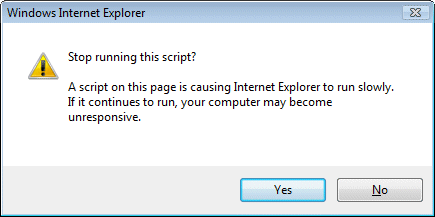
I’m writing a piece on Javascript. In the new world of AJAX, web applications may run large amounts of client-side code in the browser. I’m having a look at performance issues, so I wrote some code that does some processing in a tight loop and tested it in IE7, FireFox 2.0 and Flash 9.
Getting timings was difficult, because IE7 pops up this “Stop running this script” dialog when my code is running. Nor will it let go. You click “No”, and 1 second later the dialog pops up again. And again. And again.
I’ve trawled through the IE7 options looking for a way to switch this thing off, but cannot find one. I’m hoping I’ve missed it, or that there is a secret registry key I can change, because it is really annoying.
I don’t understand why there is no option for “don’t ask me again”, or “allow long-running scripts at this site”. After all, this scenario is going to get increasingly common. Neither FireFox nor Flash suffers from this problem.
I appreciate that IE7 is trying to be helpful here. There is though a fine line between helpful and annoying. Without any obvious way to prevent it, this falls in the latter category.
That said, I did find a way to get my timings, because of my experience with the htmleditor. If you host Mshtml in an application, you can implement the COM interface IDocHostShowUI. This has a ShowMessage function which IE calls when it wants to show a dialog. This enables you to catch the over-helpful “stop this script” message and not show it.
Unfortunately this solution isn’t something users can easily apply. It requires creating your own customized version of IE. There must be some easier way and I look forward to learning what it is.
One last comment: why does Microsoft still come up with poorly thought-out UI elements like this? It is easy to think of better ways than a brutal modal dialog. How about a “stop script” toolbar button that appears only when scripts are taking too long or grabbing too much CPU?
Update
FireFox does exactly the same thing, also with a modal dialog, “A script on this page may be busy” …
Still, two benefits to FireFox. First, the timeout is set to a more reasonable 10 seconds. Second, you can easily amend it. Navigate to about:config. Find the entry dom.max_script_run_time. Change it from 10 to whatever you like.
Further update
A comment has pointed me to this knowledgebase article.
Here’s the fix:
-
Using a Registry Editor such as Regedt32.exe, open this key:
HKEY_CURRENT_USER\Software\Microsoft\InternetExplorer\Styles
Note If the Styles key is not present, create a new key that is called Styles.
-
Create a new DWORD value called “MaxScriptStatements” under this key and set the value to the desired number of script statements.
By default the key doesn’t exist. If the key has not been added, Internet Explorer 4 defaults to 5,000,000 statements executed as the trigger for the time-out dialog box.
Technorati tags: ie7, software development, javascript, firefox