Finding obscure commands in Office 2007

I was intrigued to see an article on CNET called Word 2007 loses the ability to export outlines to Powerpoint. It says:

There’s a great little feature in Microsoft Word 2003 and earlier versions of the word-processing program that lets you export to Powerpoint an outline of any Word file formatted with headings … I was all set to tell you how to use the feature in Word 2007 when I realized it has been removed.

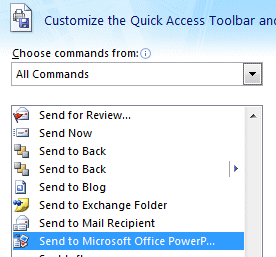
I wondered if perhaps the feature was still there, but the author missed it, so I used my usual technique for finding obscure commands in Office 2007. Go to Customize Quick Access Toolbar, then choose More Commands, then All Commands. Hey, there it is:

This is a great place to look if you cannot find a feature you used in earlier versions of Office.

SharePoint’s secret sauce

Just before Christmas I spoke to Daz Wilkin, Microsoft Developer Platform Evangelist, about Office development and Sharepoint. I’ve wanted to catch up on Sharepoint for some time, since it is achieving significant usage. Here’s a recent study which claims that:

the number of SharePoint applications in place today will quadruple over the next 12 months

Wilkin says that:

SharePoint is approaching becoming a billion dollar business for Microsoft. It’s vastly exceeded all of our estimates.

I suspect that journalists, myself included, have given Sharepoint insufficient attention. One reason is that it is a slippery product to describe and seems to straddle several categories, such as portal server, smart file store, and workflow platform. “I don’t think Microsoft has done a bang-up job in being able to articulate it. It is many things to many people,” says Wilkin.

Another problem is the confusion over SharePoint Portal Server (paid for) and SharePoint Services (free add-on for Windows server). You can find a point-by-point comparison here. The free SharePoint Services, on which Portal Server is built, are surprisingly rich. Once you have them installed, which can be a little painful, you get instant wikis and blogs, shared documents with versioning, permissions, and the ability to open and save directly from Office applications, shared calendars and tasks, and online forums. Here’s the settings panel for a shared document store:
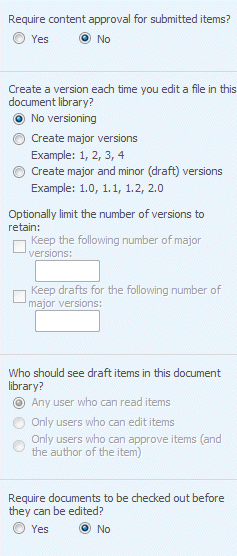
Site options including content approval,versioning,permissions and check out 

It’s a shame that document versioning is off by default, but there is plenty of value in these features. Note we are mainly talking intranet rather than internet, though hosting SharePoint is a growing industry and it is also core to Microsoft’s own hosted service efforts.

Why is installation painful? Well, you need Windows Server, and if you want to use ASP.NET for something other than SharePoint on the same box, it needs a bit of tweaking. For example, if you run Exchange and install SharePoint Services, it breaks Outlook Web Access. On my server I got round this by adding a second host name in local DNS, pointing to the same machine, and using this for the SharePoint site using IIS host headers. Real-world businesses either install SharePoint on a separate server, or have Small Business Server which builds it in, so this is mainly an issue for journalists and the like. Perhaps this is a small factor in why SharePoint gets less coverage than it should; it is not something we can just pick up and use like Office itself.

So why is SharePoint taking off? According to Wilkin, it is about “group productivity”. He talks about how SharePoint deals with the classic document review process. Emailing documents around a company and getting numerous edited versions back is a hassle. Apparently Microsoft itself is now using SharePoint more intensively, and users just check-out a document, make changes, and check it back in. He adds,

…If you then combine that with the ease with which you can check that document into a workflow, and then have it automatically routed around the organization, and then very naturally combine that with data going in and out of backend systems whatever they are, that to me is the magic. Customers tend to get the value more quickly than some of the ISVs.

Visual Studio 2008 has support for SharePoint projects and this is something I plan to write about soon. If anyone has been doing SharePoint and/or Workflow Foundation development, I’d be interested to know how you found it.
Detailed look at a WordPress hack

Angsuman Chakraborty’s technical blog suffered a similar attack to mine – the malicious script was the same, though the detail of the attack was different. In my case WordPress was attacked via Phorum. Chakraborty offers a detailed look at how his site was compromised and makes some suggestions for improving WordPress security.

In both these cases, WordPress was not solely to blame. At least, that is the implication. Chakraborty thinks his attack began with an exploit described by Secunia, which requires the hacker first to obtain access to the WordPress password database, via a stray backup or a SQL injection attack. Nevertheless, Chakraborty says:

One of the challenges with WordPress is that security considerations were mostly an afterthought (feel free to disagree) which were latched on as WordPress became more and more popular.

I have huge respect for WordPress. Nevertheless, I believe its web site could do better with regard to security. The installation instructions say little about it. You really need to find this page on hardening WordPress. It should be more prominent.

Technorati tags: ,

Is Adobe spying on you?

Abode is on the defensive after users complained that their premier software package Creative Suite 3 is collecting usage stats in an underhand manner.

On the other hand, Adobe’s John Nack reports that the content being tracked is content delivered from the internet, such as a Live News SWF, and online help which really is online, not just local files.

The other part of this story is that Adobe is using Omniture for analytics, and Omniture has chosen a deceptive url for its tracking stats, specifically 192.168.112.2O7.net. That’s not an IP number, it’s an URL – note the capital O used where it looks like a zero.

Breach of privacy? Case not proven. Anyone running a web site should track stats for all kinds of reasons; I used them recently to investigate a break-in. When desktop applications call internet resources, they are acting like a web browser, and users should expect that they leave a digital trail. It is not as if CS3 calls the internet secretly – I think most of us can figure out that a live news panel is doing more than showing files installed by setup.

Unfortunately once you start browsing the web it is difficult to know exactly what resources you are calling and from where. What users see as a single web page typically has ads from one place, maybe images from another, and often slightly sneaky tricks like invisible images or scripts put in place solely to track usage. Now desktop apps are doing the same thing; it is not different in kind though it is true that neither case is transparent for the user.

That’s no excuse for Omniture using a silly URL that is the kind of thing you would expect from spam sites or misleading emails that want you to click malware links. Omniture’s URL is designed to look like an internal IP address which would normally be safe. That’s beyond “not transparent”; it is deliberate deception, albeit easy to spot for anyone moderately technical.

Should Adobe offer an option to turn off all non-local content? Possibly, though not many users would want to do so. There is a simple way for users to protect their privacy, which is to disconnect their machine from the Internet.

The big unknown is how these stats are used. Does Adobe check for the same serial number being used on multiple machines concurrently? Does it link usage stats to registration details? Does it check which apps in the suite are used most, and use that for contextual marketing to specific users? There is probably a privacy policy somewhere which explains what Adobe does, or does not, or might do. Unfortunately users have to take such things on trust. Occasionally companies slip up, even with good intentions – you may recall the day AOL released search logs for 500,000 users naively thinking they were not personally identifiable.

This problem is not specific to Adobe. It is inherent in internet-connected applications including web browsers. That said, Adobe should beat up Omniture for its shady URL, and do a better job informing users what kind of data it is collecting and how it is used. Which is pretty much what Nack says in a second post – except he says security when this is a privacy issue. Not the same thing.

Technorati tags: , , , ,