JBuilder 2008 and Vista’s Program Compatibility Assistant

One of Vista’s annoyances is this dialog, which you may see shortly after installing an application:
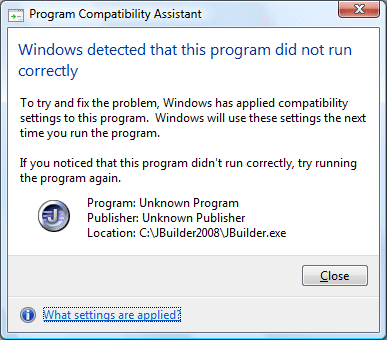
As you can see, I got this after installing CodeGear’s new JBuilder. The reason it annoys me is that it doesn’t tell you what “compatibility settings” it has applied. In this case, even if you go to JBuilder.exe in Explorer and view its properties, you will find all the compatibility options unchecked. So what has it done?

Of course I clicked “What settings are applied”. Here’s what it says:
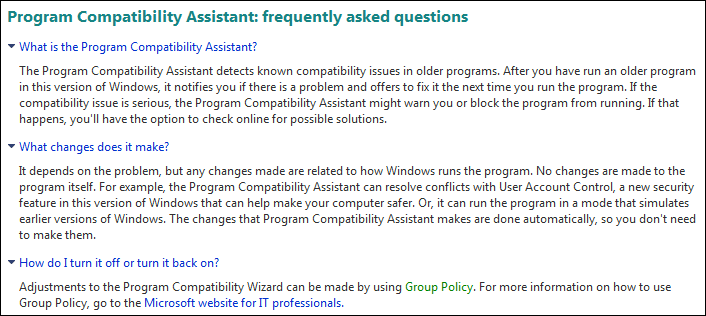
As you can see, this still does not tell you what settings are applied. By the way, Group Policy enables you to disable the Program Compatibility Assistant completely, but does not show the settings for individual applications.

I ran the registry editor, and found this entry:
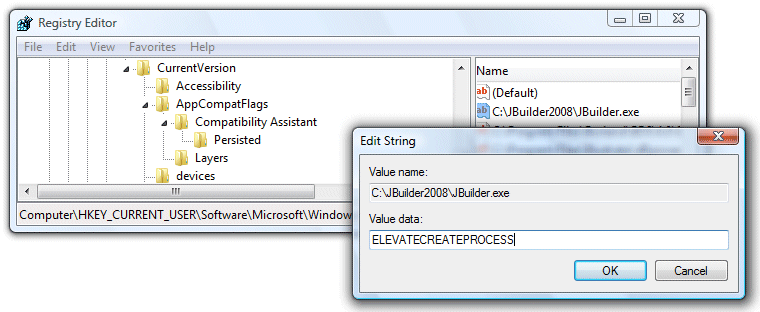
It looks like the Persisted key tells Vista which applications have already had settings applied, while the Layers key tells Vista what settings to apply. ELEVATECREATEPROCESS lets the application create child processes which require admin rights, though they still raise a UAC prompt.

I also found this Microsoft article which does a good job of explaining how the Compatibility Assistant works. It appears that JBuilder 2008 tries to run something which requires administrator permissions, but does not use the  correct Vista technique for doing so. I soon found out what it is:
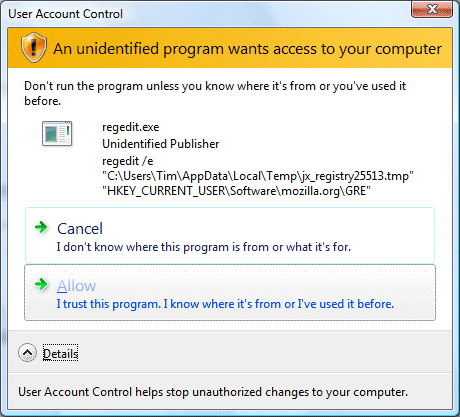
It’s running regedit, and exporting some keys that appear to relate to Mozilla’s Gecko Runtime project, for embedding a browser in an application. Unfortunately it does this (twice) every time it runs, which is unlikely to be necessary. You would have thought there would be a better way to use these registry entries, than exporting a temporary file.

Conclusions? None really; I just wanted to know what this annoying wizard does. A couple of observations though. First, it’s careless of CodeGear to let JBuilder 2008 out like this. It just looks bad, to have your app identified as an old one that needs compatibility help.

Second, if you read Microsoft’s article you’ll notice that among other things Vista “instruments” the CreateProcess API call in order to make this work. There must be a performance impact. I guess Microsoft will say it is a small one; but I guess it also makes its little contribution to Vista’s overall performance issues.

Microsoft’s business model for Silverlight

Pretty vague. As you’d expect. In this excellent interview Microsoft’s developer division VP Scott Guthrie cites three revenue opportunities:

  • Tools and servers
  • Customer engagement leading to ad sales
  • As a platform for other, presumably profitable, apps

I’m most interested in the third of these. By the way, I like Silverlight. Cross-platform .NET has been a personal interest of mine for ever. In 2002 I wrote an introductory article about .NET, and said:

It would do .Net enormous good if it became a credible cross-platform contender, say on Windows, Linux and the Mac. It would do Microsoft enormous good if it could be seen to work with the open source community in the same way as IBM does so successfully.

Six years on, the cross-platform potential in .NET is finally coming together. However, it is as a web-based runtime, rather than as a desktop runtime. That wasn’t quite what I expected back in 2002, but it is no bad thing. If Microsoft is serious about refactoring all its software for cloud services, as Ray Ozzie stated at Mix08, then Silverlight could be a key enabling technology, giving a rich desktop-like experience but in browser-hosted applications.

I was also interested in Guthrie’s comments on open source:

…people in the Linux community are much more likely to trust Novell and, specifically, Miguel [de Icaza] and the Mono Project and feel like, “Okay — if it is open source, I can get access to all the source [code]. You’re telling me that I can snap the source and build it myself if you’re not doing a good job? Okay, that’s interesting.” The higher level libraries that we are distributing — our controls and things like that — those will just work on the Linux version of Silverlight. They can take our source and use them for that.

Microsoft isn’t posting its source for the Silverlight runtime, but it is supporting an official open source implementation. That’s an intriguing distinction versus Flash, which has open source implementations none of which have taken off. Adobe has open-sourced Flex, but not the Flash runtime. However, note Guthrie’s comment:

We actually deliver the media graphics stack to Novell, so we use the same video pipeline and same media pipeline on the Linux version as on the Windows and Mac versions.

So that “media graphics stack”, is that open source? I suspect not but would be glad to be proved wrong. This point might make a difference to Linux distributions that exclude proprietary software by default.

Finally, Guthrie makes some remarks about Adobe AIR and the fact that Silverlight doesn’t have an equivalent cross-platform desktop engine. He says businesses are more interested in a “web-based model”, and observes that the full .NET and WPF stack is already a desktop runtime.

I’m not sure that this is a big deal. It wouldn’t be a huge step to host Silverlight in a cross-platform desktop application, for example by including it in a browser control. At the 2007 Mix, the New York Times folk told me they intended to do this with Times Reader. We are also going to see a number of different approaches to this problem. Mozilla is working on desktop integration for browser apps. Google shows a desktop shortcut in its introductory video for offline access. I recall Adobe’s Kevin Lynch remarking on the psychological barrier to opening a browser application when offline, as being one of the motivations for developing AIR, but there is more than one way to mitigate this.