I don’t envy anyone trying to sell a WordProcessor or Office Suite that is neither Microsoft Office, nor free. Corel has just released WordPerfect X4, which it is promoting as a PDF editor. Both Open Office and Microsoft Word 2007 can save in PDF format, but WordPerfect can open PDFs as well. That could be a handy feature, though PDF was conceived as an output format so arguably it is not a big deal. In any case, you may be less keen on the idea once you read online help, as opposed to the marketing blurb, which explains that WordPerfect does not preserve the formatting of most PDF documents. If it’s an honest PDF, you get something editable but possibly different:
The layout in the imported PDF may be different from the layout in the original PDF, but you can still modify text strings and create a new document without having to copy or redesign all the elements.
If the PDF contains images of text, WordPerfect uses OCR to scan the images and generate editable text. Again, that could be handy, but if you think you can use WordPerfect to open an incoming PDF, make a few changes, and send it on its way, think again.
Let me add that all my attempts to import a PDF into WordPerfect have failed. I installed the trial, and tried to open the first PDF I came across – a 20 page Forrester report. WordPerfect whirled way at 25% CPU and using over 1GB RAM (I have lots installed), eventually offering a blank document. I tried again, and it crashed. Finally, I started a new document, typed the word “Test”, and exported it to PDF. Then I tried to open it in WordPerfect – nothing. It opens fine in Acrobat. I guess something is broken in my install.
Personally I am more interested in its support for OOXML (or possibly OXML), the native format in Microsoft Office 2007 and the subject of contentious ISO standardization. WordPerfect X4 has the cheek to make itself the default editor for .docx, .xlsx, and .pptx. Again, I opened the first document I came across, which is an 8 page Q&A, very simple, no images. The good news is that it opened. The bad news: plain text became bold, paragraph spacing disappeared, and the result looked worse than the original.
Next, I tried a document with a more complex layout. This is actually a bidding card for use in Duplicate Bridge: you can find similar ones here, but in .doc format – mine was one I had amended and saved as .docx. WordPerfect opened it, but with the layout completely messed up. Graphics were lost. I tried opening the old .doc version. Better, but still not right. It spread the document over 5 pages, a shame when it is meant to be printed on two-sided A4 to make a card. Open Office on the other hand could handle the .doc version nicely; I was impressed.
That gave me an idea for a further torture test. Open the bidding card in Open Office, save in ODF format, which WordPerfect X4 is also meant to support. Now open the .odt in WordPerfect X4. It crashed.
WordPerfect X4 may have all sorts of good points as a general Office Suite, but what about this claim in the press release [PDF]:
File Format Freedom
In addition to its significant PDF enhancements, WordPerfect Office X4 now provides suitewide compatibility with Microsoft Office 2007 files (OOXML) and Open Document Format (ODF) in WordPerfect X4. With PDF-reading software installed on more than 80% of all U.S. PCs (Source: Jupiter Research), WordPerfect Office X4 enables users to collaborate and share files more broadly and more effectively than ever before.
Hmmm.
Update
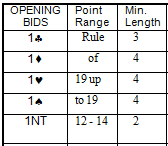
I did a bit more experimentation. It turned out that the worst case (in terms of messed up formatting) involved a document which had originally been pasted from HTML. I imagine it was a bit of a mess internally, so perhaps one should excuse WordPerfect (though users don’t understand these distinctions). I reconverted a Bidding Card document and this time WP did better. Here are some images. First, a portion of the document in Word:
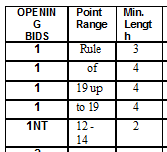
Now, here’s the doc imported into WordPerfect X4. Not right, but looks fixable:
Here it is in Open Office:
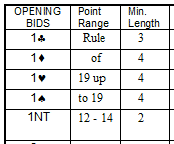
Identical to the Word rendering as far as I can see. Then I saved as .odt and opened in WordPerfect X4: