Expression Blend 2.5 problems with Silverlight 2.0 Beta 2

I hit a worrying error in Expression Blend 2.5 June 2008 preview. In search of a good screenshot, I opened the new Clock sample, and got this result:
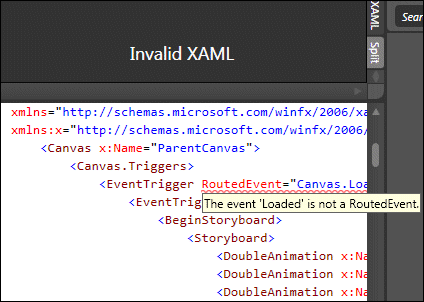
The same XAML compiles and runs fine in Visual Studio 2008 with the latest Silverlight 2.0 Beta 2 tools.

Note that if Expression can’t render the XAML, none of its design tools can be used at all.

So what is going on here? Don’t Expression Blend and Visual Studio share the same parser? This kind of problem would soon torpedo any notion of designers and developers working seamlessly on the same code.

I got my screenshot by temporarily modifying the offending code.
Fixing a Silverlight 2.0 WCF reference in a VB application

Another in my recent series on getting Silverlight 2.0 beta 2 working.

If you create a WCF web service for Silverlight, it’s well known that on the server side you have to change the binding to basicHttpBinding (or use the new Silverlight-enabled WCF service). Then you can use the Add Reference wizard in your Silverlight application and code against the generated ServiceClient.

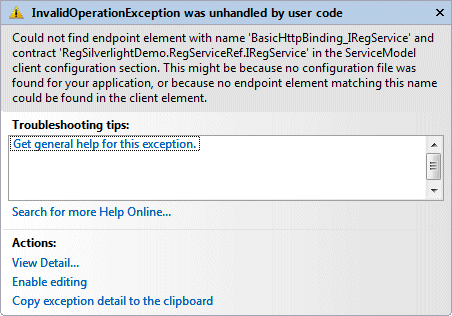
This works in C#, but in VB you may hit this error at runtime:

The error is “Could not find endpoint element” etc, and it refers to your “client configuration section”.

I fixed this by comparing the ServiceReferences.ClientConfig file generated in a VB project with that for a C# project. Check the Contract attribute of the endpoint element. It should be qualified with the full namespace, by default the name of your app. In this example, it would be:

contract="RegSilverlightDemoApp.RegService.IRegService"

However, the VB wizard omits the first part of the namespace; then at runtime, it can’t find the service.

Evidence, perhaps, that C# is the language of choice in Microsoft’s developer division.

More Silverlight, Visual Studio setup hassles

I thought I’d fixed my Silverlight 2 Beta 2 installation; but I had not.

I ran into the issues described here, specifically:

  1. Error “Object reference not set to an instance of an object” when adding a WCF service
  2. Silverlight app cannot see WCF services in same solution
  3. Error “Unable to find ‘DynamicTypeService’” when clicking the Advanced button in the Add Service Reference dialog.
  4. Visual Studio crashing on exit

Here’s what fixed it for me. First, I attempted to debug Visual Studio while adding a WCF service and spotted an exception related to version control. I discovered that Visual Studio was set to use Team Foundation Server as the Source Control plug-in, even though my Team Foundation Server is offline. I don’t know if the Silverlight install somehow reset this, as I thought I’d set it to None in Tools – Options – Source Control – Plug-in Selector; but I changed it back to None and that fixed the Object Reference error.

Unfortunately it did not fix the second problem. Following a tip in the thread mentioned above, I moved the file:

\Program Files\Microsoft Visual Studio 9.0\Common7\IDE\Microsoft.VisualStudio.ServicesProxy.dll

Then I uninstalled Microsoft Silverlight Tools Beta 2 for Visual Studio 2008. Then I reinstalled it (no reboot). Everything works.

The Microsoft.VisualStudio.ServicesProxy.dll is replaced with a new version.

An indicator of this problem is the size of your Silverlight Tools install in Control Panel – Programs and Features. If it is 1.14MB you may have the problem. If it is 1.17 or 1.18MB you probably do not have the problem. The size of my install increased from 1.14MB to 1.17MB on reinstall. A theory is that if the Silverlight Tools installer sees the ServicesProxy.dll, it doesn’t install some other stuff that in fact it should install.