AVG is a reasonable anti-virus product as these things go; it is also available in a free version for personal use. The recent version 8.0 release however has some problems, as The Reg points out. The trouble with the anti-virus vendors is that they cannot resist adding bloat to their products, even when customers prefer them to be as lightweight and efficient as possible.
In AVG’s case the team dreamed up a feature called LinkScanner. The idea is that that AVG verifies the safety of an Internet link before you visit the site. Sounds good; but how does it work? Well, it seems that when you have a page full of links, such as those from a Google search, AVG visits all of them, just in case you click, and gives them a pass or fail based on some combination of malware reports and perhaps direct detection. It’s desperately inefficient; and overlaps with functionality built into FireFox and Internet Explorer. FireFox 3 has a phishing and malware protection feature, while Internet Explorer has a phishing filter which is evolving into a Safety Filter in IE8. There are also privacy issues with any system that depends on sending your browsing history to a third party for review.
I tried this new feature in AVG 8.0, didn’t like it, and disabled it. Unfortunately although AVG allows you to disable it, it then treats it as an error condition:
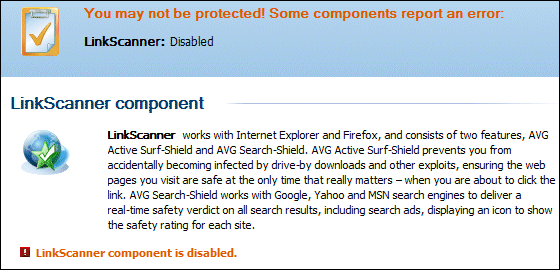
Although in reality everything is fine, the little icon in the system tray sports an exclamation mark, disguising more serious problems such as a failure to download updated virus signatures.
Fortunately you can avoid the LinkScanner by removing and reinstalling AVG. It is no longer necessary to use the /REMOVE_FEATURE fea_AVG_SafeSurf /REMOVE_FEATURE fea_AVG_SafeSearch arguments; with the latest version, just choose a custom install and uncheck the Safe Search feature (Safe Surf is a feature of the paid-for version).
If you don’t see the Safe Search option, re-download AVG and try again.
I also disable the daily scan, which slows down the computer excessively while it is running and which strikes me as unnecessary. How are viruses going to get on the computer, if the on-access scanner is working? Then again, almost nothing about anti-virus software works reliably (the task is too difficult) so I suppose there is a case for it.