Where is your SQL Server CE Database?

Maybe not where you think. Now, I admit I am three years late with this bug strange feature of Visual Studio but it wasted some of my time today so it is still worth reporting.

I’ve been writing about creating database applications in Visual Studio. Specifically, I was looking at what happens if you download Visual Basic Express and take the quickest, easiest route to knocking together a database application.

The default local database engine these days is SQL Server Compact 3.5:

When you create applications, the preferred local database is SQL Server Compact 3.5.

says MSDN.

OK, so you add a new database to your project and accept various defaults. The wizard then asks you whether you would like to “copy the file to your project and modify the connection”?
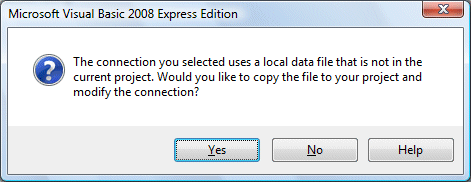
Sounds reasonable, if you can figure out what it means. Default is Yes, so OK do it.

Mistake. Don’t do that. Not, at least, without reading and understanding this document. But I digress. Next up, you are asked another question:

Storing connection strings in your application configuration file eases maintenance and deployment … do you want to save the connection string to the application configuration file?

It’s another option that sounds good. OK, do it.

Now you set up a little table or two, add some data-bound controls, and off you go. Run the app, enter some data, save it. Run the app again … and all your data has disappeared. Why?

Well, it has to be either that the updates are silently failing; or that the database file is getting overwritten. It’s the latter. It turns out that VB is treating your database like any other resource, and copying to bin/debug when you run the app. This is the copy you are connecting to, you update it, but next time you build and run it gets overwritten.

None of this is obvious, because when you look at the connection string in the application settings (which VB hides by default, sigh), it shows the database file in the root of your project folder. Click Test Connection, all is fine. The only warning sign is that the connection string looks like this:

Data Source=|DataDirectory|\test.sdf

So where is |DataDirectory| set? That’s not obvious either. Read here for the answer. It’s an application property that is not visible anywhere, that gets set to different values depending on how you deploy the app. I can see why someone thought this was a smart idea; but the implementation is horrible. It gives you the illusion of having one database file, when in fact you have multiple copies (source, debug, release etc) overwriting one another, and during testing you are never editing the correct one.

Once you have worked this out you can fix it, of course. But here’s another problem. You are the single user of a database. You insert a record and save it, using all the generated data-bound stuff that Visual Studio provides. Works fine. Then you edit the record you just inserted, and save again. Boom. Concurrency exception. Why?

It is all do to with a limitation of SQL Server Compact 3.5. It can’t handle multiple SQL statements. This means that a feature of the ADO.NET TableAdapter, called Refresh the Data Table in the configuration wizard, is not available. This option kicks in when you have an identity column that auto-increments, which is by the easiest way to create a primary key. In this scenario, the actual value of the identity column is not known until after you make the insert, because it is generated by the database engine. Normally, the TableAdapter would retrieve it with a Select statement immediately after the Insert statement. However, with SQL Server Compact 3.5 that does not work.

The result is that saving a record works fine, but next time around the row has an incorrect primary key in the DataSet. No wonder you get a concurrency exception.

You can work around this in code, of course. But what surprises me is just how hard Microsoft has made all this for the kind of newbie programmer who might pick up VB Express. In fact, easy database programming in VB has marched backwards since Visual Basic 3 back in 1993.

By the way, I also dislike the way VB adds so much database gunk to your main form, again by default. What if you add another form to your app? What if you want to delete the first form? It all gets messy fast.

Look at Ruby on Rails. It has simple database handling that works. OK, you are going to have to modify that code eventually; and I accept that database apps have an inherent complexity that no amount of wizards, O/R layers or even "Convention over Configuration” can remove. I still think that simple, single table, single user apps should be, well, simple. Not in VB, unfortunately.

Microsoft MSMVPs blog site taken over by malware

Susan Bradley is blogging about a break-in on the server that runs numerous blogs for Microsoft MVPs (Most Valuable Professionals).

She describes spotting a service that turned out to be the W32/Rbot-GOS work with IRC backdoor functionality.

Currently she doesn’t know how it happened, but promises to let us know; it’s also being investigated by Microsoft support.

Kudos to Bradley for being open about this. It’s embarrassing for someone with deep expertise who blogs about security; on the other hand it demonstrates what a tough problem this is. I’ll be watching with interest for the further analysis.

Microsoft’s big break: failing competitors

The BBC has an article, prompted by Bill Gates’ retirement from Microsoft, on how the company thrived because of the failings of its competitors.

I find this ironic. What gave Apple its big break in music, and in gaining market share for the Mac? What gave FireFox its big break in web browsers? Maybe even Google’s success is enabled in part by Microsoft’s failure to compete effectively.

The description of the young, nimble Microsoft is quite a contrast with the company today, which takes around a year to get a product from a feature-complete development stage, to actual shipping.

Technorati tags: ,

Real-world book authoring

Lengthy but worthwhile post on what is it like to write a technical book, from O’Reilly author Baron Schwartz.

Two things that particularly interest me here. One, it is a good account of how much work is involved in writing something worthwhile. Two, the discussion of authoring tools is fascinating: bugs and inadequacies in Open Office and Word.

I have done a couple of quick books; they were low-budget affairs and the process was simpler, but they were still a considerable labour. The first was well received and sold remarkably well. In the second, I misjudged the readership and it bombed. I’d like to do more but I need to block out a large chunk of time, as well as coming up with a winning idea and execution. I’m happy to take a chance on the latter, but finding time is the biggest problem.

For my books I used Pagemaker, and although there were a few annoyances, it never skipped a beat. I’d be quite inclined to use it again, even though it is deprecated in favour of InDesign. Pagemaker’s long document support is excellent. For collaborative authoring though, DocBook might be better.

What’s coming in Buzzword – and Live Writer as Word for the cloud

Interesting post from Lisa Underkoffler’s on what’s coming in Buzzword, Adobe’s internet word processor. She mentions named styles, which I would enjoy since I use these all the time in Word; though I was surprised that it is frequently requested; most people seem happy to apply specific formatting and don’t worry about the structure provided it looks right. Maybe this is Adobe’s strong presence in the print and publishing world showing through.

It prompted me to make a quick tour of the competition to see who already has named style support. Nothing I could see in Google Docs.

Zoho Writer doesn’t seem to have them either.* Zoho’s site also seems a bit temperamental this morning. The connection kept failing which meant a long wait while, perhaps, some AJAX operation was not completing. Zoho froze IE completely; I switched to FireFox but it remained slow. I wish the Zoho folk would stop adding features (even named styles) and focus on performance and reliability for a while; perhaps it is better in the USA.

ThinkFree has them, and they seemed to work (more or less) once I had downloaded its gargantuan Java applet. The company seems to be shifting the emphasis to a downloadable application with online storage, perhaps because the applet is too big for casual use on any old computer. I tried the downloaded application as well. Curiously, after I saved and re-opened the document, my named style disappeared from the list of styles. I think something is not quite right here; I also had a few performance issues.

If you are happy to run a desktop application, Word plus Live Mesh makes a decent and familiar alternative. Just save your document to the Mesh, and open it from anywhere. Main snags: no Mac or Linux support yet, no online editing.

I’ve actually fallen into the habit of using Live Writer plus WordPress as a kind of cloud word processor. Writer has a feature called Post Draft to Weblog. Your document is saved to your blog, but not actually published. Usually I do this for posts that will be published later; but sometimes I use it for notes that will never be published. I can open the draft later from another PC using Writer; or use the online editor in WordPress if Writer is not installed. Another option is to save the draft locally, handy if you are offline; Live Writer will synch it with the online version later. Not recommended for confidential documents, but for casual use it is a powerful combination.

No named styles though. Never mind.

*Update: See comment below: Zoho does support CSS. So if you have a CSS stylesheet set up, you could use these styles in your document. Good idea, though I’m not sure how you go about using this if you are not a skilled web developer.