Chrome browser memory usage: a good start

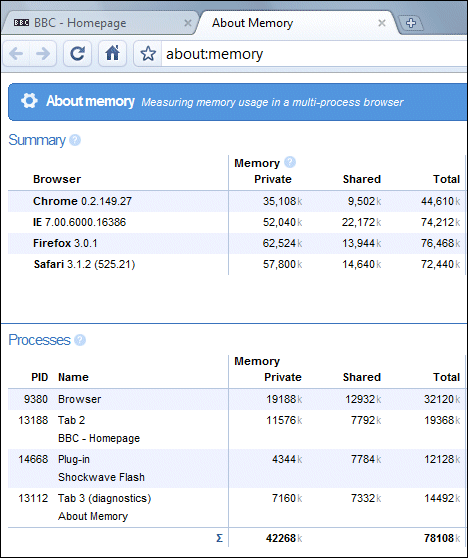
If you go to the special url about:memory in Google Chrome, you get a summary of memory usage in all your running browsers, not just Chrome. I tried the following test:

1. Close all browsers.

2. Reopen all browsers – IE7, Chrome, Firefox, Safari – navigate to bbc.co.uk

3. Open the Chrome memory status page:

There are figures for virtual memory as well; I’ve truncated them to make the image fit better. Chrome is easily the smallest.

Microsoft.com blank in Google Chrome browser history

Google Chrome is available for download. I’ve done it in fact; very smooth install. It looks like the company is serious about getting this widely deployed quickly, despite its beta status – there’s a download link on the Google home page – must be important to break the 28 words rule.

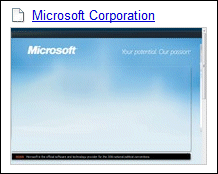
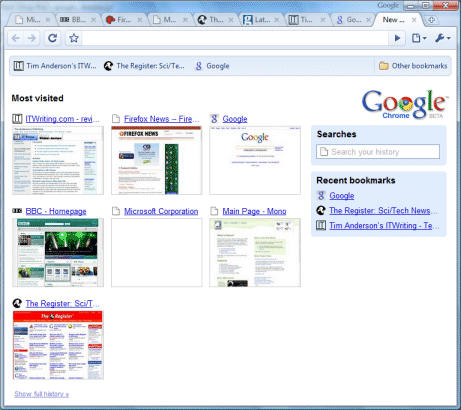
Chrome shows your “most visited” sites as a kind of home page. I was amused to see that Microsoft.com shows up here as blank:

No doubt there is a good technical reason. People used to say “DOS Ain’t Done until Lotus won’t run”; and that was not true either.

Update: Honesty compels me to admit that the Microsoft snapshot eventually filled in. Still, it is not much better:

The problem is that the central Silverlight panel is failing to load; the main site looks like this in Chrome as well. OK, so Silverlight doesn’t support Chrome. But Microsoft no doubt has something better than a blank panel for incompatible browsers. Was it warned in advance about the advent of Chrome? Was anyone? I know this is WebKit and that what works in Safari should work here; but we all know that browser compatibility is complex. Still, it is entertaining.

Further update: It looks the same in Safari on Windows! I should explain that there is some more stuff to the right and below the empty panel; but the empty sky background occupies the main part of the page.

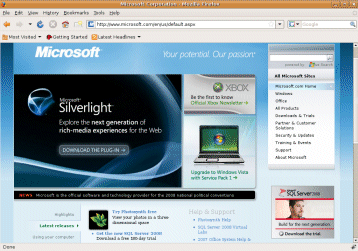
To get the full picture, I visited the page with FireFox on Linux:


This looks better, but it’s a tease. It has a link to download Silverlight; if you follow it, it eventually reveals that your browser or operating system is unsupported. Sloppy Microsoft; Google exonerated.

More on Chrome soon, no doubt.

Technorati tags: ,

It is time we stopped talking about Rich Internet Applications

I have a couple of posts on a new blog aimed at IT Professionals:

Delphi: a secret weapon for Windows developers

Is Adobe Flex and Air in your future?

The latter post is already out of date, following Google’s Chrome announcement. In it, I summarize the different approach to Rich Internet Applications, and argue that rather than discussing RIAs we should simply talk about the next generation of the client. I noted that “Google and Mozilla are also stretching browser technology”; now that we have Chrome this looks like a full-on battle.

Technorati tags: , , , , , ,

10 things you might not have known about XAML

I’ve written a short piece on XAML for the Register. Here’s a few things you might not have known about Microsoft’s Extensible Application Markup Language:

1. It is not just for WPF (Windows Presentation Foundation); it is also used as a language for Workflow Foundation (WF). Microsoft has hinted that we will see more XAML applications announced at the forthcoming PDC.

2. XAML doesn’t have to be XML – see the intro to the XAML Object Mapping Specification 2006, which says that “any physical representation may be used.”

3. XAML is a small core and distinct from XAML vocabularies. The huge WPF is a XAML vocabulary. WF is another vocabulary.

4. Although XAML is usually represented as XML, it is near-impossible to create an XML Schema to validate it usefully. Here’s where Microsoft explains why.

5. In Visual Studio 2005, a huge but imperfect .xsd schema file was used for validation and to drive IntelliSense (things like code completion) in the XAML editor. In Visual Studio 2008 Microsoft abandoned that idea and uses a language service instead.

6. The core idea behind XAML is to be a declarative language for .NET. WPF is merely an early application for XAML.

7. XPS, Microsoft’s fixed-layout language that competes (just about) with Adobe’s PDF, uses XAML that is a subset of WPF. This means that you can actually display XPS documents in Silverlight – there’s no need for a viewer, it is native Silverlight code.

8. When you compile a Silverlight application, the XAML stays as XAML, albeit bundled into a resource.

9. Silverlight allows you to write inline XAML within HTML.

10. XAML rhymes with Camel. Sorry, you knew that already. But did you know that CAML (Compiled Application Markup Language) is XAML compiled to MSIL (Microsoft Intermediate Language)? Microsoft tested this idea in pre-release versions of WPF, but apparently the performance benefits were disappointing and it was less compact than BAML (Binary Application Markup Language), a tokenized representation of XAML. Silverlight doesn’t bother with either: XAML is saved as a resource in a .NET DLL, and then zipped as part of the .XAP package by which a Silverlight application is delivered.
Technorati tags: , , , ,