As time allows, I’m upgrading various machines to Windows 7 using the RTM bits and will be blogging points of interest.
One of them is Movie Maker. As I previously noted, the Windows 7 Movie Maker (which is a separate download as part of the “Live Essentials”, and currently in beta, is a disappointment compared to the version in Vista.
Following a tip here, I tried copying the Movie Maker folder from Vista to Windows 7. To my surprise, it seems to work fine (though I have not tested all the features). The screenshot shows the Windows Vista version in front, and the cut-down Windows 7 version behind; you can run them side by side.
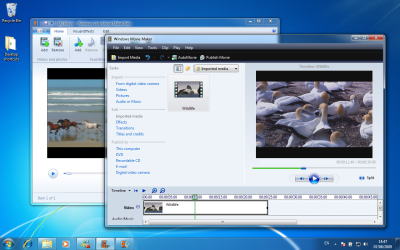
The reason for my surprise is that many applications require registration of COM components or other setup magic before they will run (though see update below).
If in fact the Vista version works, what are the implications? Has Microsoft actually tweaked Windows 7 so that Vista Movie Maker will run? If so, that’s odd since the in-place upgrade actually removes it. And why is Microsoft making us install a beta as part of Live Experience, if the old one works OK and would at least tide us over?
Those who do not want to risk the Vista version can download a proper installer for Movie Maker 2.6 here.
Update: according to this post you do also have to register some DLLs to get full functionality – a batch file is provided.
I have a new laptop with W7.
What can I do to get movie maker on it?
I need to assemble still pictures into a movie like in XP. I saw where Papajohn could not get stills to work.
Also the link to the 2.6 installer looks like an install utility. Do I need to be connected on line when I open the installer above? How large is the actual movie maker program?
Thanks,
Dan