My Vista laptop could no longer connect to the Internet, when I plugged it directly into my router (to bypass my ISA firewall, to test some stuff).
Checked the IP settings, all fine – except that I had two Default Gateways, one of which was 0.0.0.0, the other of which was correct. Tried fixed IP with hard-coded default gateway, same result.
Booted into Linux, all fine.
Studied the Network and Sharing center. I had two active networks. One was called Network 5, the other Unidentified. Both were using the same connection – Local Area Connection 6.
Aside: I presume that when I first installed Vista this was Local Area Connection 1. Somehow, over time, Windows decided it should delete it and re-detect it, with a new name, 5 times over.
That didn’t look right. I noticed that if you click Customize, to the right of a network in the Network and Sharing Center, you get an option to “Merge or delete network locations”. Worth a try. Clicking this option gets you an ugly functional dialog that lets you select a network and, umm, merge or delete it. All the networks I have ever joined in hotels, conferences and hotspots round the world were listed.
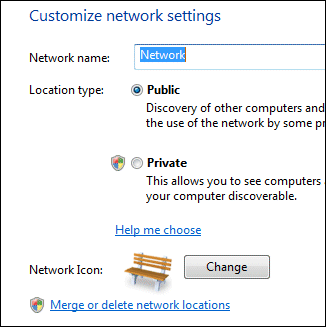
My first thought was to merge. However, you can’t merge networks that are in use. I disabled the network card (in Manage Network Connections) and tried again. But, “Unidentified” was not listed. Forget that – I selected the lot and clicked Delete.
Re-enabled the card, and I’m back on the Internet. One default gateway. All fine.
I’d be interested to know what went wrong. And the network UI in Vista seems over-complex to me.
Vista really has trouble with re-detecting hardware, I have 4 lan connections and 6 soundcards now… (really just one of each ofcourse)