Cannot open the Outlook window – what sort of error message is that?
I’m actually enjoying Outlook 2007 on my desktop, especially since applying the February patch. It opens in a couple of seconds even from cold. I’m running on Vista 64-bit, and not using cached Exchange mode.
Until today, that is. Started Outlook and got this bewildering message:
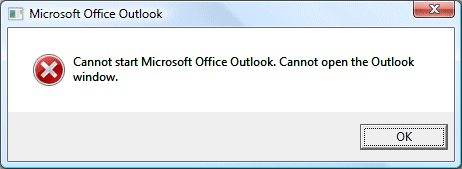
This Microsoft article suggested I might not have a default gateway. That was nonsense; so I opened Mail setup (I can get to this through the Properties of the Outlook shortcut), clicked Show Profiles, added a new profile and set the new one as default.
Outlook works fine now. I’m not impressed with the error message though.
Update
While using a new profile works, there is an easier fix as noted in many of the comments to this post. You can run Outlook with the /resetnavpane argument. Here’s the step by step:
1. Press Windows key and R together to open the Run dialog.
2. In the Open field, type:
outlook.exe /resetnavpane
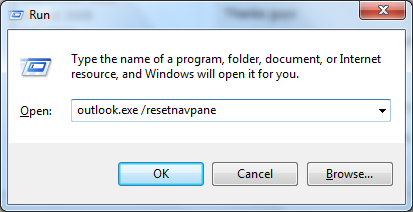
Note: there is a space between outlook.exe and /resetnavpane. There are no other spaces in what you have to type.
3. Click OK. Outlook should open.
Helpful post? Sponsor ITWriting.com for ad-free access to the site
Related posts:

Aliomar Oliveira:
May 5th, 2009 at 3:08 am
Dear Tim,
I spent many days looking for a solution at support.microsoft.com but I found nothing there! So I tryed Mr. Google and… I found your post!
Thanks a LooooooooT!
Rik Wall:
May 7th, 2009 at 3:19 am
Yeah I agree with Aliomar Oliveira. I got my Mail back!! Thank you TONS!!
Mike:
May 11th, 2009 at 6:30 pm
Worked for me as well. Once you complete this, go into Outlook and import the pst fiels with all your contacts and mail from the previous account. Do this by going to File, Import, find the files type with (.pst) ending on it and select that feature. Browse for the old .pst file and open it. If you’re like me and have a ton of emails on file, thsi might take a few minutes….or 20 in my case!
Matan:
May 13th, 2009 at 9:05 pm
I have this exact same problem! I am running Windows 7 RC1 x64 and one day Outlook is working and then next day it isn’t! I tried running scanpst.exe but that didn’t fix the problem. Reinstalling also didn’t fix the problem! I am shocked!
Can you please explain how I can access Mail Setup?
“Mail setup (I can get to this through the Properties of the Outlook shortcut)”
I didn’t understand this part.
tim:
May 13th, 2009 at 10:40 pm
You right-click the Outlook shortcut in the Start menu, and choose Properties.
Tim
Matan:
May 14th, 2009 at 1:12 am
Tim – I really apologise; but I must have “shit-for-brains” today.
When I right-click on the Outlook shortcut in the Start menu and open the properties window, all I get are the 6 tabs (General, Compatibility, Shortcut, Previous Versions, Details, Security).
How on earth am I meant to evoke Mail Setup?
Mark:
May 14th, 2009 at 1:15 am
I was having the same problem, and could not find “Mail Setup” anywhere in the Properties tabs of the Outlook shortcut. I am running Vista-64 with Outlook 2007, I don’t know maybe something is different from your setup.
Anyway, I went to the Control Panel (classic view), then “View 32-Bit Control Panel Items”, then “Mail”. Click “Show Profiles” > Highlight the “Outlook” profile and select “Copy…”, name the copy “Outlook2″ and set that as the default (“Always use this profile”). Click OK, and try opening Outlook. This worked for me, hope this helps others as well.
Matan:
May 14th, 2009 at 2:39 am
No it’s okay – I figured it out. The solution is different in Win 7. Will post in a sec.
Matan:
May 14th, 2009 at 3:24 am
In Windows 7 do the following:
1) Open Control Panel
2) Select User Accounts and Family Safety
3) Select Mail (32 bit)
4) Select Show Profiles
Add a new profile. Make sure that you select the option “Always use this profile”. Put in your email account details. Start Outlook and import your email from the old .pst file.
I hate you Microsoft. Tim – thank you for this thread! You’re a champion. Back in the old days of Mac OS 9 … never had these f***ing problems.
tim:
May 14th, 2009 at 9:20 am
@Mark @Matan thanks for the further guide
There is a “special” Outlook shortcut which gives the Mail properties and there are standard Outlook shortcuts which do not. I’ve got the special one which I think you get by default; but I don’t pretend to have figured this one out completely. The mail applet is a more reliable way to get to it.
Tim
Jim Wilson:
May 14th, 2009 at 12:29 pm
Hi Tim,
I had the same problem yesterday. outlook had been working great up until then.
After following your advice I added a new profile and all is now working OK. I deleted the old one.
I note that a lot of the responses have been over the last few days!!
I tried microsoft for a solution without sucess.
Many thanks.
PS Is there eany way this can be relayed to Microsoft for them to action?
Christopher:
May 15th, 2009 at 10:02 pm
Many thanks Matan – just used your Windows7 fix and it worked. Whew…. thought I was a gonner. I do like Win7 I must admit. Too fricken bad MS doesn’t have this solution – although, this is the Win7 Release Candidate and not the final version.
DreamensioN:
May 19th, 2009 at 1:32 am
+1 – thanks a lot Tim & Matan! This also fixed my issue. I’m running Outlook 2007 SP2, under Windows 7 RC. And likewise, it was working fine for weeks until this morning, then I couldn’t get in. Rebuilding my outlook profile worked a treat. Cheers!
Sandy:
May 23rd, 2009 at 11:35 pm
Thanks!!! I am running Windows Vista 64-bit, Office Professional. Everything was running smoothly when I received that error this morning. Like Matan, I tried repairing using the original disk, I tried SCANPST.EXE,and I uninstalled and reinstalled Office. Nothing helped. Found your fix — works terrific!!!! May the e-gods always smile on you.
Shaize:
May 24th, 2009 at 1:05 am
Hey Tim, I had the same problem too. Many thanks for the fix. One difference in my case though, i was able to copy the existing corrupt profile (I had a profile called “outlook”), then chose to default to this copied profile and it started working for me. Really random error, and also curious how it happened to so many people around the same time.
Sandy:
May 25th, 2009 at 1:23 am
New problem. ARRRGH!!! My computer didn’t start up right away, asked me if I wanted to use system restore, so I did. Now the problem with Outlook is back, and the profile fix ISN’T fixing it. I tried SCANPST again, I don’t know what else to do. Any thoughts?
Kate:
May 26th, 2009 at 6:36 pm
Thanks a lot – so far it is working again. It just happened suddenly this afternoon. By the way I have recently upgraded to I.E.8. Could that be part of the problem?
Brendan:
May 26th, 2009 at 11:15 pm
Thanks for this. I also experienced this after upgrading to IE8. A much better solution than messing with the Registry settings that Microsoft suggest!
Jason:
June 1st, 2009 at 9:01 am
Running Outlook 2007 on Windows 7 (RC-7100) and had the same issue.
Having around 6 email accounts I hated the thought of having to re-enter all the details again so I tried just doing the Copy option in the Control Panel -> Mail (32 bit) and that seems to work fine !
Cueball:
June 8th, 2009 at 10:10 am
Hmm weird, Microsoft wont give the answer but you guys do. Thanks I was scared there for a bit, thought I lost my mail and had to redo it again.
Anyway I used to copy solution aswell.
To clairfy :
open conmtrol panel, open E-mail(32bit) select copy and select one you want to copy. Rename it and make sure you select it as default.
Works.
Tom:
June 8th, 2009 at 2:24 pm
Thanks for saving me time in a recovery of outlook on Vista 32. After trying scanpst and microsoft office tools on all the accounts and the archive I was beginning to think the worst.
wayne:
June 9th, 2009 at 3:31 am
Microsoft HELP was useless!
This did the trick. Thanks!
SummeR:
June 10th, 2009 at 2:14 pm
referring to
http://blogs.msdn.com/matt_deacon/archive/2009/06/01/cannot-start-microsoft-office-outlook-cannot-open-the-outlook-window.aspx
there is a much easier way to fix your outlook problem.
simply right-click on your outlook-shortcut and select properties.
As the properties window appears move to the “shortcut” tab.
there, under “target”, you will see the path of the outlook.exe. C:\….\office\OUTLOOK.EXE
now simply add the parameter “/resetnavpane” to the line with OUTLOOK.exe.
Means:
“C:\Program Files\Microsoft Office\Office12\OUTLOOK.EXE” /recycle /resetnavpane” <–
when youre done, close window, start outlook.
it will take much more time than usual to start it up, since it is checking youre UI and every connection to you datafiles.
after outlook successfully started up, every window should appear as usual.
Dont forget to delete the “/resetnavpane” parameter from your outlook-short cut or it will be resetting the navigation pane-settings every time it starts.
SummeR:
June 10th, 2009 at 2:17 pm
Sorry, i was totally wrong
My way i explained also works, but it takes too much steps.
the actual easiest way to do a navigation-pane-reset is:
Run outlook.exe /resetnavpane
outlook opens – fixes settings and youre done!
i seem to have misunderstood a part of matt deacon’s manual…
Jason:
June 14th, 2009 at 2:15 am
Very much appreciated this post. Got me out of a real bind – thanks!
PC Resolver:
June 14th, 2009 at 10:03 pm
Thanks SummeR
I wish all fixes for catastrophic problems was so easy!
Run outlook.exe /resetnavpane
Then everything returned as it was when I left it.
Mark:
June 15th, 2009 at 12:21 pm
Thank all of you for taking to post this! The Run outlook.exe /resetnavpane worked.
By the way I had this problem after my system performed a Microsoft auto updated overnight. My system is Visat 64 Edition.
Joy:
June 15th, 2009 at 5:18 pm
This is the first time I’ve ever used a forum to find a solution to microsoft problems – you guys saved my bacon. It works fine now, but I’m really scared of running any more updates (that’s when it happened)!
Doug:
June 15th, 2009 at 7:40 pm
Thanks for the tips… I have my outlook back. But tell me… doesn’t this seem strange? why is it that something just comes up and interfears with Outlook?
Nonetheless… thanks to all of your tips… I am less fearful.
Taylorio:
June 16th, 2009 at 12:01 am
Thanks SummeR
You are stellar
The run outlook.exe /resetnavpane worked for me too.
Kathleen:
June 16th, 2009 at 1:52 am
Now I know why I *always* use Firefox! IE is just crappy – I downloaded IE8 this am (’cause, unfortunately, I must use it at times!) and had the same problem as y’all. MS “fix” was totally unhelpful. THANKS much, Tim, Mark and others for posting EASY fix here. I’m smiling and happy, big time.
Chris:
June 16th, 2009 at 4:31 am
thanks for the post. i got the same error, had no luck on microsofts web site. i typed the error into google and found your site. followed your instructions and outlook 07 is back up amd running.
thanks again
Chris Collison:
June 17th, 2009 at 10:55 am
Many thanks SummeR and Tim. The /resetnavpane worked immediately. Cheers!
Chanaka:
June 17th, 2009 at 8:09 pm
This code saves me hours
outlook.exe /resetnavpane
Thank you very much !
Kathy:
June 17th, 2009 at 11:14 pm
Thank you so much!! We’ve been struggling for a couple of weeks.
Rod:
June 19th, 2009 at 9:09 am
Thanks from me too.
I’m using Outlook 2007, XP2 and IE8 (IE8 for the last week only) and the Run outlook.exe /resetnavpane worked for me. Incidentally the issue only occurred on one of the three accounts on this PC
Tim Beullens:
June 19th, 2009 at 12:42 pm
I have just fixed my bosses outlook with the same issue.
I just copied the defective outlook profile and opened outlook with the copy. Works fine!
William:
June 19th, 2009 at 11:44 pm
Thank you very much for your information. It worked great. I have tried for hours to repair Outlook…………William
Matt:
June 20th, 2009 at 5:02 pm
… fantastic advice. Worked first time. Thank you.
helen:
June 21st, 2009 at 7:27 pm
i have tried outlook.exe/resetnavpane and my pc still says cannot find outlook.exe/resetnavpane what is up with it.. this is causing mayhem in our house!!!
Eimas:
June 22nd, 2009 at 10:09 am
Many thx, i had this problem today as well. So very thx to You all
it helped!!!!
paul:
June 22nd, 2009 at 12:21 pm
Great…The /resetnavpane added to the shortcut is what works. Follow the instructions exactly regarding adding the command line parameter to the shortcut. it should look something like “C:\Program Files\Micrsoft Office\Office 12\Outlook.exe” /recycle/resetnavpane
Thanks for the quick resolution.
Alex:
June 23rd, 2009 at 2:43 am
This works!! Thank you very much!
Darren:
June 23rd, 2009 at 2:28 pm
Add one more to the “thanks” list – using Windows 7 RC1 7100, and just had this come up. Thanks to the later advice as well of going to Control Panel > Mail (32-bit) and using the “copy” option for a profile, fixed in seconds. And a contender for “least useful error message”!
Phil Cooper:
June 23rd, 2009 at 5:46 pm
Many thanks! I got to work this morning to find my machine BSOD’d and unresponsive due to problems with crcdisk.sys (running Vista).
Did a repair to get to a command prompt, “chkdsk c: /f” found TONS of problems, rebooted and good to go. Then launched my Outlook to get the error you posted. Googled it, and one of the links brought me here after the others failing to repair it.
Sometimes it’s the easy way that’s the best.
Joe Ng:
June 26th, 2009 at 2:54 pm
Thank you. Such a short and easy solution i never expected.
dave:
June 29th, 2009 at 12:41 am
Thank you very VERY much. I was tearing my hair out runing the inbox repair tool and all kinds of things. Creating a new profile fixed it (vista and outlook12). I had to rename the pst to match the profile. but it worked – thanks again
dave
Wendy:
June 30th, 2009 at 4:11 pm
Hi Tim, thank you very much for posting this solution. Thank God for Google!
Wendy
ChrisTian:
July 1st, 2009 at 4:25 am
thanks a lot from Ecuador
Magnus:
July 2nd, 2009 at 7:38 am
Wonderful!
Got this error 10 minutes ago, and thanx to you guys it’s fixed already! outlook.exe /resetnavpane
Bob Wolfe:
July 4th, 2009 at 5:13 pm
Thanks. Got this error after latest Windows update. Your tip saved us.
dave:
July 5th, 2009 at 3:08 am
still need help
I opened Mail setup through the Properties of the Outlook shortcut, clicked Show Profiles,
but don’t know how to add a new profile and set the new one as default….these last two parts are foreign to me….sorry
dave
George:
July 7th, 2009 at 10:16 am
Worked for me in – I copied my profile to a new name and then applied it.
Fantastic – thank you very much
Reggie McAfee:
July 7th, 2009 at 2:28 pm
I have the Cannot start MS Office outlook, Cannot open the outlook windows.
Tried the soln – Run, start entered the following
C:\Program Files\Micrsoft Office\Office 12\Outlook.exe” /recycle/resetnavpane
Results – Windows cannot find c:\Program, make sure you typed correctly. I need help !
Recommedations appreciated.
Thanks!
Peter:
July 8th, 2009 at 9:27 am
Reggie, if you want to use the /resetnavpane option for fixing this problem, remove the “/recycle” portion. This is not the solution that I used, but in reading all the threads above, I think you may have missed the post where (user)SummeR corrects his previous post indicating to REPLACE /receycle WITH /resetnavpane rather than adding to it.
Hope this helps… One thing for sure is that this thread has helped me immensely !!
Thanks to all for proving that there is hope yet for the human spirit and the genuine desire to help others. (Wish I could say there was as much hope for Microsoft’s “desire” to help… but that’s for another show!
Peace!
max:
July 9th, 2009 at 12:30 am
Thanks a ton!! Got it fixed!
KT:
July 9th, 2009 at 10:03 pm
SummeR,
I would like to thank you so much as well for offering such a wise and easy to apply solution, thank you so much. I was straight forward like a piece of cake! Thank you! Best, K.T.
DB:
July 9th, 2009 at 11:03 pm
SummeR,
Thank you for your post. The fix was very simple as nothing else was working.
Frank:
July 10th, 2009 at 2:33 am
Thanks for this post. I was able to just copy my Outlook profile to a new one and that worked.
Reinis:
July 10th, 2009 at 6:26 pm
Thanks for the information – saved me a ton of worries. Worked perfectly in Win7
Ken:
July 11th, 2009 at 6:01 pm
Thanks Tim, saved much, much effort.
Zeb:
July 14th, 2009 at 4:32 pm
Tim, add my name to the thank you list. This has been an all consuming problem for the last 20 hours. Your fix worked great!
Andie Reid:
July 15th, 2009 at 2:31 pm
THANK YOU! That worked great! I got this after loading Microsoft’s latest updates. Don’t know what they did to gank up my Outlook, but thanks to you, it’s fixed now.
Dan:
July 17th, 2009 at 7:16 am
THANKS!
Jim:
July 17th, 2009 at 7:26 am
Thanks SummeR for the fix.
Used outlook.exe /resetnavpane after trying the copy pst suggestion
Paul:
July 17th, 2009 at 8:26 am
Hi, I also had this problem on Windows Vista with Outlook 2007. I am using an MS Exchange account.
I fixed it by doing this:
I brought up the windows run dialog and typed in outlook.exe /resetnavpane
Worked a treat
Patty:
July 17th, 2009 at 1:40 pm
I have tried the outlook.exe/resetnavpane and still not working. One time when i tried it it took me to Outook in Safe Mode, which got me to at least check e mails. I wndered if I could go in safe mode again and do some sort of changes… Anyway, I’m sure someone here can help me. Oh, I also did try to repair & reload Outlook w/my disc. That did not work!
Thanks!
Pangram:
July 20th, 2009 at 1:27 pm
Thanks, I had the same problem but had been using IE8, Vista and Outlook 2007 for months. Just suddenly happened overnight.
Mark’s solution worked for me.
Steve:
July 22nd, 2009 at 5:33 am
Thank you! Creating a shortcut (C:\Program Files (x86)\Microsoft Office\Office12\OUTLOOK.EXE” /resetnavpane) worked wonderfully. If you’re having trouble with it, make sure you’re adding that space in after the path. It’s a shame Microsoft lacks the ability to document this error properly.
Dave:
July 22nd, 2009 at 7:56 pm
Brilliant – thanks a lot for the solution. It happened to my PC after a Microsoft update. it wasn’t until I removed the update, did a system file check, uninstalled office and tore my hair out that I bothered to look for a solution on the web. Well done guys…
Baldy
patty:
July 23rd, 2009 at 12:42 pm
TO STEVE;
(C:\Program Files (x86)\Microsoft Office\Office12\OUTLOOK.EXE” /resetnavpane)
HOW DO YOU CREATE THE SHORTCUT FOR THE ABOVE? i KNOW HOW TO RUN IT, BUT CONFUSED. i AM STILL HAVING NO LUCK & CAN’T OPEN IN SAFE MODE NOW!
HELP! & THANKS!
George:
July 23rd, 2009 at 3:24 pm
Folks:
I’m not having any success. The closest I can come to that outlook.exe file is one called outlook.exe.manifest with no success when I change that to resetnavpane.
I also tried MS’ fix of changing the compatability mode, also with no success. This is terrible.
Alex P:
July 23rd, 2009 at 3:33 pm
Is anyone having this issue with XP, Outlook 2007 connected to an Exchange Mailbox? When the user has a minute I am going to try the /resetnavpan option and I will then post my results.
George:
July 23rd, 2009 at 3:49 pm
Alex. I have an Enterprise edition, but it’s not connected to an Exchange Mailbox. This is just a personal account which has been working fine since February.
Alex P:
July 23rd, 2009 at 8:33 pm
I opened a command prompt and executed Outlook.exe with the /resetnavpane and it worked perfectly. Does anyone know what caused this?
Cristie:
July 28th, 2009 at 7:39 pm
Another citizen saved by this thread. Thanks Tim and SummeR
Kris Morrill:
August 1st, 2009 at 9:40 pm
Helped us and is fixed. thanks
Ben:
August 1st, 2009 at 11:31 pm
Thanks to everyone for their help. Microsoft’s help was useless but your various instructions saved me a huge amount of stress and time. I find it amazing that a relatively common problem is being dealt with properly here, yet not by Microsoft. Many thanks to all. Ben. (Vista 32 Business SP2, Outlook 2007 SP2)
John Paul:
August 4th, 2009 at 5:05 pm
This fix worked on XP Pro with SP3 running Outlook 2007 as well.
Control panel > Mail > profiles > copy, set new copy as default…
jerry guess:
August 6th, 2009 at 9:59 pm
Thanks SummeR for the fix.
I Used outlook.exe /resetnavpane after trying the copy pst suggestion which didnt work,
but in less than 5 seconds running the repair nav pane from the run command everything came back to life, thanks if i could i would buy you a beer.
jerry
Frank P:
August 7th, 2009 at 6:29 am
Summer, thank you so much for the advice. You have earned a place in heaven!
Rod Merrill:
August 8th, 2009 at 12:17 pm
John Paul’s simple Copy solution (79) worked for me. What a relief! This reminds me of the early days of Microsoft Windows when so many hours would be lost with the sudden “blue screen of death”. What I don’t understand is why this “Cannot Open the Outlook Window” problem continues to persist for months since the original post in this Forum. One would think Microsoft would have patched the problem by now. Many thanks for this Forum and those who’ve contributed.
rgm:
August 10th, 2009 at 8:33 pm
Help please!! I’m having the ‘cannot open Outlook window’ message. I’ve followed your advice and everything works. Here’s my problem: I didn’t back-up my Outlook file for the last 3 months. Is there a way for me to back-up my Outlook file ‘without’ opening the application (since I can’t open it)? I’d like to fix the problem with your suggested solution, but without losing 3 months of data. Many thanks.
rgm:
August 10th, 2009 at 11:13 pm
after trying different things, this worked: Run outlook.exe /resetnavpane
many thanks.
Donna:
August 17th, 2009 at 9:05 pm
Tim,
Thanks for this! I read everything I could find online and tried them all. Nothing worked! I even uninstalled and re-installed Outlook. Still no help. I am using Vista Ultimate 32bit and you’re solution worked for me too!
Can’t thank you enough!!!
J. Michael Rhyne:
August 18th, 2009 at 4:03 pm
Tim,
Thank you! Running XP Pro and Office Enterprise 2007, got the error last night. Found your post this morning, back in business before noon! You rock. Outlook…grrr…argh!
Joe:
August 20th, 2009 at 3:44 am
My blood pressure is now decreasing. Thanks much. The space between “outlook.exe” and “/resetnavepane” is critical.
Angela:
August 20th, 2009 at 2:17 pm
Thank you very much I have been pulling my hair out for days sorting this out………
Thank you, Thank you
EddieBT:
August 21st, 2009 at 7:08 pm
I got around this not by creating a new profile but simply copying the one I already had via Window 7′s Control Panel, Mail, Show Profiles.
I just renamed it and made it the default. Outlook 2007 opened straight away and all my emails and contacts were in place. There were some minor send and receive setting changes to make.
Seems whatever corrupted the profile didn’t affect the core settings.
ReadS:
August 24th, 2009 at 3:26 pm
Got the “Can’t open Outlook Window” message this morning – I think related to the fact that while opening Outlook I also clicked to download a new version of Avasti antivirus program. Something went screwy! Anyway – by Google miracle I found this site, and the fix worked perfectly. Many thanks!
Andrew:
August 24th, 2009 at 9:23 pm
Just did the same. Really simple.
Control Panel > Show Profiles >
Copy Existing Profile
Give it a New Name
Change in Always Use this Profile
Works fine, thanks for the thread
Andrew:
August 24th, 2009 at 9:24 pm
It should read
Control Panel > Mail > Show Profiles
(just to fill in the step)
katchapong:
August 25th, 2009 at 3:54 am
thankyou tim
when i type outlook.exe /resetnavpane
my outlook is worked
many thanks.
Liz:
August 30th, 2009 at 5:16 am
Thank you
thank you thank you thank you.
Tim, and the other who posted. I followed the directions and outlook is back.
Tamala:
August 30th, 2009 at 4:22 pm
You saved me so much grief….thank you so much for sharing..
John Fields:
August 30th, 2009 at 11:33 pm
I entered “outlook.exe /resetnavpane” as recommended above It restored all my outlook email.
I use Vista64. I had found and made backup copies of the outlook pst files first as insurance, but fotunately did not need to use them. Thanks for the help.
Paul:
September 2nd, 2009 at 12:49 am
/resetnavpane
This solution worked perfectly first time.
Wish I had tried it first time around.
Martin Nicolaus:
September 5th, 2009 at 6:30 pm
Thanks to the solutions posted here I was able to get past this nasty Microsoft bug without spending hours and hours.
Why isn’t someone at Microsoft held accountable for this kind of shoddy programming and testing? Heads should roll for this.
Dave Morgan:
September 6th, 2009 at 2:01 pm
Add my thanks to the list. I was really on a downer with Microsoft (well still am really) buy at least I’m working again.
Cheers
Justin:
September 7th, 2009 at 11:01 am
YESSSSSS.. Thankyou so much.. I lazily didnt read to the end but the
Open conmtrol panel, open E-mail(32bit) select copy and select one you want to copy. Rename it and make sure you select it as default.
Works.
Stars you all are 4 sure
Chezza:
September 7th, 2009 at 11:24 pm
I knew there had to be a simple solution. Thanks so very much for posting it guys!
Ade Kiddell:
September 8th, 2009 at 5:12 pm
What a result glad i found this and sorted it out
cyber beers alround
Regina Milano:
September 9th, 2009 at 4:15 pm
I want to thank Tim and everyone here who posts such easy-to-follow solutions. In a few short minutes, you helped me to restore Outlook to full functionality.
I appreciate everyone’s know-how and support.
Kind regards,
Regina
Michelle:
September 9th, 2009 at 8:19 pm
THANK YOU THANK YOU THANK YOU…Really appreciate your help I wasn’t sure how to carry on with my day.
Rob:
September 10th, 2009 at 1:34 am
I should have read up from the bottom. Copying the profile took 2 seconds and worked perfectly.
Thanks!
Lisa:
September 10th, 2009 at 2:03 pm
Thanks so much for your help! Copied profile and now it works.
Marna:
September 10th, 2009 at 5:11 pm
Thank you SO much!!! I’ve spent hours looking around for a fix with not much luck. I finally read your fix and the further down explanations on how to get to the places you said (running Vista 32) and it worked. Nothing I could find on Microsoft even addressed the problem. Just hope it doesn’t happen again!!
Rohit:
September 10th, 2009 at 6:05 pm
Thank you Mark (entry 7). Your suggestion worked for me, running Outlook 2007 on Vista. And, as others found, when I followed the instructions offered by Microsoft (I tried the Regedit approach) it didn’t work. Thank you so very much Mark, et al.
Kevin Dawson:
September 10th, 2009 at 9:31 pm
Thanks folks for your help, this has saved my bacon also. I’m self employed and rely heavily on my emails for job details and this could have caused me a huge headache and cost me loads if I was unable to sort it. So a massive thank you to all those that came up with solutions, worked a treat.
Frans Macken:
September 15th, 2009 at 9:24 pm
Many many thanks for sharing this. I ‘m a dummy and didn’t even know how to launch the “run” command, so I just copied the
outlook.exe /resetnavpane in the “search” window at the left bottom of the Vista Start window … the command appeared , clicked on it and Outlook worked again.
My problem also occcured after I had launched an update of Windows Vista …I thought they did that to resolve problems , not to create new issues.
Louise:
September 17th, 2009 at 1:12 pm
SummerR ‘s second definition the easiest, thanks, that was a headdache!!
win 7
Charlene:
September 21st, 2009 at 11:47 pm
Tim, you’re an angel! I love you!!! Outlook crashed last week and I tried a ton of stuff to fix it, gave up, went to Windows Mail, HATED IT, and decided to give fixing Outlook one last try. I found your brilliant and simple solution and I’m back up in 5 minutes.
You rock!!!
Charlene
Laura:
September 23rd, 2009 at 10:18 am
Thank you everyone!!
Gourmet Coffee Lover:
September 30th, 2009 at 2:37 am
You are the best. This worked:
Run outlook.exe /resetnavpane
I tried defrag, Spybot, Norton and Outlook repair from the original disks and none of it worked.
I also had this problem after installing IE 8. You Rock. Thank you all!
Jonogib:
October 6th, 2009 at 3:04 am
Thought I was a gonner! opened START, clcked “Run”, copied & pasted
“outlook.exe /resetnavpane”. Then opened Outlook, “File”, “Import and Export”, over to the right to “Outlook”, highlighted “Import from another program or file”, clicked “Next”, highlighted “Personal Folder File (.pst), clicked next, and fifteen minutes later I had all mail going back to 7/25/09 (755total), plus everything saved in my personal folders.
Thank you, Thank YOU!, THANK YOU!!
Lisa:
October 6th, 2009 at 12:24 pm
Hi
I have tried to add a new profile but i can find how to default back to the new one. Do i have to delete the original profile?
this has been really helpful but i am not sure i have done it all correctly.
Pleeeease can anyone help?
Regards
ARK:
October 7th, 2009 at 5:24 am
Why didn’t I look for this first????!!!
Spent half a day trying to repair Outlook, uninstalling Office, reinstalling Office, trying to repair XP Pro.
Just one tweak to the instructions for XP users:
1. Go to Control Panel and select mail
2 You see a pop up that has four buttons below it – click on “Properties”
3 In my case, I had something called “Microsoft Outlook Internet Settings” (as well as “Outlook”)
4 Here’s the tweak) – I used the fouirth button, “Copy”, to copy that “Microsoft Outlook Internet Settings” profile and changed the name – e.g., to “Microsoft Outlook Settings”
5 Then went to the pull down tab at the bottom, made sure it showed
Always use this profile
“Microsoft Outlook Settings”
and – bingo!
Thanks so much for this!!
Jaymz:
October 12th, 2009 at 5:21 am
outlook.exe /resetnavpane worked like a charm. absolute genious!
Cheers
Rachel:
October 13th, 2009 at 7:42 pm
Thanks so much! Saved my day with this.
Alexandre:
October 14th, 2009 at 3:02 pm
I had to run scanpst.exe a couple of times on my pst files to repair them (a single pass did not work and left the files damaged); then I ran outlook.exe /resetnavpane and it worked.
Thanks
John:
October 16th, 2009 at 6:04 am
Thanks, Tim for the thread and SummerR for the solution. Worked like a charm and was so easy to execute.
Bill Geary:
October 16th, 2009 at 12:51 pm
Your solution worked! Bless you. Microsoft has nothing on their Knownothing Base. Microsoft Office Diagnostics was useless. As a last resort, I Googled the cryptic “Cannot open Outlook Folder” message and found your straight-forward solution.
I too hate Microsoft!
JV:
October 16th, 2009 at 3:20 pm
Tim, thank you so very much for this post.
Peter:
October 17th, 2009 at 2:46 pm
I am unable to fix anything, but yet with your help I got my outlook back….not sure if the ” need to be used, it worked without the ” for me!
Anthony:
October 21st, 2009 at 5:29 pm
Tim – a big thank you as your suggestion saved me a great deal of pain and heartache. It is a shame we all have to share information this way to solve these problems, however I’m thankful we all take the time to share.
Doug Bergman:
October 21st, 2009 at 11:37 pm
excellent. The copy profile thing fixed my outlook 07 issues. thanks
Therese:
October 22nd, 2009 at 2:29 am
Thank you so much. I spent two days on this using MR FIX IT from Microsoft and having them tell me to “pay” since I could not get my PID code…I did lose all my saved mail, BUT I got my again..do you know how to retrieve lost “saved mail??? You are such a blessing and I am so glad you came up in google.
kinan:
October 25th, 2009 at 6:48 am
thaaaaaaaaaaaaaaaaaaaaaankkkkkkkks
you are my saver….
KB:
October 26th, 2009 at 6:15 pm
Tim: God bless you sir! Mike: You’re awesome too! I have NEVER been able to find anything the Microsoft “help” sites offer to be of any use. It seems to be deliberately set up to confuse and frustrate by sadistic nerds. Tim: your suggestion of creating a new profile was all it took. Mike: your step by step instructions on getting the old .pst imported worked like a charm. I don’t know why Outlook decides one day to just not launch…but I quit trying to figure it out. Saving money for an Apple!
Alan Appel:
October 28th, 2009 at 1:50 pm
Thanks to Tim!
One clarification – I created a new profile called “Outlook1″ as tim suggested. That creates new files called Outlook1.pst and Outlook1.log. Had to rename my original Outlook.pst and Outlook.log files to these new names, and everything worked. BTW, I’m using WindowsXP.
Ian West:
October 30th, 2009 at 12:29 am
Thank you, another one saved by your good work.
Gordon Laing:
November 3rd, 2009 at 1:18 am
Tim was a former colleague of mine on PCW magazine and he was always a fantastic contributor.
I came across this page after suffering from exactly the same problem, and bingo, it worked great! (for the record, I’m running Outlook 2007 under fully-patched Vista x64 with IE 8. Copying the existing profile and setting it as the default seemed to do the trick).
Many thanks Tim, and the other folk who posted their additions.
Phred Flintstone:
November 3rd, 2009 at 2:26 pm
Thanks Tim! Don’t know how Google got me here, but your profile hint worked for me. I’m running Outlook 2007 on 32-bit Vista and both have the latest patches. I suspect Microsoft has not fully characterized the problem yet as it seems intermittent. After creating the new profile, I removed the old one. I then made my old outlok .pst file the default for my new profile and I’m back to exactly where I was before the problem occurred. Loving you and Google but I’m a little disappointed in Microsoft.
Jason Willia:
November 4th, 2009 at 7:21 am
Sir – thank you thank you thank you!!! After 3 system restores and frustration, I found this page and said “mee too” – thanks for getting my Outlook Back!
Darren:
November 4th, 2009 at 8:18 pm
As an alternate solution, instead of creating a new profile and then having to copy all my data to that new profile, I simply copied my existing default profile.
I gave it a unique name (COPY-OUTLOOK) and set that as the default. Lo and behold, that worked too, and the best part is that I didn’t have to copy anything…all my data was intact.
Dano:
November 5th, 2009 at 1:25 am
This totally saved me I thought I had done some bad juju on my laptop. I wish microsoft had this on their site
SteveTek:
November 5th, 2009 at 3:06 pm
I ran into the “Cannot Open the Outlook Window” error message. I suspect from a corrupted profile, or something like that.
First, I backed up the PST files, just in case.
Then, instead of creating a new account profile, and having to enter credentials, servers, etc. I copied the existing account, named it something else, and made it the new default. Worked quickly, and had Outlook running again within minutes!
Thanks.
BREED:
November 6th, 2009 at 2:11 am
This profiles fix worked for me as well. Took a little while to run through it in Windows 7.
Thanks!
Bob Bowskill:
November 9th, 2009 at 11:54 am
Clicking on “Start” then “Run” then pasting in “outlook.exe /resetnavpane” and then “OK” and it was fixed in a second.
Many, many thanks to you guys – I am a fuddy-duddy running Outlook 2007 in Windows XP.
I think, too, it was after an overnight, automatic update from those friendly people at Microsoft.
Zach:
November 9th, 2009 at 1:20 pm
I get a “windows Cannot find C:\Program” message? help!
Zach:
November 9th, 2009 at 2:19 pm
Sorted it thanks!
Leslie Vail:
November 10th, 2009 at 4:43 am
This is great! run outlook.exe /resetnavpane
worked for me too!
Vijay:
November 11th, 2009 at 7:10 pm
Thank you very much, this solved my problem. I used the outlook.exe /resetnavpane and popped up into run and now Outlook is back to normal.
Steve Garner:
November 12th, 2009 at 10:01 pm
Tim,
I followed your tip about creating a new profile and opening Outlook again. Thanks.
However, I have not managed to retrieve my mail and addresses. I’m running Vista by the way. When I go into ‘import internet mail and addresses’, the option is only to choose between eudora or outlook express/windows mail. I choose the latter, and get nothing.
Does anyone know how I would get back the addresses and mail from the original Outlook profile?
Thanks for your help.
Steve Garner
tim:
November 12th, 2009 at 10:15 pm
@Steve
I presume you are not using Exchange; so your old email etc will be in a file called outlook.pst buried under your user folder. Try searching for it – make sure you include hidden files and folders – it will be the largest instance of outlook.pst. Then you can open it in Outlook (File – Open – Outlook data file) and drag the data across to the new one.
Tim
Curt:
November 13th, 2009 at 2:30 am
Guys, just found a great easier fix…
drop to a command prompt and type:
Outlook.exe /resetnavpane
Worked like a charm!!!
CB
Andy:
November 13th, 2009 at 9:10 am
Yes hi all, i solved this quickly, by copying the profile outlook, and named it something different. All working Now.
Steve Garner:
November 13th, 2009 at 11:52 am
Tim,
I found the file. However, when I cick ‘open data file’ and OK for the outlook.pst file, the ‘Personal Folders – Outlook Today’ pane opens and there is no sign of the data I am looking for. Am I just not looking in the right place?
Steve
tim:
November 13th, 2009 at 12:00 pm
@Steve
In Outlook make sure you have the Folder List showing. You should then see the subfolders of the .pst you have opened.
Tim
Lisa:
November 18th, 2009 at 7:32 pm
Thanks so much!! I haven’t been able to use my outlook for months until I found this post! It was so simple to do!! Thanks again!!
monica pennino:
November 20th, 2009 at 2:18 pm
Dear All,
today I had the same problem AND spent 2 hours trying to emails. phone, get in touch with Miscrosoft and….. HAD NO LUCK, and I guess nobody is suprised.
Then, I found all your comments and managed to fix it.
I thank you ALL!
I find it amazing though that Microsoft is not aknowledging this issue and I agree there must be a way of relaying this back.
Thank you all again,
back to work now
Monica
mike:
November 20th, 2009 at 11:54 pm
Same thing, the Outlook.exe /resetnavpane solution worked first time for me, thank you kindly folks!
John:
November 23rd, 2009 at 2:08 am
Thanks. Instantly fixed. This happened, by the way, after downloading an update to Blackberry software.
charles P:
November 23rd, 2009 at 5:57 am
Thanks to the suggestions on this forum, the issue is now fixed.
Have Win7 (newly upgraded from Vista) Ultimate running Office 2007 and also had the email problem just after I applied the Win7 upgrade.
I tried to change the shortcut as one of the earlier postings suggested, but Win7 will not allow that (does Vita allow this – I dont know?)
I too tried reload, Office repair, the registry change and what have you… checked MS error papers and none worked. And what a ueless error message!
I did not want to create new profiles… this may not correct the issue..just present a new problem later on.
Noting that the Run option is not available in Win7, I wrote a .bat file in notepad (the extensive use of good ‘ol DOS days still pays off) and placed in my tools folder on the desktop:
cls
@echo off
c:
cd \Program Files\Microsoft Office\Office12
OUTLOOK.EXE /resetnavpane
echo Outlook fix completed
pause
…but why did it take a forum like this to correct a problem as profound as email malfunction! Shame on you Microsoft.
Rampaging Orange:
November 23rd, 2009 at 7:42 pm
Thanks so much Tim and Mike for the reminder about importing.
I guess thanks should also go to all those search engines out there throwing up this site.
But Microsoft – what’s all this about then?!
Dan H:
November 23rd, 2009 at 9:35 pm
outlook.exe /resetnavpane worked perfect for me !!
Thanks, I was totally dead in the water !!
Patty M:
November 24th, 2009 at 11:38 pm
THANKS!!! I am bookmarking this blog. I spent nearly two days trying everything else, but then I found this and it worked. Again many thanks!!!
Carl H:
November 25th, 2009 at 3:56 pm
outlook.exe /resetnavpane worked but it lost all my personal folders and recent mail etc. Can I get it back
Dan Careau:
November 28th, 2009 at 8:17 pm
Tim,
Many thanks as I had the same problem as so many others. Your expertise was great and my outlook is now working as before.
Keep up the good work. We need more people like you.
Ray Smith:
November 30th, 2009 at 11:12 pm
Thanks, like many others was battling with this for days, after reading your post I was up and running in minutes. Thanks again. Ray
Fred Townley-McKay:
December 1st, 2009 at 2:59 am
Hi everyone – I’ve done the Control panel fix, but my problem is that I can’t open an archived pst file in Outlook 2007 running on Windows 7. Has anyone else got this fix?
Steve Whiteley:
December 1st, 2009 at 7:17 pm
Thanks, that helped me too. I had a trojan horse attack and after having to do a system restore I was left with my email not working properly; this did the trick. Many thanks.
Rocky:
December 1st, 2009 at 8:14 pm
While I wish I could say your fix worked Tim unfortunately in my case it didn’t. Found the solution to my problems here – http://www.msoutlook.info/question/268 – took 2 seconds to copy and paste the command to Run and Outlook boted right up.
Fred Townley-McKay:
December 1st, 2009 at 9:47 pm
Got my problem fixed through Microsoft support team….my Windows 7 install had Outlook running in Windows Vista 64 bit compatability mode. Unchecked that and everything works fine. They were excellent.
Ramboia:
December 2nd, 2009 at 9:47 am
Hi,
I add a new profile and works fine.
So I like do say Thanks, and it´s great find ppl like you.
Ramboia
tsmithnm:
December 6th, 2009 at 4:47 pm
Finally a fix on the internet that works!!!
Scott T.:
December 7th, 2009 at 9:38 pm
The Run “Outlook.exe /resetnavpane” worked absolutely perfectly. XP Pro; Outlook 2007.
The reason Microsoft will not post easy solutions like this is that they rely on you screwing up your registry so that you can hire a Microsoft-approved consultant to fix it. One-line solutions empower users and do not bring in revenue.
Pardon the cynicism, but when I see nonsense like my xp-installed Zune not working under Vista, it gets a little frustrating.
Paul S:
December 10th, 2009 at 6:04 am
Kudos to Matan. What an awful bug. Windows 7 with Outlook 2007 running fine until the big error message. No Microsoft support. You saved me a lot of time. Thank you!!!
Peter Holmes:
December 11th, 2009 at 1:43 am
Thanks heaps, I fixed my outlook problem by following the advice posted by Mark May14,2009 by changing the settings thru the control panel.
Sherri Gast:
December 11th, 2009 at 5:15 pm
Thanks for the help. I copied the outlook
and reset it with “outlook2″ and it opened. My resoultion is off. I selected 256, then 640x 480
then both and I could not get my normal appearance back. Tried minimize the screen but everything has a font size of maybe 40? Looked online to change the skin color or outlook, and calendar view options, that didn’t do anything.
I am happy my outlook is back. Not happy with the new appearance. Any suggestions?
Mark:
December 11th, 2009 at 8:01 pm
WOW! I tried the patch “restnavepane” and was still getting nowhere. 2 days no email. This is my buisness. Finally reread the posts and did a copy past to be sure I was getting it right. Pasted in run and BINGO. Thanks to all here for your contributions.
Dave S:
December 11th, 2009 at 8:01 pm
Scott T wrote: The Run “Outlook.exe /resetnavpane” worked absolutely perfectly. It did for me as well, I’m running Vista Home Premium and Outlook 2007.
Ron F:
December 15th, 2009 at 12:53 am
Running Windows 7. This happened on my Wife’s laptop. You made me look like a hero. Running ‘Outlook.exe /resetnavpane’ worked great.
Thank you.
Alli:
December 15th, 2009 at 1:24 pm
OMG you are a star !
I have just spent 4 hours trying to fix this. wtf is up with Microsoft ? Why cant they make any troubleshooting simple ?
thank you thank you thank you
Leslie:
December 15th, 2009 at 9:59 pm
Fixed my Outlook 2007 with win7 using Outlook.exe /resetnavpane
Microsoft – hmmmnn
Frederica Robinson:
December 16th, 2009 at 10:50 pm
THANK YOU, THANK YOU, THANK YOU!!!! JUST THIS LITTLE /resetnavpane HAS SAVED MY BUSINESS AND PERSONAL EMAILS.
Sally:
December 18th, 2009 at 1:27 am
Thanks so much! I found your post with a Google Search using the error message “Cannot Start Microsoft Outlook. Cannot Open Outlook Window.” I followed directions, found the Profile in Mail (going through Control Panel), and copied and renamed the old Profile. Now Outlook opens right up! Thanks SO MUCH!!! (I’m using Windows XP Pro, Office 2007.) AWESOME HELP!
Katmandu:
December 18th, 2009 at 12:33 pm
Thank you so much! I appreciate your sharing .
Roberto:
December 21st, 2009 at 1:47 pm
Using Outcrock 2007 on Win 7 – ran “outlook.exe /resetnavpane” and now fixed. Strange that the .pst file is now much smaller 265KD – before it was 870KB – all the data is there but the favourite folders had vanised. Who knows what is going on with this stuff! Is there an alternative to Outcroak? It is so flaky with vital data…
Thanks for the fix
Michael:
December 25th, 2009 at 5:50 am
Thank you very much… wasted several hours on this before noticing the space between outlook.exe and the slash. It worked imediately after I tried that. scrolled down a few messages and someone said “the space is critcal”…. indeed it is. thanks a bunch everyone….
Sally:
December 28th, 2009 at 3:04 pm
Sally again. I have a Palm Treo and just tried to synch it with Outlook; now that I have a new Profile, the Microsoft ActiveSync will not recognize the new profile and won’t synch with my Treo. It tells me to open the old profile – but that is now “defunct” (ie, doesn’t work). How do I reset my Treo/ActiveSync to read the new Profile for the synch? Thanks so much. Microsoft Support Code for this error message is 8503001f.
Sally:
December 28th, 2009 at 4:26 pm
I googled the Error Code and found information directing me to delete the device from ActiveSync, and have the computer re-detect the device. I did that, and it worked beautifully. Now my Treo is synched again and everything is fine.
Thanks for your awesome website! Sally
Niclas:
December 31st, 2009 at 7:45 am
Thanks! SummeRs solution worked great, saved me a lot of trouble.
kev:
January 2nd, 2010 at 7:42 pm
summer, #24,, thanks so much. worked flawlessly, and so simple. muchos gracias
Anne-Margaret:
January 5th, 2010 at 8:47 am
Thanks a bunch! The shortcut and switch profile info worked a treat. Happy New Year!!
Rynhere:
January 8th, 2010 at 10:53 am
Hello all,
yes, the /resetnavpane run command seems to work like a charm, but I’m not posting the 300th lovey kissy post, I have a question.
I have had to run this command line fix now a number of times. It works eveytime, sure.
But why is this happening in the first place?
1. And why does it keep reoccurring every 3 weeks or so?
2. Is there a permanent fix for those who experience the error more then once? (not just a run switch bandaid?)
3. What caused it to start happening in the first place?
sha:
January 12th, 2010 at 2:57 am
Tks, I got over the Outlook window not opening with the reset navpane command but now every time I open Outlook the resolution changes and the picture expands making it very difficult to read and get to the exit button. Also after resetting it and then navigating on the outlook like open messages the same thing often happens again, making Outlook very inconvenient to work with
tks yr suggestions
sha
Chris Elms:
January 12th, 2010 at 8:18 pm
I tried your fix to the exact same problem. It got my outlook up and running but I seem to have lost all the data held in the contacts and calendar, plus my e-mail folders! This is a real problem. Do you have any suggestions please?
tim:
January 13th, 2010 at 12:39 am
Chris
I presume you are not using Exchange?
Try a search for *.pst. You will probably find a large file called outlook.pst that has all your old data in it. You can copy this to your new profile.
Tim
Jay:
January 14th, 2010 at 11:46 am
Hi guys
Thanks so much for the resetnavpane solution. I was a PC for 8 years before I decided to switch to the MAC. Not a single problem recorded on the Leopard OS on my macbook of 2 years and still, touch wood, works like a charm.
Last week, I switched to PC for work purposes and 5 days down the line, this issue crops up.
Typical of Microsoft. Just like the Apple Ads. I just wish MS Office ran better on Apple. That way, I wouldn’t even bother with a PC.
Once again, thanks guys for your help. It works a doddle.
Marblehead:
January 14th, 2010 at 7:01 pm
Well, I’m now a victim of this nasty gremlin, running Outlook 2007, Vista 64-bit and suddenly, out of nowhere, the Outlook dies! My second day of wrestling with this, did the repair with the install CDs, did a system restore back 4 days and have now done my best to follow the above instructions, still with no joy. I created a new user, set it as my default, copied and created a new Outlook2 file, but still nothing. Any further ideas? Still can’t open the Outlook and everything else seems to be working okay on this PC. By the way, I also synch to Blackberry in case there’s any connection with this glitch. . .
Marblehead:
January 14th, 2010 at 7:05 pm
This is the “Death X” text:
Cannot start Microsoft Office Outlook. Cannot open the Outlook windwo. The set of folders cannot be opened. Errors have been detected in the file
C:\Users\Me\AppData\Local\Microsoft\Outlook\Outlook.pst. Quit Outlook and all mail-enabled applications, and then use the Inbox repair tool (Scanpst.exe) to diagnose and repair errors in the file. For more information about the Inbox repair tool, see Help.
Yea, right!
Any further thoughts/strategies would be most welcome and appreciated!
tim:
January 14th, 2010 at 7:13 pm
@Marblehead
First stop is to check the event log – any disk errors? Sometimes these turn out to be hardware problems.
Tim
Marblehead:
January 14th, 2010 at 8:09 pm
Thanks for your monitoring this site/thread, Tim and for your reply. Would you be so kind as to further counsel me on how to check for disk errors/event log?
Thanks again. . .Hope it turns up nothing!
tim:
January 15th, 2010 at 1:23 am
@Marblehead control panel – administrative tools – event viewer – look for disk errors in the system log, or anything else interesting!
Tim
Marblehead:
January 15th, 2010 at 3:04 am
Thanks for the further tip. Opened up the event viewer but do not see anything notable, which is a relief. Still don’t have joy with the Outlook, however, and am taking the tower to my tech consultant on the morrow. Stand by and I’ll let everyone know what I discover. . .
mike:
January 15th, 2010 at 3:26 am
OUTLOOK.EXE /resetnavpane WORKED GREAT FIRST TIME! thanks for the post
Sam:
January 15th, 2010 at 10:26 am
Have this problem with my windows 7 pro
being computer illiterate I don’t know how to solve the problem
can you assist with simple steps in plain english ?
ta
John:
January 15th, 2010 at 10:50 pm
Thanks so much – the outlook.exe /resetnavpane did it for me
Ben:
January 17th, 2010 at 7:40 am
This is such a rediculous issue from microsoft. Thanks everyone for your help. Your tips have made this day a happy day!!!
Mark:
January 19th, 2010 at 6:20 pm
Don’t use the microsoft tool !!! It deleted all mny mail from 2001 – now! Outlook.exe /resetnavpane works fine!
Justin:
January 30th, 2010 at 1:31 am
Outlook.exe /resetnavpane worked great for me. I’ve been trying to figure this one out for an hour now. Thanks for the post Mark.
Terry:
February 3rd, 2010 at 6:40 am
I could not find any such access to the setup from properties. where is it at? How do I get to it? Thanks
tim:
February 3rd, 2010 at 1:20 pm
@Terry use the mail applet in control panel
Tim:
February 10th, 2010 at 8:07 pm
outlook.exe /resetnavpane….you saved my life!
Dan:
February 11th, 2010 at 7:52 pm
outlook.exe /resetnavpane does the trick. Don’t forget to leave a space between exe and /. You saved me untold time trying to figure this one out. Thanks!!!
Timi:
February 11th, 2010 at 11:59 pm
Dear Tim, can you help? I just used your suggestion to restore my outlook express, however, I have lost over 4000 emails which were there 4 days ago. Is it possible to have them restored from my computer?
I would really appreciate any help
Thanks,
Timi
Timi:
February 12th, 2010 at 2:23 am
Dear Tim, read through your blog and followed your instructions to recover my emails. Thanks a million. God bless you.
Timi
Phil:
February 13th, 2010 at 4:19 am
If you are running Windows 7 the solution is very simple. Open the windows program pane by clicking the icon at the bottom left of your screen. Type outlook.exe /resetnavpane into the “search programs and files” box at the bottom and click. The search will find the outlook.exe /resetnavpane file. When it does, double click it and hey presto, problem solved1
Pernilla:
February 13th, 2010 at 5:11 pm
Lots of thanks!!!!! Tried to solve this problem under 2 weeks time.
Finally it works
Paul:
February 15th, 2010 at 8:38 pm
Phil’s approach worked great! Thanks for that. BTY, there is a space between the .exe and the /
Paul:
February 15th, 2010 at 8:58 pm
Phil’s approach worked great! Thanks for that. By the way, there is a space between the .exe and the /
Raymond:
February 16th, 2010 at 2:44 pm
Hi,
I see that more people are having the same problems. Mine is a little more complex:
This is what I get when starting Outlook 2007:
“Cannot start Microsoft Office Outlook. Cannot open the Outlook window. The set of folders cannot be opened. The information store could not be opened.”
I have tried using scanpst.exe with no luck. Also with regedit deleting the Profiles did not work. Also reimporting the Profiles did not work. Setting outlook.exe to run in compatibility mode with Windows XP SP2 did not work.
PLEASE let me know if you know of any options to fix the(se) problems with Outlook 2007.
Kind regards,
Raymond
Peter Sydney Aust:
February 16th, 2010 at 4:28 pm
Thanks guys-you saved me from heaps of stress;worked first time-cannot wait to tell the It guys !
Paul Perth WA:
February 17th, 2010 at 1:39 pm
Running the outlook rest worked
Tom Sydney:
February 23rd, 2010 at 3:36 am
Saved my backside. Thank you so very much!
Last time I did the profile ‘solution’ and it meant everything was default… lost all my profile settings!
Reset navpane worked wonders! I’d hug you!
Joe:
February 23rd, 2010 at 4:07 pm
could i please get how to do the original solution on this…i have looked quite a bit, and have not been able to find the first post with the solution….
Thanks a lot.
Philip from Atlanta:
February 23rd, 2010 at 4:20 pm
Why did this happen? At first I thought I have to reinstall the software again!
jlruivo:
February 24th, 2010 at 11:37 am
Many thanks to Mark!
His solution worked 100%!
I can´t understand why Microsoft systematically gives useless/complex/damaging advice…
Now I also would like to know why such a thing happens.
joe:
February 24th, 2010 at 5:50 pm
Outlook.exe /resetnavpane this worked great, thanks
Kim:
February 25th, 2010 at 9:17 pm
Thanks so much. It took 4 tries with the Outlook.exe /resetnavpane but finally it worked. I was terrified I would loose all my business contacts.
dave:
February 26th, 2010 at 4:01 pm
I am the latest to suffer from this “cannot openthe outlook window” glitch. I am wary of using the fix going in through the properties, as I cannot afford to loose my emails.
I want to use the Run Outlook.exe /resetnavpane solution, but I cannot figure out where to type it. Where have MS hidden the command prompt?
Anton:
February 27th, 2010 at 2:15 am
Outstanding fix!!! Back-up and running in less than 10 minutes following that awful outlook error. The power of Google search and knowledgeable people. Thanks a million!
Jan:
February 27th, 2010 at 1:07 pm
Thanks so much. I just copied the command into search and clicked in it and it worked! Does anyone know why it happens – I’ve never had it before!
Jan:
February 27th, 2010 at 2:54 pm
I’ve just had to reboot and had the same error. Is this happening to anyone else and is there a permanent fix?
Joe:
March 1st, 2010 at 11:20 pm
+1 for the use of the /resetnavpane switch. Just brought a customer install back after scanpst failed to do the trick.
Kelly:
March 1st, 2010 at 11:37 pm
outlook.exe /resetnavpane worked for me!
Make sure you put a space after exe!
THANKS!
Jack Patel:
March 2nd, 2010 at 4:18 pm
Thanks its work on first try you save my life.
Dave:
March 2nd, 2010 at 7:40 pm
I used the outlook.exe /resetnavpane to restore my outlook 2007, but it appears that I have lost all of my data, emails, contacts, etc.. Any suggestions as to how to recover those elements.
Leigh Ann:
March 3rd, 2010 at 6:44 pm
Used your suggestion (outlook.exe /resetnavpane ) and it worked like a charm. Didn’t want to get our IT guy involved, he always messes up my system trying to fix something he knows nothing about. THANKS
Akinola:
March 3rd, 2010 at 9:44 pm
outlook.exe /resetnavpane worked perfectly!! Many thanks
Linzi:
March 4th, 2010 at 7:34 pm
I am using a new laptop with Windows 7 and my email was working fine until I shut the laptop down and restarted then I get this message! Please can someone tell me what to do in ways that I can understand as I am no computer expert! thanks
Nancy:
March 5th, 2010 at 1:01 am
Thank you so much – it worked!! the resetnavpane worked perfectly. I’m copying the line and keeping it separate on sticky notes just in case I need it again. I hope not!
I still don’t know why it happened but as long as there’s a work-around I’m happy.
essequemodeia:
March 6th, 2010 at 7:22 pm
I used the microsoft tool and kablammy – it erased my entire .pst. I had to restore from a backup and lost 3 months of emails. Outlook /resetnavpane is the right way to go. Seeing as how this is one of the top search results for this problem, perhaps it might be prudent to stick this information at the top with some exclamation points?
lionnel:
March 9th, 2010 at 9:56 am
You saved my day with the solution;
I wished that the MS guys fix this, this is really annoying
LittleLulu:
March 10th, 2010 at 4:34 am
Thankyou!
Kaizad:
March 10th, 2010 at 4:22 pm
Thanks resetnavpane worked did the trick! cheers
Mary:
March 11th, 2010 at 10:53 am
outlook.exe /resetnavpane worked! Thanks!
Terry Klingensmith:
March 11th, 2010 at 2:09 pm
I cannot open outlook I get unknown error 0×800040600
Per Rasmussen:
March 11th, 2010 at 10:20 pm
outlook.exe / resetnavpane – hurrah, it works!
Thank you very much, Phil, for solving the problem.
And also thanks to Bill Gates and his crew for the riddles and funny suprises which go with the new products and updates. Greetings from Denmark
Deane:
March 13th, 2010 at 5:00 pm
Outlook.exe /resetnavpane worked like a charm …. thanks
linda:
March 14th, 2010 at 8:19 pm
WOW I am the dummiest of computer dummies(strictly point and click person) and the outlook.exe /resetnavpane worked!Don’t forget that space after exe . Thanks so very much Been stressing for 4 days!!!!!Many Many thanks !!!!!
Mizi:
March 15th, 2010 at 2:35 am
Thanks to Phil’s posted instruction, I got my outlook back! MS is useless, you should teach them how to provide support instruction!
Steve Parkin:
March 16th, 2010 at 5:50 pm
It works! – which is more than can said for Microsoft advice. Well done.
PS I cut and paste the link so I didn’t foprget the space.
Tony Wood:
March 19th, 2010 at 3:51 pm
Thank you so much for outlook.exe /resetnavpane. It stopped this stupid error message and got me going again right away.
Dan:
March 20th, 2010 at 3:29 am
Thanks OUTLOOK.EXE /resetnavpane worked 1st time………
Howard Hanson:
March 20th, 2010 at 1:43 pm
Brilliant! resetnavpane worked first time.
Thanks a lot.
Jeff Evans:
March 22nd, 2010 at 6:53 am
resetnavpane worked great, too bad I had already deleted the profile (which did not work). (I had copied safeties of the .pst file and the .nk2). THE BIG QUESTION: why are so many folks seeing this? Anyone with insight into the CAUSE?
Georges Coquin:
March 22nd, 2010 at 11:12 am
“outlook.exe /resetnavpane”
Worked for me too! Thanks
PsyMan:
March 23rd, 2010 at 11:52 am
brilliant, I had backed up the reg entry then deleted it, creating a new profile and losing all of my email and settings, rules etc was not acceptable so I restored the reg and ran outlook.exe /resetnavpane – jobs a good un, Wonder whats caused it for so many people.
Nicola:
March 24th, 2010 at 3:39 am
Phil’s suggestion “outlook.exe /resetnavpane” worked beautifully and I didn’t lose any mail! Yay! Thanks.
Sameer:
March 27th, 2010 at 10:45 pm
I was having same problem. I tried to run Outlook/resetnavpane while the “Cannot open Outlook window” still open. After a while I got a message stating that Im not running the command as an administrator, & I need to modify folder pernissions & run the command again, or a file called extend.xxx is missing. I just pressed ok on the window message and for surprise, outlook opened, and no emails were lost, although I had exchange account connected over http/RPC, IMAP account, and personal folder.
Michael:
April 1st, 2010 at 9:44 pm
I must be an idiot because I can’t figure out where to enter “outlook.exe /resetnavpane”. I’ve gone to the command prompt and enter it as shown, but get the message “outlook.exe” is not recognized as an internal or external command. What am I missing here?
Dale:
April 4th, 2010 at 10:57 pm
Microsoft support is worthless! They need to step up and give useable information to fix problems and KEEP CUSTOMERS. Your solution to use: RUN “outlook.exe_/resetnavpane must include the “_” (space)Excellent info. Thank you.
Pete:
April 7th, 2010 at 9:31 am
I had the same Outlook error as the screen capture above for Outlook 2007, Win7-64bit after a PC crach and after doing -> RUN “outlook.exe_/resetnavpane must include the “_” (space), it repaired whatever it needed to and Outlook came back up.. yay.. Thankyou
)
Pete:
April 7th, 2010 at 9:21 pm
Have to agree with all the above. I had a Blue screen crash when shuting down, on reopening I kept getting the error message when trying to open Outlook. Microsoft help was of no use to me, when doing a search on google came upon this site, most helpful. I ran the outlook.exe /resetnavpane and Outlooked work, I have lost some email older than a week, but at least its up and running, if anyone knows how get get back lost emails nice to hear from you
Lynda:
April 12th, 2010 at 12:51 pm
Thank you Nicola, it worked a treat…I have been trying all morning and then searched the internet in a last ditch attempt to find a solution…thank you.
kalby16:
April 14th, 2010 at 2:25 pm
The outlook.exe /resetnavpane worked like magic! Agreed – don’t use the Microsoft tool – deleted all of my e-mail! outlook.exe /resetnavpane recovered them. Thank you!
Joyce:
April 15th, 2010 at 2:36 pm
C:\users\joyce>
This is where the command prompt opens.
I have typed every variations of the suggestions above do I type Start->run
New screen type “outlook.exe /resetnavpane”
doesn’t work…help
benedict:
April 16th, 2010 at 10:14 am
Thank you soooo much Phil. i have windows 7, read your post and it was the best in helping me resolve the problem. copied and pasted outlook.exe /resetnavpane,into the search programmes/ file box clicked and hey presto! problem fixed thank you so much
Mark Duman:
April 16th, 2010 at 2:57 pm
I want to cry! Outlook was working last night and I live on email. I’m getting the above error message and have tried pasting the following (without dictation marks) “outlook.exe_/resetnavpane” into the RUN box and sadly am getting another error message:
“Windows cannot find ‘outlook.exe_/resetnavpane’. Make sure you type the name correctly, and then try again.”
Please, please can anyone help – pls feel free to call on 07824 605 352 and I’ll call you back as am desperate to get backonline…Thanks, MD
Graham:
April 17th, 2010 at 1:17 am
Quote
“PC Resolver
June 14th, 2009 at 10:03 pm
Thanks SummeR
I wish all fixes for catastrophic problems was so easy!
Run outlook.exe /resetnavpane
Then everything returned as it was when I left it.”
Worked great for me, thought i lost whole business email, thank the lord there are some people out there that can find easy simple fixes to what is seen to be such large issues.
Thanks for this post and to the people that post helpful info to all issues etc
G
Graham:
April 17th, 2010 at 1:22 am
Mark,
Dont copy and past just type it in there, or to make sure just try typng in run outlook.exe first and see what you get, if above message then put in /resetnavpane. So space after .exe then / no space but type resetnavpane.
If the this dont work or just the outlook.exe in the run section and it is not found some how i think you have lost your outlook, maybe try a search for it.
THis is for outlook and not outlook express. I know it may sound daft but hey i followed the steps and every thing worked for me
G
Clive:
April 18th, 2010 at 6:26 pm
Thanks very much! I was pulling my hair out and cursing Microsoft…next PC I build/get will be a Mac as they never ever have these sort of problems from an operaing system that always has bugs…the patches come out…more bugs…and so on or get open source software!
Chris:
April 18th, 2010 at 8:06 pm
For those that are having trouble, you may try navigating to the oulook.exe first. Here are my steps:
Start> Run
type in “cmd” (no quotes) >Enter
type in “CD c:\Program Files\Microsoft Office\Office12″ (no quotes and with spaces shown) >Enter
type in “outlook.exe /resetnavpane” (no quotes with only one space in the string) >Enter
Result – Outlook opened with everything in place.
MB:
April 20th, 2010 at 1:47 am
I was having issues to with the resetnavpane. I just was forgetting to put a space. Worked like a charm! Thanks for the info peeps. Now my email is running fine. I also had a shut down that is why my email was jacked up.
Tricia B in Palm Desert:
April 20th, 2010 at 3:51 am
I ran the microsoft fix on the web and it completely wiped my email out. I reset all of my email account settings and only got new emails. All of my contacts and old emails are gone. I then tried the fix listed above (outlook.exe /resetnavpane) several times with absolutely no luck. Can you help me out please I am lost without my contacts as theya re for a middle school band and am the only one with those emails. HELP ! HELP !!
Jim P.:
April 21st, 2010 at 5:18 am
WORKED LIKE A CHARM AFTER A FRUSTRATING SEARCH ON THE MS SITES AND THEIR USELESS FIX. THANKS LADIES AND GUYS. JIM
Chris from Cheshire:
April 22nd, 2010 at 10:34 am
Hi Pete,
Thank you for your info above re Outlook Not opening .
Your info was spot on.
Thanks a Million !
regards
Chris
Mike P:
April 24th, 2010 at 7:39 am
Thanks for this info… it has saved me a lot of hassle.
Mike
Grahame:
April 24th, 2010 at 6:49 pm
{ hug }
Thanks. This was driving me CrAAAAxyyyyYY.
A Simple fix for an unfuriating problem. You sir, are a genius. Thanks!
Yves Thomas:
April 27th, 2010 at 9:29 pm
Running Windows 7 64bit
Same issue: blue screen with memory dump.
After restart trying to open Outlook.
Same error message as displayed above the topic: “Cannot start Microsoft Office Outlook. Cannot open the Outlook window”.
I tried a repair of Office, also tried a system restore to a restore point before the blue screen crash… It didn’t helped.
Just running the command “outlook.exe /resetnavpane” solved the issue immediately.
Chris F:
April 28th, 2010 at 5:58 am
Excellent help!! Same issue as one above; Windows 7×64 bit with a blue screen. Outlook would not come up afterwards. THANK YOU!!
tiger:
April 28th, 2010 at 2:11 pm
thank you all so much for posting all the helpful advise!
i had the same issue, but the solution worked like a charm.
Fred O:
April 28th, 2010 at 7:09 pm
Fixed it! Thank you!
I am running Windows Vista 64 bit. I went into the properties of the outlook shortcut and added the /resetnavpane but that did not work.
After reading some more of the posts I found that I first had to remove the /recycle and replace it with /resetnavpane that fixed the problem for me.
Then I went back to the shortcut as suggested and replaced the /resetnavpane with the /recycle and outlook is still working fine.
I could not seem to fix it using the Run outlook.exe /resetnavepane method for some reason.
Joe:
April 29th, 2010 at 5:17 pm
Thank you for the tidbid about putting the space after outlook.exe! It worked! Who knew?
fred:
April 29th, 2010 at 5:25 pm
thanks so much to all of you smart users who exchange solutions that the so-called support staffs don’t know about. i used the outlook.exe /resetnavpane in the program search box for windows 7, clicked on the found file and it worked like a charm. muchos muchos gracias. i am so thankful – this is my first post!
Bridget:
May 1st, 2010 at 1:26 pm
I did the outlook.exe /resetnavpane HOWEVER, it started again today when I opened my computer up. How do I fix this so I don’t have to run this command each time I shut down?
Neryl:
May 3rd, 2010 at 10:12 am
Brilliant, just Brilliant!!!! Thanks so much for your help. It worked like magic!!
justjodi:
May 3rd, 2010 at 4:26 pm
Thanks so much for your help, had to go to the DOS screen and then the resetnavpane worked!
Bob:
May 4th, 2010 at 5:30 am
Thanks for the help. However; I do have a question. Probably too tired to figure this out right now; but I am getting a message saying cannot open default email folders. Do you know what I’m doing wrong here? Thanks
Bob:
May 4th, 2010 at 5:41 am
Got it. Appreciate it.
Taylor:
May 4th, 2010 at 11:22 pm
I have the same problem on Win xp with outlook 2010
reset navpane runs but does not fix the errors
ive done a repair from the add remove programs but still i get Cannot open the outlook window
Im stumped
anyone got an idea?
Taylor:
May 4th, 2010 at 11:25 pm
ok, nevermind Im a dolt…
removed recently added exchange server and outlook loads right up, go figure
Ann:
May 6th, 2010 at 7:15 am
Chris,
Thank you. I tried this over and over–and finally got it right.
Katie:
May 6th, 2010 at 6:03 pm
Thank you so much for the info on including the space for the resetnavpane command! it finally worked!
Bryoney:
May 7th, 2010 at 10:42 pm
Chris, THANK YOU SO MUCH!!!
I couldnt get this to work until i read your breakdown of what to do, where to go, and what to type!
and, as you said, BINGO!
Outlook opens like magic!!!
Jane Allan:
May 8th, 2010 at 2:05 pm
What IS it with Microsoft? Why is it such misery? Thank you all of you, here I was tearing my hair out as I live in remote France and rely on e-mails then I put in the outlook.exe/resetnavpane: clicked on the file like you said and all is well. I beging to believe it is a ploy to make us buy Office 2010
Rick Wannall:
May 10th, 2010 at 5:59 am
Worked for me.
Opened cmd windows.
Navigated to d:\program files\microsoft office\office12.
Ran “outlook.exe /resetnavpane”.
Opened Outlook.
Voila!
Thank you!!
Sherryl P:
May 11th, 2010 at 3:53 pm
Note for Vista 64-bit users: – Chris’s step-by-step instructions are perfect except we need to specify Program Files (x86).
StaceyM:
May 12th, 2010 at 2:11 pm
I just did this on a Windows 7 machine and it worked, thank God! But make sure you run it from the command prompt–it will not work from the Run box, even if you navigate to outlook.exe.
Thanks everyone!
ChrisM:
May 12th, 2010 at 4:28 pm
Thank you very much Chris. Although it took several attempts, it finally worked when I did it first running outlook.exe then adding the /resetnavpane while the error comment was still open.
Many thanks!
ChrisM
BernardN:
May 13th, 2010 at 10:54 am
Thanks for resetnavpane info – I used it a few weeks ago and it worked. However, Windows Vista decided to update itself on my computer, and the error message showed again. Resetnavpane has come to the rescue again and it works, but how can I stop this happening every time we get updates down the line?
MarianC:
May 13th, 2010 at 5:27 pm
THANKS so much, Chris! Your step by step saved my emails and my sanity. This worked. My laptop took 20 minutes to boot (I thought it was a goner), then Outlook 2007 wouldn’t open. I followed your directions and Outlook opened fine, and no lost emails! Yay!!
A. Lopez:
May 13th, 2010 at 8:12 pm
Thank you so much!!! Worked like a charm. I was going nuts!!
Scout:
May 14th, 2010 at 4:46 am
Thanks from me too. Couldn’t get it to work because I was reading the “_” in the instructions as an underscore when it is meant to be a space. All fixed. Ta
Bob Beyerlein:
May 14th, 2010 at 12:21 pm
Running outlook.exe /resetnavpane works well. I have ad to do this thr5ee times in the last thirty days. What is the cause of this and how do we prevent it happening in the future?
Phoebe:
May 14th, 2010 at 4:44 pm
I can kiss everyone. I was pulling out my hair. What worked for me was OUTLOOK.EXE /resetnavpane . You have to search for the run function in accessories in Win7. It was fixed instantly.
Kristin:
May 15th, 2010 at 10:16 pm
The “outlook.exe /resetnavpane”. worked but it comes back when I turn my computer on! How do I stop this happening every time I turn on the computer?
ross:
May 17th, 2010 at 8:36 am
many thanks, worked perfectly, first place i’ll come for any qns.
Penny:
May 17th, 2010 at 1:05 pm
Thanks everyone for all your help- what a stupid message to get up and no way of accessing outlook to fix it. Just followed your instructions and seems perfect…Run outlook.exe /resetnavpane
Not sure why this happens or if it will do it again?? Any answers?? Thanks again.
Christina:
May 17th, 2010 at 2:40 pm
I did as the above suggested. I typed “run” in the “start search” space of my program files. I then typed “Run outlook.exe /resetnavpane” in the run program, and it opened up my Outlook Express and my email now works again! Thank you all!!!
gail:
May 18th, 2010 at 5:30 am
cannot start microsoft outlook.cannot open outlook window…that is the message I am getting…if you could please help I would appreciate it thankyou Gail
Ruth Hope:
May 28th, 2010 at 5:01 pm
Thanks! I have been trying for days to open my outlook folder!! I ran typed the ‘outlook.exe /resetnavpane’ into the search section at the start button, double clicked and hey presto – it opened. Thank guys
Bob Burgess:
May 29th, 2010 at 9:33 am
Thanks for the post. I accessed outlook profiles via control panel/mail and set up a new profile as above. It created a new PST file but once I had outlook up and running I went into data file management and pointed it at the original pst file, I then got all my emails, folders and calender entries back. Thanks again for the help.
Martin:
May 29th, 2010 at 10:45 am
Had same problem and done as you said
Start pane then RUN and taped it outlook.exe /resetnavpane
Outlook opened ok right away.
Thanks guys
I’ve been so destroyed by this error can’t understand either.
Andre:
May 31st, 2010 at 7:57 am
Quite great solution.. I almost try to reinstall my ms office.
Thanks a lot.
laurel:
May 31st, 2010 at 11:53 am
Thank you so much. This is a life saver.
Run outlook.exe /resetnavpane
Helen:
June 4th, 2010 at 8:14 pm
Thank you so much – did both the run outlook.exe /restnavpane
Jill:
June 6th, 2010 at 1:46 am
I don’ t undestand where to type in run outlook.exe /navpane I opened properties and entered it under add a profile – I am so frustrated. please help
Tara:
June 8th, 2010 at 4:45 pm
This worked perfectly! Thanks!
Simon:
June 9th, 2010 at 1:12 pm
Great fix. Thanks.
richard:
June 9th, 2010 at 8:50 pm
thanks the resetnavpane worked yay !!!
James:
June 10th, 2010 at 5:50 am
Thanks! You guys save lives!!!
Tina:
June 10th, 2010 at 11:34 am
It works however when I started up again I had to do it again…is there a permanent fix?
John Randall:
June 10th, 2010 at 10:07 pm
Super, worked first time. Can’t thank you enough.
Rhonda:
June 11th, 2010 at 12:47 am
Thanks so much! It worked without a glitch!
Logan:
June 12th, 2010 at 6:58 am
Thanks Tim. It worked. I am using Win 7 64 Bit and Outlook 2007.
Dea:
June 12th, 2010 at 2:49 pm
Great Fix. I looked all over the internet. Everyone else had different(more complicated) fixes.
Thanks
OS Windows 7 64 bit
OutlooK 2007
dan l:
June 12th, 2010 at 8:32 pm
I join the crowd. Thanks for the fix
Christine:
June 14th, 2010 at 11:34 am
Tim, I have the same problem as the crowd, however, I need to do this everyday upon start-up. I’ve already tried MS repair with the disc…didn’t fix. I’ve also tried changing the extend.dat to extend.old. Is there a permanent fix for my problem?
Thank You
Christine
tim:
June 14th, 2010 at 12:01 pm
@Christine
Did you try the other option, deleting the Outlook profile?
The other obvious thing to check would be any add-ins that you can disable.
Tim
mullers:
June 14th, 2010 at 12:38 pm
Marvellous solution! A million thanks. If only I found this site five hours ago to save me a dull Monday morning………….
Christine:
June 14th, 2010 at 12:48 pm
Wow..fast reply! I did disable add-ins by typing in outlook /a in the run box. Didn’t work either. Not sure how to delete the profile. Thank you Tim
Christine
Jude:
June 14th, 2010 at 1:19 pm
Fantastic! It worked perfectly. Hope it will fix this permanently. You are a lifesaver!!! Thanks Tim.
Jude
Bill:
June 15th, 2010 at 2:19 pm
Thank you! Worked GREAT!
Razan:
June 17th, 2010 at 9:12 am
I was strugling to open my outlook. This worked like a magic. Thanks.
Camille:
June 18th, 2010 at 8:12 pm
I tried it also. I was on the point on re-installing Outlook. The suggestion of typing outlook.exe /navpane in the run window worked perfectly. Thank you so much. Now I dare not turn off my computer. I hope I can access it again.
Chirag Agarwal:
June 19th, 2010 at 10:55 am
I faced the same problem and was very upset but thanks to the solution that i tried this and opened like magic.
thanks.
Donna:
June 21st, 2010 at 12:08 am
You are a life save I have spent 10 hours today trying to fix this issue and you have fixed it in 2 seconds xxxx many thanks
Tim:
June 22nd, 2010 at 12:44 am
THANK YOU!!! THIS IS FANTASTIC!! YOU ARE FANTASTIC!!!
steven:
June 23rd, 2010 at 3:17 pm
Perfect … thousand thanks, Tim
janet:
June 24th, 2010 at 2:05 pm
Perfect! Thanks for the note about the space btw exe and / and how to get to run. I found these instructions elsewhere but not with the space data or how to get to run. I love you!
Bill Thilman:
June 25th, 2010 at 4:25 am
Great solution, you rock! Got no where on MS website, took me 2 secdonds to read your solution and got ‘er up and running, thanks a ton!
Sally:
June 25th, 2010 at 5:24 pm
Thank you so much!!! Thought I was up the creek without a paddle!! Need to remember to put a space after the exe before the forward slash. For some reason it couldn’t find it without one. Others may know this but I didn’t. Thanks again.
Diane Yocom:
June 26th, 2010 at 2:06 am
It all starts with an automatic Windows update, and things just disappear.
Thanks so much, spent hours scanning, cleaning, checking EVERYTHING and here you are with a 30 second fix!!!
Great job, thank you
Ann:
June 27th, 2010 at 10:32 pm
How brilliant was that – an answer that actually worked!! I could type all of the comments and thanks as above but I won’t!! – suffice to say the outlook.exe /resetnavpane solution worked and I am so grateful. Thank you.
Spicnat:
June 30th, 2010 at 12:02 am
This worked!
My itunes stopped working at the same time, started getting the error message The song blah blah blah could not be used because the original file could not be found.
Are these two things related???
Thanks
pramod:
June 30th, 2010 at 6:15 am
Thanks a lot! Another guy told excatly the same answer, but did mention space between outlook.exe and /resetnavpane. Thanks dude
Pramod
Taiger:
July 2nd, 2010 at 9:31 pm
Thank you!!!!!!!! The space thing was throwing me off. Thanks for making it so clear.
Dave:
July 4th, 2010 at 7:27 pm
Thanks who ever you are. I was really struck until you came along. Well done and thank you for sharing your knowledge.
Tammy:
July 7th, 2010 at 3:23 pm
wow. iot worked and quick. I was hella stressed, all my work contacts are in my outlook.
Jim:
July 8th, 2010 at 12:38 am
Thanks, worked like a charm. The MSFT knowledge base is Brer Rabbit’s briar patch. This made it easy.
Charlie:
July 8th, 2010 at 4:09 pm
I have tried the fix for 2 days and well over 10 times, but it doesn’t help me. Let me give you the entire message I am getting and perhaps my problem is deeper than all the others. Here is what I am told when my Outlook shuts right down again each time, even after trying outlook.exe /resetnavpane: Cannot start Microsoft Outlook. Cannot open the Outlook window. The set of folders cannot be opened. The file C:\Users\Charlie\AppData\Local\Microsoft\Outlook\Outlook.pst is not a personal folders file.
I am remebering to put the space after exe so I know that is not the issue.
I am completely baffled. Any help you could give me would be greatly appreciated!
tim:
July 8th, 2010 at 4:54 pm
@Charlie
If you get the message that outlook.pst is not a personal folders file, I’d guess that the file is corrupt. There are repair utilities that might help, or you could try deleting it and creating a new one, or deleting the profile. I’d also check the hard drive in case it is failing – if so, you will get more problems.
Tim
Ed:
July 8th, 2010 at 7:59 pm
Thanks,
This worked perfectly.
Melissa:
July 9th, 2010 at 2:55 am
It worked!! Thank you so much!!!
Greg:
July 9th, 2010 at 9:27 am
Thank you ….this worked for me, i encountered the problem after syncing my iphone
bosco1980:
July 9th, 2010 at 8:20 pm
wonderful hint, this was magical !!
Tulga:
July 10th, 2010 at 4:59 pm
Dear Tim,
i’ve defragmented my C drive and later i am facing exactly the same problem as Charlie above.
Cannot start Microsoft Outlook. Cannot open the Outlook window. The set of folders cannot be opened. The file C:\Users\TU@GA\AppData\Local\Microsoft\Outlook\Outlook.pst is not a personal folders file.
Then by your suggestion i checked Event Viewer and noticed a lot ERRORs under Source and Session Microsoft Office 12. Don’t know what to do!? What kind of repair utilities are u suggesting and what will happen if i delete profile? will i loose all my mails etc? Please, please advise. Thank you…………
Tulga:
July 10th, 2010 at 5:04 pm
Hi Charlie,
I am facing exactly the same problem as you are! And in case if you manage to fix it please let me know as well. Which repair utilities did you use etc….? Hope Tim can help us and fingers crossed.
Thorsten:
July 10th, 2010 at 8:04 pm
Great, thanks much for this …
It works.
tim:
July 10th, 2010 at 8:26 pm
@Tulga the first thing to check is whether the hard drive is failing. Check the Event Viewer for errors in the Disk category. You can also usually obtain a utility from the drive manufacturer to verify that it is working OK. If it is not, you are in a recovery situation, get a new drive and restore from backup.
There is a repair tool that sometimes works on a PST, though I highly recommend you make a copy of it first. Find it here:
http://support.microsoft.com/kb/287497
If you delete your profile, yes, you could lose emails.
I’m sorry, I can’t do detailed troubleshooting here. You could try the Outlook forums.
Tim
Raj:
July 11th, 2010 at 7:35 am
Great
Thanks a lot , i was facing this problem since morning read a lot of post , nothing worked ,
your solution worked like charm. worked well
thanks
Tulga:
July 14th, 2010 at 12:46 pm
Hi Tim,
Thank you for your reply. It looks like my pst. folder is erased. In outlook folder there are no personal folder at all. It seems nothing can recover my archive hence the PST is not there.
Regards,
Tulga
tim:
July 14th, 2010 at 2:37 pm
@Tulga
Always worth searching the entire drive for *.pst, perhaps it is elsewhere.
In the worst case, you can try an undelete utility, it might not work but if you have critical info there worth a try.
Tim
NA:
July 19th, 2010 at 9:11 pm
This worked great. thanks
outlook.exe /resetnavpane
Nathalia:
July 20th, 2010 at 3:29 pm
worked perfectly!!! thank you sooooo soooo much!!!!
JulieF:
July 22nd, 2010 at 12:24 am
Thank you – just copied and pasted outlook.exe /resetnavpane and problem solved!
matthew:
August 2nd, 2010 at 12:00 am
it work it is all good
mark:
August 3rd, 2010 at 4:57 pm
worked great … thanks
outlook.exe /resetnavpane
especially afer reparing outlook doing the scanpst didnt work.
Sandy:
August 3rd, 2010 at 9:18 pm
I was perplexed when I could not open my outlook. I found this website and thanks to outlook.exe /resetnavpane I can get to my e-mail again. Thanks guys.
Johan:
August 5th, 2010 at 1:49 am
thank you so much for this, outlook.exe /resetnavpane it works
pardes:
August 5th, 2010 at 6:18 am
You saved my email problem too. Thanks!
Marcus:
August 10th, 2010 at 10:18 am
Thanks very much toptip 100% on the money fixed it right away THANKS
Roxana:
August 13th, 2010 at 7:33 am
GOD BLESS YOU!
Helen:
August 16th, 2010 at 1:12 am
Perfect fix – worked like a charm. thanks
Igortheugly:
August 17th, 2010 at 3:13 pm
Wish I had found you an hour ago. Does what it says on the tin, nice work fella!
Andrew Green:
August 20th, 2010 at 2:34 am
Worked a treat Thank You so much
Matt:
August 20th, 2010 at 10:10 am
Worked a charm, thanks. Bloody Windows.
kat:
August 27th, 2010 at 2:32 am
youve been very helpful.. im losing hope for i cant open my outlook, im freakin out thinking that a virus caused the problem.. thank you for the tip .. you save my work and make my day so bright… thanks a million!!!
dsheets1:
August 29th, 2010 at 11:30 pm
It worked, but you are the only one that said to put a space after exe. Thanks
dragonman87:
August 30th, 2010 at 7:12 am
You So ROCK!!
thanks for all the help.
kt:
August 30th, 2010 at 2:30 pm
Thank you so much! I am an office manager and I swear Microsoft causes more problems for our office everyday and, in the fine tradition of giant corporations everywhere, Microsoft offers little to no real support for their products. I don’t know what I would do without troubleshooting forums like these!
RB:
August 31st, 2010 at 5:16 am
works great thanks for your help
Boni:
September 3rd, 2010 at 8:50 pm
outlook.exe /resetnavpane worked like a charm
thanks a lot
Geoff Boulden:
September 4th, 2010 at 8:47 pm
thank you. worked great
Rajesh:
September 10th, 2010 at 9:37 am
thank you…it works well..
Gwyneth Tweats:
September 11th, 2010 at 8:04 pm
I had read this fix and tried it several times with no success, then I read that there is a space between exe and / (something that the other sites had failed to point out, and it worked first time! Thank you so much!
Razvan:
September 15th, 2010 at 10:29 am
it works. thanks a lot .
Valeria:
September 17th, 2010 at 11:16 pm
This posting was very helpful, a lot more helpful than the Microsoft Support web site!!! Thank you Valeria
nishit:
September 23rd, 2010 at 1:10 pm
Hi,
I am getting msg “Cannot start Microsoft offfice outlook.Cannot open the outlook window.the set of folders cannot be opened.The information store could not be opened ”
Please tell me how to fix.i have done outlook.exe /safe and outlook.exe /resetnavepane alos but nothing happened.Its my company account . please help!!
guylise2:
September 25th, 2010 at 10:33 pm
Thank you, it works out great; but don’t forget the space or it won’t work.
steve:
October 4th, 2010 at 8:57 pm
man it works like hot cakes
Farid:
October 13th, 2010 at 10:15 am
it opened, thanks a lot
MOverheul:
October 22nd, 2010 at 11:06 pm
just got this same message but the “trick” is not working for me!
zelda:
December 8th, 2010 at 1:35 pm
This was the greatest help I’ve received so far this month! Thanx a million
Asi:
December 22nd, 2010 at 2:29 pm
thank you very much its working great
Connie:
January 2nd, 2011 at 4:30 am
I got the same thing. NOTHING is working for me. No clue how to change the profile tho. Can someone please email me at connie@everythingiced.com.
I would greatly appreciate it.
Flybarb:
January 10th, 2011 at 12:34 am
I tried the same things and nothing worked. Tried outlook.exe/resernavpane with space, without space, downloaded the program twice and nothing happened. I’ve been like this for months now and can’t get any help from microsoft unless I pay them bucko money. Anyone knows anything else to do??? I looked for scanpst.exe and can’t find the file either. I have carbonite so I hope the file is there but without being able to open Outlook I believe it doesn’t matter even if I find the file. Help!!!!!
Chris Try:
February 23rd, 2011 at 8:21 pm
Thanks for the pointers but NOTHING worked for me until I started Outlook in Safe:3 mode.
This still gave me an error message about about OUTLBAR.INF, but at least it now runs and I was able to import from my old pst file
Huge goal:
February 25th, 2011 at 12:32 am
Well very helpfull tanXs
beauty:
May 11th, 2011 at 6:15 am
It worked
Thank you so much
Thierry:
June 5th, 2011 at 8:48 pm
That worked for me too! THANK YOU so much!
richard:
June 10th, 2011 at 10:53 pm
I am in the same boat as Connie and a few others where the outlook.exe /safe and or outlook.exe /resetnavpane isn’t working.. my issue stated when tech serv loaded a new MD Security patch and crashed the exch server. When that was back up the solution to resync was to delete the ost file and the profile.. when that fif not work for resyncing I just deleted the exchange profile thinking to reinstall.. not I cannot open outlook even when I restore to an earlier version (from backup) .. HELP!!!!
Cannot Start Outlook:
July 18th, 2011 at 7:03 pm
i actually have a whole website didicated to cannot start outlook problem
Matej:
August 4th, 2011 at 2:22 pm
Thank you! It worked!
Lee:
August 20th, 2011 at 3:08 am
Worked like a CHAMP! thank you!
Judy:
October 9th, 2011 at 4:13 pm
Amazing! Had the same problem and now solved! Save us the hassle of going to any IT Shop where they will charge you to perform such simple task. Thank you for the being soo generous!
Jorge:
November 1st, 2011 at 1:51 pm
It worked. Thank you!
Nouman Ayub:
November 28th, 2011 at 10:54 am
Its worked. Thanks
T.Johnson Miller:
February 4th, 2012 at 8:03 pm
“Outlook.exe /resetnavpane” worked for me. Thanks.
josh:
February 23rd, 2012 at 6:55 pm
didn’t work for me! outlook still doesnt open, says unknown error.
Jey:
April 28th, 2012 at 10:37 am
Thanks!! its worked for me!