A Silverlight application is a .NET application. Most developers will be aware of this; but it is worth noting that whereas ASP.NET code executes on the server and is not normally available for download, Silverlight code is downloaded to the client and can easily be decompiled. It is almost as easy to view as JavaScript code in the browser.
If you want to investigate this, the first thing to do is to find the .xap file which contains the Silverlight application. You will likely find this in your browser cache, or you can download it directly from the web site hosting the application. If you have out-of-browser Silverlight apps, they are usually located at:
C:\Users\[username]\AppData\LocalLow\Microsoft\Silverlight\OutOfBrowser
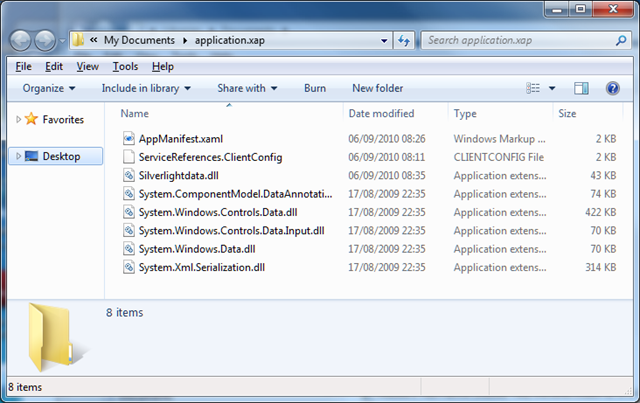
Copy the .xap file somewhere convenient, and rename it to have a .zip extension. Then extract the files. The result looks something like this:
Next, you need a .NET decompiler such as Redgate .NET Reflector. Run Reflector and open a .dll file containing application code. Select a method, and Reflector does its best to show you the code. It does a good job too:
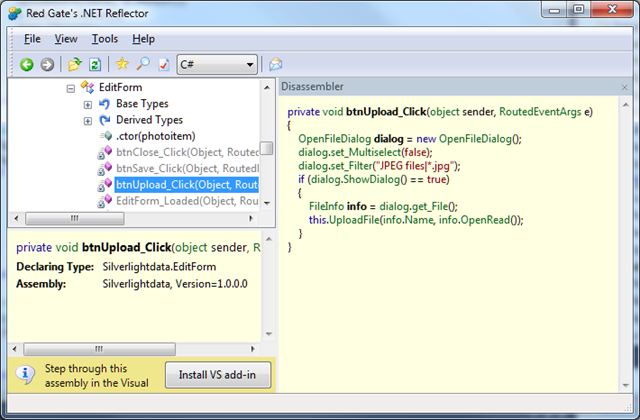
The purpose of this post is not to encourage decompiling other people’s code, but rather to make the point that even though Silverlight code is “compiled”, it is trivial to read it – just in case anyone thought it was a bright idea to store passwords or other authentication secrets there.
The solution is to never to put anything security-critical in client-side code. Second, you can use an obsfuscator such as dotfuscator to make the decompiled code harder to read.
Humm… very interesting “hidden” feature! 🙂
Don’t you think this might get developers and companies turning away from Silverlight for fear of Intellectual Property issues? I mean, even if you don’t store any security related information in the code, your algorithms will be open for everyone to reverse engineer, right?