Tag Archives: .net

First steps with MAUI: some friction

I am evaluating Microsoft’s MAUI (Multi-platform app UI) for use on a cross-platform project. I mainly develop on a Mac with Visual Studio Code.

Setup for MAUI development is well explained here though getting everything in place for Mac Catalyst, iOS and Android is tedious. There is a tricky issue related to Apple’s Xcode, needed for MAUI for the Apple targets. Apple’s recommendation is that you install Xcode from the App Store. As you would expect, it updates quite frequently and always when there is a new version of macOS. The version on my machine is therefore 26.6. After installing MAUI for .NET 10 I got an error when trying to build, stating that I had the wrong version (mine was too new).

The workaround for this is either to install multiple versions of Xcode, which is fiddly, or to set ValidateXcodeVersion to false in the .csproj project file.

As it turns out, there is another fix. The .NET for iOS SDK (used by MAUI) was updated last month to require Xcode 26.6. Note: require, not support. Each version of the SDK requires one and only one version of Xcode, and there is a lag between Apple releasing a new version, and Microsoft updating its SDKs.

My instinct is to set ValidateXcodeVersion false during development and to watch out for strange errors that might be fixed for a production build, using the correct Xcode version.

Microsoft’s MAUI SDK engineering lead said:

Updates can include different things that amount to varying levels of work. Sometimes there’s api changes in the SDKs Xcode ships that we need to account for, sometimes they change Cli tools or break things in other ways. Depending on the changes it can be a little bit of work or a lot. 

Lately minor version updates to Xcode tend to be somewhat compatible with existing MAUI (Mac/ios) workloads and you can technically force trying to use it with the right build settings, but we generally advise not installing Xcode from the App Store so that it isn’t silently updated and you can install updates when you know they’ll be supported by MAUI instead.

This is friction, though it comes with the cross-platform territory. Note that Apple insists on building with the latest Xcode for store submission.

With that out of the say, I started building an experimental app. This is not Windows and conceptually one should think of the app UI as a single page, mobile app style, even if developing for Windows and Mac Catalyst. I decided to use a Tab Bar for navigation, but ran into an issue: when debugging the app for Mac Catalyst, the Tab Bar did not appear.

I thought this was something I was doing wrong, even though it was a simple and basic case. Then after digging a bit I discovered that it was a bug, that I was not the first to hit it, and that it was fixed with a workaround late last year.

The solution is to run: dotnet workload update from the command line to get the latest version.

Both issues are a reminder of how tricksy cross-platform development can be, particularly for frameworks like MAUI which use native widgets rather then drawing them from scratch like Flutter or Avalonia UI.

The solution, it seems to me, is to keep the user interface simple.
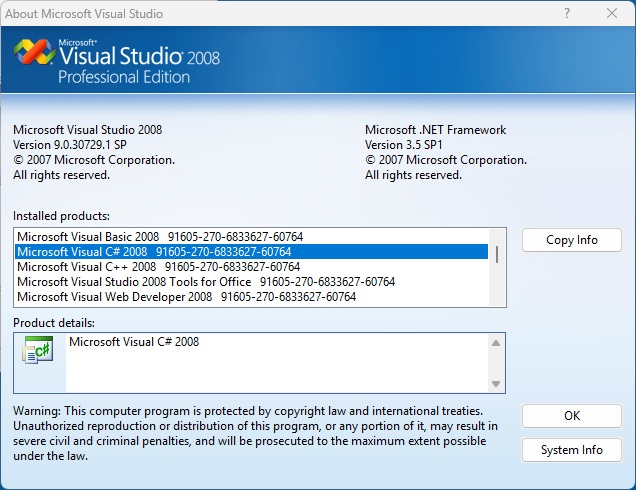
Running Visual Studio 2008 in Windows 11

One thing Microsoft is generally good about is keeping old applications running. Applications built with Visual Basic 6.0 (first released in 1998) still run well (in most cases) on the latest Windows.

I maintain an application which is not quite that old, but which was built with Visual Studio 2008 and .NET Framework 2.0. It still runs but needs modernizing and taking cross-platform.

I tried opening the project in Visual Studio 2026 but the automatic project conversion failed and it was proving difficult to fix up. Maybe it would be easier to keep it as-is and import it piecemeal to a new project, converting the database from Access MDB to SQLite along the way.

To this end, I decided to install Visual Studio 2008 on Windows 11. One can still download the trial from Microsoft as this Stack Overflow thread discusses, and upgrade to full if you have a valid key. I had to disable Windows 11 Smart App Control in order to mount the .iso files.

I installed both VS 2008 and the SP1 patch, as well as the MSDN library. Remarkably everything worked smoothly, with the exception of SQL Server 2005 (installed by default) which Windows warns will not work correctly.

My project loads and runs perfectly and the old Visual Studio is delightfully responsive to use.

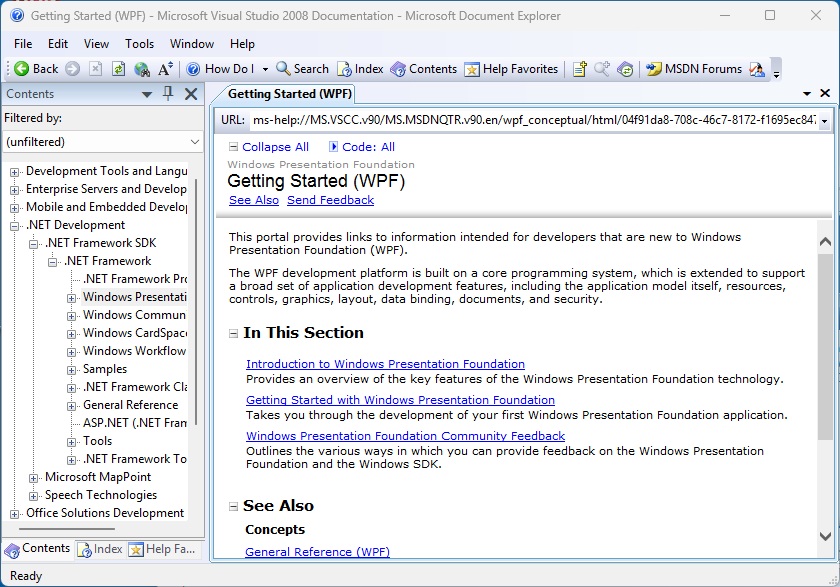
The presence of local help is nostalgic:

One of the first things I did was to write code to export the MDB to SQLite, an important step forward in the modernization journey, and the task was completed in less than a day.

No Mono in Microsoft’s cross-platform MAUI framework on .NET 11 – and a quick hands-on

Microsoft has released preview 6 of .NET 11, for which release is expected in November, including a big change to MAUI (Multi-platform App UI): it now runs only on .NET Core, rather than the Mono runtime.

Principal product manager David Ortinau reports that “your app builds and runs on CoreCLR, the same runtime behind ASP.NET Core, your cloud services, and desktop .NET.”

According to Ortinau, performance is generally faster than Mono on iOS and Mac Catalyst. The implication is that it is slower on Android, though he does say that it is within 10% on startup and app size. Selecting Mono is no longer an option, and the only use of Mono in .NET 11 is for Blazor WebAssembly.

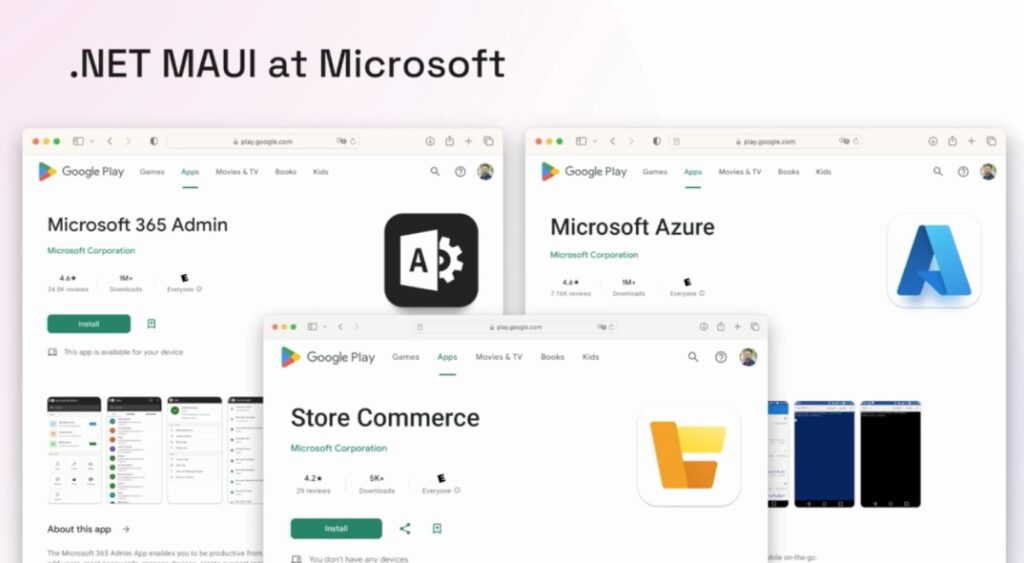
There is a key remark in Ortinau’s post. “We have worked closely with first party .NET MAUI apps validating our progress, and have received feedback from several others,” he says. The question developers may ask: what first party .NET MAUI apps? Microsoft does not use MAUI for its well-known cross-platform apps such as Teams or Office. In 2023, the company said it uses MAUI for its 365 admin, Azure admin and Store Commerce apps, though I do not know if this is still the case.

Slide from .NET Conf 2023 showing some limited use of MAUI at Microsoft

Developers would have more confidence in MAUI, both for its quality and its long-term future, if Microsoft itself made more use of it.

That said, the company does seem to be putting substantial effort into MAUI for .NET 11. Along with the CoreCLR work there are other updates in this preview. Microsoft states that the focus in .NET 11 is “to improve product quality” and this is something developers will be happy about; in some cases a statement like this might imply neglect but for MAUI it is exactly what is needed.

I have a demo MAUI project and decided to upgrade it to the new preview, working with Visual Studio Code on a Mac. It was not as easy as I had hoped. The process involved not only updating the target framework, but also the minimum versions of Android, iOS and Mac Catalyst. Then the Android SDK had to be updated, with an annoyance related to the recommended:

dotnet build -t:InstallAndroidDependencies -f net11.0-android “-p:AndroidSdkDirectory=[your path to the Android SDKs]”

The command failed with an error about the Android SDK licenses not being accepted. The fix is to set an environment variable:

export AcceptAndroidSDKLicenses=True

and then it works, though I’m not sure how this satisfies the lawyers. I also had an error where

builder.Logging.AddDebug();

could not find the AddDebug method; the fix was to add a package reference to Microsoft.Extensions.Logging.Debug to the .csproj file.

With all that done, the “Start debugging” command is not working for me in VS Code. I get a message that the “configured debug type ‘coreclr_mobile’ is not supported, and an instruction to install coreclr_mobile Extension; clicking this button gets me “no extensions found.” Update – this was resolved after updating both the C# and C# Dev Kit extensions to pre-release versions (.NET MAUI was already pre-release).

However, dotnet run from the command line works:

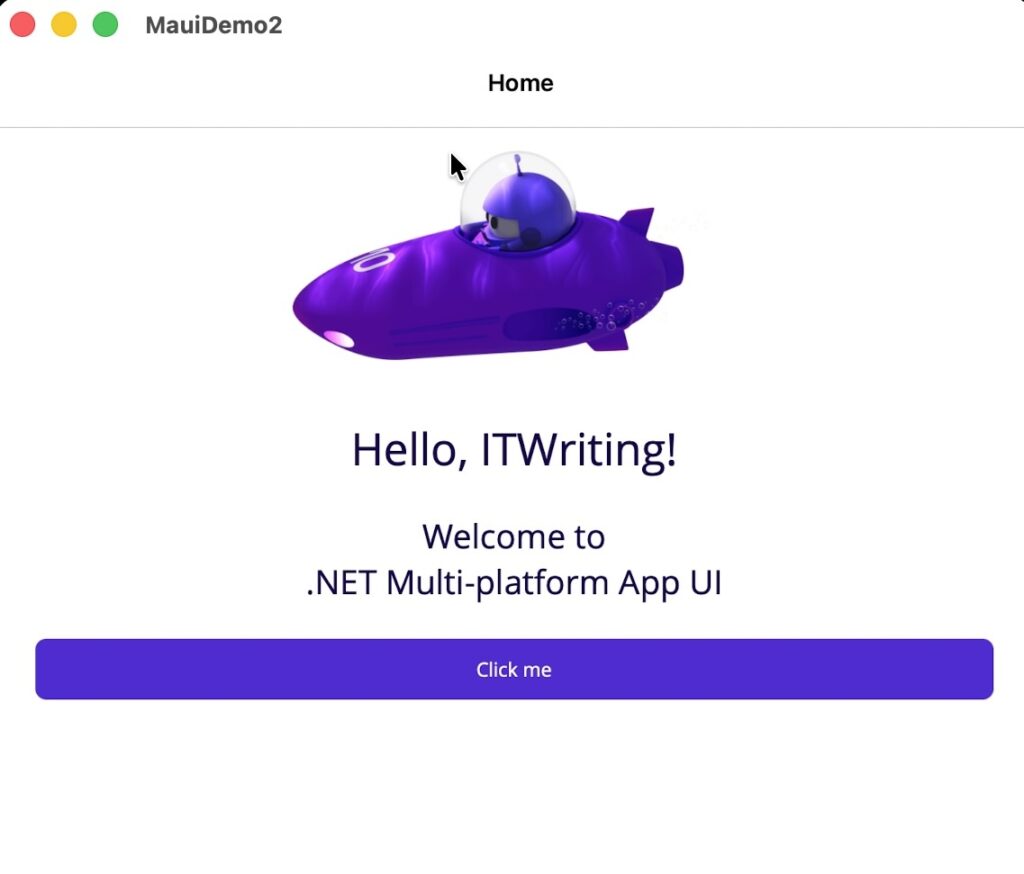
Demo of MAUI using .NET 11 Preview 6 on a Mac

I plan to do some more experimentation; note that this is a preview of .NET so some friction is expected.

JetBrains Resharper for Visual Studio Code adds C# debugging support

One of the oddities of Microsoft’s Visual Studio Code is that it is free to use for almost anything other than the company’s own .NET platform. That is, there is nothing to stop developers from coding in C# with VS Code and using the .net command-line tools without paying Microsoft for a license; but the official C# Dev Kit extension requires a license for teams of 6 developers or more:

For personal, academic, and open-source projects, C# Dev Kit can be used at no cost. For commercial purposes, teams of up to 5 can also use the C# Dev Kit at no cost. For 6+ developers, those users will need a Visual Studio Professional (or higher) subscription.

In addition, there are licensing restrictions on Microsoft’s .NET debugger which impact VS Code forks:

The C# extension for Visual Studio Code includes the Microsoft .NET Core Debugger (vsdbg). Unlike VS Code, and most other parts of the .NET Core ecosystem, vsdbg is not an open source product but rather is a proprietary part of Visual Studio. It is licensed to work only with IDEs from Microsoft — Visual Studio Code, Visual Studio, or Visual Studio for Mac.

JetBrains has now introduced C# debugging support for the ReSharper VS Code extension, which means there is now another high quality option for developers who either prefer not to use the C# Dev Kit, or are using a VS Code fork such as AWS Kiro, Cursor, Windsurf or Google Antigravity, for which the official .NET debugger is not licensed.

ReSharper is free for non-commercial use, or costs £119.00 ($149.00) per year for an individual or £295.00 ($389.00) per year for developers working for an organization. The cheapest standalone Visual Studio Professional plan is currently $540.00 per year, though some developers will get it bundled with other plans.

Leaving aside licensing and cost considerations, how does ReSharper compare to C# DevKit and the Microsoft .NET debugger? I have yet to use ReSharper so do not have a personal opinion; but will note that Microsoft’s recent change which removed the Solution Explorer is unpopular.

Finally, my personal view is that Microsoft has more to gain by making .NET and its tooling fully open, than by playing games with licensing restrictions in an effort to keep developers hooked to Visual Studio or VS Code.

Avalonia UI vs Microsoft’s .NET MAUI

What framework to choose for a cross-platform .NET GUI application continues to be awkward, with multiple good-ish options but no obvious first choice.

The three leading contenders are Microsoft’s MAUI (multi-platform app UI), third-party Avalonia UI, and third-party Uno Platform.

Joseph Tomkinson, head of software engineering at the British Heart Foundation, has an excellent post on the pros and cons of MAUI vs Avalonia UI, noting the fundamental difference that MAUI wraps native controls while Avalonia UI does all its own rendering. Tomkinson argues that MAUI has stronger mobile support (since this has only come recently to Avalonia) but that Avalonia has advantages in consistency, desktop performance, and Linux support.

A concern with Avalonia UI has been the drift towards important features becoming commercial-only, not unreasonable but a barrier to adoption for some developers. That has improved though since a sponsor appeared to fund Avalonia open-source development. CEO Mike James (formerly at Xamarin and then Microsoft) has posted about the difference this has made.

According to James, the Avalonia UI team has more than doubled, to 20 people, and now includes a QA lead. He says usage is growing:

“In the whole of 2025, Avalonia projects were built over 122 million times. In the first six months of 2026 alone, that figure has already passed 410 million.”

I am not sure exactly what this metric is counting – telemetry every time a developer builds a project? – but presuming it is like with like, that is impressive.

On the MAUI side though, one thing Tomkinson notes is that third-party components are more widely available, because it is an official Microsoft framework, and that quality is much better now than it was early on.

The BigCorp factor is not entirely in MAUI’s favour though. Microsoft might change direction and decide MAUI is no longer important, particularly as its own internal usage of the framework still seems minimal.

I am inclined to try building an example project in both frameworks to get my own feel for which would work best.

.NET P/Invoke on Azure App Service for Linux

I have an online bridge game in development (yes, still!) and it is written in ASP.NET Core with C#. One of the things that interests bridge players is called double-dummy analysis; this is where you look at what would be the best play in a game if you knew where all the cards were, whereas when actually playing bridge you only see your own cards and, during play, another hand called Dummy, so half the cards are hidden.

Double-dummy analysis is a solved problem and bridge programmers benefit from an open source library called DDS (Double Dummy Solver) written primarily by Bo Hagland and Soren Hein. This is a C++ DLL that can also be compiled for Linux and MacOS.

I wanted to integrate DDS into the bridge game in order to give players information at the end of a game including whether they were in the optimum contract and whether they beat the optimum score. I started by doing a new C# wrapper for DDS though borrowing from the work here. My version is 64-bit and wraps a few more functions. I compiled the native DLL for Windows and Linux using OpenMP for concurrency, which considerably improves performance (Boost is another option but I did not find much difference).

Note: the usual caveats about P/Invoke apply here. During one of my tests I actually crashed the container running the app. The ASP.NET developers do a lot of work to make the platform reliable, and doing P/Invoke may introduce instability.

I added my wrapper into the ASP.NET application and it worked fine on my development machine. I deployed it to App Service and the P/Invoke calls did not work. Fixing this required a bit of a deep dive into Azure App Service for Linux.

I am deploying the native code .so library into the same directory as the compiled .NET code for the rest of the application. The error I got was:

Cannot open shared object file: No such file or directory

I raised the topic on Stack Overflow.

One of the things that puzzled me was that the unit tests, which include the P/Invoke code, ran OK in Azure Pipelines, which I use for deployment. But not when deployed.

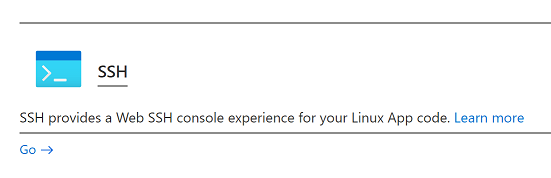
The first point is that you get the “No such file” error not only when the file itself is not present (it was) but also when a dependency is missing. So step one is to SSH into the container running the ASP.NET app, which you can do with the Development Tools in the Azure portal. Note that with Azure App Service for Linux the app always runs in a container.

image

This gives you root permissions in the container though not to the host operating system. Navigate to the directory with the troublesome library and type:

ldd libdds.so

(or the name of your library). This will tell you if any dependencies are missing or other issues. I noticed two things. One is that it was missing the dependency libgomp.so.1 which is the OpenMP library. Second, ldd reported that my library required at least GLIBC 2.29 where the available version was 2.28.

How could I fix the GLIBC version? This is determined by the version of Linux and you can use

ldd – version

to check the version you have. In my case it said I had Debian with GLIBC 2.28:

image

I did some more research. If you really want to know about Azure App Service for Linux, there are a few key documents.

The basics here: Operating system functionality – Azure App Service | Microsoft Learn

The FAQ here: App Service on Linux FAQ | Microsoft Learn

Here you will learn details like why you cannot use a file-based database like SQLite in Azure App Service for Linux:

“The file system of your application is a mounted network share. This enables scale out scenarios where your code needs to be executed across multiple hosts. Unfortunately this blocks the use of file-based database providers like SQLite since it’s not possible to acquire exclusive locks on the database file.”

But I digress. To go deeper still, check this post by Jim Cheshire:

Things You Should Know: Web Apps and Linux – Microsoft Tech Community

which has lots of critical information, like why a custom container on App Service must respond to ping.

So after reading through all this and greatly improving my understanding of how App Service for Linux works, I got to the heart of my problem. When you deploy a .NET Core application to App Service for Linux, it will by default use a container from the Microsoft Artifact Registry that matches the version of .NET you are using. If you check this page you will see that the current version for ASP.NET Core 6.0 is tagged mcr.microsoft.com/dotnet/aspnet:6.0

image

If you examine this container you will find that it runs Debian Buster which uses GLIBC 2.28. It is a matter of slight concern since Debian Buster is shown on the Debian releases wiki as having an approximate end of life August 2022, though the LTS project extends that to June 2024.

Still, now I knew how to fix my problem. Either use a custom container image, or upgrade to .NET 7, or recompile libdds.so to run on Debian Buster.

I decided that the easiest short-term solution was to recompile. I downloaded Buster and recompiled the library.

What about libgomp.so.1? This was kind-of fixable by using SSH to run:

apt-get update

apt-get install libgomp1

This is not great though since Azure could replace the container at any time, and always if you do something like scale the plan up or down, to change the specification of the VM. I tried copying the buster version of libgomp.so.1 to the application directory. It works, but I also needed to add a linker option to enable DDS to use a library in the same directory:

 -Wl,-rpath='${ORIGIN}'

as explained here.

I think a better solution is to move to deploying a custom container to App Service, which is an option:

image

Care is needed though as there is a bit of special sauce in the official container images if you want features like SSH in the portal to work properly. It also means revisiting my deployment scripts, so the above hack was an easier and quicker workaround for me.

The future of WPF for developers who need to support Windows 7

If you talk to Microsoft about what is new for Windows Presentation Foundation (WPF), a framework for Windows desktop applications, the answer tends to revolve around the Windows UI Library (WinUI), user interface controls for the Universal Windows Platform and therefore Windows 10, which you can use with WPF. That is no use if you need to compile applications that work on Windows 7. Is WPF on Windows 7 in effect frozen?

Not quite. First, note that WPF (and Windows Forms) was updated for .NET Framework 4.8, with High DPI enhancements and bug fixes. The complete list of fixes is here. So there have been recent updates.

Microsoft says though that .NET Framework 4.8 is the “last major version” of .NET Framework. This suggests that WPF on .NET Framework will not change much in future. WPF is open source; but the open source project targets .NET Core, the cross-platform version of .NET. In addition, there are a few features in WPF for .NET Framework that will never be ported, including XBAPs (XAML Browser Applications) – probably not something you care about.

The good news though is that .NET Core does run on Windows 7 (currently SP1 is required). You can see the progress of WPF on .NET Core here. It is not yet done and there are a few things that will never be supported. But when this is production-ready, it is likely that the open source WPF will run on Windows 7 and thus benefit from any updates and fixes made to the code.

From what I have learned here at Build, Microsoft’s developer conference, it is that .NET Core work that is currently top of mind for the WPF team. This means that WPF on Windows 7 does have a future – provided that .NET Core continues to support Windows 7. This proviso is important, since it is the decision of a different team. At some point there will be a version of .NET Core that does not support Windows 7, and that will be the moment when WPF cannot really progress on that operating system.

There may also be a special case. Presuming Edge Chromium runs on Windows 7, WPF may get a new Edge-based WebView control that runs on Windows 7.

Summary: WPF (and Windows Forms) on .NET Framework is not going to change much in future. If you can transition to using these frameworks on .NET Core though, there is more hope of improvements, though there is no magic that will make Windows 10 features available on Windows 7.

One .NET: unification of .NET for Windows and .NET Core, Xamarin too

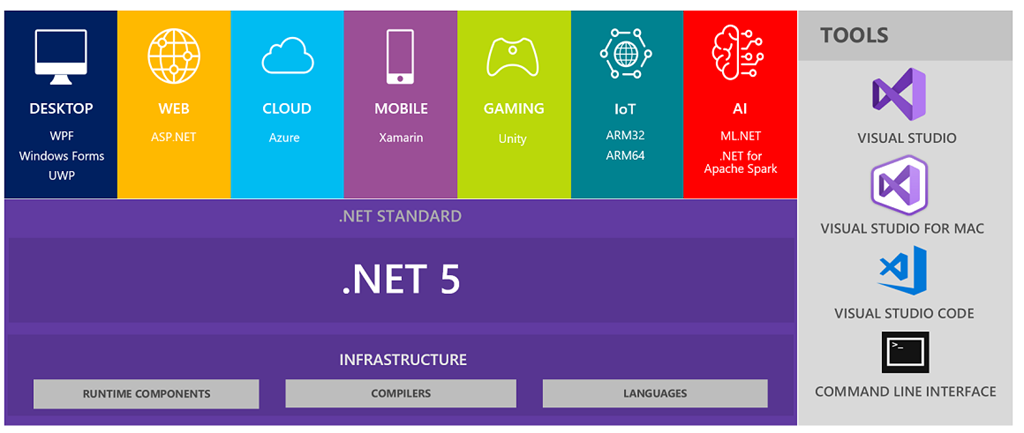
Microsoft’s forking of the .NET development platform into the Windows-only .NET Framework on one side, and the cross-platform .NET Core on the other, has caused considerable confusion. Which should you target? What is the compatibility story? And where does Mono, the older cross-platform .NET fit in? Xamarin, partly based on Mono, is another piece of the puzzle.

Now Microsoft has announced that .NET 5, coming in November 2020, will unify these diverse .NET versions.

“There will be just one .NET going forward, and you will be able to use it to target Windows, Linux, macOS, iOS, Android, tvOS, watchOS and WebAssembly and more,” says Microsoft’s Rich Turner.

image

Following the release of .NET 5.0, the framework will have a major release every November, says Turner, with a long-term support release every two years.

Some other key announcements:

  • CoreCLR (the .NET Core runtime) and Mono will become drop-in replacements for one another.
  • Java interoperability will be available on all platforms.
  • Objective-C and Swift interoperability will be supported on multiple operating systems.
  • CoreFX will be extended to support static compilation of .NET and support for more operating systems.

A note of caution though. Turner says there are a number of issues still to be resolved. There is room for scepticism about how complete this unification will be.

More details in the official announcement here.

Update: having looked at these plans in a little more detail, it is wrong to say that Microsoft is unifying .NET Framework and .NET Core. Rather, Microsoft is saying that .NET Core is the replacement for .NET Framework for new applications whether on Windows or elsewhere. Certain parts of .NET Framework, including WCF, Web Forms, and Windows Workflow, will never be migrated to .NET 5. .NET Framework 4.8 will still be maintained and is recommended for existing applications.

Which application platform for desktop Windows apps? Microsoft has stated its official line, but UWP is still not compelling

One year ago I wrote a post on Which .NET framework for Windows: UWP, WPF or Windows Forms? which is still the most popular post on this site, indicating perhaps that this is a tricky issue for many developers. That this is a live question is a symptom of Microsoft’s many changes of strategic direction over the last decade, making it hard for even the most loyal developers to read the signals.

I was intrigued therefore to note that Microsoft has an official Choose your platform post on this subject. There is something curious about this post. It covers three frameworks: Universal Windows Platform (UWP), Windows Presentation Foundation (WPF) and Windows Forms (WinForms). Microsoft states:

UWP is our newest, leading-edge application platform.

implying that if you have an unconstrained choice, this is the way to go. Yet if you look at the table of “Scenarios that have limited support”, UWP has the longest list. It is not only Windows 7 support that you will miss, but also something called Dense UI, along with other rather significant features like multiple windows and “full platform support”.

What is Dense UI? I presume this is a reference to the chunkiness of a typical UWP UI, caused by the fact that it was originally optimised for touch control. This matters if, for example, you are writing a business application and want to have a lot of information to hand in a single window. It may not be ideal for cosmetics, but it can be good for productivity.

With respect to all three of these limitations, Microsoft does note that “We have publicly announced features that will address this scenario in a future release of Windows 10.” I am not sure that they are in fact fully addressed; but it is clear that improvements are coming. In fact, the promise of further active development is perhaps the key reason why you might choose UWP for a new project, that is, if you do not learn from the past and believe that UWP will still be core to Microsoft’s strategy in say five years time.

Take a look at the strengths column for UWP though. Anything really compelling there? To my mind, just one. “Secure execution via application containers.” Yet the security of UWP was undermined by Microsoft’s decision to abandon its original goal of restricting the Windows Runtime API (used for UWP) to a safe subset of the full Windows API. You can also now wrap WPF and WinForm applications using Desktop Bridge, getting Store delivery and a certain amount of isolation.

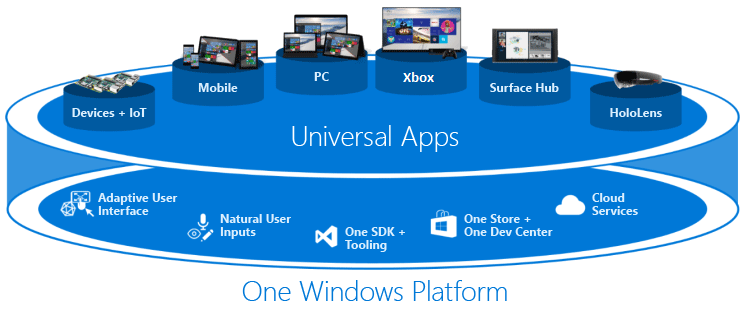
At the time of writing, Microsoft is still displaying this diagram in its guide to UWP.

image

This is now somewhat misleading though. Windows Mobile is on death row:

Windows 10 Mobile, version 1709 (released October 2017) is the last release of Windows 10 Mobile and Microsoft will end support on December 10, 2019. The end of support date applies to all Windows 10 Mobile products, including Windows 10 Mobile and Windows 10 Mobile Enterprise.

Windows 10 Mobile users will no longer be eligible to receive new security updates, non-security hotfixes, free assisted support options or online technical content updates from Microsoft for free.

As a developer then, would you rather have PC, Xbox and HoloLens support? Or PC, Mac, iOS and Android support? If the latter, you would be better off investigating Microsoft’s Xamarin Forms framework than UWP as such.

The truth is, many developers who target Windows desktop applications do so because they want to run well on Windows and are not concerned about cross-platform. While that may seem odd from a consumer perspective, it is not so odd for corporate development with deskbound users performing specific business operations.

I was at one time enthusiastic about Windows Runtime/UWP because I liked the idea of “one Windows platform” as illustrated above, and I liked the idea of making Windows a platform for secure applications. Both these concepts have been thoroughly undermined, and I would suggest that the average developer is probably better off with WPF or WinForms (or other approaches to Win32 applications such as Delphi etc), than with UWP. Or with Xamarin for a cross-platform solution. That is unfortunate because it implies that the application platform Microsoft is investing in most is at odds with what developers need.

If UWP becomes a better platform than WPF or WinForms in all important respects, that advice will change; but right now it is not all that compelling.

A glimpse into Microsoft history which goes some way to explaining the decline of Windows

Why is Windows in decline today? Short answer: because Microsoft lost out and/or gave up on Windows Phone / Mobile.

But how did it get to that point? A significant part of the story is the failure of Longhorn (when two to three years of Windows development was wasted in a big reset), and the failure of Windows 8.

In fact these two things are related. Here’s a post from Justin Chase; it is from back in May but only caught my attention when Jose Fajardo put it on Twitter. Chase was a software engineer at Microsoft between 2008 and 2014.

Chase notes that Internet Explorer (IE) stagnated because many of the developers working on it switched over to work on Windows Presentation Foundation, one of the “three pillars” of Longhorn. I can corroborate this to the extent that I recall a conversation with a senior Microsoft executive at Tech Ed Europe, in pre-Longhorn days, when I asked why not much was happening with IE. He said that the future lay in rich internet-connected applications rather than browser applications. Insightful perhaps, if you look at mobile apps today, but no doubt Microsoft also had in mind locking people into Windows.

WPF, based on .NET and DirectX, was intended to be used for the entire Windows shell in Longhorn. It was too slow, memory hungry, and buggy, eventually leading to the Longhorn reset.

“Ever since Longhorn the Windows team has had an extremely bitter attitude towards .NET. I don’t think its completely fair as they essentially went all in on a brand new technology and .NET has done a lot of evolving since then but nonetheless that sentiment remains among some of the now top players in Microsoft. So effectively there is a sentiment that some of the largest disasters in Microsoft history (IE’s fall from grace and multiple “bad” versions of Windows) are, essentially, totally the fault of gambling on .NET and losing (from their perspective). “

writes Chase.

This went on to impact Windows 8. You will recall that Windows Phone development was once based on Silverlight. Windows 8 however did not use Silverlight but instead had its own flavour of XAML. At the time I was bemused that Microsoft, with an empty Windows 8 app store, had not enabled compatibility with Windows Phone applications which would have given Windows 8 a considerable boost as well as helping developers port their code. Chase explains:

“So when Microsoft went to make their new metro apps for windows 8/10, they almost didn’t even support XAML apps but only C++ and JavaScript. It was only the passion of the developer community that pushed it over the edge and let it in.”

That was a shame because Silverlight was a great bit of technology, lightweight, powerful, graphically rich, and even cross-platform to some extent. If Microsoft had given developers a consistent and largely compatible path from Silverlight to Windows Phone to Windows 8 to Windows 10, rather than the endless changes of direction that happened instead, its modern Windows development platform would be stronger. Perhaps, even, Windows Phone / Mobile would not have been abandoned; and we would not have to choose today between the Apple island and the ad-driven Android.