I was intrigued to see an article on CNET called Word 2007 loses the ability to export outlines to Powerpoint. It says:
There’s a great little feature in Microsoft Word 2003 and earlier versions of the word-processing program that lets you export to Powerpoint an outline of any Word file formatted with headings … I was all set to tell you how to use the feature in Word 2007 when I realized it has been removed.
I wondered if perhaps the feature was still there, but the author missed it, so I used my usual technique for finding obscure commands in Office 2007. Go to Customize Quick Access Toolbar, then choose More Commands, then All Commands. Hey, there it is:
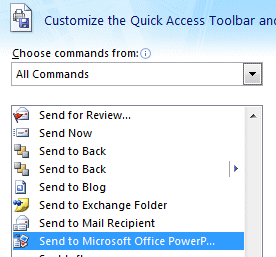
This is a great place to look if you cannot find a feature you used in earlier versions of Office.
Thanks very much for the tip on where to look for commands “missing” from the new version of Word. I’ll come back to this topic in a future blog post, and I’ll certainly credit you with the useful information (with a prominent link to your blog, of course).
Powerpoint 2007 also has an option in the Open dialog box to open “All Outlines(*.txt;*.rtf;*.wpd;*.doc;*.docx;*.docm;*.wps)”. The ability to share between products in the suite is enhanced in 2007 so try importing various word documents to see how Powerpoint utilizes the content in the new version. I think you’ll be pleasantly surprised.
I attempted to use this command with a docx document in Word 2007, but after processing for a few seconds it tells me that the location where I am trying to save the document is inaccessible, and that it may be full, write-protected, etc.
Also, I attempted to import the Word document using PPT 2007 using the Convert Outline to Slides command, and after a long period of processing (the progress bar inches along to about 3/4 finished), it just stops with no error message.
This is so frustrating! This is supposed to be one of the beauties of using MS Office….
Just FYI, I am using custom styles but they are all correctly assigned outline levels.
OK, I figured it out–the command does work but only with the built-in Word headings (whereas in Office 2003 you could convert documents with custom styles/custom outline levels).
Please let me know if anyone finds a workaround. Thanks.
Hi Tim,
That is a great trick! Hope you don’t mind, I shared it with my readers at my Office 2007 help site – with full kudos to you of course!
Cheers,
Paul W
(TheNewPaperclip.com)
Thanks you for the tip, i really missed this feature and was about to spend a lot of time creating a similar solution.
This is wonderful. I am a university professor and am always trying to teach/assist students with shortcuts and navigation tips and was lost without this function. Thanks so much for the direction.
Meliss B.
What a lifesaver it was to find this tip!!
Many thanks.
Oh very good. Thanks so much! This helps with some things I do very frequently.
This is not working for me. I used microsoft predetermined headings throughout my document and when i try sending it to pwr point through word as suggested it opens a pwr point document but the screen is blue (its not there) the same happens if i havge a blank power point open. I also tried opening the word document through all files and all outlines and it would say its loading but cancel or something and go to a new presentation!!!! please help!!
the only concern that may be affecting it is the word document is fairly large and has some charts and pictures
It does not work….please help