Fixing the Xbox 360

Microsoft says it will give a retrospective 3 year warranty to all owners of Xbox 360 consoles. Here’s a snippet from the press release:

As a result of what Microsoft views as an unacceptable number of repairs to Xbox 360 consoles, the company conducted extensive investigations into potential sources of general hardware failures.  Having identified a number of factors which can cause general hardware failures indicated by three red flashing lights on the console, Microsoft has made improvements to the console and is enhancing its Xbox 360 warranty policy for existing and new customers.

While the whole world knows that the 360 is unreliable, this perhaps Microsoft’s first public confession. An extended warranty is good; but prospective purchasers may be even more interested in the “improvements to the console” mentioned above. Has Microsoft really found a fix to the design fault(s) which cause the problem?

Another unanswered question concerns the DRM which causes problems for users who return consoles for repair and get back a refurbished unit that used to belong to someone else. This is a common practice in the IT industry, and normally it makes good sense, because you get a replacement quicker. Unfortunately it is a flawed plan with respect to the 360, because purchased downloads are tied to the machine on which they were downloaded. See this thread for the gory details, lots of unhappy customers, and Microsoft’s inconsistent response.

You would think that someone at Microsoft would have realised even before the launch that this was a likely scenario. Of course it is made worse by the high number of returned machines. Surely Microsoft can work out some way to allow customers to re-download the games they own, fully unlocked, to a new machine. Currently the mechanism seems to be: argue with customer service until you get your Microsoft Points refunded, then re-purchase the games. That is a disappointingly crude mechanism. 

Here’s another thing that puzzles me. Let’s presume that the Xbox 360 has a design fault, to do with overheating, that makes premature failure likely. Reasonable, I think. So how long ago was this fact apparent to Microsoft? I’d have thought it would be well over a year ago. I recall users complaining about repeated red light incidents in early 2006. Why then did Microsoft continue turning the handle and manufacturing machines with the same flaw for so long?

Still, users will be grateful that Microsoft has had the decency and the resources to admit to the problem and fix at least the hardware side of it for free.
Sun’s ODF converter

I had a quick look at Sun’s Open Document Format (ODF) converter for Microsoft Office.

This is aimed at users of Microsoft Office who want to open and save documents in ODF, an XML document format also used by Open Office and standardised by ISO. Why would you want to do this? The main reasons would be if you worked in an organization that mandates ODF as a standard, or if you need to send and receive documents from other organizations which use ODF as standard.

There is a curious twist here. On the face of it, one of the reasons you would send documents in ODF rather than, say, DOC or XLS, is to make it easier for users of Open Office to read your documents. However, this doesn’t necessarily apply, since this ODF converter actually is the same code used in Open Office to convert to and from Microsoft Office formats, so the recipient is really no better off. The new Open Office XML formats are a different matter but … the converter does not yet support Office 2007 (find out why here), or even Vista, according to the readme.

How good is the converter? On my quick test, pretty good, which I’d expect, given that Open Office is also pretty good in respect of Microsoft Office compatibility. It does not convert macros, but that’s not usually a problem since you rarely want to distribute documents containing macros. I managed to trip it up on one feature – there are probably others, but this is one that I found quickly. I tested the converter on my old Tablet notebook, since this still has Office 2003 installed. I created a new document and added an ink comment – a handwitten annotation written with a Tablet pen. Saved the document to ODT, reopened it, no comment. Not exactly a showstopper, but it illustrates the point that there are compromises if you choose to standardise on a non-native format.

Using the ODF converter in Word is more pleasant than with Microsoft’s ODF converter. It installs as an import/export filter, so that you can simply use Save As. You can even set Word to use it as default. There are also converters for Excel and PowerPoint, but these are not so deeply integrated.

Now for a few gripes. First, why is the download not digitally signed? This looks unprofessional these days, from a major software vendor.

Second, the converter installs itself in the system tray. What is a document converter doing in the system tray? I think this is ridiculous clutter. The only reason I can think of is to enable automatic or semi-automatic update; but I’d have thought this could be done on starting the add-in.

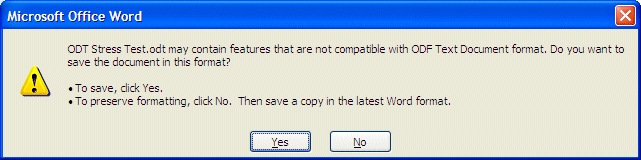
Third, the dialogs. Here’s what you get when you save a document as ODT:

The readme says of this dialog:

This warning unfortunately cannot be disabled and should be ignored.

I agree it is annoying; but should it be ignored given that, in fact, it might be true? If I’d been foolish enough to add lots of ink comments to a document, saved it as ODT, and ignored the dialog as Sun advises, I would be upset to have lost my work.

On the other hand, the real irritation of this dialog is that you do not know. Everything might be fine, or it might not.

Next, you get another dialog:

Sun’s readme says that this can be disabled, provided you have Word 2003 or XP, by setting a registry key. We are referred to KB 837011. But what does this KB say?

Word 2003 prompts you with the error messages that are mentioned in the “Symptoms” section when it is using file converters that have not been digitally signed. The prompt is expected and it is typical.

Right, so the real problem here is that Sun, again, hasn’t digitally signed its converter. If you read the KB article carefully, Microsoft does not recommend that you disable the warning. It is only intended for use if you have compatibility issues with legacy filters. Not, surely, something just released by Sun Microsystems.

Nevertheless, this is a decent converter. Would I use it? It will be handy for occasional import and export, but I would be most reluctant to use it by default on all my documents. If you are using Microsoft Office, it makes sense to use the Office native formats. If I’m sending a document and need the widest possible compatibility, RTF is good. At this point even .DOC and .XLS are probably more widely compatible than ODF, since they have been de facto standards for so long.

Technorati tags: , , , , , ,
