An Office Ribbon macro to control audio in Word

I wrote a macro to control audio via keystrokes in Word. Its main use is for transcribing interviews, but you could use it for music as well – easy to pause a song when the phone rings. The idea is that you can pause, play and rewind an audio file from keystrokes in Word, which saves switching applications or reaching for the mouse.

It’s work in progress, hence the smiley faces. Even so, I found it interesting to do. The ribbon is great for macro developers, but could do with a visual editor. I used the Office 2007 Custom UI Editor.
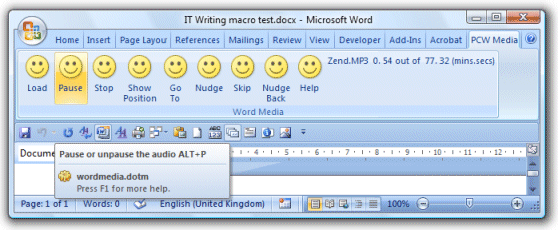
There is a little more info and a download link here.

The day my web site was hacked

Here are the gory details.

Let me add my thanks to the great guys at phorum.org for their help in trying to work out what went wrong. The WordPress folk seemed less interested, maybe because the forums there are so busy that a hack report makes barely a ripple. Further the WordPress code itself was not to blame, so it was not their problem to solve.

I loosened the permissions on the WordPress uploads folder in order to upload images with Live Writer. Lesson learned; I’m back to using SCP.

Technorati tags: , ,