Apple accused of security blunder; highlights cloud risks

According to this post, someone at Apple committed a huge security blunder, giving the password to someone’s Apple ID to a third party. How was this accomplished? Someone emailed from an email account not associated with the Apple ID, and asked for the password. Apple apparently just reset the password and emailed it to the enquirer.

I haven’t verified the claim; but even if it is false, it highlights the risks of living the cloud life. Here’s what victim Marko Karppinen emailed to Apple:

Apparently based on a single-line email inquiry, you have allowed a third party access to:
– My personal details
– My personal email
– All the files stored on my iDisk
– Everything I’ve synchronized to .Mac, including my Address Book, Bookmarks, Keychain items, etc.
– My credit card details as stored in my Apple Store profile
– My iTunes Music Store Account
– My ADC Premier membership, including the software seed key and other assets
– The iPhone Developer Program’s Program Portal, including details of our development team

Frankly, this makes me so angry that I can’t see straight.

Simon Willison, whose blog alerted me to the incident, mentioned a few weeks ago the security problem inherent in any site which will email you a password:

I have a very simple rule of thumb for whether or not a site should consider whitelisting OpenID providers: does the site offer a “forgotten password” feature that e-mails the user a login token? If it does, then the owners have already made the decision to outsource the security of their users to whoever they picked as an e-mail provider.

Let’s bear in mind too that email mostly travels through the internet as plain text, vulnerable to interception.

Thought for the day: how much of your data is protected only by a simple username/password combination, and presuming there is some, how well protected is that password itself?

I imagine Apple will be tightening up its procedures, if the incident above is confirmed, since it was easily avoidable.
Technorati tags: ,

Sample code for a very very simple VB database application

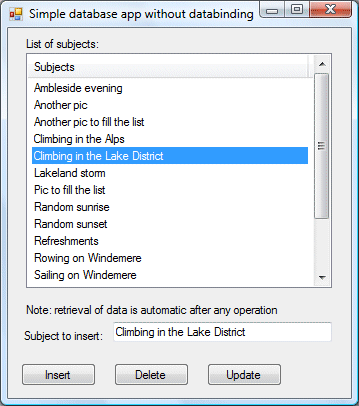
I wrote a short piece for Personal Computer World about making a simple Windows Forms database application. I did this because I get a lot of enquiries about it, and search hits to this site looking for samples.

The piece is actually in two parts. Part one shows how to do CRUD without any databinding or datasets.

You can download the code here – but please don’t bother if you can already do this in your sleep. The app is for Visual Basic Express 2008.

Part two is about using the VB wizards to create an app with a typed dataset, TableAdapters and so on. The database is SQL Server CE, which is well suited to this kind of application. It is the default in Visual Studio 2008 even though it turns out not to be fully compatible with the wizards. Typical Microsoft – simple, but with enough gotchas to frustrate beginners and keep experts in business.

I ran into another little puzzle while doing the sample. I needed to populate the listbox with both a string value and the ID that is the primary key in the database table. The way I would do this normally is to create a custom class to represent the record, implement a ToString() that returns the display value, and add instances of this object to the listbox. I wanted an even simpler way though, so I decided to use a ListView. This lets you add items that have both a key and a value. You can do this with one of the overloaded Add methods for a ListViewItemCollection, documented like this:

Creates an item with the specified key, text, and image and adds an item to the collection.

The strange thing is, the ListViewItem has no key property. So how do you retrieve the value of the key?

The answer is that the ListViewItem.Name property returns the value of the key. So the key is the name. Why not call it the name in both places? Or the key?

I guess that would be too easy.