Tried the BBC’s AIR application for the Olympics.

It has three skins – yes, they are all that bad.
Adobe is doing well in getting AIR apps out there; but I’m still not seeing many that are worth installing.
Tried the BBC’s AIR application for the Olympics.
It has three skins – yes, they are all that bad.
Adobe is doing well in getting AIR apps out there; but I’m still not seeing many that are worth installing.
Looks like I’ll be missing out on Silverlight’s big moment – the NBC Olympics site.
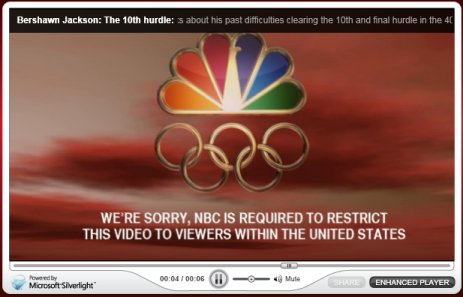
Annoyingly, it was happy to display the pre-roll ad.
I’ll be interested to know how Silverlight and the streaming servers for this event perform.
More details are emerging about the ODF converter which will be in Office 2007 SP2, set for release next year. Doug Mahugh’s post outlines the architecture and explains how the converter will deal with compatibility issues.
I want to highlight the section that describes how the converter is implemented:
Word, Excel and PowerPoint have a Model-View-Controller design. The in-memory representation of the document, or Model, is designed to facilitate document revision and display functions and includes concepts which are never saved to the file, such as the insertion point and the selection.
The persistence code converts this in-memory representation to and from some sort of the disk file based representation. Office 2007 already had code to support a number of angle-brackety persistence formats including HTML and OOXML. When we built in support for ODF, we added it in that area of our code.
That suggests deep integration, and a converter that has good chances of working smoothly and quickly – unlike the clunky open source translator which Microsoft sponsored, which is based on XSLT.
Users also have the option of Sun’s plug-in, which is based on Open Office code.
It seems that Microsoft is aiming to make Office 2007 a good ODF citizen. Will that impede adoption of Microsoft’s own OOXML format? Well, I guess OOXML will still be the default, and will have the best support for Office-specific features. Another thing to bear in mind is that OOXML was designed with Office specifically in mind. Potentially troublesome creatures like very large Excel spreadsheets may well perform best with OOXML. Another point is that Microsoft’s server products, where they exploit XML documents, are likely to work best with OOXML. In other words, there are likely to be advantages in OOXML within enterprises that use Microsoft’s platform.
Still, strong support for ODF by default in Office will be a significant boost for the OASIS format. Microsoft is protecting its very profitable Office sales against the risk of being dropped for lack of ODF compatibility.
Virus propagation follows an evolutionary pattern – the ones we see are the survivors, that have the right balance of technical ingenuity and social psychology to get themselves installed. I therefore conclude that lots of people have clicked Continue on sight of the following dialog, which you get if you follow a link on the CNN Daily Top 10 spam email doing the rounds right now (I have had it over 20 times):
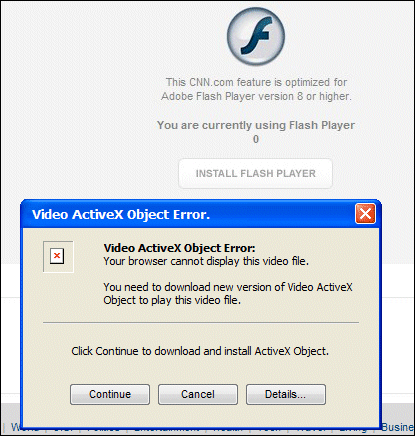
In FireFox it is even cruder – just a link to a viral executable, click OK or cancel.
What gets me is that this is such an obvious virus. Here’s several clues:
I also presume from the success of the virus that either lots of people don’t have current a/v software installed, or it didn’t work because it was not updated in time.
Why is this virus succeeding? I imagine because it is trading on two respected brands – CNN, and the fact that most people are happy to install Flash and know it is OK to do so (the real one, that is).
Shows what a tough job the security guys have. You have to assume people will click OK to almost anything.