Building Chromium

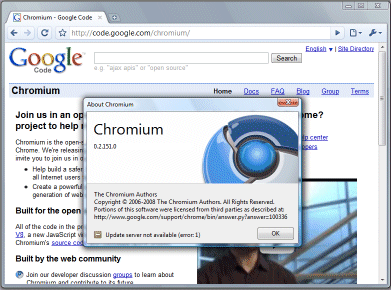
I’ve successfully downloaded the Chromium source and completed a successful build:

The source is delivered as a Visual Studio 2005 solution, making it relatively straightforward for Windows developers who have this installed. You also need the Windows SDK, but other than that there are few dependencies.

Chromium is not quite the same as Google Chrome. The logo is shades of blue, rather than Chrome’s red green and yellow, and the word Google does not appear at top right in the title bar. If you squint carefully, you can also see that it is a later build: 0.2.151.0 instead of Chrome’s 0.2.149.27 – both at the time of writing.

Oh, and I believe you can download and build without agreeing the onerous Google EULA that is attracting some discussion.

Flash and Silverlight are the Chrome losers, says Zoho boss

Zoho CEO Sridhar Vembu makes an interesting statement in an email he has circulated following the launch of Google Chrome:

The biggest losers in Google’s announcement are not really competing browsers, but competing rich client engines like Flash and Silverlight. As Javascript advances rapidly, it inevitably encroaches on the territory currently held by Flash. Native browser video is likely the last nail in the coffin — and Google needs native browser-based video for its own YouTube; so we can be confident Google Chrome and Firefox will both have native video support, with Javascript-accessible VOM (video object model) APIs for web applications to manipulate video. As for Silverlight, let me just say that if Silverlight is the future of web computing, companies like us might as well find another line of work — and I suspect Google and Yahoo probably see it the same way too.

These last weeks have not been good for Adobe. First there was the Harmony announcement, sidelining the Adobe/Mozilla Tamarin project and making Adobe’s ActionScript 3.0 look more proprietary. Now there is Chrome; and I’m inclined to agree with Vembu, that Google will try to move away from Flash dependency. If that is right, then neither Google, nor Microsoft, nor Apple wants to play the Flash game.

As for Silverlight, I see this more as a Microsoft platform solution, extending its reach beyond the Windows client. I doubt it will be much affected by Chrome, though Vembu is right in saying that the more capable the browser becomes, the less necessity there is for something like Silverlight.

What about Zoho itself? I would take it more seriously if it were not so desperately slow whenever I give it a try, in contrast to Google’s usually responsive servers. It may be better in the USA, or perhaps there is some other reason, but for me the performance just kills it.

Counting primes in Google Chrome

A while back I put together a quick prime counting test for Flash and Silverlight.

As someone noted, this test runs remarkably fast in Chrome, thanks to the V8 JavaScript engine.

Here’s the JavaScript version of the test – note that you cannot easily run this in IE or Firefox for larger values, because the script times out, though you can configure your browser to prevent this.

Here are my figures on Vista (lower is better):

  1. Microsoft Silverlight 2.0 beta 2: 0.464 secs
  2. JavaScript Google Chrome: 1.4 secs
  3. Adobe Flash: 1.667 secs
  4. JavaScript Mozilla Firefox 3: 6.046 secs
  5. JavaScript Microsoft IE7: 11.916 secs

I can’t easily test IE8 as I have it installed in a virtual machine.

Google Chrome: the developer angle

The real purpose of Chrome is to run web applications. Google would like it to be Google applications, of course. Here’s a few things I noticed.

1. The V8 Javascript engine in Chrome is really fast – thanks to just-in-time compilation and other optimizations. This is important, because it removes some of the advantages of plug-ins such as Flash and Silverlight, which also do just-in-time compilation.

2. Chrome includes Gears, which enables offline functionality and other useful services, like a local database engine.

3. This is really part of Gears; but it’s worth noting separately. The Gears Desktop API lets you create application shortcuts – without further permission, apparently. In Chrome this is surfaced as a Create application shortcut dialog:
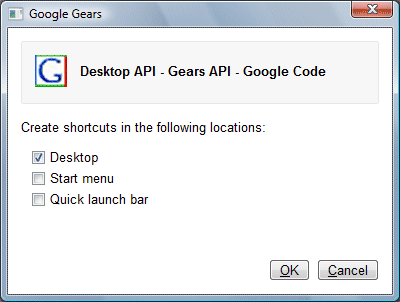
Note that this is a browser dialog, not a web page dialog.

Why is this a big deal? Well, I recall Adobe’s Kevin Lynch telling me that the usability issue around navigating to an URL in order to run an application was one of the motivations behind the development of AIR, Flash on the desktop. Google reckons it is easier to deal with the usability issue, than to create a separate desktop runtime.

4. Web applications started from shortcuts have no browser furniture. Just the web page in a window. There are probably other ways to get this effect too. I noticed that if you type Ctrl-T while in one of these full-window Chrome pages, which normally starts a new tab, it actually opens a second Chrome window, not just a new tab. Google wants that shortcut to behave like an application, not like a web browser.
Technorati tags: , , ,