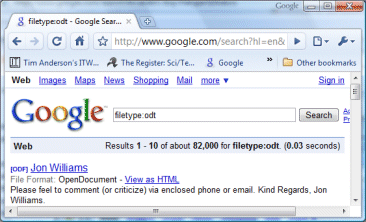
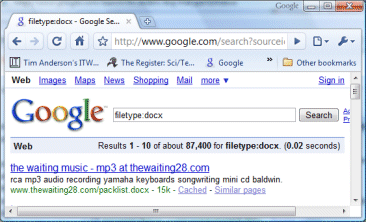
More OOXML than ODF on the Internet, according to Google

In May 2007, IBM’s Rob Weir made a point of how few of Microsoft’s Office Open XML documents were available on the Internet. Here are his figures from back then:

odt 85,200
ods 20,700
odp 43,400
Total ODF 149,300

docx 471
xlsx 63
pptx 69
Total OOXML 603

The ODF formats are those used by Open Office, Star Office, and Lotus Symphony. Now that Office 2007 has been out for a while, I thought it would be interesting to repeat his test, using the same methodology (as I understand it), a Google filetype search. I added the macro variants to the list as this seems fair, though they don’t affect the total much:

odt    82,000
ods    16,600
odp    26,100
Total ODF 124,700

docx    87,400
docm    1,440
xlsx    14,900
xlsm    738
pptx    31,400
pptm    1,300
Total OOXML 137,178

Let me say at once, I’m not sure this is significant. For one thing, I’m suspicious of Google’s arithmetic (in all search totals, not just these). For another, I reckon it is a mistake to put either format on the public Web: PDF, RTF, or even Microsoft’s thoroughly well-supported binary formats are more fit for purpose.

Even so, it is quite a turnaround. What is particularly odd is that the ODF figures appear to have declined. Again, it could just be that Google changed its way of estimating the totals.

Incidentally, I doubt that this has anything to do with ISO standardization, especially considering that the current OOXML implementation in Office 2007 does not conform. It has everything to do with the popularity of Microsoft Office and its default settings for saving documents.
WordPress company acquiring IntenseDebate, makes a blog into a forum

I was glad to see on Matt Mullenweg’s blog that Automattic, the WordPress company, is acquiring IntenseDebate. I’m not actually familiar with the product, but the features it promises address an obvious deficiency in WordPress: the comment system. IntenseDebate adds features including comment threading, reputation points, comment widgets, and Twitter, FriendFeed and email integration.

I’ve been conscious of several comment-related problems on this blog.

I have a few posts that have tons of comments. Most of these are about technical problems which affect a lot of people: they Google the problem to find the post. Once a discussion gets beyond about 50 posts it is hard to find the most useful content quickly. Examples:

Annoying Word 2007 problem: can’t select text (210 comments)

Outlook 2007 is slow, RSS broken (186 comments)

Fixing wi-fi on an Asus Eee PC 901 with Linux (60 comments)

Adobe CS3 won’t install (79 comments, hope CS4 is better!)

At this stage, the blog has become in effect a forum. Of course there is already excellent forum software out there; but it is no good telling people to go away and use a forum instead; maybe it’s OK that blogs and forums are becoming almost the same thing (most forums can also be used as blog feeds).

Sometimes the comments are more interesting than the original post, particularly when someone close to the subject of the post replies. I suspect such comments do not get the readership they deserve, because we are all busy and just scan the headlines. A comment widget might help with this.

An aside about reputation points. These are pretty much essential when there are lots of comments; sites like slashdot depend on them (though in that case you have to be a moderator to score comments). That said, it is an imperfect system. My posts on The Register are now scored by readers (though most seem not to bother); and I’m not sure whether they primarily measure the quality of the article, or the extent to which the reader agrees. As with Wikipedia, these things promote the wisdom of the crowd; overall it is more healthy than not, but the crowd is not always right.

Google’s shoddy EULA

I am sensitized to design issues right now so I’m calling out this shoddy piece of work by Google on new Toshiba laptops (and most likely some other new PCs, in the UK at least).

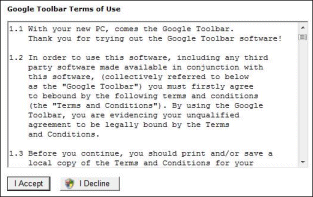
Yesterday I set up a new laptop for a friend – a scenario which does not seem to have occurred to the legal folk. It comes with the Google Desktop and Google Toolbar pre-installed. Someone has decided that the most important thing in the world is that you should therefore agree to the Google EULA, which almost fills the screen with an ugly dialog that nevertheless displays the actual text of the agreement in a relatively small scrolling box.

There are a few notable features:

1. The agreement comes up automatically on startup, until you accept or decline.

2. The window has no close, cancel or even minimize buttons. Just accept or decline.

3. The agreement has some advice for you:

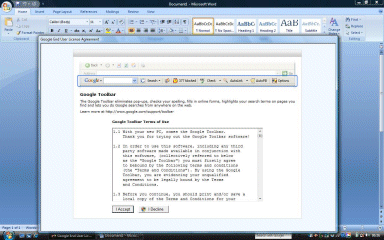
It says that before getting  “bebound” you “should print and/or save a local copy”. I would like to know how the designers of this screen intend you to do so. Your printer, if you have one, is probably not set up yet. I guess you should copy the text into another application (that’s what I did), which is fine provided you know about Ctrl-C, but made awkward because the EULA window is set to be always on top. The first image above shows what happens when you run Word after the EULA appears.

4. Still, you can drag the EULA to the right, select the text, copy and paste into Word. If you do this, as I did, you will find even stranger terms below the fold. Like this one:

2.3 In addition to the standard information that your web browser will typically send to most web pages you the Google Toolbar will send to Google a computer visit, generated unique identifier that is stored in your computer’s registry upon install.

I think I get it. Google will record every page you visit. I call this obscure language though.

5. I am not a lawyer, but some stuff confuses me. Clause 3 is headed “Additional terms” and says that use of the Toolbar is also subject to Google’s general terms of service on the web. Clause 9.1 says that “The Terms and Conditions constitute the entire agreement between you and Google”. “Terms and Conditions” is specifically defined in clause 1.2 as the current document. So did you agree to what is on the web, or not?

I realise I am possibly the only user ever to read this agreement. I still think it is disappointing: the horrible UI, the broken English, the obscure terms. I did not click Accept; my friend can do so if he wants. Ctrl-Alt-Del; Task Manager; terminate the two processes beginning EULA.

Technorati tags: , , ,