Future of Web Apps London next week

I gather that FOWA 2008 London is nearly sold out so now is the time to book, if you have not already. I’ll be there.

With stock markets reeling around the world, it’s an interesting time to have a conference focused on start-ups. Still, there are always opportunities. Lean times also help to concentrate minds on what is really cost-effective; if we are in for a prolonged downturn (which looks likely), that may stimulate interest in both web-based and open source technologies.

Some of the schedule looks like more of the same, if you have been to this kind of conference before, but there are some new topics there too: “How to decrease the environmental impact of your app” is intriguing; and I’ve already mentioned that XCalibre and Amazon will be co-presenting on cloud interoperability. I’m also looking forward to Tim Bray’s session as I have not heard him speak before.
Windows comes to Amazon’s cloud

You will soon be able to run Windows on Amazon’s Elastic Compute Cloud (EC2), in a fully supported manner. Jeff Barr says this is scheduled for public release by the end of 2008:

The 32 and 64 bit versions of Windows Server will be available and will be able to use all existing EC2 features such as Elastic IP Addresses, Availability Zones, and the Elastic Block Store. You’ll be able to call any of the other Amazon Web Services from your application. You will, for example, be able to use the Amazon Simple Queue Service to glue cross-platform applications together.

This opens up EC2 to a substantial new group of potential customers. They will be asking, of course, if the cloud can be made reliable.

Now, how about integrating with Hyper-V and/or VMware so you could easily move your servers in and out of the cloud?

Adobe Media Player adding to Windows bloat

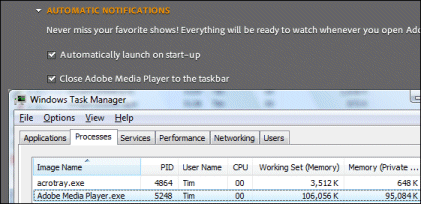
I allowed Adobe Media Player to auto-update yesterday, and noticed that it added itself to the list of applications that run automatically on startup (without asking, as I recall).

This is an AIR application and has a relatively large memory footprint even when inactive, according to Task Manager. It is also currently of little use as far as I can tell; Adobe no doubt plans for it to be the next iTunes, but right now there’s only a tiny selection of videos on offer, some of which report “not available in your territory” if you try to play them.

You can stop this software from impacting Windows performance by going to Options – Automatic notifications and unchecking Automatically launch on startup and Close Adobe Media Player to the taskbar.

The Windows utility msconfig is great for identifying startup applications and shows you where they can be disabled. Stripping these down to a minimum can have a marked affect on performance.