I grabbed this screenshot from a preview just installed:
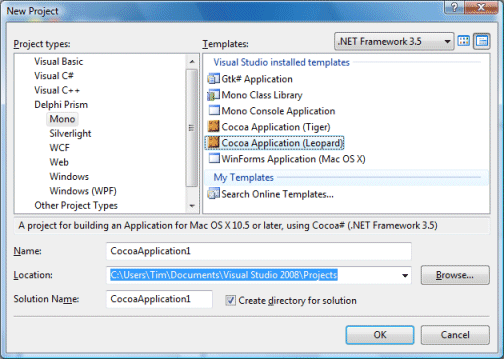
It comes from Delphi Prism, a new product from Embarcadero/Codegear which lets you code for .NET using the Delphi language, an object-oriented version of Pascal. The product is not as new as it first appears. It is based on an existing product from RemObjects, called Oxygene, which it now replaces.
Here’s the story in a nutshell. 2003: Borland, the company which created Delphi, decides (rightly) that .NET is here to stay, and releases Delphi 8, a pure .NET version. Nobody wants it, because it has no advantages to speak of over Win32 Delphi (which is faster), or C#, which is the Microsoft .NET language.
At that time some voices muttered that what Borland should do is to integrate Delphi into Visual Studio, rather than doing its own .NET IDE. One was Marc Hoffman at RemObjects, only he did more than mutter: his company developed its own implementation of Delphi Pascal for Visual Studio, called Chrome.
Borland soldiers on with Delphi 2005, which does both .NET and Win32 in a single IDE. Developers are happy to have a new Win32 Delphi, but most still don’t see the point of the .NET stuff. Further, Delphi 2005 is buggy; many stick with Delphi 7. Next comes Delphi 2006: more of the same, but less buggy.
There’s a couple of problems with Delphi’s .NET support. First, it is always out-of-date compared to Microsoft’s .NET tools. Second, it has component library schizophrenia. There’s VCL for .NET, based on Delphi’s component and GUI library, but that’s not compatible with .NET components built for Windows Forms. There’s Windows Forms, but that’s not compatible with existing Delphi code. Borland decides to deprecate use of Delphi .NET with Windows Forms. This is really for VCL developers, it says.
Next comes Delphi 2007. Nice product, but where’s .NET? Gone. Nobody seems to mind [and it turns up later in RAD Studio 2007*]. Delphi 2009, gone again. But now there’s Prism, and it is a complete U-turn. Forget VCL.NET. It uses standard .NET libraries, runs in Visual Studio, supports Windows Forms, ASP.NET, WPF, and soon Silverlight. Oh, and it’s based on what that other guy did back in 2004, with some Borland Codegear Embarcadero technology thrown in: dbExpress database framework, client support for DataSnap multi-tier applications, and the Blackfish pure .NET database engine.
Very good; but there’s still that awkward question: why not use C#? The answer, I guess, being either that you love coding in the Delphi language, or you want to use one of the Delphi-compatible libraries.
Or that you want to use Mono, which of course is what enables those tasty Mac options in the New Project dialog above. You can also use C# with Mono – possibly you should, since it is Mono’s core language – but in Prism it comes nicely integrated into Visual Studio. Well, somewhat nicely. In practice there are a few extra steps you need to take to get it working. The recommendation is to run Visual Studio in a VM on a Mac, since Windows cannot run Cocoa applications. And you’re going to be using Apple’s Interface Builder; there’s no GUI designer in Visual Studio itself.
Hardly enterprise-ready then; but still an intriguing development.
*Added correction thanks to John Moshakis’ comment below.
Technorati tags:
delphi,
prism,
codegear,
embarcadero,
remobjects,
pascal,
visual studio,
mono,
microsoft,
mac,
apple,
oxygene,
.net