Is Vista more prone to malware than Windows 2000?

So says the research department of PC Tools, apparently.

I was intrigued as I’ve investigated security in Vista. I went along to the PC Tools site in search of more information. Unfortunately there is no relevant press release in the news section or other details. I did find an article on ars technica that asks the questions I wanted to ask, but no answers.

I also registered on the site as press in search of further information, and received my username and password back as a plain text email. Remarkable, for a security company.

I don’t mean to be cynical; I really am interested, but frankly stories like this are worthless without more information. I blogged three years ago about exaggerated claims made by a security company. These companies are unlikely to put out releases saying that we no longer need their products.

My question to these security folk: given that most PC users (that I see) have been scared into using their products, why have we not seen a corresponding reduction in malware infections? It is as if the industry is glad to brag about the failure of its products.

Technorati tags: , , ,

Visual Basic returning to Mac Office

Microsoft will restore VBA to Mac Office:

The Mac BU [Business Unit] announced it is bringing VBA-language support back to the next version of Office for Mac. Sharing information with customers as early as possible continues to be a priority for the Mac BU to allow customers to plan for their software needs. Although the Mac BU increased support in Office 2008 with alternate scripting tools such as Automator and AppleScript — and also worked with MacTech Magazine to create a reference guide, available at http://www.mactech.com/vba-transition-guide — the team recognizes that VBA-language support is important to a select group of customers who rely on sharing macros across platforms. The Mac BU is always working to meet customers’ needs and already is hard at work on the next version of Office for Mac.

There’s a couple of ways to take announcements like this. The positive: the company is listening. The negative: what was it thinking when it cut the feature?

By the time Mac Office vNext is out of the door, I imagine many potential VBA users will have found other solutions.

The other point of interest: while Microsoft’s Mac BU is benefiting from Apple’s strength, I doubt that is enough to compensate for the lost Windows sales which are also implied.

How Outlook 2007 deletes your messages without asking

A puzzled Outlook 2007 user asked me why his Outlook 2007 archive folders were empty. Investigation led me to this dialog, found at Tools – Options – Other – AutoArchive:
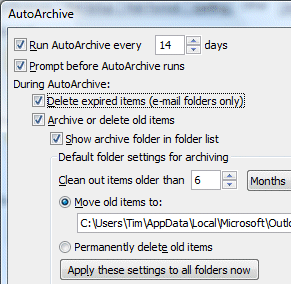
This is actually from my own Outlook; but as you can see, it is set to move old items to an archive folder. Note that the option to Move rather than delete is set by default.

However, I was puzzled by the option to Delete expired items (e-mail folders only). What does this mean? In particular, why does it refer to expired items when the rest of the dialog refers to old items? The word expired suggests some kind of non-validity, like an expired subscription, or password, or credit card.

Pressing F1 did not yield anything helpful; but this article explains:

Delete expired items (e-mail folders only)   This option is not selected by default. You can choose to have e-mail messages deleted when their aging period has expired. The default period for your Draft and Inbox items is six months, and three months for your Sent Items, but you can change these periods using the Clean out items older than option.

As I understand it, this means that items are deleted after as little as three months if the option is checked; and expired means exactly the same as old. But that’s OK; it isn’t checked by default.

Or is it? For sure, I have never checked that option, nor did my contact, but it is checked on all my Outlook installations, and on his. Take a look: is your Outlook set up like this? I’d be interested to know.

The consequence is that old emails simply disappear. The only dialog the user will see is that auto-archive wants to run. By the way, most people would not imagine that an archive process will delete items. Archive means long-term storage. Words like prune or purge imply deletion, but not archive.

Now, I happen to think that archiving in Outlook is a mess anyway. If you have several machines on the go (which is one of the reasons for using Exchange and Outlook), then you usually end up with several archives, buried deep in hidden folders where nobody is likely to find them without help. It is easy to miss these archive files when migrating to a new machine.

Still, I hadn’t realised that Outlook actually deletes old emails without asking – that is, if I am right and this is (incorrectly) the default.

It may seem a small matter; but there are times when finding that old email, sent or received, is critically important. It is another reason why I am fed up with Outlook 2007: its amusingly obscure dialogs, its broken RSS support, and its disgracefully slow performance.

Update: Duncan Smart below suggests that the “Expired items” refers to emails that have an expiry date set in message options. I must say that makes more sense to me. On the other hand, it isn’t what the help document says, and it doesn’t explain why why my contact had no messages in his archive folder, until I changed the setting. I’ll try some experiments … [slightly later] … if I archive a folder with File – Archive, it does not delete old messages (good); on the other hand this dialog is different because you specify the archive date so it is not a perfect test.

I suspect it is not as bad as I first thought, that the help document is incorrect, and that some other factor must have messed up my contact’s archiving. I hope that is the case.

See also this official help document:

Choosing an option to have items deleted permanently deletes the items automatically when they expire. They are not archived. For instance, if you click Delete expired items (e-mail folders only), this option deletes all messages in all your e-mail folders, such as Inbox, Sent, or Drafts, when they reach the end of their aging periods. The messages are not archived.

So … either Outlook really is deleting messages without asking; or I’m not the only one confused.

Substantial .NET, Visual Studio 2008 update in Service Pack 1

Microsoft’s Scott Guthrie has announced .NET 3.5 SP1 and Visual Studio 2008 SP1 beta. Some of the things which caught my eye:

  • Performance: up to 40% faster startup for desktop .NET apps, up to 10% faster ASP.NET.
  • Smaller runtime in .NET “Client profile”. There is a new cut-down runtime for Windows Forms or WPF client apps, bringing the setup down to “only” 26MB. The key point here is the size of the file a user must download and run if she does not already have .NET installed in the right version. Tim Sneath has more details about the new client profile.

A bit of context: the .NET 2.0 runtime is only 22.4MB. This ballooned to 50.3MB for .NET 3.0, and 197MB for .NET 3.5 (check the size of the full package, not the 2.7MB bootstrapper which launches further downloads) – though there are ways to reduce the size of the 197MB monster, which actually includes several versions of the .NET Framework.

  • New vector shape, Printing, and DataRepeater controls for Windows Forms – echoes of old VB controls.
  • A datagrid for WPF – not actually in SP1, but promised shortly afterwards.
  • WPF interop with Direct3D
  • ADO.NET Data Services (formerly Astoria) and Entity Framework

The new SP offers compatibility with SQL Server 2008, and the database product itself is still expected “third quarter” as far as I’m aware. I guess it may go final at the same moment as SP1 for .NET and Visual Studio.

The smaller runtime for .NET desktop apps is welcome, but those in search of a lightweight .NET runtime should look at Silverlight 2.0, which is currently 4.38MB.