My second today:
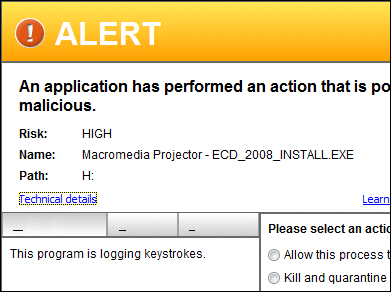
This one is a CD from HM Revenue & Customs. No reason for complacency you may say, but on balance I suspect it is PC Tools ThreatFire that is slipping up here.
My second today:
This one is a CD from HM Revenue & Customs. No reason for complacency you may say, but on balance I suspect it is PC Tools ThreatFire that is slipping up here.
A bug in the Debian-modified version of OpenSSL (also used by Ubuntu) means that cryptographic keys generated on Debian systems for the last couple of years may be insecure. Instead of being well randomized, they are easily guessable.
More information about the vulnerability is here; how to fix it here.
How much does this matter? The full scope has not emerged yet; but as I understand it, it affects self-generated keys. Those who purchased certificates from a third-party certificate authority are not affected, unless one of those authorities turns out to have been using the broken version which is unlikely. Even if you purchased certificates from a third-party certificate authority, you would still be affected if you generated the certificate request on a system with the broken OpenSSL library (thanks to Nico for the correction below).
This means that a large number of supposedly secure SSH connections or SSL connections to web sites and servers over the last couple of years were actually not very secure at all.
If nothing else, it shows how easy it is to be falsely reassured, to think you are secure when you are not.
It also shows the risks of modifying security code. The problem is not with OpenSSL, but with changes made by a Debian coder who thought he was fixing something when in fact he was breaking it.
This site runs on Debian and I’ve spent some time today checking it for vulnerability and regenerating keys.
The announced prices for SBS 2008 are substantially higher than those for SBS 2003. Client Access Licenses (CALS) for standard edition users are slightly lower than before, but a new CAL for premium users is remarkably expensive: $189.00, on top of the cost of the client Windows OS itself. In the old scheme, an SBS CAL applied to both Standard and Premium users and had a single price of $97.80.
How price sensitive is SBS? From what I see, the cost of installing and configuring SBS is usually more than the license cost, presuming a business gets a specialist to do this. In addition, the announced figures do not cover cheaper OEM editions. In other words, probably not very price sensitive.
This still strikes me as a surprising move. SBS 2008 has removed some features, including the ISA Server firewall. Further, SBS has more competition than before, both from Linux and from cloud-based offerings. Is this really the moment to hoist prices? Google will be pleased.
I posted yesterday about the report from PC Tools saying that Vista is more prone to malware than Windows 2000.
The company kindly sent me its press release on the subject and is promising more information. According to the release, the figures are based on a tool called ThreatFire, available in free and commercial editions, which by default reports threats discovered back to PC Tools for analysis and statistics. ThreatFire is a behavioural tool; that is, it does not rely on signatures of known malware, but detects suspicious behaviour.
I thought I should try this tool on my own machine. I probably count as a high-risk user, since I frequently browse the web and download and run software, sometimes unsigned software. Would ThreatFire find any malware?
It did not take long:
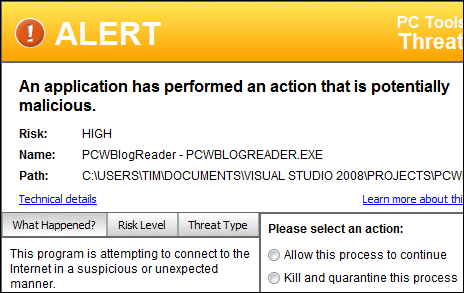
The application is my own custom blog reader, a simple .NET app which calls the common feed list API and renders blog posts in the WebBrowser control.
Looks like a false positive to me. Still, I poked around in the dialog. The risk level is supposedly high. The Technical Details link does not tell you any more about what the app did that was suspicious, but identifies the files I can choose to quarantine. The link that says “Learn more about this threat” does a Google search on the file name.
By the way, doing a random web search on what is potentially malware strikes me as poor practice. Here’s what online help says:
Click the Learn more about this threat link to launch a quick web search on the threat. In most cases the result of this search provides a clear indication of how to proceed.
Ever tried searching for the name of an executable or process? The bad guys and the scammers know we do this; and you will be offered all manner of “security” products some of which are likely spyware or malware themselves. A foolish thing to encourage. Further, how will a random web search provide “a clear indication of how to proceed”? It’s the wild web, no more, no less.
My blog reader is not very famous, so in this case Google found nothing. I’m puzzled that ThreatFire doesn’t tell you more about the supposedly malicious activity, like what data was sent and where, so that the user would have more chance of judging whether this is really a dangerous app.
I guess the “threat” is now in the PC Tools database, and my machine marked as Vista with malware. I’ll be interested to see what else it finds.