Analysing Mojave: is Vista really that good?

Microsoft’s Mojave Experiment is now online. As I understand it, a group of people with negative perceptions of Windows Vista were shown a forthcoming version of OS code-named Mojave. In the cases Microsoft is choosing to present, they liked it much better – one woman scored Vista 0, and Mojave 10. Finally, it was revealed that Mojave was in fact Vista.

It’s a fun promotion and strikes me as a good effort in persuading people to take another look. Still, a few things puzzle me. The web page is somewhat frustrating, since to get all the content you have to click all of the little boxes – there are 55, but some repeat – but we still never see a complete video of what one of these subjects saw demonstrated.

I’ll describe one of them. Early on in her session (I presume), a woman is asked:

“Have you heard of Windows Vista?”

“Based on all the negative comments and frustrations I’ve seen my husband having to deal with I wouldn’t touch the thing,” she replies.

Now we get a snippet from the end of her session:

“Windows Mojave is actually Windows Vista”

“Oh is it [laughs] … Maybe it has more to do with the user than the application.”

I am going to defend her husband. Sure, users can be unpredictable and frustrating to deal with, but consumer software is meant to be “user-friendly” which means that if someone – and in Vista’s case, many people – have a negative and frustrating experience, then something is wrong with the software. That’s not necessarily Microsoft’s software; it could be third-party drivers, or lack of drivers, or the ugly stuff that gets bundled with a new computer.

Personally I moved to Vista back in 2006 and have never wanted to return to Windows XP. Then again, I did my own clean installs. I’ve also had problems including buggy display drivers flashing the screen, Windows Search causing painful delays in Explorer, stuttering sound with supposedly high-end audio cards, hours spent getting a new laptop ready for use,  Explorer wrongly displaying files as music, Media Center corrupting itself, and network weirdness (today) which knocked me off the Internet. Finally, when I compared Vista and XP performance, XP came out noticeably faster.

Few computers operate entirely without problems. Even so, I’ve seen enough to understand why someone might get frustrated; and that’s with clean installs of the OS.

There’s not much wrong with the core of Vista, as demonstrated by the generally solid performance of Server 2008, and now by Mojave. That doesn’t excuse the numerous problems that have spoilt the release. Let’s hope lessons have been learned.
Technorati tags: , , , ,

Vista Network weirdness

My Vista laptop could no longer connect to the Internet, when I plugged it directly into my router (to bypass my ISA firewall, to test some stuff).

Checked the IP settings, all fine – except that I had two Default Gateways, one of which was 0.0.0.0, the other of which was correct. Tried fixed IP with hard-coded default gateway, same result.

Booted into Linux, all fine.

Studied the Network and Sharing center. I had two active networks. One was called Network 5, the other Unidentified. Both were using the same connection – Local Area Connection 6.

Aside: I presume that when I first installed Vista this was Local Area Connection 1. Somehow, over time, Windows decided it should delete it and re-detect it, with a new name, 5 times over.

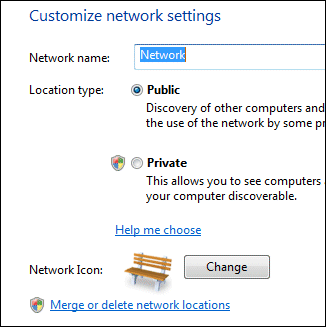
That didn’t look right. I noticed that if you click Customize, to the right of a network in the Network and Sharing Center, you get an option to “Merge or delete network locations”. Worth a try. Clicking this option gets you an ugly functional dialog that lets you select a network and, umm, merge or delete it. All the networks I have ever joined in hotels, conferences and hotspots round the world were listed.

My first thought was to merge. However, you can’t merge networks that are in use. I disabled the network card (in Manage Network Connections) and tried again. But, “Unidentified” was not listed. Forget that – I selected the lot and clicked Delete.

Re-enabled the card, and I’m back on the Internet. One default gateway. All fine.

I’d be interested to know what went wrong. And the network UI in Vista seems over-complex to me.

FluorineFx and Weborb bring fast web services to .NET and Flex

Adobe’s Andrew Shorten contacted me following my piece on consuming .NET SOAP with Flex.

He mentioned two free products which integrate Flex with .NET.

Fluorine “provides an implementation of Flex/Flash Remoting, Flex Data Services and real-time messaging functionality for the .NET framework.”

WebORB from Midnight Coders “supports Action Message Format (AMF) version 0 and 3 and can be used to process Flex and Flash Remoting requests. Additionally, WebORB provides an implementation of the RTMP protocol and supports the following real-time messaging and streaming features: Flash Video streaming, video recording, data push, server-to-client invocation and remote shared objects.” There are also implementations of WebORB for Java, PHP and Ruby.

These look useful if you want to take advantage of the faster AMF protocol or use other features like RTMP. The disadvantage: more server-side gunk.

Technorati tags: , , ,