I’m watching Google’s press briefing on the forthcoming Chrome OS. It is amazing. What Google is developing is a computer that answers several of the problems that have troubled users since the advent of the personal computer.
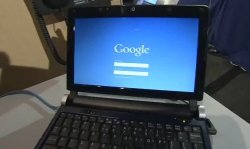
Exaggeration? Here’s a quick summary of what Chrome OS is. It’s a device that you will purchase which runs in effect just the Chrome browser. All storage is solid-state, it boots in a very short time – a few seconds.
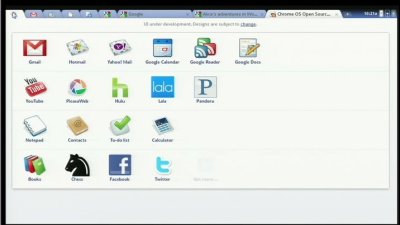
The Chrome browser is somewhat modified. It has “application tabs” – on the top left below – which represent web applications that you use.

It also supports panels, windows which float above the browser. Use case: Google Talk, there while you browse other web pages.
All the data is online, apart from a user area that is a cache of online data. All binaries in Chrome OS are signed and inspected on start-up. They are known binaries, because the user will never install an application – only a browser extension, maybe, which will come via Google. Google is not planning to support anything other than web applications.
This has two implications. One is that stronger security is possible. If any binary is added or modified, that can easily be detected; it is a white-list approach. In the event of a problem, the machine can be re-imaged, making it clean.
Second, if your Chrome OS computer breaks or is stolen, or re-imaged as above, it’s no hassle. You can simply buy a new device, log back on, and all your data is there.
There will be offline support, with automatic synchronization to your online store.
At top left is a start button app button which opens an application-centric Favourites menu.
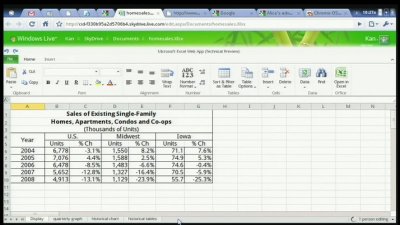
If you double-click a document, it opens on the Web. If it is an Excel document, for example, it might open in the Excel Web App, which Google rather gleefully demonstrated.
Will this be good? Yes. Cheap, fast, effective. Stream music. Run any web application.
What about the dark side of Chrome OS? That is easy to spot. The security model depends on Google knowing about all the binaries and browser extensions. If you have a binary which Google does not want to approve – “there is no certification process for an alternative web browser”, we were told – you have no way round Google’s control.
Alongside that, you will naturally see Google’s applications and identity management woven into the product. It gives Google huge power over its users. It could make Microsoft’s monopoly look trivial.
In mitigation, everything in Chrome OS is open source, and it draws on open source projects such as Web Kit.
I am sure there will be much debate on the implications of today’s announcement, but count me highly impressed – though Google acknowledges that this is not going to be a computer for every purpose.
It could nevertheless meet a large subset of computing needs; which will gradually grow as it matures.
More info here.