Category Archives: software development

Role of web video in tech communications

Last week’s Live Mesh announcement was a significant one for Microsoft watchers. It was interesting to note that all the in-depth information came in the form of web video.

Personally I dislike this trend. Video cannot easily be scanned to see what it contains; it also requires audio which is a nuisance. It is more work to quote from a video that to copy some text. I also resort to playing them at double speed where possible, to come closer to the speed of reading, and noting down the time of sections that I want to return to.

Some of these problems could be mitigated by better presentation. For example, you could have summary text on the page next to an embedded video, with links to indexed points.

However I also recognize that I may be in a minority. Video has obvious advantages; it is more informal, and can includes real demos as opposed to diagrams and screen grabs.

I am even contemplating trying some video publishing of my own; it is time I reviewed Adobe Visual Communicator.

Even so, I’d suggest that companies take the time to offer transcripts of important video content. Text has advantages too.

Microsoft Live Mesh is AIR++

This post on the Microsoft Live Dev blog reminded me to view some of the Live Mesh videos Microsoft has put out for developers – this quick tour is a good place to start; this video with Ori Amiga has more details with examples.

A few comments. First, it seems to me that Live Mesh is at heart a feed aggregrator. It is interesting to me because I had high hopes for Microsoft’s plans to integrate RSS into the operating system, and wrote about it in 2005. Sadly, Microsoft messed up its common feed platform – though I am perhaps one of the few who uses it outside IE7 or Outlook, with a custom feed reader thrown together in VB.

Live Mesh takes the feed aggregation concept and adds a few things. These include a REST API for posts and updates; a synchronization engine; an identity system so that you can control access; and a local feed server that works entirely offline when needed. Hence MOE (Mesh Operating Environment), also known as the Service Composition Runtime.

By the way, Mesh can synch peer to peer as well as with the cloud hub. Interesting for Intranet usage.

So what’s an application? A feed of course, one that contains stuff you can execute. The local runtime could be just HTML and Javascript engine; but you can see how nicely Silverlight fits into this scheme of things. It’s a neat deployment model. Buying an application becomes similar to subscribing to a web site, except you get an executable that works offline as well as online. As Amiga explains in the video above, this is about performance as well as convenience. The speed of the Net cannot match a local store.

Another aspect of this is that you can use Mesh services in your non-Mesh application, essentially as a data source that is automatically synchronized across everywhere.

If I’m anywhere close to grasping this, then it is not inherently Windows-centric. It also strikes me that this is AIR++, where the ++ is services and synchronization; Adobe should worry – except that Adobe has AIR out already and is no doubt working on great things for version 2.0.

A question though: what’s the business model? Commercial MESHable services? Tools and hosting? Premium MESH? MESH with ads? Right now, I guess Microsoft will do anything to buy mind share and market share for cloud services; but that will not do long-term.

Schwartz vs Mickos on MySQL and open source

At least, that’s how it looks. I was intrigued when I saw reports raising the possibility of “high-end” features in MySQL being released under a closed-source license – confirmed (as a possibility) in a roundabout way here. I found it odd because Sun CEO Jonathan Schwartz had told me of Sun’s intention to open source everything.

So what does Schwartz think of the MySQL idea? Not much, according to his statement in this email interview with Tim O’Reilly:

Marten Mickos (SVP, Database Group at Sun, former CEO, MySQL) made some comments saying he was considering making available certain MySQL add-ons to MySQL Enterprise subscribers only – and as I said on stage, leaders at Sun have the autonomy to do what they think is right to maximize their business value – so long as they remember their responsibility to the corporation and all of its communities (from shareholders to developers). Not just their silo.

I think Marten got some fairly direct and immediate feedback saying the idea was a bad one – and we have no plans whatever of “hiding the ball,” of keeping any technology from the community. Everything Sun delivers will be freely available, via a free and open license (either GPL, LGPL or Mozilla/CDDL), to the community.

Everything.

No exception.

Seems clear enough to me.

Buying a Microsoft code-signing certificate from Thawte? Don’t use Vista.

Here’s the problem. You go along to http://www.thawte.com and ask to buy a Microsoft authenticode certificate. It’s the right thing to do; signing code is increasingly important in these days of Internet delivery of applications; and unsigned code presents the user with dire warnings that may unnerve them.

So you go to buy a certificate. The way this works is in two stages. When you apply for the certificate, you are issued with a new private key, but not the certificate itself. Thawte then does its due diligence and checks out that you really do represent the organization for which you are requesting a certificate. Finally, you can go back and download the certificate and get on with signing your apps.

This process works differently on Vista than on XP. I got this wrong when I first tried it, because it is not obvious. To begin with, you have to relax IE’s security for the thawte site – ironic, for a security operation – and make sure it is not running in protected mode. Next, the first page of the application is a big form that has the details of the organization, how you are going to pay, and so on. If you complete this on Vista, and click Submit, you get a message saying “This web site is requesting a new certificate on your behalf”:


You complete the application, sit back and wait. A few days later you get an email saying your certificate is ready for download. You download it; it is a file called something like mycert.spc. You can right-click and choose Install Certificate, to place it in the Windows certificate store. You can even sign code with it. Just open a Visual Studio command prompt, type:

signtool signwizard

and off you go. You can select the new certificate from your certificate store, timestamp the code (recommended), and you’re done.

So what’s the problem? Well, what if you want to sign code on a different machine than the one on which you applied for the certificate? And what if you want to back up your certificate?

Did you realise when you made the purchase that you were irretrievably hooking the certificate to the actual Vista installation which you were using for the transaction?

It is all to do with the private key. To sign code, you need the private key, which was installed into your certificate store when that first page of the application was submitted. Unfortunately it cannot be exported; it is marked as non-exportable, which means the Export feature of Vista’s Certificate Manager will not allow the private key to be exported. Thawte cannot re-issue the private key; the only solution I know of is to get the entire certificate revoked reissued (fortunately this is a free service).

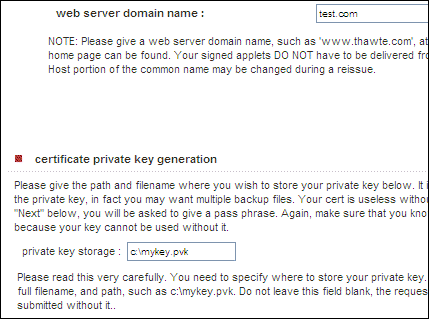
This problem does not occur on Windows XP. Here is the evidence. The screenshot below shows part of the application form on Vista:

Now, here is the same part of the form on Windows XP (still IE7):

Spot the difference? An additional section appears in XP, which lets you specify where to save your private key as a file with a .pvk extension. On Vista, you don’t get that choice and you don’t get a .pvk file. Once you have both the .pvk and the .spc files, you can backup or move the certificate wherever you want, with full signing capability. You can import the the certificate plus private key into your certificate store using this tool:

http://www.microsoft.com/downloads/details.aspx?FamilyID=F9992C94-B129-46BC-B240-414BDFF679A7&displaylang=EN

which is billed as a tool for Office 2000, but works fine for this purpose.

Now, I guess this is a security feature. If you have these private key files hanging around, they are easier to steal than if they are locked into your certificate store and marked non-exportable. Fair enough, but I’d rather make that decision for myself, than have it imposed by an obscure installation process.

Generics, anonymous methods, Unicode coming to Delphi

Codegear has posted an updated roadmap for Delphi and C++ Builder, its native code development tools for Windows. There is also a .NET Delphi but it is not covered here.

The RAD Studio product includes both Delphi (Object Pascal) and C++ “personalities”. A release code-named Tiburon, set for later this year, will update Delphi to be “completely Unicode-based”, including the runtime library and Visual Component Library (VCL). There is also support for generics and anonymous methods.

What about 64-bit, another obvious shortcoming of the current Delphi product? It’s promised for the release after that, code-named “Commodore”, and set for mid-2009.

All of this is a bit late in the day, but probably soon enough to keep Delphi developers happy. The IDE is stable now and if you want RAD features Delphi is the best choice for native code apps on Windows.

Microsoft’s Office UI patent trap: watch out with that MFC update

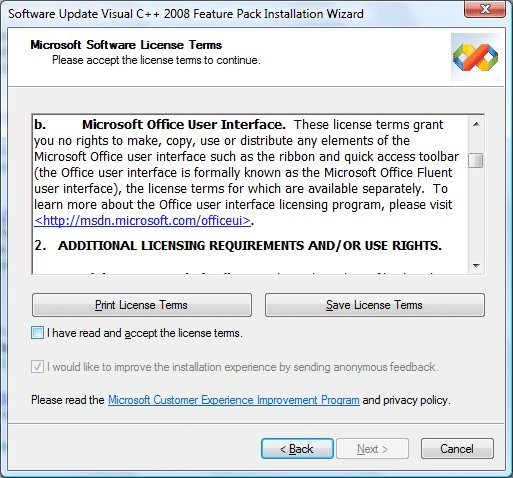
I installed the Visual Studio 2008 Feature Pack today – which, by the way, you will not find if you use Check for Updates on the Visual Studio 2008 Help menu – and noticed this paragraph in the setup agreement:

What’s this all about? Microsoft has not said so, but it seems likely to be part of the company’s war against OpenOffice. The efforts of Sun and others to improve OpenOffice, along with all the XML standardization brouhaha, prodded Microsoft into delivering the most significant Office upgrade for many years. One of its intentions was to increase the differentiation between Microsoft Office and OpenOffice. The strategy would not work if some future OpenOffice just copied the feature, hence the license.

The unintended consequences concern me.

Until now, you could pretty much use the out-of-the-box UI components in Visual Studio and not worry about licensing. That has now changed. According to Microsoft if you use any element of the Office user interface, for which the feature update supplies new classes, then you have to agree to a separate license.

Is this a burden? Well, the licensing page is now out of date, because it says “The program does not involve code”, but the feature pack provides what it calls “MFC C++ library source code for the Microsoft Office Fluent User Interface. However, Microsoft says that the license is free and covers:

…applications on any platform, except for applications that compete directly with the five Office applications that currently have the new UI (Microsoft Word, Excel, PowerPoint, Outlook, and Access)

What does it mean, to “compete directly”? It sounds like the sort of thing lawyers could have fun with. Further, if you read the license details and FAQ, it is clear that you take on a further obligation, which is to comply with Microsoft’s Office Design Guidelines, and even to update your application if Microsoft changes them:

Your Licensed UI must comply with the Design Guidelines. If Microsoft notifies you that the Design Guidelines have been updated or that you are not complying with the Design Guidelines, you will make the necessary changes to comply as soon as you reasonably can, but no later than your next product release that is 6 months or more from the date you receive notice.

OK, so let’s say you are developing some software for a customer. You deliver the app; customer pays you. Now Microsoft brings out Office 2009, changes the guidelines, and says you must update the app, even though the customer is happy with it as-is. Who will pay? I guess you would need to agree beforehand; but it is a disincentive to using the fluent UI.

Presuming you do not want to sign up, avoid all the CMFCRibbon* classes. Microsoft has helpfully commented these with a paragraph that says:

License terms to copy, use or distribute the Fluent UI are available separately.

Would any of this stand up in court? I have no idea, but I’d be reluctant to sign up or to use these classes lest I might have to find out.

Microsoft: Live Mesh or Live Mess? Here’s what to read.

Here’s what I suggest you read to get to grips with Live Mesh:

Amit Mital’s introduction (he’s the General Manager)

Mike Zintel’s Live Mesh as a Platform (he’s Director of Service Infrastructure)

Mary Jo Foley’s Ten things to know and the helpful stack diagram.

I have a few initial comments. First, it’s the platform that matters, not the Live Desktop which is the first thing Microsoft is delivering and which you will find presented at mesh.com. Microsoft is finally showing us what it means by the “software plus services” thing it has been talking about for so long. It involves a new “Mesh Operating Runtime” which has both cloud pieces and client pieces, a MeshFX API, and an identity system which is Live ID (formerly Passport).

As far as I can tell, Microsoft is delivering an API which we will be able to use to build internet-based data, document and configuration into either desktop or web applications, with synchronization to local storage for offline use. Zintel adds:

… customers will ultimately license applications to their mesh, as opposed to an instantiation of Windows, Mac or a mobile account or a web site.  Such applications will be seamlessly installed and run from their mesh and application settings persisted across their mesh

It sounds good, though the obvious question is whether Microsoft is overstating the importance of the client in an attempt to preserve its core market. Do we need this special client piece? Here’s a paragraph from Zintel’s piece that caught my eye:

A key design goal of the Live Mesh data synchronization platform is to allow customers to retain the ownership of their data that is implicit with local storage while improving on the anywhere access appeal of the web. The evolution of the web as a combined experience and storage platform is increasingly forcing customers to choose between the advantages of local storage (privacy, price, performance and applications) and the browser’s implicit promise of data durability, anywhere access and in many cases, easy sharing.

Can Microsoft improve on the “anywhere access appeal of the web? Zintel says we need to combine it with the advantages of local storage, but the advantages Zintel identifies are not all that convincing. Let’s look at them:

Privacy: maybe, but local data is vulnerable to worms, trojans, viruses; well secured Internet data accessed over SSL is arguably more secure. Data not connected to the Internet is nice and secure, but can’t participate in the Mesh.

Price: I don’t see how Mesh helps here. Yes, local storage is cheap, but as soon as data enters the Mesh it is on the Internet and we are paying for data transfer as well as possibly Internet storage. I realise that Microsoft (among others) offers generous Internet storage for free, but that is just a way of buying market share.

Performance: Granted, some types of application work faster with local storage. Still, there are non-Mesh ways of getting this from web applications in a fairly seamless manner, such as Google Gears or Adobe’s AIR.

Applications: This is perhaps the big one. Many of us are reluctant to do without traditional local applications such as Office. Well, mainly Office. Still, web equivalents get better all the time. One day they will be good enough; and new technology like Silverlight is bringing that day closer. 

What about identity management and permissions? Zintel says:

A side effect of the competition to store customer data in the cloud and display it in a web browser is the fragmentation of that data and subsequent loss of ownership. Individual sites like Spaces, Flickr and Facebook make sharing easy, provided the people you are sharing with also use the same site. It is in fact very difficult to share across sites and equally difficult to work on the same data across the PC, mobile and web tiers.

True; but Mesh currently identifies users by their Live ID. Isn’t that the same as Spaces?

If Microsoft delivers a bunch of useful web services, that’s great. If it tries to somehow replace the web with its Mesh, it will fail.

Mary Jo Foley also asks the question: to what extent is Microsoft extending, and to what extent is it replacing, existing Live services such as Office Live or the excellent Skydrive? Making sense of all this is a challenge.

Now let’s mash all this up with Yahoo! (maybe). Ouch.

How to code better: new book from ThoughtWorks

Which is more important: the code you write, or the tools you use? Instinctively I would say it is the code which really counts; but vendors tend to focus on tools because that is what they sell. I found myself thinking about this last week, because while I was engaged in puzzling out the new Application Factories feature in CodeGear’s JBuilder 2008 a book arrived on my desk. It is called The ThoughtWorks Anthology, and subtitled “Essays on Software Technology and Innovation.” The title is the worst thing about it, since it sounds like some kind of corporate puffery from ThoughtWorks (and I suppose it is); but it is also a concise, enjoyable and stimulating read. I found it particularly refreshing as a break from JBuilder, since it it concerns stuff that matters: code, testing, project management, as opposed to stuff that might introduce more problems than it solves: the latest wonder tool which promises to speed development but might end up as just another piece of clutter.

I turned first to an entertaining chapter by Jeff Bay, called Object Calisthenics. Bay sets out nine rules; I don’t want to steal all his thunder, but here are three of them:

  • Don’t use the else keyword
  • Use only one dot per line
  • Don’t use any classes with more than two instance variables

Before you scream at him, note that this is an exercise, not a set of rules for live projects, though at the end of the chapter Bay says they can be used as such. It doesn’t matter whether you agree or not; what counts is that it makes you think about how to improve the design of your code.

Martin Fowler writes about how to write a DSL (domain-specific language) in Ruby. Rebecca Parsons describes how to categorize languages. Neal Ford makes the case for polyglot programming. Erik Doernenburg discusses the use of annotations/attributes in Java and .NET for application domain metadata. Julian Simpson has a great chapter on refactoring Ant build files, which can easily become hard to maintain. Two final chapters cover test strategy and performance profiling strategy.

I particularly like the way in which the book itself reflects the coding principles it presents. Each chapter is short, clear and focused. A good read for your next transatlantic flight.

The ThoughtWorks Anthology (Pragmatic Publishing ISBN 10: 1-934356-14-X)

Amazon links:

US: The Thoughtworks Anthology

UK: The Thoughtworks Anthology

mvn cloudtools:deploy

I love this. Write your Java EE app; then deploy to up to 20 virtual servers like this:

mvn cloudtools:deploy

The servers are Amazon EC2 instances, charged by the hour.

The tool comes from Chris Richardson, author of POJOs in Action. It combines a Groovy framework called EC2Deploy with appropriate Amazon virtual machine images and a Maven plugin. He calls the combination Cloud Tools. More on EC2Deploy here. The Cloud Tools home page is here. Open source under the Apache License 2.0.

Great for testing, could be good for live deployment too, especially now that you can get proper support from Amazon.

See also Jeff Barr’s Amazon Web Services Blog.