Tag Archives: software development

Microsoft .NET gotchas revealed by Visual Studio team

The Visual Studio Blog makes great reading for .NET developers, and not only because of the product it describes. Visual Studio 2010 is one of the few Microsoft products that has made a transition from native C++ code to .NET managed code – the transition is partial, in that parts of Visual Studio remain in native code, but this is true of the shell and the editor, two of the core components. Visual Studio is also a complex application, and one that is extensible by third parties. Overall the development team stressed the .NET platform, which is good for the rest of us because the developers are in a strong position both to understand problems, and to get them fixed even if it means changes to the .NET Framework.

Two recent posts interested me. One is Marshal.ReleaseComObject Considered Dangerous. I have some familiarity with this obscure-sounding topic, thanks to work on embedding Internet Explorer components. It relates to a fundamental feature of .NET: the ability to interact with the older COM component model, which is still widely used. In fact, Microsoft still uses COM for new Windows 7 APIs; but I digress. A strong feature of .NET from its first release is that it can easily consume COM objects, and also expose .NET objects to COM.

The .NET platform manages memory using garbage collection, where the runtime detects objects that are no longer referenced by active code and deletes them. COM on the other hand uses reference counting, maintaining a count of the number of references to an object and deleting the object when it reaches zero.

Visual Studio 2008 and earlier has lots of COM APIs. Some of these were called from .NET code, and for the same of efficiency called the method mentioned above, Marshal.ReleaseComObject, to reduce the reference count immediately so that the COM object would be deleted.

Now here comes Visual Studio 2010, and some of those COM APIs are re-implemented as .NET code. For compatibility with existing code, the new .NET code is also exposed as a COM API. Some of that existing code is actually .NET code which wraps the COM API as .NET code. Yes, we have .NET to COM to .NET, a double wrapper. Everything still works though, until you call Marshal.ReleaseComObject on the doubly-wrapped object. At this point the .NET runtime throws up its hands and says it cannot decrement the reference count, because it isn’t really a COM object. Oops.

The post goes on to observe that Marshal.ReleaseComObject is dangerous in any cause, because it leaves you with an invalid .NET wrapper. This means you should only call it when the .NET instance is definitely not going to be used again. Obvious, really.

Once you’ve digested that, try this illuminating post on WPF in Visual Studio 2010 – Part 2 : Performance tuning. WPF, or Windows Presentation Foundation, is the .NET API for rich graphical user interfaces on desktop Windows applications. Here is an example of why you should read the post, if you work with WPF. Many of us frequently use Remote Desktop to run applications on remote PCs or PCs that do not have a screen and keyboard attached. This is really a bad scenario for WPF, which is designed to take advantage of local accelerated graphics. Here’s the key statement:

Over a remote desktop connection, all WPF content is rendered as a bitmap. This is in contrast to GDI rendering, where primitives such as rectangles and text are sent over the wire for reconstruction on the client.

It’s a bad scenario, but mitigated if you use graphics that are amenable to compression, like solid colours. There are also some tweaks introduced in WPF 4.0, like the ability to scroll an area on the remote client, which saves having to re-send the entire bitmap if it has moved.
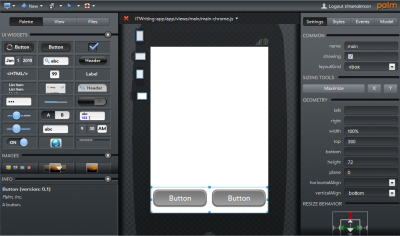
Palm Ares: an online IDE for WebOS development

I spent a few minutes trying out Ares, Palm’s web-based IDE for WebOS, the OS used in the Palm Pre smartphone.

Ares is in public beta and I’m not going to pretend I found it smooth going. No doubt it will be fine after a little patient learning. It is amazing, with drag-and-drop visual interface builder, code editor, source code management, debugger, and logging.  Microsoft’s Internet Explorer is not supported in any version; you need Mozilla Firefox 3.5 or higher, Apple Safari 4.0 or higher, or Google Chrome 3 or higher.

image

The online IDE uses a bit of Java but seems to be mostly HTML and Javascript. If you try to launch the application, you need a Palm emulator running locally, but you can preview in a browser without any local dependencies.

In order to try Ares, you have to sign up for Palm Developer Center. As part of the process, it appears that you have to give Palm permission to charge fees to your PayPal account, which I disliked, though membership is free for the time being. Of course you hope that any fees will be more than offset by the steady chink-chink of income from your app sales.

Is this the future? My immediate reaction was to be very impressed; a little further in and I was greatly missing the comfort of Eclipse.

Still, this stuff will get better; and the idea of just browsing to an URL to continue development is compelling.

What’s new in Visual Studio 2010 – more than you may realise

I’m beginning to think Microsoft has under-sold Visual Studio 2010. Of course it is a huge product, as I observed back in October, especially since it includes a major new release of the .NET Framework as well as updated tools, but I thought I had discovered most of the significant new features. Still, when I sat down recently to write up an extended review, I found a lot that I had missed.

One of my reflections on this is that Microsoft has done of poor job of communicating what is new. I attended the Professional Developer’s Conference in 2008 and 2009. The developer-focused keynote on the second day last November should have hyped the best of what is new; but instead we got Steven Sinofsky on Windows 7 quality control – hardly the most exciting of topics – a sneak preview of IE 9, an unconvincing tour of Sharepoint and Office 2010, and Scott Guthrie on Silverlight 4. Guthrie was fantastic, leading us blow by blow through Silverlight’s new capabilities, but much else was neglected.

It doesn’t help that Microsoft’s home page for Visual Studio 2010 has meaningless headlines. “Set your ideas free”, “Simplicity through integration”, “Quality tools help ensure quality results.” Pure fluff, which saps your will to read further.

Here are a few things that I found interesting – nothing like comprehensive, just features that perhaps have not had the attention they deserve.

Microsoft F# – a new language from Microsoft Research, integrated into Visual Studio with remarkable speed. The people I’ve spoken to who have taken the time to discover what it does are truly enthusiastic. Some of its strengths are parallelism, asynchronous programming, graphics manipulations, and maths. You probably won’t write a complete application in F#, but it will be great for assembling libraries.

Windows Workflow Foundation 4.0 – potentially a new and effective approach to visual programming and long-running state management. Flow charts are often used to teach programming, since they express common concepts like if conditions visually. WF lets you draw a process as a flow chart – or there are other types of chart – using the nice new WPF design tools, and then execute it in the runtime, which is part of the “Dublin” extensions to IIS, now known as Windows Server AppFabric (I have no clue why this confusing name was chosen). To get the idea, I suggest reading David Chappell’s Workflow Way. For applications that fit this kind of model, it is a compelling approach, and integrates well with Windows Communication Foundation for messaging.

Dotfuscator – I know this is a third-party thing, but this is no longer just a tool for obscuring your .NET assemblies in the hope of preventing decompilation. The new Dotfuscator does runtime analytics, and can report back to a portal when your application runs, what features you use, what operating system it is on, whether it crashed, and so on. It also supports application expiry, known as “shelf life”, and can detect if assemblies have been tampered with. Some of this sails close to the spyware wind, but this is a matter of getting informed user consent. These are interesting features for Windows desktop developers, if there are any left, and even the free edition is quite capable.

Test and Lab management – a challenge to set up and configure, but when it works, amazing. Lab Management uses Visual Studio, Hyper-V and System Center Virtual Machine Manager to automate deploying an application over one or more VMs, so you can run tests against it. This hooks into Team System so you can file a bug report with a link that actually shows the bug happening at runtime, with a snapshot of the virtual environment.

Step backwards through code – IntelliTrace is a new feature of the Visual Studio debugger. Configure it to collect IntelliTrace events and call information, and you can then step backwards as well as forwards from a breakpoint, examining variable values as they change.

Team Foundation Server Basic – what this means is that even a solo Visual Studio developer can have TFS running locally or on a networked machine for source code management, issue tracking and so on. It’s worth considering because of the way it integrates with the IDE. I admit, I still like Subversion which I have on a remotely hosted server, since it acts as an effective off-site backup, but I’d much rather use TFS Basic than nothing.

UML – Microsoft has finally done what it should have done years ago, and implemented a wide range of up-to-date UML diagram tools. Nothing revolutionary, just useful.

Not everything is wonderful in the new Visual Studio. Deploying to Azure remains clunky in Beta 2 – when is this going to get better? SharePoint is another one; I appreciate the value of F5 debugging, but you still need SharePoint installed locally, with great potential for mucking up IIS, and the whole thing feels unwieldy.