WPF/E preview is out – but no cross-platform .NET for now

Microsoft has posted a CTP (Community Tech Preview) of Windows Presentation Foundation Everywhere, a cross-platform browser-hosted runtime for XAML, its XML GUI language. There’s a download for Mac as well as Windows, but sadly one of the most intriguing aspects of WPF/E is not yet included. You can code the CTP with JavaScript, but the promised cross-platform .NET runtime is not in this release. It is still planned though:

After the December 2006 CTP, we will also enable a managed code programming model using a subset of full CLR that will enhance the programmability side of the browsers to enable more performant and more scalable Web applications.

The quote is from the WPF/E Architecture Overview, which is a great place to start if you want to know what’s in WPF/E.

See also this interview with Forest Key from back in March, if you have not read it already.

I’ve downloaded but not tried the samples yet.

Postscript: Mike Harsh has some more info and a sample WPF/E video on his blog. The humour in the video is somehow typically Microsoft…
Technorati tags: , , ,

Conquering the Office Ribbon

Rick Strahl was struggling to apply a template to an open document:

My quest today: Apply a template to an open document in Word. Where the hell is that option buried?

My generic solution to this kind of problem is the Quick Access Toolbar. Here’s how it works in this case:

Click the little down arrow at the right of the Quick Access Toolbar

  1. Choose More Commands…
  2. Choose All Commands
  3. Scroll down the list to Templates, select it and click Add
  4. Close the the dialog

Now you can click the Templates icon on the Quick Access Toolbar and it works just like Office 2003.

Of course I still don’t know how you are meant to find it in the ribbon. This technique subverts the ribbon by providing a long, simple list of everything in Word; a kind of super-menu. But it’s actually a fair solution, since the icon stays there giving one-click access to your favourite obscurities. Further, should you happen to find it elsewhere on the ribbon, you can easily remove it.

PS: the Templates dialog is also available on the Developer ribbon, which you can display through Word options

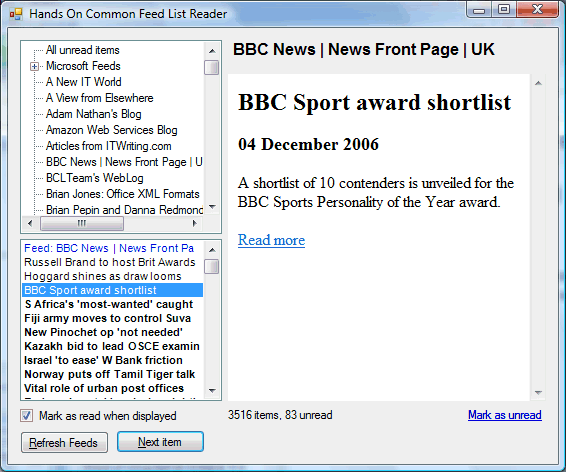
A simple blog reader for the IE7 common feed list

Readers of this blog will know of my dissatisfaction with both the IE7 feed reader and the RSS integration in Outlook 2007.

I’ve now posted the (VB.NET) code for my quick-and-dirty solution, the Hands On Common Feed List Reader.


What problems does this solve? Mainly:

  • It allows me to browse through blogs by item and not by feed
  • It reads the feed list directly instead of Outlook’s misguided synchronization efforts
  • It gives me a quick view of all unread items

Just to be clear, this is a reader for the IE7 common feed list. You still need to subscribe and unsubscribe using IE7. Lots of features could be added, but for now this works for me; however fixes and improvements are welcome.

Download the code here.

More on how this is put together in the February 2007 issue of Personal Computer World.

If anyone would like just the executable, let me know and I’ll make a quick setup. Requires .NET 2.0.

Technorati tags: , , ,