Category Archives: microsoft

Audio in Vista: more hell than heaven

Here is a contradiction. On the one hand, Vista audio is said to be much improved over audio in earlier versions of Windows. Certainly this was Microsoft’s intention. Larry Osterman’s 2005 post refers to several goals, including moving audio code out of the kernel to improve reliability, and making Windows a better platform for audio professionals. Osterman also describes the new audio API called WASAPI, which enables low-latency, and provides an illustration of how it fits together. Vista clearly has a much richer audio API than Windows XP. Here is an easy to understand overview, full of enthusiasm for its benefits.

Why a contradiction? Well, the actual, real-world experience of audio in Vista is mixed at best. Here is a typical post, complaining of stutters and pops in Vista audio which recall bygone days when PCs were barely up to the task. Surely playing 16-bit audio should be a breeze for today’s PCs?

I’ve had the same experience. I care about high-quality audio, so I installed a high-end Creative card, the Xi-Fi Elite Pro. I’ve been through all the drivers, from early betas to recent and supposedly production-ready releases. None have worked smoothly. I’ve had problems playing CDs, problems in Audacity where playback stutters or simply stops working, or a strange effect where the right and left channels go out of synch. I’ve had problems in Windows Media Player, where the responsiveness of the play, pause and stop buttons becomes sluggish, or playback fails completely.

I thought this might be primarily a problem with Creative’s drivers. There are certainly howls of anguish on the Creative forums. I also notice that if I switch to the motherboard’s integrated Realtec audio, reliability is greatly increased, though sound quality is worse. There are still occasional problems. Everyday use is fine, but a heavy editing session in Audacity causes glitches.

I decided to go pro. I removed the Xi-Fi, purchased a Terratec Phase 22, aimed at the pro market, and attached an external DAC. I chose the Terratec because it is a no-frills affair and has a Vista driver, unlike many of the pro audio cards out there. Happy now?

Well, no. The Phase 22 works OK using its internal DAC, but I’m having problems with the  SPDIF digital output. If I direct audio specifically to this output, by making it the default device, or selecting it in the preferences of an app like Audacity, it does not work. I can sometimes get it to work temporarily using the Phase 22 control panel, but it fails again as soon as I stop and restart playback. If I direct output to the Phase 22 internal DAC, then SPDIF output works, but it is always re-sampled to 48 kHz. Ideally I want bit-perfect output to the external DAC. For example, I’ve got a 96 kHz FLAC file. If I play this in Vista, it is output at 48 kHz.

In Windows XP, by contrast, it works perfectly. Ripped CDs are output at 44.1 kHz, my 96 kHz FLAC file is output at 96 kHz.

I also have problems with Steinberg’s Cubase SX. This works well in XP with the Phase 22, or with the internal card on Vista, but it does not work with the Phase 22 in Vista (I’ve not spent a lot of time trying to troubleshoot this). I called Terratec support. The guy didn’t bother trying to analyze the problem; he just said wait for a new driver.

Digging a little deeper

Maybe some of these problems are specific to my machine or the way it is configured. Maybe, and I look forward to your tips. But here are a few observations.

Pro audio vendors are very late with Vista drivers. I noticed this when looking for a replacement for the Xi-Fi. M-Audio, for example, has only patchy support, and some drivers are still in beta. E-Mu, Creative’s Pro range, is still on beta drivers. Bear in mind that Vista was released to manufacturing in November 2006, and that there were plenty of pre-releases.

Vista drivers, where available, may not be full-featured. Creative is a case in point. Its Vista drivers do not support decoding of Dolby Digital and DTS, DVD-Audio, 6.1 speaker mode, or DirectSound-based EAX effects.

General advice in the Pro community seems to be: stick with XP for the moment. I don’t see many posts from musicians raving about how much better Vista is for their work. I see plenty of posts about problems with audio in Vista.

What’s gone wrong? I don’t have a definitive answer, but can speculate a little. What we do know is that audio in Vista, and multimedia in general, is greatly changed. The links I gave above are just overviews. For a real drill-down, try the lengthy audio processing in Vista thread on the AVSForum, along with Creative’s explanation of audio in Vista. Note that a number of older APIs are now emulated on top of the new WASAPI. Emulation, as everyone knows, often means slow. Note also the two modes in Vista audio: shared and exclusive. As I understand it, in shared mode, Windows will always munge the audio at least a little. In exclusive mode this won’t happen, but according to this post, writing exclusive-mode drivers is exceedingly complex.

There’s also DRM to think about. Is the notorious protected media path getting in the way of faithful audio reproduction on Vista? Personally I doubt it, but it could be a factor.

Speculations

The bottom line is that Vista audio should be great, but in practice it is problematic for many users. Why? Here are a few possibilities.

1. Vista audio is great, but third-party vendors are a lazy bunch and haven’t bothered to do decent drivers. This is the view of many on the Creative forums, but I don’t buy this entirely. The failure to provide good drivers in a timely manner seems to go right across the industry. I am sure some vendors could have done better but I’m inclined to think there are other factors, such as perhaps…

2. Vista audio is so complex and different that third-parties had no chance of writing good drivers in time. This seems at least plausible. I still find it curious. I don’t doubt that the leading vendors of audio add-ons worked closely with Microsoft in the run up to Vista. Why then is support for the new operating system so limited and late?

3. Microsoft slipped up; audio in Vista does not work properly. It will certainly be interesting to see what effect Vista’s service pack 1 has, when it arrives later this year.

No conclusion

A year from now, we might all be saying Vista’s audio is fantastic. That will be after Vista SP1 and another year of driver development. Alternatively, we may know more clearly why it does not deliver. In the meantime, my own view is that Vista audio is more hell than heaven.

Technorati tags: , , , ,

Microsoft sets launch day for Visual Studio 2008, SQL Server 2008, Windows Server 2008

According to a press release just received, Microsoft has set 27 February 2008 for the “global launch” of its 2008 server and developer products:

Today at the Microsoft Worldwide Partner Conference, COO Kevin Turner announced that the company will jointly launch Windows Server 2008, Visual Studio 2008 and SQL Server 2008 in Los Angeles on 27 February, 2008. The event will kick off a “launch wave” of hundreds of events that Microsoft will host worldwide including training, virtual events and extensive online resources.

Windows Server 2008 has the IIS 7.0 web server, PowerShell command-line, and “Server core” which lets you install servers without any GUI components. Funny how Windows is getting more like Unix.

SQL Server 2008 has a new FileStream data type (a better blob), spatial and location data types, integrated full-text search, and a bunch of scalability and management improvements.

Visual Studio 2008 is the LINQ (Language Integrated Query) and WPF (Windows Presentation Foundation) release. WPF is already out there, but this has full design-time support. There is also ASP.NET AJAX. Visual Studio 2008 goes hand-in-hand with C# 3.0 and VB 9.0. The underlying CLR (Common Language Runtime) is still essentially 2.0, the same as for Visual Studio 2005.

Of course there are a zillion other new features, but I’ve picked out a few highlights.

Will this change our lives? LINQ is exciting, and so is WPF if anyone actually starts to use it, but of course we’ve known about these things for a while. Microsoft’s release cycle for new technology – from first announcement to full release – seems to stretch out for ages. Otherwise, this feels more like consolidation than any sort of new direction.

Fixing the Xbox 360

Microsoft says it will give a retrospective 3 year warranty to all owners of Xbox 360 consoles. Here’s a snippet from the press release:

As a result of what Microsoft views as an unacceptable number of repairs to Xbox 360 consoles, the company conducted extensive investigations into potential sources of general hardware failures.  Having identified a number of factors which can cause general hardware failures indicated by three red flashing lights on the console, Microsoft has made improvements to the console and is enhancing its Xbox 360 warranty policy for existing and new customers.

While the whole world knows that the 360 is unreliable, this perhaps Microsoft’s first public confession. An extended warranty is good; but prospective purchasers may be even more interested in the “improvements to the console” mentioned above. Has Microsoft really found a fix to the design fault(s) which cause the problem?

Another unanswered question concerns the DRM which causes problems for users who return consoles for repair and get back a refurbished unit that used to belong to someone else. This is a common practice in the IT industry, and normally it makes good sense, because you get a replacement quicker. Unfortunately it is a flawed plan with respect to the 360, because purchased downloads are tied to the machine on which they were downloaded. See this thread for the gory details, lots of unhappy customers, and Microsoft’s inconsistent response.

You would think that someone at Microsoft would have realised even before the launch that this was a likely scenario. Of course it is made worse by the high number of returned machines. Surely Microsoft can work out some way to allow customers to re-download the games they own, fully unlocked, to a new machine. Currently the mechanism seems to be: argue with customer service until you get your Microsoft Points refunded, then re-purchase the games. That is a disappointingly crude mechanism. 

Here’s another thing that puzzles me. Let’s presume that the Xbox 360 has a design fault, to do with overheating, that makes premature failure likely. Reasonable, I think. So how long ago was this fact apparent to Microsoft? I’d have thought it would be well over a year ago. I recall users complaining about repeated red light incidents in early 2006. Why then did Microsoft continue turning the handle and manufacturing machines with the same flaw for so long?

Still, users will be grateful that Microsoft has had the decency and the resources to admit to the problem and fix at least the hardware side of it for free.

Sun’s ODF converter

I had a quick look at Sun’s Open Document Format (ODF) converter for Microsoft Office.

This is aimed at users of Microsoft Office who want to open and save documents in ODF, an XML document format also used by Open Office and standardised by ISO. Why would you want to do this? The main reasons would be if you worked in an organization that mandates ODF as a standard, or if you need to send and receive documents from other organizations which use ODF as standard.

There is a curious twist here. On the face of it, one of the reasons you would send documents in ODF rather than, say, DOC or XLS, is to make it easier for users of Open Office to read your documents. However, this doesn’t necessarily apply, since this ODF converter actually is the same code used in Open Office to convert to and from Microsoft Office formats, so the recipient is really no better off. The new Open Office XML formats are a different matter but … the converter does not yet support Office 2007 (find out why here), or even Vista, according to the readme.

How good is the converter? On my quick test, pretty good, which I’d expect, given that Open Office is also pretty good in respect of Microsoft Office compatibility. It does not convert macros, but that’s not usually a problem since you rarely want to distribute documents containing macros. I managed to trip it up on one feature – there are probably others, but this is one that I found quickly. I tested the converter on my old Tablet notebook, since this still has Office 2003 installed. I created a new document and added an ink comment – a handwitten annotation written with a Tablet pen. Saved the document to ODT, reopened it, no comment. Not exactly a showstopper, but it illustrates the point that there are compromises if you choose to standardise on a non-native format.

Using the ODF converter in Word is more pleasant than with Microsoft’s ODF converter. It installs as an import/export filter, so that you can simply use Save As. You can even set Word to use it as default. There are also converters for Excel and PowerPoint, but these are not so deeply integrated.

Now for a few gripes. First, why is the download not digitally signed? This looks unprofessional these days, from a major software vendor.

Second, the converter installs itself in the system tray. What is a document converter doing in the system tray? I think this is ridiculous clutter. The only reason I can think of is to enable automatic or semi-automatic update; but I’d have thought this could be done on starting the add-in.

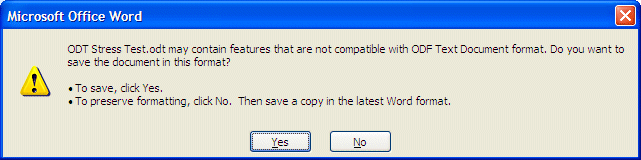
Third, the dialogs. Here’s what you get when you save a document as ODT:

The readme says of this dialog:

This warning unfortunately cannot be disabled and should be ignored.

I agree it is annoying; but should it be ignored given that, in fact, it might be true? If I’d been foolish enough to add lots of ink comments to a document, saved it as ODT, and ignored the dialog as Sun advises, I would be upset to have lost my work.

On the other hand, the real irritation of this dialog is that you do not know. Everything might be fine, or it might not.

Next, you get another dialog:

Sun’s readme says that this can be disabled, provided you have Word 2003 or XP, by setting a registry key. We are referred to KB 837011. But what does this KB say?

Word 2003 prompts you with the error messages that are mentioned in the “Symptoms” section when it is using file converters that have not been digitally signed. The prompt is expected and it is typical.

Right, so the real problem here is that Sun, again, hasn’t digitally signed its converter. If you read the KB article carefully, Microsoft does not recommend that you disable the warning. It is only intended for use if you have compatibility issues with legacy filters. Not, surely, something just released by Sun Microsystems.

Nevertheless, this is a decent converter. Would I use it? It will be handy for occasional import and export, but I would be most reluctant to use it by default on all my documents. If you are using Microsoft Office, it makes sense to use the Office native formats. If I’m sending a document and need the widest possible compatibility, RTF is good. At this point even .DOC and .XLS are probably more widely compatible than ODF, since they have been de facto standards for so long.

Technorati tags: , , , , , ,

Microsoft on Visual Studio 2008 and beyond

I spoke to Prashant Sridharan, group product manager for Visual Studio. He told me that Visual Studio 2008, formerly codenamed Orcas, is set to ship by the end of the year, which probably means November or December. Among many new features, he highlighed LINQ (Language Integrated Query), which he classified as a productivity feature, new optimization and analysis tools, and scalability and performance improvements in Team System. SQL Server 2008 will be supported. We will also get designers for WPF (Windows Presentation Foundation), and in due course for Silverlight as well. Shridharan said that the final Silverlight designer might not make the initial release, but will be available shortly after at worst.

I am still puzzled as to why it has taken Microsoft a year from the release of .NET Framework 3.0, which was released with Vista, to come up with non-beta designers for WPF. Shridharan did not really explain the delay, but commented that .NET Framework 3.0 was really an interim release; Visual Studio 2008 will ship more or less simultaneously with .NET Framework 3.5.

I asked whether the direction established with the free Express tools is likely to continue. Shridharan says that it will, but that he feels the current Express line is too complex and confusing for its target novice users. The 2008 range will be similar, but it may be further simplified in subsequent releases. I am not sure how to decode this message. Is it really that the tools are confusing for novices, or is Microsoft giving too much away and wants to draw back a little? The complexity problem is real, but chopping out a few features will not improve it much; it would take radical re-thinking of the whole development approach – think PopFly, which I’ve just noticed also uses the Express word in its slogan, “Express yourself.” See also the note on commoditization below.

I also touched on the question of software factories, about which Jack Greenfield enthused at the architecture conference I attended in March. Will this be surfaced at all in Visual Studio 2008? Well, one thing which was apparent from my chat to Greenfield was that Microsoft’s software architecture strategy is vulnerable to the musical chairs of internal reorganization. Shridharan did say that the Patterns and Practices team is now integrated with the Visual Studio team, which should mean that more of its (most interesting) work is surfaced in Visual Studio itself. That sounds good; but what of Greenfield’s vision for how software factories can transform software development? It doesn’t seem to be one shared by Shridharan, who observed that all the Visual Studio designers are software factories and was vague about future developments in this area. That may mean he is the wrong person to talk to about this, or it might suggest a more conservative approach than Greenfield hopes for. In any event, it seems that it won’t be this release which delivers radical changes in the modeling or software factories area.

Finally, I asked Sridharan about the commoditization of development tools, and whether Microsoft might one day give away Visual Studio in order to promote its platform. He prevaricated a bit. “We’re not a profit centre in the same way as Office. We do make a sizeable chunk of revenue of out Visual Studio … you can have co-existence of free tools with a high-end product on which you drive revenue.”

All true, but the free tools are improving and the trend is in that direction. “We are I think close to an infexion point , but I don’t think we’re quite there yet, in terms of the commoditization around tools,” says Sridharan. “We’re very close. Within Microsoft that gets a lot of debate, and we’re investigating actively. You’re certainly not going to see anything happen in Visual Studio 2008, but over time, who knows?”

Time to stop using non-generic collections

This is one for .NET programmers. Do you use collection classes like ArrayList or HashTable? These are useful in .NET 1.0 and 1.1, but .NET 2.0 and higher has generic collections like List<T> and Dictionary<K,V> which are safer and more efficient. It’s time to tidy up your code, because in Silverlight’s implementation of .NET these non-generic collection types have been removed completely. The BCL Team Blog has the details, together with a handy guide on how to convert your non-generic collections. Of course you can simulate non-generic collections by declaring collections of type Object, so there’s no reason to continue using the old collection types.

Technorati tags: , ,

Will Windows DRM spoil the BBC iPlayer party?

I am intensely interested in the BBC iPlayer, set to launch on 27 July. It’s a landmark in the convergence of the internet and broadcasting.

This is a convergence I welcome. I missed most of the Glastonbury 2007 broadcasts, but I’ve enjoyed the BBC’s watch and listen page which gives you immediate access to most of the sets*, despite the relatively low quality (225 kbps video, 64 kbps audio, according to the player). Just click a set and it plays, no chit-chat, no messing around with programme schedules or having to decide in advance what to record. The iPlayer promises bitrates of perhaps 750kbps to 1Mbps – effectively full broadcast quality. The immediate advantage is time-shifting, but longer term there are other interesting possibilities in internet broadcasting, such as greater interactivity and the ability to customize what you view. We saw some great demonstrations of this (using Silverlight) at Microsoft’s Mix07 earlier this year.

The iPlayer is also an important example of commercial use of peer-to-peer technology, using kontiki.  

The problem is that the BBC needs to restrict playback to seven days after first broadcast, otherwise it runs into copyright difficulties. I am sure people will put their energy into trying to bypass these restrictions, and may well succeed, but the BBC has to at least make a serious attempt to enforce it. It is this that pushed the BBC into the arms of Microsoft’s DRM, to the understandable upset of Mac users and Microsoft haters, although a Mac iPlayer is promised at some future time.

This aspect bothers me as well, not only because of cross-platform issues, but because I question whether Microsoft is able to deliver DRM that just works. See here for an amusing account of how a tech-savvy Windows user struggled to purchase and play an audio file using this system. The iPlayer appears to be based on Windows Media Player, which is notorious for its cryptic error messages and intricate, hard-to-solve problems. Here’s an example plucked from the windows.media.player newsgroup:

I just tried playing both some new songs I had just downloaded, and when those wouldn’t play, some older ones that have been on my computer awhile, but each time I try to open the songs, I get the following:  “…cannot play the file because a security upgrade is required.  Do you want to download the upgrade?”.  I click “upgrade”, but absolutely nothing happens.

I took a look at the iPlayer beta message boards, and there’s no shortage of folk with similar problems. I realise that that you must expect problem reports on internet forums, but my impression is that problems with Windows Media Player and Microsoft DRM are more prolific than they should be.

I can readily believe this, because Microsoft has woven so many dependencies into the fabric of Windows. This is what makes patching a Windows system so frustrating. You start off trying to fix a problem with, say, Microsoft Office, and end up having to install updates to seemingly unrelated components like Internet Explorer, “Genuine Advantage” ActiveX controls, or Windows Installer, some of which inevitably require restarting the system. It’s bad enough when it all works as expected, but when something fails it is truly a challenge to recover.

I’ve not yet had an opportunity to try iPlayer myself. Nor do I know if the BBC intends to move from WMP to Silverlight, though I believe it may do since this would bring Intel Mac compatibility. I suspect it would also be more trouble-free, since Silverlight does not have as many dependencies – I was told at Mix07 that it has its own media player and does not try to embed WMP.

What chance is that that BBC iPlayer will have a smooth and untroubled launch when it goes public on 27th July 2007?

*PS on Glastonbury 2007: If you have time on your hands, watch the Iggy and the Stooges performance. It has amazing energy, particularly considering the man’s age, and you also get a hilarious stage invasion which has even the Ig pleading with the audience to back off and give him some space.

Technorati tags: , , , , , , , ,

How Microsoft changed its mind about Office XML standardization

My interview with Microsoft’s XML Architect Jean Paoli back in April was not the first time I had spoken to him. I also talked to him in February 2005. At that time Microsoft had no intention of submitting its Office XML specification to a standards body. I thought it should do so, and asked Paoli why not:

Backward compatibility. We have today 400 million users of Office, which means billions of documents. So we went and did a huge job of documenting electronically all these features and we put that into this WordML format. Well we need to maintain this damn thing, and we need to maintain this big format, we have like 1500 tags. Who is going to maintain that? A standard body? It doesn’t know what is inside of Word. That’s the problem. So we said we are going to give you a license, open and free… [Jean Paoli, February 2005].

Microsoft was forced to change its mind, because important customers (mostly governments) indicated their preference for standardised document formats. The quote remains relevant, because it says a lot about the goals of Office Open XML, which is an evolution of WordML and SpreadsheetML.

While on the subject, I also want to mention Simon Jones’ piece in the August 2007 PC Pro (article not online), perhaps a little one-sided but he does a good job of debunking some of the common objections to OOXML and exposing some of the politics in the standardisation process. He adds:

I’m not saying there aren’t any problems with the ECMA-376 standard. Nor am I saying ODF is bad. I do, however, believe OOXML is technically superior to ODF in many ways, and I want to see both as ISO standards so people can have the choice.

Technorati tags: , , , ,

Office Open XML vs COM automation

Looking at the new Open XML API, introduced by Kevin Boske here, makes you realise that old-style COM automation wasn’t so bad after all.

There are two distinct aspects to working programmatically with OOXML. First, there’s the Packaging API, which deals with how the various XML files which make up a document get stored in a ZIP archive. Second, there’s the XML specification itself, which defines the schema of elements and attributes that form the content of an OOXML document.

The new wrapper classes really only deal with the packaging aspect. You still have to work out how to parse and/or generate the correct XML content using your favourite XML parser. And it’s a lot more complex then HTML.

By contrast, the old COM automation API for Office presents a programmatic object model for the content, and you don’t have to worry much about how the document gets stored – you just tell Word or Excel to save it.

The (very big) downside of the COM object model is that it depends on the presence of Microsoft Office. High resource requirements, version problems, Windows-only, and inappropriate for server apps.

We seem to have traded one problem for another. What Microsoft needs to provide is wrapper classes for the content, rather than just its packaging.

Technorati tags: , , , ,

How to speed up Vista: disable the slow slow search

What’s the biggest problems with Vista? Not the buggy drivers, which are gradually getting sorted. Not the evil DRM, which I haven’t encountered directly, though it may be a factor in increasing the complexity and therefore the bugginess of video and audio drivers. Not User Account Control security, which I think is pretty good. Not the user interface, which I reckon improves on Windows XP though there are annoyances.

No, my biggest complaint is performance. This morning I noticed that if I clicked the Start button and then Documents, it took around 15 seconds for the explorer window to display, fully populated. Doing this with Task Manager monitoring performance, I could see CPU usage spike from below 10% to between 55% and 60% while Explorer did its stuff.

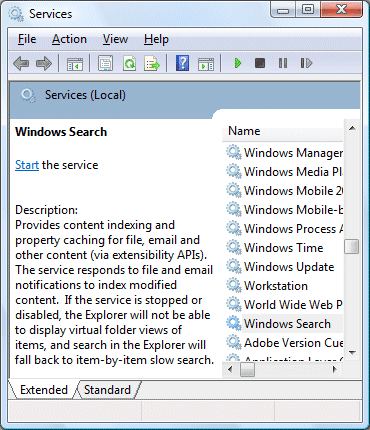
Explorer gets blamed for many things that are not really its fault. Applications which integrate with the desktop, such as file archive utilities, hook into Explorer and can cause problems. I tried to figure out what was slowing it down. I opened up Services (in Administrative Tools) and looked at what was running. It didn’t take long to find the main culprit – Windows Search:

Windows Search in Services

You will notice that the above dialog shows that the service is not running. That’s because I stopped it. The difference is amazing. The Documents folder now shows in less than a second. When I click the Start button, the menu displays immediately instead of pausing for thought. Everything seems faster.

Looking at the description above, it is not surprising that there is a performance impact. The indexer gets notified every time you change a file or receive an email (if you are using Outlook or Windows Mail). The same service creates virtual folder views in Explorer, a poor man’s WinFS that should make the real location of files less important. Notice that the explanatory text warns me that by stopping the service I lose these features and have to “fall back to item-by-item slow search”.

I think it should say, “If the service is started, Explorer will take fifteen times longer to open and your system will run more slowly.”

Desktop search is a great feature, but only if it is unobtrusive. In Vista, that’s not the case.

This kind of thing will vary substantially from one system to another. Another user may say that Windows Search causes no problems. I also believe that the system impact is much greater if the indexer has many outstanding tasks – such as indexing a large Outlook mailbox, for example. Further, disabling Windows search really does slow down the search function in Explorer.

Turning off Windows search is therefore not something to do lightly. It breaks an important part of Vista.

Still, sometimes you need to get your work done. That fifteen seconds delay soon adds up when repeated many times.

In truth, we should not be faced with this decision. Microsoft should know better – it has plenty of database expertise, after all. There’s no excuse for a system service that slows things down to this extent.

By the way, if you have understood all the caveats and still want to run without Windows Search, until Microsoft fix it, then you must set the service to disabled. Otherwise applications like Outlook will helpfully restart it for you.

Update

See comments below – a couple of others have reported (as I expected) that search works fine for them. So what is the issue here? In my case I think it is related to Outlook 2007, known to have performance problems especially with large mailboxes like mine. But what’s the general conclusion? If you are suffering from performance problems with Vista, I recommend experimenting with Search – stop and disable it temporarily, to see what effect it has. If there’s no improvement, you can always enable it again.

It strikes me that there is some unfortunate interaction between Explorer, Search, and Outlook; it’s possible that there are other bad combinations as well.

Technorati tags: , , ,