Category Archives: microsoft

Microsoft: we might withdraw Yahoo offer

Chris Liddell, senior Vice President and CFO, speaking during yesterday’s earnings call:

As outlined in our recent letter to the Yahoo board, unless we make progress with Yahoo towards an agreement by this weekend, we will consider our alternatives. We will provide updates as appropriate next week. These alternatives clearly include taking an offer to Yahoo shareholders or to withdraw our proposal and focus on other opportunities, both organic and inorganic.

Personally I think the Yahoo deal would be bad for Microsoft. I think it is driven by financial people trying to sum two market shares in search; but it is not so simple. My view is based on problems of integration, morale and culture, plus the risk of further confusing an Internet strategy that is already opaque.

Although Microsoft continues to be trounced in search (not least because it is simply not as good as its competition), there are signs of progress elsewhere. Another snippet from the earnings call: General Manager Colleen Healy mentioned that Live ID take-up is up by 18% to 448 million. No doubt many of those will be worthless accounts, but not all of them. Revenue from online business is up. Organic growth and smaller acquisitions would work better for the company.

Technorati tags: ,

Microsoft’s Office UI patent trap: watch out with that MFC update

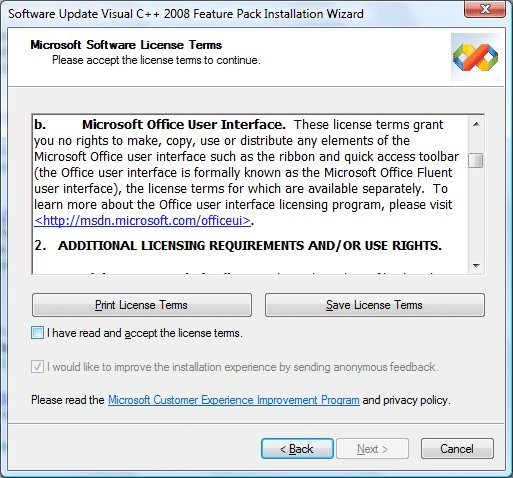
I installed the Visual Studio 2008 Feature Pack today – which, by the way, you will not find if you use Check for Updates on the Visual Studio 2008 Help menu – and noticed this paragraph in the setup agreement:

What’s this all about? Microsoft has not said so, but it seems likely to be part of the company’s war against OpenOffice. The efforts of Sun and others to improve OpenOffice, along with all the XML standardization brouhaha, prodded Microsoft into delivering the most significant Office upgrade for many years. One of its intentions was to increase the differentiation between Microsoft Office and OpenOffice. The strategy would not work if some future OpenOffice just copied the feature, hence the license.

The unintended consequences concern me.

Until now, you could pretty much use the out-of-the-box UI components in Visual Studio and not worry about licensing. That has now changed. According to Microsoft if you use any element of the Office user interface, for which the feature update supplies new classes, then you have to agree to a separate license.

Is this a burden? Well, the licensing page is now out of date, because it says “The program does not involve code”, but the feature pack provides what it calls “MFC C++ library source code for the Microsoft Office Fluent User Interface. However, Microsoft says that the license is free and covers:

…applications on any platform, except for applications that compete directly with the five Office applications that currently have the new UI (Microsoft Word, Excel, PowerPoint, Outlook, and Access)

What does it mean, to “compete directly”? It sounds like the sort of thing lawyers could have fun with. Further, if you read the license details and FAQ, it is clear that you take on a further obligation, which is to comply with Microsoft’s Office Design Guidelines, and even to update your application if Microsoft changes them:

Your Licensed UI must comply with the Design Guidelines. If Microsoft notifies you that the Design Guidelines have been updated or that you are not complying with the Design Guidelines, you will make the necessary changes to comply as soon as you reasonably can, but no later than your next product release that is 6 months or more from the date you receive notice.

OK, so let’s say you are developing some software for a customer. You deliver the app; customer pays you. Now Microsoft brings out Office 2009, changes the guidelines, and says you must update the app, even though the customer is happy with it as-is. Who will pay? I guess you would need to agree beforehand; but it is a disincentive to using the fluent UI.

Presuming you do not want to sign up, avoid all the CMFCRibbon* classes. Microsoft has helpfully commented these with a paragraph that says:

License terms to copy, use or distribute the Fluent UI are available separately.

Would any of this stand up in court? I have no idea, but I’d be reluctant to sign up or to use these classes lest I might have to find out.

Will Microsoft abandon DRM?

Ars Technica quotes an email apparently sent to customers of MSN Music:

As of August 31, 2008, we will no longer be able to support the retrieval of license keys for the songs you purchased from MSN Music or the authorization of additional computers. You will need to obtain a license key for each of your songs downloaded from MSN Music on any new computer, and you must do so before August 31, 2008. If you attempt to transfer your songs to additional computers after August 31, 2008, those songs will not successfully play.

Microsoft may not care about MSN Music any more, but this decision undermines all its DRM content sales and those from its partners.

Or will Microsoft abandon DRM? Seems unlikely; yet when I quizzed Microsoft on this general subject (what happens to DRM content when you switch PCs), the reply from Adam Anderson, Sr. product manager for Windows, included this phrase twice:

Music content providers and online music stores are increasingly moving to DRM-free downloadable tracks

As Anderson noted, this will “diminish user issues regarding rights restoration”. So will Microsoft follow this same principle in some future version of the Zune store, for example?

If it did, it might also do the right thing for its MSN Music customers, which would be to provide a tool to unlock the DRM on their purchased files. I suppose its agreement with the copyright owners does not allow for that; yet as the industry now seems willing to offer music DRM-free, it just might be possible.

Incidentally, I’d love to hear from anyone who has purchased music protected with Microsoft DRM, such as tracks purchased from Napster, CD Wow or HMV.com. Happy? Or if not, what problems have you had? I’m looking for examples for a future article.

Technorati tags: , , ,

Fixing Vista: Microsoft’s third-party problem

Ed Bott has a post on how he fixed a Sony Vaio running Vista, when the user had dismissed it as an unusable brick. Bott reasoned that it was all to do with drivers, configuration, and unnecessary pre-installed applications. He proved his point, making the machine usable. The owner made a video about what he thought of the reconfigured machine. Key points:

1. He thought it was much improved

2. He’s sticking with the Mac as his primary machine

The problem wasn’t only that Sony originally stuffed the machine with unwanted trialware. Bott’s new install also benefited from Service Pack 1 and a bunch of updated drivers.

Still, it’s a good demonstration of how big manufacturers like Sony have neglected the user experience for the sake of a few pennies of royalty, or a quicker rush to market, and in doing so lost both sales and credibility. The public mood on this has changed, perhaps because both Apple and the Linux folk are offering better alternatives in this respect.

Incidentally, all my Vista installs have been clean installs, so I haven’t personally suffered from death by trialware, though I have seen it frequently on other machines. Consumer products are worse than those aimed at businesses, but both categories are affected.

Technorati tags: , , , ,

Microsoft: Live Mesh or Live Mess? Here’s what to read.

Here’s what I suggest you read to get to grips with Live Mesh:

Amit Mital’s introduction (he’s the General Manager)

Mike Zintel’s Live Mesh as a Platform (he’s Director of Service Infrastructure)

Mary Jo Foley’s Ten things to know and the helpful stack diagram.

I have a few initial comments. First, it’s the platform that matters, not the Live Desktop which is the first thing Microsoft is delivering and which you will find presented at mesh.com. Microsoft is finally showing us what it means by the “software plus services” thing it has been talking about for so long. It involves a new “Mesh Operating Runtime” which has both cloud pieces and client pieces, a MeshFX API, and an identity system which is Live ID (formerly Passport).

As far as I can tell, Microsoft is delivering an API which we will be able to use to build internet-based data, document and configuration into either desktop or web applications, with synchronization to local storage for offline use. Zintel adds:

… customers will ultimately license applications to their mesh, as opposed to an instantiation of Windows, Mac or a mobile account or a web site.  Such applications will be seamlessly installed and run from their mesh and application settings persisted across their mesh

It sounds good, though the obvious question is whether Microsoft is overstating the importance of the client in an attempt to preserve its core market. Do we need this special client piece? Here’s a paragraph from Zintel’s piece that caught my eye:

A key design goal of the Live Mesh data synchronization platform is to allow customers to retain the ownership of their data that is implicit with local storage while improving on the anywhere access appeal of the web. The evolution of the web as a combined experience and storage platform is increasingly forcing customers to choose between the advantages of local storage (privacy, price, performance and applications) and the browser’s implicit promise of data durability, anywhere access and in many cases, easy sharing.

Can Microsoft improve on the “anywhere access appeal of the web? Zintel says we need to combine it with the advantages of local storage, but the advantages Zintel identifies are not all that convincing. Let’s look at them:

Privacy: maybe, but local data is vulnerable to worms, trojans, viruses; well secured Internet data accessed over SSL is arguably more secure. Data not connected to the Internet is nice and secure, but can’t participate in the Mesh.

Price: I don’t see how Mesh helps here. Yes, local storage is cheap, but as soon as data enters the Mesh it is on the Internet and we are paying for data transfer as well as possibly Internet storage. I realise that Microsoft (among others) offers generous Internet storage for free, but that is just a way of buying market share.

Performance: Granted, some types of application work faster with local storage. Still, there are non-Mesh ways of getting this from web applications in a fairly seamless manner, such as Google Gears or Adobe’s AIR.

Applications: This is perhaps the big one. Many of us are reluctant to do without traditional local applications such as Office. Well, mainly Office. Still, web equivalents get better all the time. One day they will be good enough; and new technology like Silverlight is bringing that day closer. 

What about identity management and permissions? Zintel says:

A side effect of the competition to store customer data in the cloud and display it in a web browser is the fragmentation of that data and subsequent loss of ownership. Individual sites like Spaces, Flickr and Facebook make sharing easy, provided the people you are sharing with also use the same site. It is in fact very difficult to share across sites and equally difficult to work on the same data across the PC, mobile and web tiers.

True; but Mesh currently identifies users by their Live ID. Isn’t that the same as Spaces?

If Microsoft delivers a bunch of useful web services, that’s great. If it tries to somehow replace the web with its Mesh, it will fail.

Mary Jo Foley also asks the question: to what extent is Microsoft extending, and to what extent is it replacing, existing Live services such as Office Live or the excellent Skydrive? Making sense of all this is a challenge.

Now let’s mash all this up with Yahoo! (maybe). Ouch.

RIA means … not much

Ryan Stewart has a go at nailing what the term Rich Internet Application means.

I think he’s coming at this from the wrong end. It’s better to look at the history.

As far as I’m aware – and based partly on my own recollection, and partly on what Adobe’s Kevin Lynch told the press at last year’s MAX Europe – the story begins around 2001, when WebVertising Inc created an online booking application for the Broadmoor Hotel in Colorado Springs. It was an HTML application redone in Flash. A PDF describing what was done is still online, and discusses some of the differences between the HTML and Flash approach, though bear in mind this is Flash evangelism.

They created iHotelier, a fully interactive, data-driven reservation application that reduces the entire reservation process down to a single screen. Users looking for information on available rooms for specific dates highlight their preferred dates in a calendar. With one click of the mouse, the Flash application displays the available (and unavailable) rooms, and their cost. (Figure 10) As a result, users do not feel like they’ve wasted a lot of time and effort if their first room choice is not available.

This case study seemed to trigger a new awareness at Macromedia concerning the potential of Flash for complete applications. I don’t mean that it had never been thought of before; after all, it was Macromedia that put powerful scripting capabilities into Flash, and I’m sure there were Flash projects before this that were applications. Nevertheless, it was a landmark example; and it was around then that I started hearing the term Rich Internet Application from Macromedia. Wikipedia claims that this paper [PDF] is the first use; it’s by Jeremy Allaire and dated March 2002. I’m sure Allaire himself could provide more background.

The problem with the term, as you can see from Allaire’s paper, is that Macromedia (now Adobe) tends to define it pretty much as whatever their latest Flash technology happens to be. This shifts around; so if you are at an AIR event, it’s AIR; if you are at a Flash event, it’s Flash; if you are at a Live Cycle event, it’s apps that use Live Cycle.

Microsoft muddied the waters a little. Realising that RIAs were attracting attention, it started using the term to describe its own technology too, though in the spirit of “embrace and extend” it changed it to mean “rich interactive application”. As I recall, Microsoft used it mainly to describe internet-connected desktop client applications such as those built with Windows Forms. Something like iTunes is a great example (even though it is from Apple), since it runs on the client but gets much of its data from the Internet, especially when you are in the iTunes store.

Now it remains a buzzword but honestly has little meaning, other than “something a bit richer than plain HTML”. If you were doing the Broadmoor Hotel app today, you could do it with AJAX and get similar results.

Technorati tags: , , ,

Windows Server 2008 is better than Vista, but why?

Mark Wilson asks:

It seems that, wherever you look, Windows Server 2008 is almost universally acclaimed. And rightly so – I believe that it is a fantastic operating system release (let’s face it, Windows Server 2003 and R2 were very good too) and is packed full of features that have the potential to add significant value to solutions.

So, tell me, why are the same journalists who think Windows Server 2008 is great, still berating Windows Vista – the client version of the same operating system codebase?

The short answer is that Server 2008 delivers new features that customers wanted, whereas Vista delivers new features that Microsoft thought its customers should want. However, it seems there may be more to it than that. Maybe Server 2008 really does perform better than Vista.

According to this post, Server 2008 performs 11-17% faster than Vista SP1, running a couple of benchmarks which test typical client applications. Christian Mohn concurs:

Windows Server 2008 performs better, even with the Aero features enabled, than Vista ever did on the same hardware. To me, this a bit strange, even if a lot of services are still disabled, as the codebase is pretty much the same as Vista.

though Mohn’s example is less scientific: he never ran Vista SP1, and also moved from 32-bit to 64-bit.

Server 2008 has a “Desktop Experience” feature, which installs things like Windows Media Player, Aero GUI effects, and other fluff that doesn’t belong on a server. My assumption had been that once you installed this, Server 2008 would perform in a similar manner to Vista. Apparently this is not the case.

It seems to me there are a few possibilities. One is that Microsoft isn’t being straight with us about this “same codebase” stuff. It would be interesting to analyze the core DLLs and work out which are the same, and which are different.

The second possibility is that there’s stuff in Vista which is not part of the core, nor part of the Desktop Experience, but which slugs performance. If so, it would be great to identify it and turn it off.

The third explanation is that the testers are wrong, and that performance is actually similar. For example, maybe Vista was running a background update or backup during tests. Background processes make it hard to conduct truly rigorous performance comparisons.

I’d like to see Mark Russinovich get his teeth into this. I’m also tempted to try the Server 2008 desktop experiment myself.

Visual C++ Feature Pack includes major MFC update

The Visual C++ 2008 Feature Pack is now available for download. It includes an update to MFC (Microsoft Foundation Classes), with classes for an Office Ribbon style interface (if you can live with the legal aspect) and other new GUI controls. There is also an implementation of  the TR1 (Technical Report 1) standard (PDF), an important update to the ISO 2003 C++ standard library.

Microsoft’s live maps upgrade is a downgrade in the UK – developers are fuming

Microsoft’s latest upgrade to Live Maps has some interesting new features, including more detailed 3D city views, labels in bird’s eye view, GeoRSS feeds, and more:

As always the changes visible in the user interface only scratch the surface of the dozens of improvements across the application tiers including Geocoding enhancements, browser compatibility (Safari and IE8), parsing improvements, reverse geocoding, printing improvements and tons more. We are also releasing an upgrade of our Map Control to version 6.1 for developers.

Unfortunately for UK developers, there’s another change. In December 2007 Microsoft acquired Multimap, and the latest update now redirects maps.live.com to Multimap, if your region settings are UK (or, possibly, elsewhere in Europe). You can see the difference if you force the region to US with an url argument: http://maps.live.com/?mkt=en-us.

The Multimap maps have fewer features and include advertising. For example, there is no 3D view in Multimap:

Here’s the real Live Maps version (note the extra features):

It looks like the photography is the same; but developers are not happy. Check out the comments to the announcement, for example:

I loved Live maps, but i’m off to Google maps if multimap doesn’t get removed and we go back to the nice clean good interface and all the features we’ve come to love.

Multimap is awful.

or

I never thought I’d have to say this, but for UK users Live Maps is now complete TRASH. Why on Earth did you replace Live Maps with Multimap??? Multimap uses technology that hasn’t changed for years, the maps are awful, the page is full of clutter, and it doesn’t even use smooth zooming – it just reloads the page every time you zoom in because it’s all static image based.

Add to that the fact that the road maps all use images scanned straight out of the PAPER atlas, not the sleek, computer-friendly road map style that Live Maps uses.

It’s a shame, as I’d been meaning to blog about how impressive Live maps and Virtual Earth looked in some of the demos as Mix08. That said, Microsoft can fix this easily by removing the redirect.

This is an integration issue. If Microsoft-Yahoo becomes a reality, I wonder what other such issues will cause developers to fret?

Thanks to Ian Blackburn for the link.

UPDATE: Live Maps is back. As of yesterday, Multimap is no longer being used even in the UK. Looks like Microsoft listened; I’m impressed.

Microsoft discusses next-gen MSDN … on Facebook

According to this blog post, Microsoft is setting up a buzz group on Facebook to discuss the next generation of its online documentation for developers, the MSDN (Microsoft Developer Network) Library:

We have put a facebook group together to aggregate together the folks who want to work with us to provide feedback, usability and ideas for the next generation of the MSDN Library. We call this project Library 3.0 and we will be organizing events and presentations from this group to bring us together on the project. My goal is build quorum of members over the next months with kickoff’s in late May for the first events.

It’s an interesting place to hold the discussion. Yes, Microsoft has a small stake in Facebook; but it also runs a vast network of technical communities and is doing great business with its Sharepoint collaboration platform. So why use Facebook?

Of course, two key areas that need improving in MSDN are collaboration and search, so you could argue that choosing a third-party platform for collaborating on MSDN itself is significant.

Then again, it’s probably more to do with internal red tape. What’s easier: getting corporate agreement on some new developer relations initiative and setting up the infrastructure, or just sticking a new group on Facebook?

If you are interested, the group is here. Currently it has no content or discussion whatsoever. Not a good start; but there’s time…

Technorati tags: , ,