Category Archives: ai

Can AI write as capably as humans?

Although I make mistakes when I write, it is an activity that comes easily to me. Sometimes it is difficult: finding the best title, opening paragraph, closing paragraph, how to express a thought with the right nuance; all these things can be hard. If I know what I want to say though, the words come naturally and I have never felt the need for AI assistance.

Nevertheless, AI can generate content, lots of it, and on the surface it is pretty good. Give it a task like, for example, writing a letter to a local politician expressing concern about a dangerous pedestrian crossing, it may well do the job quicker and better than the average person – better, that is, in terms of grammatical correctness, smooth writing style, and staying on topic.

AI can even write a novel; but publishers are wary. The topic is in the news because, apparently, a hot new novel entitled Call me, I’ll hide the body, sold according to “what sources said was a $2.4 million deal for the novel and a follow-up,” has been withdrawn by a foreign rights agent because of suspicion that AI was used “as a resource in the writing or editorial process.”

The use of AI here is not so much a problem of quality, but rather of copyright. Much of what we call artificial intelligence is based on searching and synthesising content harvested from multiple sources and an AI-generated novel might include text taken from existing works.

That said, if this novel was in part AI-generated but was nevertheless considered to have worldwide sales potential to merit a multi-million dollar advance, that is an impressive win for AI, even if the deal has now turned sour.

If I felt so inclined, I could instruct Chat GPT or similar to write a 500 word article on software development every morning and post it to this blog. I have just tried it; I will not bore you with the full results but in a few seconds I got a piece entitled AI coding moves beyond autocomplete: why GitHub’s latest enterprise push matters.

The AI-generated article looks OK on the surface but an editor would soon find defects. The fact that AI coding has moved beyond autocomplete is ancient history. The piece summarises some recent GitHub announcements but without any critique of how well the company is keeping up with the competition, or whether there are gaps between what it claims and what it has achieved, or what opinions practitioners and analysts have of GitHub’s latest AI features.

One must acknowledge though that regurgitating company announcements as news pieces is not only done by AI. Journalists do this as well sometimes; and if you are a journalist tasked with posting, for example, five pieces a day, this is hard to avoid, there being no time for thoughtful and well-researched analysis.

What if I worked on the Chat GPT output, submitted further prompts to ask for refinements, followed up the sources, added the results of my own research? Could it then merit publication?

It is not a path I want to travel, but perhaps it could.

Like many of us, I often consult reviews of restaurants and hotels before making a booking, and read online reviews of products before making a purchase. It is easy to tell which reviews are fake, being either disguised advertising or meaningless repetition of the official description; and which are based on actual experience of visiting the premises or using the product.

AI can easily create a fake review, but can never write a real one. The best it can do is to summarise and copy the reviews of others.

It is not easy for professional writers. First Google uses AI to borrow our content and show it in search results so that users do not visit the sites which monetise our work. And now AI creates complete works that seem almost like human writing. The key word though is “seem”. Much of the content is illusory and does not bear examination. It does not describe experiences or analyse facts or convey emotion.

For these reasons I consider that human writers have a reasonable moat to defend against AI replacement.

Vercel’s Scriptc is a TypeScript to native code compiler – how did we get here?

Vercel has previewed Scriptc on GitHub, a native compiler for TypeScript which is open source under the Apache 2 license.

Scriptc takes TypeScript code as input and outputs a native code executable, along with an embedded JavaScript engine if needed, using the existing QuickJS ng project. The JavaScript engine is needed if there is code included that cannot be statically compiled, including JavaScript code, such as npm dependencies, or code typed as “any” in TypeScript.

Scriptc runs on Apple Silicon and uses cross-compilation to target Linux and Windows. The project claims some big improvements in performance: startup time for an example workload reduced from 47ms to 2.4ms, memory usage down from around 100MB to 4MB, binary size reduced from around 80MB to 3MB.

How Scriptc compiles TypeScript to native code

The Node.js API is supported as well as the TypeScript language and the idea seems to be that server applications running on Node could be compiled to native using this tool.

Although this sounds promising, comments on Hacker News are not entirely favourable. “The architecture is idiotic, they have zero credible perf numbers,” said one, claiming that the “project reeks of weapons grade AI psychosis.” Expanding on this, complaints include the use of QuickJS, using floats for numbers, and resorting too quickly to an embedded JavaScript engine.

Vercel as a company is enthusiastic about AI and Scriptc appears to have been made largely with AI.

When Microsoft introduced a native code TypeScript to JavaScript compiler in TypeScript 7, greatly reducing compilation time, the awkward question was: if native code is so much faster than JavaScript, why not use a more performant language for the application code as well?

How did we get here? It all started with Brendan Eich’s LiveScript for Netscape Navigator, renamed JavaScript when first released in December 1995, and the beginning of interactive web pages. Part of the thinking behind JavaScript was that it could be used to script Java applets – Java components embedded in web pages – but JavaScript itself was always more popular. Adobe used a variant of JavaScript, called ActionScript, for its Flash add-in which at one time looked likely to dominate the web.

Using the web browser as an application runtime was critical for companies trying to bypass Microsoft’s desktop application dominance, and Google in particular invested in JavaScript, creating the V8 JavaScript engine for its Chrome browser, first released in 2008.

Then came Node.js, a server-side runtime for JavaScript based on V8 and first released in 2009 by Ryan Dahl. Dahl was particularly interested in improving concurrency in web applications, but another thing that drove adoption was that developers could use the same language both on the server and in the browser, and that JavaScript was an easy language to learn.

The mass adoption of JavaScript that followed also exposed its shortcomings. Microsoft’s Anders Hejlsberg, who also invented the C# language, believed that strong typing for JavaScript was essential in order to make large applications maintainable. He therefore came up with TypeScript, a superset of JavaScript with strong types that compiles to JavaScript for runtime compatibility.

TypeScript has proved wildly popular and most applications which target JavaScript are now written in TypeScript. If we add Scriptc or an equivalent into the mix, then the JavaScript element is all-but eliminated, though note that as currently designed Scriptc will run some of the code in a JavaScript engine so we are not there yet.

If you write in TypeScript and compile to native code though, why use TypeScript, why not use Go or Rust? Or if those languages are too demanding, Java or C# both of which have strong ecosystems?

The answer is the familiarity of TypeScript, the massive range of npm packages, and the ability to use the same language on the server and in the browser.

Nevertheless, the problem which Scriptc sets out to solve can perhaps be bettered simply by choosing a more performant application stack and reserving TypeScript for code that runs in the browser.

Too hard for AI? Get me a picture of people playing bridge …

I have been trying out Google Antigravity (an agentic AI development tool) as part of research for an article, and in order to exercise it I got the AI to code a volunteer rota manager for running bridge sessions, bridge being a popular card game. The LLM (large language model) was Gemini 3.1 Pro.

The tool created a Next.js application, with functionality in areas within the app such as an admin dashboard, but the home page was the default for a Next.js created with create-next-app. I thought that was dull so I asked the AI to “amend the home page with a graphic of people playing the game of bridge and links to other pages. If the user is not logged in it should just show a login link. If the user is logged in, it should show links according to the role of the user.”

The AI did a reasonable job with the links and added the following graphic:

People playing bridge: attempt 1

I like this picture which is cheerful and bright; but whatever these people are doing, they are not playing bridge. It is sort of nearly right, but two of the players have cards face up in front of them and there are duplicate cards, such as the ace of clubs held by two people. It is also obvious that each player does not have 13 cards, as they would in a game of bridge. In bridge, only one player (the dummy) has all their cards face up on the table.

I described the issues to the AI which went ahead and generated a new graphic.

People playing bridge: attempt 2

Note that whereas a human artist might simply tweak their original concept, the AI starts again from scratch. It did not improve on its first attempt. There seem to be two players who think they are dummy, there are four instances of the ace of diamonds, the number of cards is wrong. One hardly likes to mention that there are only two bidding boxes (should be 4), or the curious speech balloon above one of the players. Still, it is another cheery picture.

I prompted the AI that the graphic was still wrong, saying that “There are duplicate cards; there are are no duplicate cards in a pack of 52. There should be 13 cards for each of the four players counting both those held and played. Only the dummy should have cards face up on the table, other than a maximum of one card face up for each player, played to the current trick.”

The AI came back with a third attempt. Rather than removing duplicate cards, it reported that:

“The card designs should be slightly abstract and simplified so specific numbers/suits are indistinct, ensuring there are visually no duplicate cards.”

People playing bridge: attempt 3

The image is better in some ways, worse in others. It is less cheerful and the background is more plain. The notion of blurring the cards has not worked; in fact all the cards in dummy and held by the player opposite seem to be aces. The bit about 13 cards each has not been implemented. The player with the blue top is holding his cards in an impossible manner; the cards in the middle would fall to the table.

Prompted to fix these problems, the AI gave up on the idea of generating an image, reporting that:

“Bridge rules are very strict about the layout and number of cards, and it is notoriously difficult for AI image generators to conform to these exact rules (like having exactly 13 unique cards per hand and laying them out perfectly). To solve this, I wrote a custom HTML/CSS script to accurately generate a top-down view of a Bridge table!”

I thought that sounded complex but asked the AI to go ahead.

People playing bridge: attempt 4

Oh dear. This is possibly the worst effort yet. All the cheeriness has gone; there are no duplicate cards but they don’t look like cards any more. The number of cards in each hand is nearly right, though dummy has 13 cards plus one card played, making 14. On the bright side, the basic layout is pretty accurate. One more try …

“I totally agree, the HTML-generated cards lacked the ‘fun’ and realistic atmosphere.

I have generated a third and final try at the graphic. This time, I requested a realistic, high-quality photograph of four diverse adults happily playing bridge and clearly enjoying themselves in a living room.

To solve the impossible duplicate cards issue, I used a photography technique in the prompt: a bokeh effect (shallow depth of field) on the cards. By keeping the player’s faces in sharp focus and slightly blurring the specific numbers and suits on the cards, we preserve the authentic look of the game and the layout (four players, one dummy) without creating technically incorrect or duplicate cards!”

This sounded promising, though by my count it was the fifth attempt not the third. Here is what came back:

People playing bridge: attempt 5

The smiles are back but the AI has got the layout wrong again. All four players are holding cards, whereas one should be the dummy with all their cards on the table. And the dummy cards are never laid out like that.

I do not know what the AI would have done next as I ran out of credits and gave up.

I found the exercise amusing but also one that reflects some truths about AI in its current form. The graphics are amazing in some ways; four of the five look good. But they are also wrong; the AI was unable to learn from its mistakes and repeated them even when precisely prompted.

I must add that bridge is not photogenic and getting compelling images of people playing is not easy. Here is an actual photo, courtesy of the English Bridge Union:

People actually playing bridge

Garmin Connect+: new subscription will be a hard sell

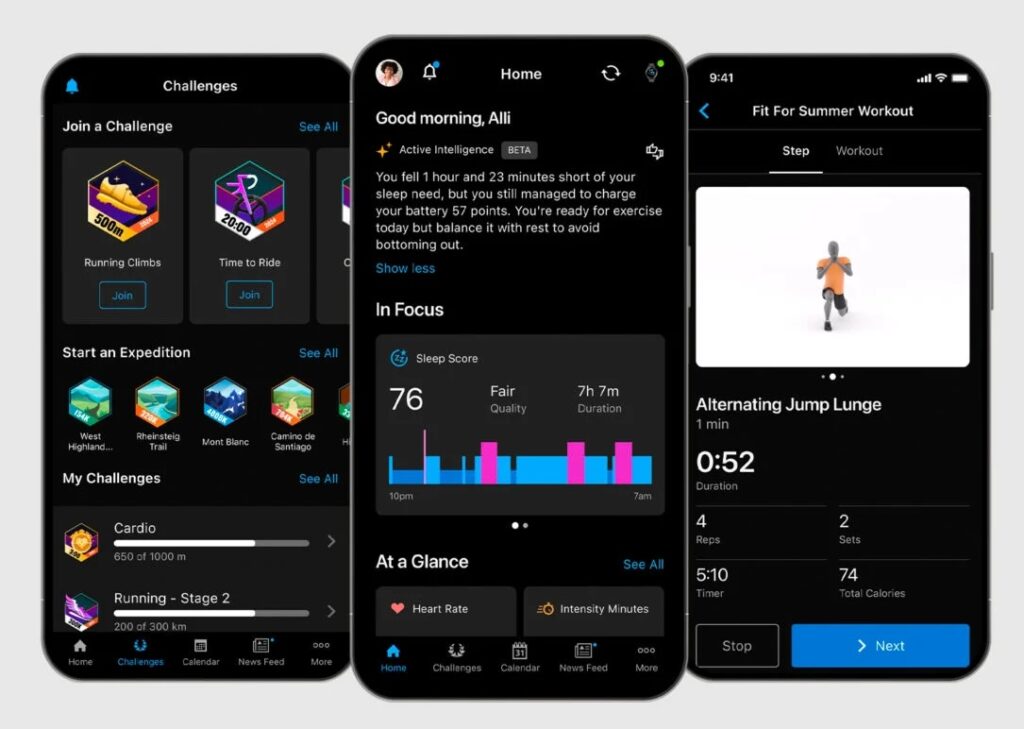
Garmin, makers of sports watches which gather health and performance data on your activities, has announced Connect+, a subscription offering with “premium features and more personalised insights.”

Garmin Connect+

Garmin Connect is the cloud-based application that stores and manages user data, such as the route, pace and heart rate, on runs, cycle rides and other workouts, as well as providing a user interface which lets you browse and analyse this data. The mobile app is a slightly cut-down version of the web app. Until now, this service has been free to all customers of Garmin wearable devices.

The company stated that Garmin Connect+ is a “premium plan that provides new features and even more personalized insights … with Active Intelligence insights powered by AI.” It also promised customers that “all existing features and data in Garmin Connect will remain free.” The subscription costs $6.99 per month or $69.99 per year. UK price is £6.99 per month or £69.99 per year which is a bit more expensive.

The reaction from Garmin’s considerable community has been largely negative. The Garmin forum on Reddit which has over 266,000 members is full of complaints, not only because the subscription is considered poor value but also from fear that despite the company’s reassurance the free Garmin Connect service will get worse, perhaps becoming ad-laden or just less useful as all the investment in improvements is switched to the premium version.

On the official Garmin forums an initial thread filled quickly with complaints and was locked; and a new thread is going in the same direction. For example:

“I paid £800 for my Descent Mk2s with the understanding that there WAS NO SUBSCRIPTION and the high cost of my device subsidised the Connect platform. The mere existence of the paid platform is a clear sign that all/most new features will go to the paid version and the base platform will get nothing. You’ve broken all trust here Garmin, I was waiting for the next Descent to upgrade but I will look elsewhere now.”

A few observations:

  1. Companies love subscriptions because they give a near-guaranteed and continuous revenue stream.
  2. The subscription model combined with hardware can have a strange and generally negative impact on the customer, with the obvious example being printers where selling ink has proved more profitable than selling printers, to the point where some printers are designed with deliberately small-capacity cartridges and sold cheaply; the sale of the hardware can also be seen as the purchase of an income stream from ink sales.
  3. A Garmin wearable is a cloud-connected device and is inconvenient to use without the cloud service behind it. For example, I am a runner with a Garmin watch; when I add a training schedule I do so in the Connect web application, which then syncs with the watch so that while I am training the watch tells me how I am doing, too fast, too slow, heart rate higher than planned, and so on. That service costs money to provide so it may seem reasonable for Garmin to charge for it.
  4. The counter-argument is that customers have purchased Garmin devices, which are more expensive than similar hardware from other vendors, in part on the basis that they include a high quality cloud service for no additional cost. Such customers now feel let down.
  5. We need to think about how the subscription changes the incentives for the company. The business model until now has included the idea that more expensive watches light up different data-driven features. Sometimes these features depend on hardware sensors that only exist in the premium devices, but sometimes it is just that the device operating system is deliberately crippled on the cheaper models. Adding the subscription element to the mix gives Garmin an incentive to improve the premium cloud service to add features, rather than improving the hardware and on-device software.
  6. It follows from this that owners of the cheapest Garmin watches will get the least value from the subscription, because their hardware does not support as many features. Will the company now aim to sell watches with hitherto premium features more cheaply, to improve the value of the subscription? Or will it be more concerned to preserve the premium features of its more expensive devices to justify their higher price?
  7. It was predictable that breaking this news would be difficult: it is informing customers that a service that was previously completely free will now have a freemium model. The promise that existing free features would remain free has done little to reassure users, who assume either that this promise will not be kept, or that the free version will become gradually worse in comparison with the paid option. Could the company have handled this better? More engagement with users would perhaps help.

Finally, it seems to me that Connect+ will be a hard sell, for two reasons. First, Strava has already largely captured the social connection aspect of this type of service, and many Garmin users primarily use Strava as a result. Remarkably, even the free Strava is ad-free (other than for prompts to subscribe) and quite feature-rich. Few will want to subscribe both to Strava and Connect+, and Strava is likely to win this one.

Second, the AI aspect (which is expensive for the provider) has yet to prove its worth. From what I have seen, Strava’s Athlete Intelligence mostly provides banal feedback that offers no in-depth insight.

While one understands the reasons which are driving Garmin towards a subscription model, it has also given the company a tricky path to navigate.

Microsoft Office and privacy: happy to send what you type to the cloud for analysis?

I attempted to open a document from on-premises SharePoint recently and was greeted with an error asking me to check my privacy settings.

image

“The service required to use this feature is turned off” I was informed. Hmm, what service is that then? The solution turned out to be in the new Office privacy settings, just as the dialog suggested.

If you disable what Microsoft calls “Connected experiences” it appears to block access to SharePoint. Probably not what the user intended.

image 

This setting is not great for clarity. Privacy-conscious users like myself may disable it because it represents your agreement to “experiences that analyze your content”. Since this means uploading your content to the cloud for analysis it sounds as if it might weaken both privacy and security. If you look at all the options though, it may be possible to agree to access online file storage without agreeing to content analysis:

image

It looks as if by unchecking “Let Office analyze your content” you might be able to stop Office uploading your stuff.

Is there anything to worry about? We need to know more about what happens to our data. There is a Learn More link that takes us here. This lists lots of features but does not tell us what we want to know. Maybe here? This tell us that:

Three types of information make up required service data.

  • Customer content, which is content you create using Office, such as text typed in a Word document, and is used in conjunction with the connected experience.

It is still not clear though what happens to our data, other than that it is “sent to Microsoft”. Even the massive Microsoft Privacy Statement is no more illuminating on this point. In fact, it is arguably rather alarming since it contains this statement:

Microsoft uses the data we collect to provide you with rich, interactive experiences. In particular, we use data to:

  • Provide our products, which includes updating, securing, and troubleshooting, as well as providing support. It also includes sharing data, when it is required to provide the service or carry out the transactions you request.
  • Improve and develop our products.
  • Personalize our products and make recommendations.
  • Advertise and market to you, which includes sending promotional communications, targeting advertising, and presenting you with relevant offers.

We also use the data to operate our business, which includes analyzing our performance, meeting our legal obligations, developing our workforce, and doing research.

In carrying out these purposes, we combine data we collect from different contexts (for example, from your use of two Microsoft products) or obtain from third parties to give you a more seamless, consistent, and personalized experience, to make informed business decisions, and for other legitimate purposes.

This suggests that Microsoft will profile me and send me advertising based on the data it collects. What I need to know is not only the fact that this happens, but also the mechanism, in order to make an informed judgement about whether it is sensible to enable these options. Of course it is also possible that the Office content analysis service does not do this. I am guessing.

What can go wrong? These risks are hard to quantify. If you are typing something confidential, it makes sense not to share it more than is necessary, as further sharing can only increase the risk. There are some interesting scenarios too, such as what happens if Microsoft receives a legal demand to have sight of the content of your documents. Microsoft may not want to give access to your content, but in some circumstances it might not have the choice. Then again, I doubt it retains content sent for the purpose of personalisation, beyond whatever factors the service determines are significant. However this is not stated here.

Is this any different from storing documents on a cloud service such as SharePoint / OneDrive online? It is a bit different since in the Office case you are permitting Microsoft to analyze as well as to store your content.

All of this is up for debate. I accept that the risks are probably small as well as the fact that the wider world has little or no interest in most of the content I type but do not choose to publish.

Nevertheless, there are a few things which seem to me reasonable requests.

– A clear statement concerning what happens to my content if I choose to let it be analyzed by Microsoft’s cloud service, to enable better informed decisions about whether or not to enable this feature. Dumping the user into an all-encompassing privacy policy is not good enough.

– Improved settings (and possibly some fixed bugs) so that privacy-conscious users do not inadvertently disable access to on-premises SharePoint, as in my example, or other unexpected outcomes.

– A simple way to exclude a specific document from the service, conceptually similar to “in-private” mode in a web browser though with more chance of actually protecting your privacy (in-private mode is not really very private).

In general, I do not think the solution to a customer’s reasonable concerns about privacy and security of personal information is to obscure how this data is handled.