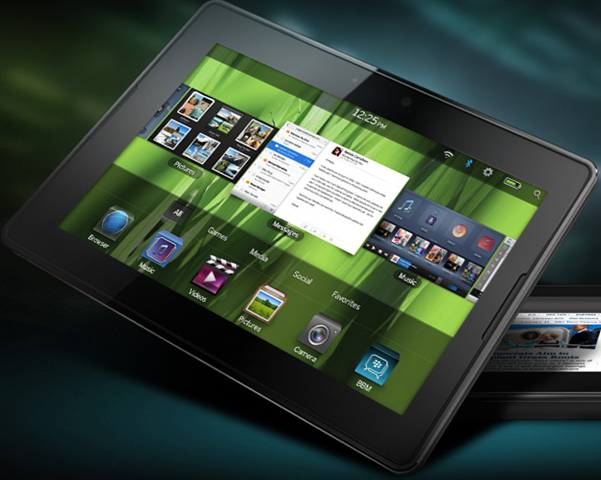
Blackberry has announced its pitch for the emerging tablet market, the 7” screen PlayBook. It has a new OS base on QNX Neutrino, a webkit-based web browser, Adobe Flash and AIR – offline Flash applications – front and rear cameras for video conferencing as well as taking snaps, and includes a USB port and HDMI out. There is wi-fi and Bluetooth but no 3G in the first release; you can connect to the Internet via your Blackberry. Storage is not yet specified as far as I can tell. There is no physical keyboard, which is surprising in some ways as the keyboard is the reason I hear most often for users choosing a BlackBerry smartphone over Apple’s iPhone.
Alongside the PlayBook RIM has announced a new developer platform. WebWorks is an HTML5 platform extended with access to local APIs, and targets both the Tablet OS and BlackBerry smartphones:
BlackBerry WebWorks applications can tap into the always-on, notification-based, push-enabled, contextual and social attributes of the BlackBerry smartphone. These applications can also access hardware features and integrate with other apps, and are powerful Super Apps that are fully integrated into the BlackBerry Application Platform.
In order to access local resources you need to package your app as a Blackberry application. Java and native C applications are also supported.
A winner? Well, there is a widespread industry presumption that we all want tablets; for example NVIDIA CEO Jen-Hsun Huang is planning on this basis, judging by what he said to the press last week. It is certainly a market in which every vendor wants a presence. There are a number of open questions though. The new tablet market is really defined by Apple’s iPad, and success for other operating systems and form factors is yet to be demonstrated. Personally I am not sure about the 7-inch screen, which is perhaps too large for a pocket and too small for the desktop-like web browsing you can do on an iPad. Here are the dimensions:
BlackBerry PlayBook: 7-inch 1024×600 screen,130mm x 193mm x 10mm
Apple iPad: 9.7-inch 1024×768 screen, 189.7mm x 242.8mm x 13.4mm
I doubt there will be much enthusiasm for carting around a phone, a small tablet, and a laptop, so in order to be viable as a portable device for work it has to be a laptop replacement. I do see this happening already with the iPad, though for me personally a netbook is both cheaper and more practical.
Apps are another key factor. It is smart of RIM to support Flash and AIR, which along with HTML 5 web applications are likely the best bet for supporting something like the PlayBook without a lot of device-specific work.
NVIDIA CEO Jen-Hsung Huang spoke to the press at the GPU Technology Conference and I took the opportunity to ask some questions.
I asked for his views on the cloud as a supercomputer and whether that would impact the need for local supercomputers of the kind GPU computing enables.
Although we expect more and more to happen in the cloud, in the meantime we’re going to keep buying devices with more and more solid state memory. The way to think about it is, storage is simply a surrogate for bandwidth. If we had infinite bandwidth none of us would need storage. As bandwidth improves the requirement for storage should reduce. But there’s another trend which is that the amount of data we collect is growing incredibly fast … It’s going to be quite a long time before our need for storage will reduce.
But what about local computing power, Gigaflops as opposed to storage?
Wherever there is storage, there’s GigaFlops. Local storage, local computing.
Next, I brought up a subject which has been puzzling me here at GTC. You can do GPU programming with NVIDIA’s CUDA C, which only works on NVIDIA GPUs, or with OpenCL which works with other vendor’s GPUs as well. Why is there more focus here on CUDA, when on the face of it developers would be better off with the cross-GPU approach? (Of course I know part of the answer, that NVIDIA does not mind locking developers to its own products).
The reason we focus all our evangelism and energy on CUDA is because CUDA requires us to, OpenCL does not. OpenCL has the benefit of IBM, AMD, Intel, and ourselves. Now CUDA is a little difference in that its programming approach is different. Instead of an API it’s a language extension. You program in C, it’s a different model.
The reason why CUDA is more adopted than OpenCL is because it is simply more advanced. We’ve invested in CUDA much longer. The quality of the compiler is much better. The robustness of the programming environment is better. The tools around it are better, and there are more people programming it. The ecosystem is richer.
People ask me how do we feel about the fact that it is proprietary. There’s two ways to think about it. There’s CUDA and there’s Tesla. Tesla’s not proprietary at all, Tesla supports OpenCL and CUDA. If you bought a server with Tesla in it, you’re not getting anything less, you’re getting CUDA more. That’s the reason Tesla has been adopted by all the OEMs. If you want a GPU cluster, would you want one that only does OpenCL? Or does OpenCL and CUDA? 80% of GPU computing today is CUDA, 20% is OpenCL. If you want to reach 100% of it, you’re better off using Tesla. Over time, if more people use OpenCL that’s fine with us. The most important thing is GPU computing, the next most important thing to us is NVIDIA’s GPUs, and the next is CUDA. It’s way down the list.
Next, a hot topic. Jen-Hsun Huang explained why he announced a roadmap for future graphics chip architectures – Kepler in 2011, Maxwell in 2013 – so that software developers engaged in GPU programming can plan their projects. I asked him why Fermi, the current chip architecture, had been so delayed, and whether there was good reason to have confidence in the newly announced dates.
He answered by explaining the Fermi delay in both technical and management terms.
The technical answer is that there’s a piece of functionality that is between the shared symmetric multiprocessors (SMs), 236 processors, that need to communicate with each other, and with memory of all different types. So there’s SMs up here, and underneath the memories. In between there is a very complicated inter-connecting system that is very fast. It’s nearly all wires, dense metal with very little logic … we call that the fabric.
When you have wires that are next to each other that closely they couple, they interfere … it’s a solid mesh of metal. We found a major breakdown between the models, the tools, and reality. We got the first Fermi back. That piece of fabric – imagine we are all processors. All of us seem to be working. But we can’t talk to each other. We found out it’s because the connection between us is completely broken. We re-engineered the whole thing and made it work.
Your question was deeper than that. Your question wasn’t just what broke with Fermi – it was the fabric – but the question is how would you not let it happen again? It won’t be fabric next time, it will be something else.
The reason why the fabric failed isn’t because it was hard, but because it sat between the responsibility of two groups. The fabric is complicated because there’s an architectural component, a logic design component, and there’s a physics component. My engineers who know physics and my engineers who know architecture are in two different organisations. We let it sit right in the middle. So the management lesson learned – there should always be a pilot in charge.
Huang spent some time discussing changes in the industry. He identifies mobile computing “superphones” and tablets as the focus of a major shift happening now. Someone asked “What does that mean for your Geforce business?”
I don’t think like that. The way I think is, “what is my personal computer business”. The personal computer business is Geforce plus Tegra. If you start a business, don’t think about the product you make. Think about the customer you’re making it for. I want to give them the best possible personal computing experience.
Tegra is NVIDIA’s complete system on a chip, including ARM processor and of course NVIDIA graphics, aimed at mobile devices. NVIDIA’s challenge is that its success with Geforce does not guarantee success with Tegra, for which it is early days.
The further implication is that the immediate future may not be easy, as traditional PC and laptop sales decline.
The mainstream business for the personal computer industry will be rocky for some time. The reason is not because of the economy but because of mobile computing. The PC … will be under disruption from tablets. The difference between a tablet and a PC is going to become very small. Over the next few years we’re going to see that more and more people use their mobile device as their primary computer.
[Holds up Blackberry] There’s no question right now that this is my primary computer.
The rise of mobile devices is a topic Huang has returned to on several occasions here. “ARM is the most important CPU architecture, instruction set architecture, of the future” he told the keynote audience.
Clearly NVIDIA’s business plans are not without risk; but you cannot fault Huang for enthusiasm or awareness of coming changes. It is clear to me that NVIDIA has the attention of the scientific and academic community for GPU computing, and workstation OEMs are scrambling to built Tesla GPU computing cards into their systems, but transitions in the market for its mass-market graphics cards will be tricky for the company.
Update: Huang’s comments about the reasons for Fermi’s delay raised considerable interest as apparently he had not spoken about this on record before. Journalist Nico Ernst captured the moment on video:
I’m at NVIDIA’s GPU tech conference in San Jose. The central theme of the conference is that the capabilities of modern GPUs enable substantial performance gains for general computing, not just for graphics, though most of the examples we have seen involve some element of graphical processing. The reason you should care about this is that the gains are huge.
Take Matlab for example, a popular language and IDE for algorithm development, data analysis and mathematical computation. We were told in the keynote here yesterday that Matlab is offering a parallel computing toolkit based on NVIDIA’s CUDA, with speed-ups from 10 to 40 times. Dramatic performance improvements opens up new possibilities in computing.
Why has GPU performance advanced so rapidly, whereas CPU performance has levelled off? The reason is that they use different computing models. CPUs are general-purpose. The focus is on fast serial computation, executing a single thread as rapidly as possible. Since many applications are largely single-thread, this is what we need, but there are technical barriers to increasing clock speed. Of course multi-core and multi-processor systems are now standard, so we have dual-core or quad-core machines, with big performance gains for multi-threaded applications.
By contrast, GPUs are designed to be massively parallel. A Tesla C1060 has not 2 or 4 or 8 cores, but 240; the C2050 has 448. These are not the same as CPU cores, but nevertheless do execute in parallel. The clock speed is only 1.3Ghz, whereas an Intel Core i7 Extreme is 3.3Ghz, but the Intel CPU has a mere 6 cores. An Intel Xeon 7560 runs at 2.266 Ghz and has 8 cores.The lower clock speed in the GPU is one reason it is more power-efficient.
NVIDIA’s CUDA initiative is about making this capability available to any application. NVIDIA made changes to its hardware to make it more amenable to standard C code, and delivered CUDA C with extensions to support it. In essence it is pretty simple. The extensions let you specify functions to execute on the GPU, allocate memory for pointers on the GPU, and copy memory between the GPU (called the device) and the main memory on the PC (called the host). You can also synchronize threads and use shared memory between threads.
The reward is great performance, but there are several disadvantages. One is the challenge of concurrent programming and the subtle bugs it can introduce.
Another is the hassle of copying memory between host and device. The device is in effect a computer within a computer. Shifting data between the two is relatively show.
A third is that CUDA is proprietary to NVIDIA. If you want your code to work with ATI’s equivalent, called Streams, then you should use the OpenCL library, though I’ve noticed that most people here seem to use CUDA; I presume they are able to specify the hardware and would rather avoid the compromises of a cross-GPU library. In the worst case, if you need to support both CUDA and non-CUDA systems, you might need to support different code paths depending on what is detected at runtime.
It is all a bit messy, though there are tools and libraries to simplify the task. For example, this morning we heard about GMAC, which makes host and device appear to use a single address space, though I imagine there are performance implications.
NVIDIA says it is democratizing supercomputing, bringing high performance computing within reach for almost anyone. There is something in that; but at the same time as a developer I would rather not think about whether my code will execute on the CPU or the GPU. Viewed at the highest level, I find it disappointing that to get great performance I need to bolster the capabilities of the CPU with a specialist add-on. The triumph of the GPU is in a sense the failure of the CPU. Convergence in some form or other strikes me as inevitable.
At the NVIDIA GPU Technology Conference in San Jose CEO Jen-Hsun Huang talked up the company’s progress in GPU computing, showed some example applications, and announced a high-level roadmap for future graphics chip architectures. NVIDIA has three areas of focus, he said: the Quadro line for visualisation, Tesla for parallel computing, and GeForce/Tegra for personal computing. Tegra is a system on a chip aimed at mobile devices. Mobile, says Huang, is “a completely disruptive force to all of computing.”
NVIDIA’s current chip architecture is called Fermi. The company is settling on a two-year product cycle and will deliver Kepler in 2011 with 3 to 4 times the performance (expressed as Gigaflops per watt) of Fermi. Maxwell in 2013 will have around 12 times the performance of Fermi. In between these architecture changes, NVIDIA will do “kicker” updates to refresh its products, with one for Fermi due soon.
The focus of the conference though is not on super-fast graphics cards in themselves, but rather on using the GPU for general purpose computing. GPUs are very, very good at doing mathematics fast and in parallel. If you have an application that does intensive calculations, then executing that part of the code on the GPU can offer impressive performance increases. NVIDIA’s CUDA library for C lets you do exactly that. Another option is OpenCL, a standard that works across GPUs from multiple vendors.
Adobe uses CUDA for the Mercury Playback engine in Creative Suite 5, greatly improving performance in After Effects, Premiere Pro and Photoshop, but with the annoyance that you have to use a compatible NVIDIA graphics card.
The performance gain from GPU programming is so great that it is unavoidable for applications in relevant areas, such as simulation or statistical analysis. Huang gave a compelling example during the keynote, bringing heart surgeon Dr Michael Black on stage to talk about his work. Operating on a beating heart is difficult because it presents a moving target. By combining robotic surgery with software that is able to predict the heart’s movement through simulation, he is researching how to operate on a heart almost as if it were stopped and with just a small incision.
Programming the GPU is compelling, but difficult. NVIDIA is keen to see it become part of mainstream programming, for obvious reasons, and there are new libraries and tools which help with this, like Parallel Nsight for Visual Studio 2010. Another interesting development, announced today, is CUDA for x86, being developed by PGI, which will let your CUDA code run even when an NVIDIA GPU is not present. Even if the performance gains are limited, it will mean developers who need to support diverse systems can run the same code, rather than having a different code path when no CUDA GPU is detected.
That said, GPU programming still has all the challenges of concurrent development, prone to race conditions and synchronization problems.
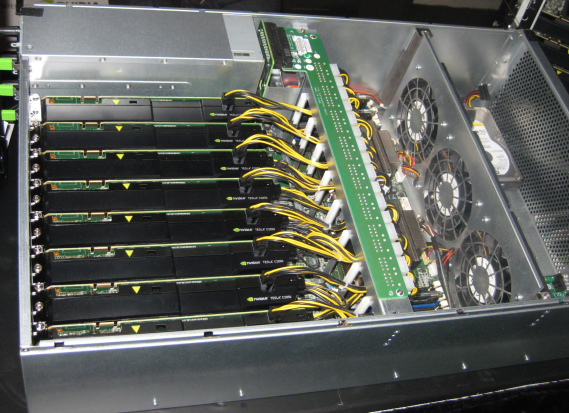
Stuffing a server full of GPUs is a cost-effective route to super-computing. I took a brief look at the exhibition, which includes this Colfax CXT8000 with 8 Tesla GPUs; it also has three 1200W power supplies. It may cost $25,000 but if you look at the performance you are getting for the price, machines like this are great value.
I’ve just picked up that Delphi XE, the latest RAD Windows development suite from Embarcadero, includes licenses for older versions going back to Delphi 7.
There’s an explanation and list of what’s on offer here. Delphi 7 was the last version to use the old fully native code IDE and is delightfully fast and lightweight by today’s standards. Delphi 2007 was the last version before big Unicode changes in Delphi 2009, which often broke code, so could be useful for older projects.
The FAQ includes a few points of interest. Embarcadero is dismissive of the old Delphi for .NET (before Prism) and will not supply it:
That is an old technology that was replaced by Delphi Prism and we don’t want to encourage use of that old product.
If you have purchased XE and want to take advantage of the offer, you must do so within 180 days.
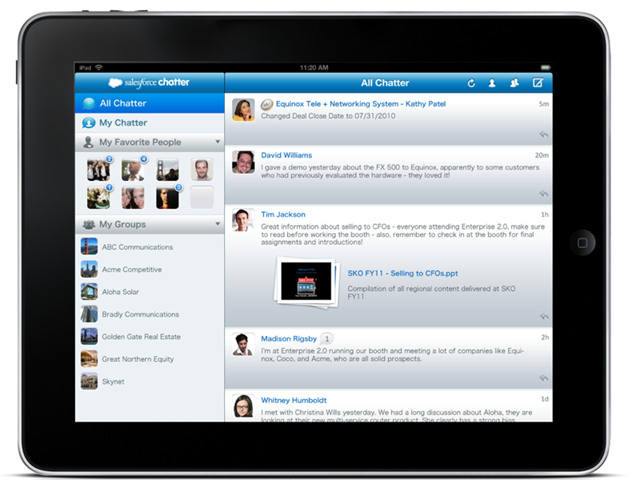
I’m attending the Cloudforce conference in London to catch up on what’s new with the Salesforce.com platform. CEO Marc Benioff was on good form, with a fun slide in his keynote presentation saying “Beware of the false cloud” – this was a jab at private clouds which he considers lack the advantages of a multi-tenanted public cloud platform like, you know, Salesforce.com. He has some justification – operating your own cloud is clearly a significant IT burden to carry – but that is the price of freedom. His company continues to report impressive growth. The theme this year is Salesforce.com Chatter, a Twitter-like service embedded into the platform, for which there are just-announced mobile clients (Apple iOS, Blackberry, Android coming) as well as integration with the web UI and programmable platform.
Chatter is reducing email usage for adopters, apparently; Benioff says by 40% in his own company. Another of its advantages (aside from general social media goodness) is that users cannot attach documents directly, but only links to documents – pass by reference not by value – which is a better approach to collaboration. Of course you can do this in emails as well, but people habitually do not. It makes you think – maybe the likes of Outlook should do this by default, saving no end of space in corporate mailboxes. Or perhaps we should just use Chatter instead.
But what about the developer angle, the Force.com platform that lets you build custom applications? I attended a session on the subject. There was a comment from partner Nimbus which caught my ear – the speaker said that they avoid writing custom Apex code wherever possible, and generally find ways to use the platform’s built-in features instead. His rationale: “You will have to live with that code for ever”. It is another angle on declarative programming, in which you declare your intentions and let some underlying engine transform them into actual code. The advantage is not only ease of development, but also that improvements in the engine can enhance the application without any need to rewrite code.
I asked what is new and what is coming in the Force.com platform. Chatter is one element; one of its key features is that applications can “chat” as well as individuals. Another theme is workflow tools, and integrating the technology acquired with Informavores, which is being rebuilt on the Salesforce.com platform as Visual Process Manager. In tune with the remarks from Nimbus, there is also an effort to reduce the need for Apex code and to offer guided steps that business users can apply without the need of a development specialist. Another focus is scalability – “people are starting to use the platform in ways that we didn’t think of” – which mean back end work to handle their demands. Finally, there is the joint development with VMWare called VMForce that lets you run Java with full access to the Force.com API.
Think Apple’s iPad is a consumer platform? Think again. I’m at the Cloudforce conference in London; and the level of iPad visibility has been striking. I’m not talking about attendees clutching the devices, though there are some. Rather, it’s the number of mentions and actual usage examples that are in the presentations. Before the keynote, Peter Coffee from Salesforce.com was using an iPad for interview notes, using it like a pad of paper. Next, we had demos of Salesforce.com’s new Chatter for mobile running on the iPad. Next, a representative from case study Bausch+Lomb mentioned that his company has just deployed 700 iPads to its sales force.
All business use cases, and all the more impressive given that they are incidental to the theme of the event.
Personally I have mixed feelings about this development. I’ve been a fan of the tablet format for years; here’s an article from 2003 (with apologies for the dated layout) in which I enthuse about an early Acer tablet. Some of the features for which the iPad is praised, like the ease of sharing what’s on the screen with others, are things I’ve long taken advantage of with Windows tablets.
The iPad is succeeding where Windows tablets mostly failed, thanks to its better design, lighter weight, longer battery life, and lower price. That’s welcome to me since I like the format, but the locked-in nature of the platform alarms me. Apple to be the single pipe for all public software deployments? No Flash, Silverlight, Java, or any runtime or other enabling software which Apple chooses not to approve?
This is merely an observation though – what counts is that users are adopting the device and enjoying what it offers them, in business as well as for personal use.
Now that Apple has shown how to make the tablet concept work, others are climbing on board, mostly with Android devices. The next point of interest is whether these also succeed; and even whether Microsoft can clamber back into the market either with a new wave of Windows devices, or more plausibly with the Windows Phone 7 OS (though the company claims not to be contemplating this).
For the moment though, broad reach deployment must include either an HTML version of your app, or native iOS.
Microsoft’s Brad Becker, Director of Product Management for Developer Platforms, has defended the role of Silverlight in the HTML 5 era. Arguing that it is natural for HTML to acquire some of the features previously provided by plug-ins – “because some of these features are so pervasive on the web that they are seen by users as fundamentally expected capabilities” – he goes on to identify three areas where Silverlight remains necessary. These are “premium” multimedia which merges video with application elements such as conferencing, picture in picture, DRM, analytics; consumers apps and games; and finally business/enterprise apps.
It is the last of these which interests me most. Becker’s statements come soon after the preview of Visual Studio LightSwitch, which is solely designed for data-driven business applications. Taking the two together, and bearing in mind that apps may run on the desktop as well as in browser, Silverlight is now encroaching on the territory which used to belong to Windows applications. With LightSwitch in particular, Microsoft is encouraging developers who might previously have built an app in Access or Visual Basic to consider Silverlight instead.
Why? Isn’t Microsoft better off if developers stick to Windows-only applications?
In one sense it is, as it gets the Windows lock-in – and yes, this is effective. I’m aware of businesses who are tied to Windows because of apps that they use, who might otherwise consider Macs for all or some of their business desktops. On the other hand, even Microsoft can see the direction in which we are travelling – cloud, mobile, diverse clients – and that Silverlight fits better with this model than Windows-only desktop clients.
Another consideration is that setup and deployment issues remain a pain-point for Windows apps. One issue is when it goes wrong, and Windows requires skilled surgery to get some app installed and working. Another issue is the constant energy drain of getting new computers and having to provision them with the apps you need. Microsoft has improved this no end for larger organisations, with standard system images and centralised application deployment, but Silverlight is still a welcome simplification; provided that the runtime is installed, it is pretty much the web model – just navigate to the URL and the app is there, right-click if you want to run on the desktop.
If Microsoft can also establish Windows Phone 7, which uses Silverlight as the runtime for custom apps, the platform then extends to mobile as well as desktop and browser.
The downside is that Silverlight apps have fewer capabilities than native Windows apps. Printing is tricky, for example, though Becker refers to “Virtualized printing” and I am not sure what exactly he means. He also highlights COM automation and group policy management, features that only work on Windows and which undermine Silverlight’s cross-platform promise. That said, via COM automation Silverlight has full access to the local machine giving developers a way of overcoming any limitations if they are willing to abandon cross-platform and browser-hosted deployment.
A winning strategy? Well, at least it is one that makes sense in the cloud era. On the other hand, Microsoft faces substantial difficulties in establishing Silverlight as a mainstream development platform. One is that Adobe was there first with Flash, which has a more widely deployed runtime, works on Android and soon other mobile devices, and is supported by the advanced design tools in Creative Suite. Another is the Apple factor, the popular iPhone and iPad devices which are a spear through the heart of cross-platform runtimes like Silverlight and Flash.
Finally, even within the Microsoft development community Silverlight is a hard sell for many developers. Some us recall how hard the company had to work to persuade Visual Basic 6 developers to move to .NET. The reason was not just stubborn individuals who dislike change – though there was certainly some of that – but also existing investment in code that could not easily be migrated. Both factors also apply to Silverlight. Further, it is a constrained platform, which means developers have to live with certain limitations. It is also managed code only, whereas some of the best developers for both desktop and mobile apps work in C/C++.
I suspect there is division even within Microsoft with regard to Silverlight. Clearly it has wide support and is considered a strategic area of development. At the same time, it is not helpful to the Windows team who will want to see apps that take advantage of new features in Windows 7 and beyond.
Yesterday Windows Phone 7 was released to manufacturing, which means the software is done. Another piece of the Silverlight platform is in place; and I guess over the next year or two we will see the extent to which Microsoft can make it a success.
I had a chat with Jay Schmelzer and Doug Seven from the Visual Studio LightSwitch team. I asked about the release date – no news yet.
What else? Well, Schmelzer and Seven had read my earlier blog post so we discussed some of the things I speculated about. Windows Phone 7? Won’t be in the first release, they said, but maybe later.
What about generating other application types from the same model? Doug Seven comments:
The way we’ve architected LightSwitch does not preclude us from making changes .. it’s not currently on the plan to have different output formats, but if demand were high it’s feasible in the future.
I find this interesting, particularly given that the future of the business client is not clear right now. The popularity of Apple’s iPad and iPhone is a real and increasing deployment problem, for example. No Flash, no Silverlight, no Java, only HTML or native apps. The idea of simply selecting a different output format is compelling, especially when you put it together with the fast JIT-compiled JavaScript in modern web browsers. Of course support for multiple targets has long been the goal of model-driven architecture (remember PIM,PSM and PDM?) ; but in practice the concept of a cross-platform runtime has proved more workable.
There’s no sign of this in the product yet though, so it is idle speculation. There is another possible approach though, which is to build a LightSwitch application, and then build an alternative client, say in ASP.NET, that uses the same WCF RIA Services. Since Visual Studio is extensible, it will be fun to see if add-ins appear that exploit these possibilities.
I also asked about Mac support. It was as I expected – the team is firmly Windows-centric, despite Silverlight’s cross-platform capability. Schmelzer was under the impression that Silverlight on a Mac only works within the browser, though he added “I could be wrong”.
In fact, Silverlight out of browser already works on a Mac; the piece that doesn’t work is COM interop, which is not essential to LightSwitch other than for export to Excel. It should not be difficult to run a LightSwitch app out-of-browser on a Mac, just right-click a browser-hosted app and choose Install onto this computer, but Microsoft is marketing it as a tool for Windows desktop apps, or Web apps for any other client where Silverlight runs.
Finally I asked whether the making of LightSwitch had influenced the features of Silverlight or WCF RIA Services themselves. Apparently it did:
There are quite a few aspects of both Silveright 4 and RIA services that are in those products because we were building on them. We uncovered things that we needed to make it easier to build a business application with those technologies. We put quite a few changes into the Silverlight data grid.
said Schmelzer, who also mentioned performance optimizations for WCF RIA Services, especially with larger data sets, some of which will come in a future service pack. I think this is encouraging for those intending to use Silverlight for business applications.
There are many facets to LightSwitch. As a new low-end edition of Visual Studio it is not that interesting. As an effort to establish Silverlight as a business application platform, it may be significant. As an attempt to bring model-driven architecture to the mainstream, it is fascinating.
The caveat (and it is a big one) is that Microsoft’s track-record on modelling in Visual Studio is to embrace in one release and extinguish in the next. The company’s track-record on cross-platform is even worse. On balance it is unlikely that LightSwitch will fulfil its potential; but you never know.
Apple’s iPhone is still perceived as primarily marketed to individuals rather than corporates. However, I was interested to see how much Apple is doing to attract corporate developers. First, Apple now supports some basic enterprise-friendly features, such as Microsoft Exchange (with a few caveats), VPN, remote wipe, and the ability to lock down iTunes to some extent. Without these capabilities, the devices would not be acceptable in many environments, making it pointless to consider them for custom applications.
Unfortunately iTunes is still needed for activation, deploying software updates, and installing applications. It is silly that Apple requires business users to install a music library to use its phone, I guess reflecting the device’s history as a music player. It is also a somewhat intrusive application especially on Windows.
If you then want to develop internal applications, you sign up for the iPhone Developer Enterprise Program. At $299 per year this is more expensive than the more general equivalent, but no big deal. Then you have to get a digital certificate from Apple. Next, create one or more “provisioning profiles” that install onto the device and authorize it to run your applications. Applications you create must be signed with your digital certificate. Finally, you can add the signed applications to an iTunes library, and users can then drag them to their iPhone or iPad. It will only run on devices that have the matching provisioning profile installed. Organisations can also revoke applications by revoking the identity used to sign the provisioning profile.
As Adobe pointed out to me, since these apps do not go through Apple’s approval process, there is nothing to stop corporate developers using the Flash Packager for iPhone that is available in Creative Suite 5.