Tag Archives: apple

Apple user interface catches me out

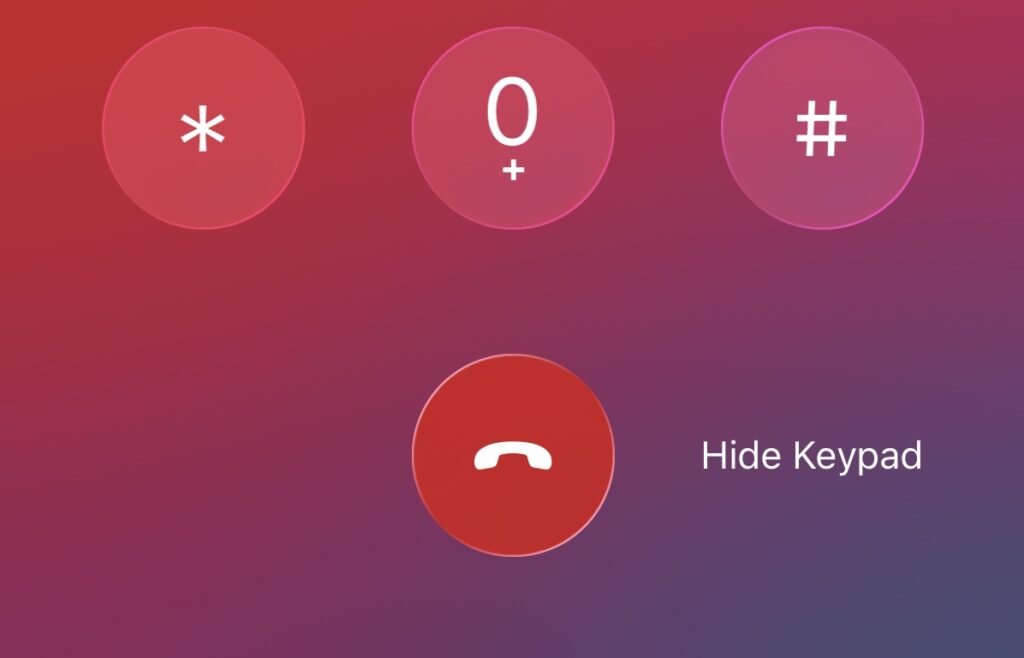
I’m in one of those long calls to support where you wait for ages before a human answers, which is my excuse for slipping up. I’ve had the iPhone keypad open to navigate menus but now I want to hide the keypad.

There is a button for this:

iPhone UI for hiding the keypad

Unfortunately the text that looks like a caption is a button, and the button that looks like it is captioned is the button for hanging up. And I have to call back and wait again.

Yes I should know better but I do not think this is good design. The “button” for Hide Keypad is not even underlined or highlighted to show that it might do something when tapped.

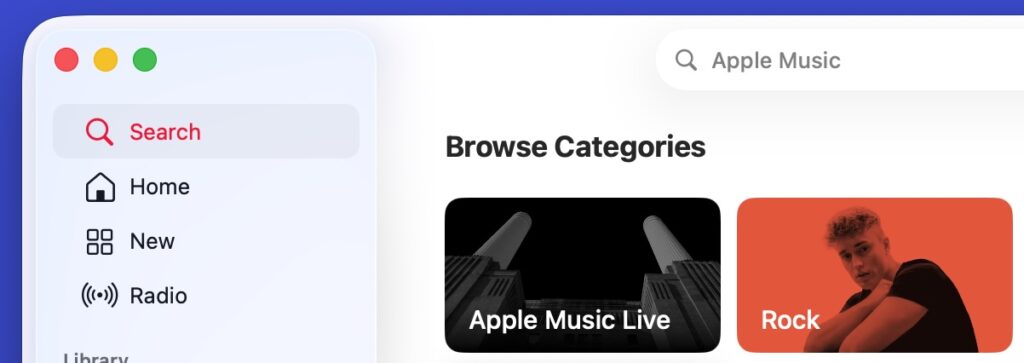
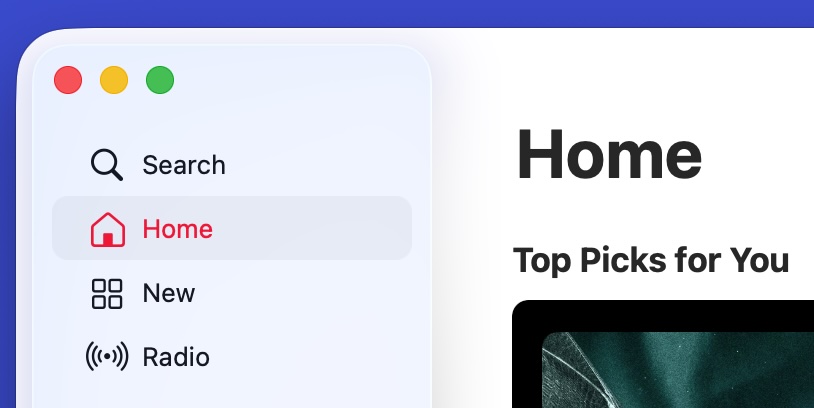
Here is another one, from Apple Music. I am on the home page and want to search for some music. There is a Search button or perhaps tab indicator top left:

Search tab/button

Tap Search though, and there is nowhere to type. Wait a moment, yes there is. It is up at the top and there is not even a flashing cursor to show that I can type there. I have to click again to do that, not where it says Search, but where it says Apple Music:

Apple Music search confusion

This is on the Mac desktop app; the mobile one is a little better but not great.

I am guilty of clicking Search multiple times before realising that I have to click where it says Apple Music.

I think I get the intent here; the UI is steering you towards clicking/tapping on categories rather than typing a search. To me though, that is browse rather than search.

Book review: After Steve by Tripp Mickle

This is billed as a book about a company, but is more accurately described as about two people, Tim Cook and Jony Ive, respectively CEO and former Chief Design Officer at Apple, one of the world’s biggest and most profitable companies. The author Tripp Mickle is a reporter at the Wall Street Journal where he covered Apple for four years.
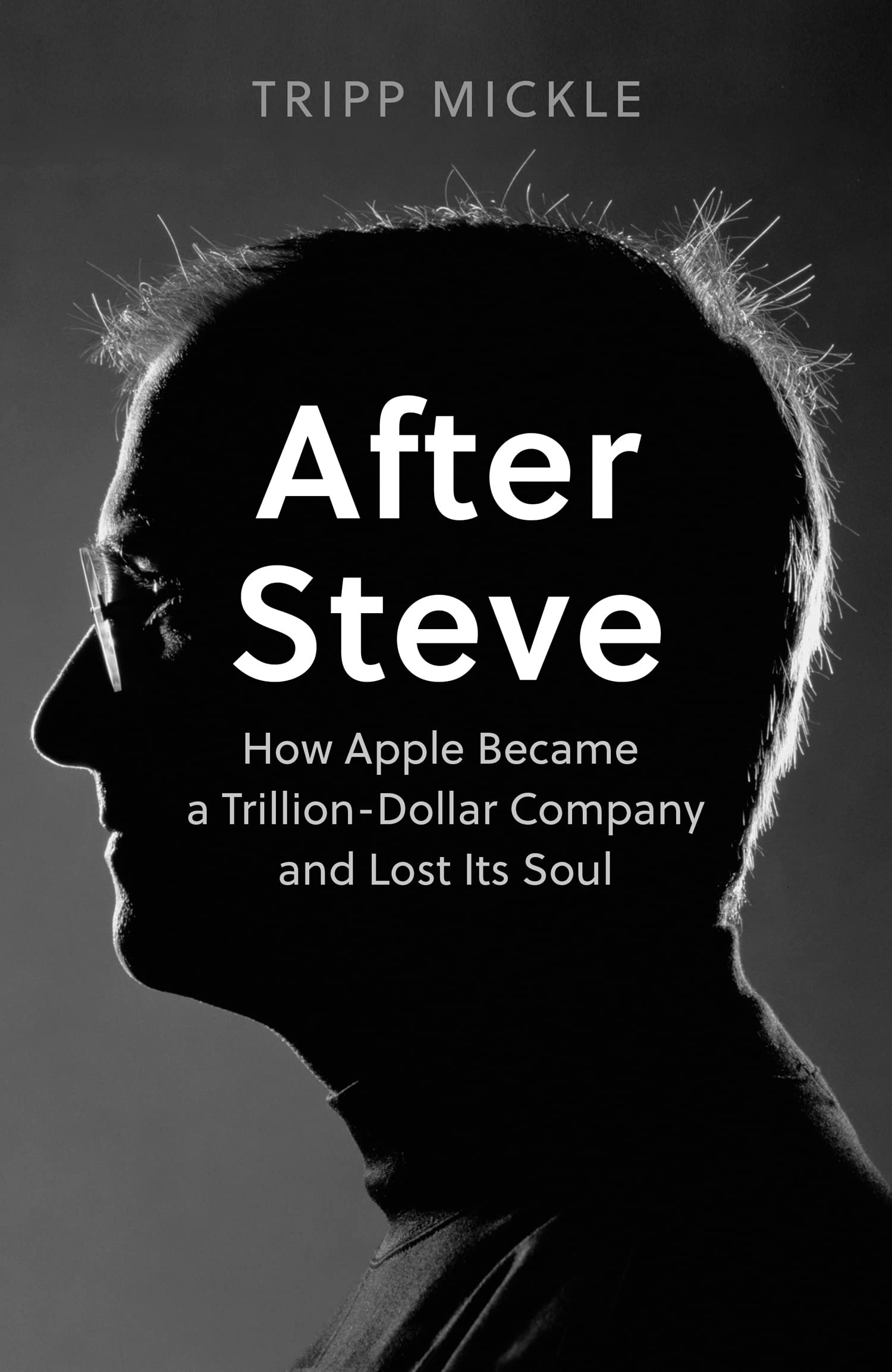
Mickle has a thesis: that under Cook Apple’s profitability has flourished but its design-led innovation has faltered, damaged in 2011 when co-founder Steve Jobs died at the age of 56. “It’s unclear if design will ever regain its position as the dominant voice over product direction,” he writes. In his epilogue, Mickle says that “Cook’s aloofness and unknowability made him an imperfect partner for an artist who wanted to bring empathy to every product.” The author mentions several times that Cook “seldom went to the design studio to see Ive’s team work.”

The book has amazing detail and represents the outcome of interviews with “more than two hundred current and former Apple employees” supplemented by further interviews with their family members, friends, suppliers of Apple, competitors, and government officials. There is lots of dialogue in the accounts of key incidents, drawn either from recordings or “reconstructed based on the recollections of people familiar with the events described.” As you read, you feel immersed in the company. It is a great achievement, particularly (as the author also notes) considering that “at Apple, current and former employees adhere to a strict code of silence.” There is a thick section of notes and references.

After Steve then is essential reading for Apple watchers. That said, I have a couple of reservations. At 512pp this is a lengthy work and for me, too long. It is occasionally repetitive, the writing is professional but at times pedestrian. Further, if your interest is in Apple the company rather than Cook and Ive, it is overly focused on those two people.

This last point is perhaps why Mickle misses the impact of Apple Silicon, the series of ARM-based processors which began with the A series and took over from Intel as the technology in Mac computers from November 2020 with the launch of the M1. Recently Apple has announced the M2 with claimed performance improvements of up to 18% for the CPU and 35% for the GPU, compared to the M1.

Apple Silicon matters because it dramatically improves over x86 in its power/performance ratio, making the company’s laptops and iPads a delight compared to their competition. It may not be design-based, and it builds on ARM and the work of others, but it is a huge advance and gives the company’s hardware an edge over its Windows and Android competition that is hard to counter. Johny Srouji, in charge of Apple Silicon? Not mentioned by Mickle.

I would have preferred the book to be shorter (though researchers may be glad of its detail). What of its central thesis? Mickle makes the point that Apple Watch has a disappointing lack of focus, which I agree with, and that projects like the Apple electric car appear to have faltered. The Beats acquisition had a mixed outcome, and this was a puzzle to me too. Apple did not need Beats, its culture was alien, and my sense is that Apple Music would have flourished equally well without it.

I do think though that since Jobs Apple has developed something with iPhone-level impact and that is Apple Silicon and the M series in particular. I also think that Mickle misses something of the big picture. Buying a smartphone or computer? There is the Android jungle, or the Windows jungle, or Apple. For many it is hardly a choice; and the fact that this is more than ever true more than a decade after the passing of Jobs is huge credit to those involved and makes the accusation “how Apple became a trillion-dollar company and lost its soul” ring just a bit hollow.
The two key things I do with a new Mac

My Windows laptop is ancient (2015) and my company decided to replace it with a MacBook Pro especially since we need to develop software compatible with Apple Silicon. The new Mac works well  and I have been busy putting the essentials (for me) on it: Xcode, Visual Studio Code, .NET 6.0 SDK, Microsoft Office and so on.

Tip for .NET developers: when you put .NET and VS Code on an M1 Mac, you might get a CPU not supported error from Mono, at one time a dependency of the OmniSharp language server. You can fix this either by installing rosetta 2, the x86 translator for Apple silicon, or by setting omnisharp.useModernNet – see here for details.

There are two things I always have to do with a new Mac. The first is to go to  System preferences – Trackpad  – Scroll & Zoom and uncheck the mischievously worded option Scroll direction: Natural. This seems to set this for the mouse too. The reason is that as far as I can tell the Apple preference is no more or less natural than the older approach and having it different depending which operating system you are using is confusing. My suspicion is that Apple introduced this in order to make it harder to switch between Mac and Windows.

image

The second thing is a bit trickier which is to install my password manager. I use Password Safe which does not offer an up to date Mac download, nor an Apple Silicon version. There is a commercial version in the App Store, but since it is open source my solution is to build from source. I recall doing some tweaking the last time I did this, a couple of years back for an Intel Mac, but the process seems to be smooth now as a few fixes have been added for Xcode and arm64 support. I used the latest development release of wxWidgets, 3.1.6, which has to be built first. My build declares itself to be v 0.01 OSX.

image

Without the password manager a laptop is almost unusable for me since I don’t know many of the passwords I use and generally prefer not to save them in the  browser.

My desktop PC which I use for the majority of my work remains Windows and I am a fan of WSL (Windows Subsystem for Linux) which from my perspective is the best new feature of Windows since the release of Windows  7. I miss WSL on the Mac though it is less necessary because macOS is a Unix-like operating system.

In general I do not have a strong preference between Mac and Windows, though I feel that Microsoft and its OEM partners have some work to do to get Windows on Arm working as well as M1 Macs. I was also disappointed by Windows 11, particularly by its lack of support for slightly older CPUs, and the new Start menu and taskbar which is a step backwards from Windows 10. The appearance of ads in the user interface is a concern too, though it is minimal if carefully configured.

Rumours of a new Mac Mini? It is about time.

Bloomberg is reporting rumours of a new Mac Mini in time for the back-to-school market this year. The source of the rumours is claimed to be “people familiar with the plans”.

Apple is also planning the first upgrade to the Mac mini in about four years. It’s a Mac desktop that doesn’t include a screen, keyboard, or mouse in the box and costs $500. The computer has been favored because of its lower price, and it’s popular with app developers, those running home media centers, and server farm managers. For this year’s model, Apple is focusing primarily on these pro users, and new storage and processor options are likely to make it more expensive than previous versions, the people said.

You can still buy a Mac Mini, but it has not been updated since 2014, making it particularly poor value. It is useful for developers since a Mac of some kind is required for iOS and of course Mac development. It is also handy for keeping up to date with macOS.

The latest rumours sound plausible though the prospect of being “more expensive than previous versions” will not go down well with some of the target market, who want to minimise the premium paid for Apple products. Another reason why the 2014 Mac Mini is unappealing is that additional RAM is factory-fit only, which again means extraordinarily high prices. Check out the iFixit teardown:

Unfortunately, the RAM is soldered to the logic board. This means that if you want to upgrade the RAM, you can only do so at time of purchase.

Will Apple do the same again? It seems likely. My guess is that the new Mac Mini (if it exists) will be even smaller than before, but just as hard to upgrade.

Another good quarter for Apple, but Huawei growth and Samsung decline is the real Smartphone story

Apple has reported its “best June quarter ever” with revenue up 17% year on year. iPhone unit sales were flat, but higher average prices bumped up revenue.

More significant though is the rise of Huawei, now number two in unit sales after Samsung and ahead of Apple. Here are the latest unit sales for the top ten vendors according to preliminary figures from IHS Markit:

Global smartphone shipments by OEM (million units)

Rank

Company

Q2’18

Market Share

YoY

Q1’18

Q2’17

1

Samsung

70.8

20.6%

-10.8%

78.0

79.4

2

Huawei

54.2

15.7%

41.0%

39.3

38.5

3

Apple

41.3

12.0%

0.7%

52.2

41.0

4

Xiaomi

33.7

9.8%

45.6%

28.4

23.2

5

Oppo

31.9

9.3%

4.5%

25.9

30.5

6

Vivo

28.6

8.3%

20.3%

21.2

23.8

7

LG

11.2

3.3%

-15.5%

11.3

13.3

8

Motorola

10.0

2.9%

41.5%

8.7

7.1

Others

62.8

18.1%

-33.3%

80.4

94.2

Total

344.6

100.0%

-1.8%

345.5

350.9

Source: IHS Markit, Smartphone Intelligence Service, 2018.

What is notable is that the number one vendor Samsung suffered a 10% year on year decline, but Huawei grew units by an amazing 41% to become number two ahead of Apple, by volume.

image
Huawei P20 Pro

Note that Apple has not declined as such. This is about Huawei winning sales both from Samsung and from other vendors. If the trend continues, Huawei is on track to overtake Samsung in another few quarters.

Samsung remains the premium Android brand though it has struggled to come up with compelling reasons to keep upgrading its high end devices. A new Galaxy Note is on the way and may be the distinctive new model that the company needs.

That said, it will take more than that to disrupt Huawei. In one sense, there is nothing very complicated about Huawei’s success: it has delivered devices both via its Huawei and Honor brands that are well made and which offer the best value proposition on the market. That does not make them the best in absolute terms (I would rather have a Samsung), but that is not the most important thing. Chatting to a Three salesperson in a shop recently confirmed this: they sell more Huawei/Honor than any other brand, because customers look at what they get for their money.

It is logical that as Android devices have become thoroughly commoditised, that Chinese vendors can achieve better value than their competition thanks to the cost-effective manufacturing capacity available in their own country.

Xiaomi, another Chinese company, confirms this trend, with its units up over 45%, growing faster than Huawei.

On Face Unlock

Face unlock is a common feature on premium (and even mid-range) devices today. Notable examples are Apple with the iPhone X, Microsoft with Windows Hello (when fully implemented with a depth-sensing camera like Intel RealSense), and on Android phones including Samsung Galaxy S9, OnePlus 6, Huawei P20 and Honor View 10 and Honor 10 AI

I’ve been trying the Honor 10 AI and naturally enabled the Face Unlock, passing warnings that it was less secure than a PIN or password. Why less secure? It is not stated, but a typical issue is being able to log in with a picture of the normal user (this would not work with Microsoft Hello).

Security is an issue, but I was also interested in how desirable this is as a feature. So far I am not convinced. Technically it works reasonably well. It is not 100% effective, especially in either bright sunlight or dim light, but most of the time it successfully unlocks the Honor phone. It is all the more impressive because I sometimes wear glasses, and it works whether or not I am wearing them.

image

I enjoyed face unlock at first, since it removes a bit of friction in day to day use. Then I came across annoyances. Sometimes the face recognition takes longer than a PIN, if the lighting conditions are not optimal, and occasionally it fails. It has introduced a touch of uncertainty to the unlock process, whereas the PIN is fully reliable and controllable. I tried the optional “wake on pick up” feature and again had a mixed experience; sometimes the the phone would light up and unlock when I did not need it.

Conclusion? It is something I can easily live without so a low priority when choosing a new phone. Whereas fingerprint unlock, now that the technology has matured to the point of high reliability, is something I still enjoy.

Your favourite article on The Register, and what that says about technology and the media

I’m at Mobile World Congress in Barcelona and meeting people new to me who say, “who do you write for”? I’ve been struck by several separate occasions when people say, after I mention The Register, “Oh yes, I loved that Apple article”.

The piece they mean (not one of mine), is this one by Kieren McCarthy. It recounts the Reg’s efforts to attend the iPhone 7 launch; or more precisely, efforts to get Apple PR to admit that the Reg is on a “don’t invite” list and would not be able to attend.

image

Why does everyone remember this piece? In short, because it is a breath of reality in a world of hype.

The piece also exposes hidden pressures that influence tech media. There are more people working in PR than in journalism, as I recall, and it is their job to attempt to manage media coverage in order to get it to reflect as closely as possible the messaging that that their customers, the tech companies, wish to put out.

Small tech companies and start-ups struggle to get any coverage and welcome almost any press interest. The giants though are in a more privileged position, none more so than Apple, for whom public interest in its news is intense. This means it can select who gets to attend its events and naturally chooses those it thinks will give the most on-message coverage.

I do not mean to imply that those favoured journalists are biased. I believe most people write what they really think. Still, consciously or unconsciously they know that if they drift too far from the vendor’s preferred account they might not get invited next time round, which is probably a bad career move.

Apple is in a class of its own, but you see similar pressures to a lesser extent with other big companies.

Another thing I’ve noticed over years of attending technology events is that the opportunities for open questioning of the most senior executives have diminished. They would rather have communication specialists answer the questions, and stay behind closed doors or give scripted presentations from a stage.

Here in Barcelona I’ve discovered the Placa de George Orwell for the first time:

image

Orwell knew as well as anyone the power of the media, even though he almost certainly did not say what is now often attributed to him, “Journalism is printing what someone else does not want printed: everything else is public relations.”

Still, as I move into a series of carefully-crafted presentations it is a thought worth keeping in front of mind.

Finally, let me note that I have never worked full-time for The Register though I have written a fair amount there over the years (the headlines by the way are usually not written by me). The more scurrilous aspect of some Reg pieces is not really me, but I absolutely identify with The Register’s willingness to allow writers to say what they think without worrying about what the vendor will think. 

Office 2016 now “built out of one codebase for all platforms” says Microsoft engineer

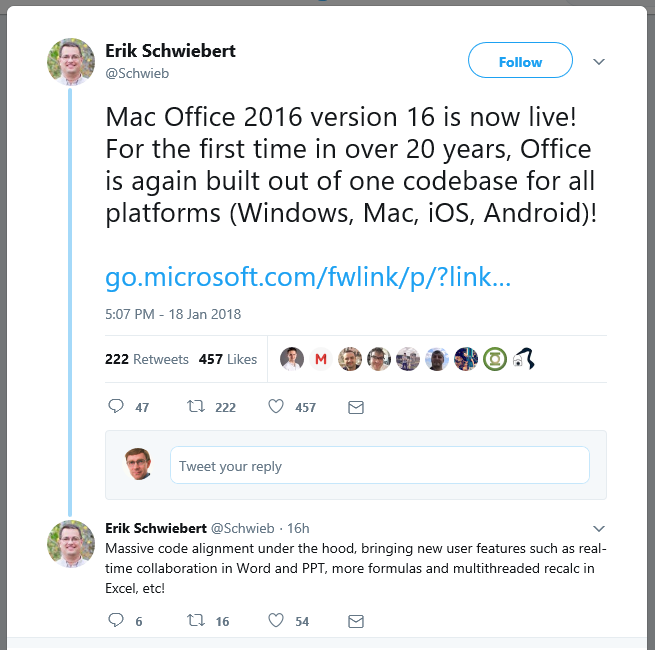
Microsoft’s Erik Schweibert, principal engineer in the Apple Productivity Experiences group, says that with the release of Office 2016 version 16 for the Mac, the productivity suite is now “for the first time in 20 years, built out of one codebase for all platforms (Windows, Mac, iOS, Android).”

image

This is not the first time I have heard of substantial code-sharing between the various versions of Office, but this claim goes beyond that. Of course there is still platform-specific code and it is worth reading the Twitter thread for a more background.

“The shared code is all C++. Each platform has native code interfacing with the OS (ie, Objective C for Mac and iOS, Java for Android, C/C++ for Windows, etc),” says Schweibert.

Does this mean that there is exact feature parity? No. The mobile versions remain cut-down, and some features remain platform-specific. “We’re not trying to provide uniform “lowest common denominator” support across all platforms so there will always be disparate feature gaps,” he says.

Even the online version of Office shares much of the code. “Web components share some code (backend server is shared C++ compiled code, front end is HTML and script)”, Schweibert says.

There is more news on what is new in Office for the Mac here. The big feature is real-time collaborative editing in Word, Excel and PowerPoint. 

What about 20 years ago? Schweibert is thinking about Word 6 for the Mac in 1994, a terrible release about which you can read more here:

“Shipping a crappy product is a lot like beating your head against the wall.  It really does feel good when you ship a great product as a follow-up, and it really does motivate you to spend some time trying to figure out how not to ship a crappy product again.

Mac Word 6.0 was a crappy product.  And, we spent some time trying to figure out how not to do that again.  In the process, we learned a few things, not the least of which was the meaning of the term “Mac-like.”

Word 6.0 for the Mac was poor for all sorts of reasons, as explained by Rick Schaut in the post above. The performance was poor, and the look and feel was too much like the Windows version – because it was the Windows code, recompiled. “Dialog boxes had "OK" and "Cancel" exactly reversed compared to the way they were in virtually every other Mac application — because that was the convention under Windows,” says one comment.

This is not the case today. Thanks to its lack of a mobile platform, Microsoft has a strong incentive to create excellent cross-platform applications.

There is more about the new cross-platform engineering effort in the video below.

Compile Android Java, iOS Objective C apps for Windows 10 with Visual Studio: a game changer?

Microsoft has announced the ability to compile Windows 10 apps written in Java or C++ for Android, or in Objective C for iOS, at its Build developer conference here in San Francisco.

image
Objective C code in Visual Studio

The Android compatibility had been widely rumoured, but the Objective C support not so much.

This is big news, but oddly the Build attendees were more excited by the HoloLens section of the keynote (3D virtual reality) than by the iOS/Android compatibility. That is partly because this is the wrong crown; these are the Windows faithful who would rather code in C#.

Another factor is that those who want Microsoft’s platform to succeed will have mixed feelings. Is the company now removing any incentive to code dedicated Windows apps that will make the most of the platform?

Details of the new capabilities are scant though we will no doubt get more details as the event progresses. A few observations though.

Microsoft is trying to fix the “app gap”, the fact that both Windows Store and Windows Phone Store (which are merging) have a poor selection of apps compared to iOS or Android. Worse, many simply ignore the platforms as too small to bother with. Lack of apps make the platforms less attractive so the situation does not improve.

The goal then is to make it easier for developers to port their code, and also perhaps to raise the quality of Windows mobile apps by enabling code sharing with the more important platforms.

There are apparently ways to add Windows-specific features if you want your ported app to work properly with the platform.

Will it work? The Amazon Fire and the Blackberry 10 precedents are not encouraging. Both platforms make it easy to port Android apps (Amazon Fire is actually a version of Android), yet the apps available in the respective app stores are still far short of what you can get for Google Android.

The reasons are various, but I would guess part of the problem is that ease of porting code does not make an unimportant platform important. Another factor is that supporting an additional platform never comes for free; there is admin and support to consider.

The strategy could help though, if Microsoft through other means makes the platform an attractive target. The primary way to do this of course is to have lots of users. VP Terry Myerson told us that Microsoft is aiming for 1 billion devices running Windows 10 within 2-3 years. If it gets there, the platform will form a strong app market and that in turn will attract developers, some of whom will be glad to be able to port their existing code.

The announcement though is not transformative on its own. Microsoft still has to drive lots of Windows 10 upgrades and sell more phones.

The Watch

I am in San Francisco so naturally I looked into the Apple Store to see the Watch.

image

The poor old Apple Store is stuck behind a crane and a lot of fencing but there was still a good crowd there.

image

There are watches behind glass, watches you can play with that are firmly attached to the counter, and watches in drawers which you can try on under the guidance of a rep, but which are disabled (the buttons do nothing).

A few observations.

It is a lot of fun. I found it easy to navigate using the main menu (a heap of icons, as you would expect), and zooming/tapping to explore.

There are two physical buttons, the crown and a pushbutton. The pushbutton only does two things (I was told by the rep), one press for the contacts app, press and hold for Apple Pay. Can you configure this? Apparently not.

image

The crown is a  select button if you push it, zoom (or something app-specific) if you spin it, and Siri if you press and hold.

image

Most of the features are things you can already do with a smartphone, excepting the fitness sensors of course, but this is on your wrist and therefore handier.

Maps is useful; it might be worth it just for that.

image

Note that the watch is largely a remote for an iPhone. If you don’t have an iPhone (or it is out of charge) it is not much use. The rep thought it would still tell the time but wasn’t sure.

I tried on a couple of models, one the Sports with a cheapish strap ($400; the base model is $349), and another with a stainless steel band ($700). Both were comfortable and I was especially taken with the stainless steel edition.

There are plenty of things about the gadget that are annoying. The need for daily recharging is one, the dependence on an iPhone is another. However it is elegant and delightful so I imagine all will be forgiven, among the Apple community at least.

How do I buy one? Online only, I was told, and delivery maybe in July.