Category Archives: development

Delphi and C++ Builder XE Starter Editions announced

Embarcadero has announced Starter Editions for both Delphi XE and C++ Builder XE, rapid development environments for native Windows applications.

These are not toy versions. The main technical difference between the Starter editions and the Professional versions are the absence of UML modelling, Class Explorer and Resource Manager tools. You also miss out on code completion for HTML, Live Code Templates, Subversion support, translation manager, refactoring and unit testing.

Not a big deal: most of these lacks are either not critical or can be addressed in other ways. Most features are the same, and you can build excellent high-performance applications with these Starter Editions.

The real restriction is the licensing:

Delphi XE Starter can be used by individuals who will earn less than US $1,000 for the applications they create with Delphi, or organizations or companies with five or fewer developers and less than US$1,000 in total annual revenue. Purchase the Professional edition or higher for larger scale commercial use.

with a similar wording for C++ Builder XE Starter.

The other question: how much? At the time of writing the Starter Editions are not in the online store, but according to this article in SD Times they will be $199 each or £149 for upgrades. Ownership of a Starter Edition gives you $100 discount if you later upgrade to a higher edition.

Delphi is as good as ever, especially bearing in mind that Microsoft has no real equivalent. Visual Studio is mostly .NET-based, whereas Delphi compiles to native code; and Visual C++ is more challenging to learn and arguably less productive. It is true that developers are waiting impatiently for 64-bit Delphi and for a promised compiler for OS X (and perhaps iOS?); but in the meantime if you need to build Windows applications do not ignore it.

Update: the European price is €199 each, or upgrades for €149.

No more Ruby support in NetBeans – the feature was little used, says Oracle

Oracle has announced the discontinuation of Ruby support in the NetBeans IDE. The reason? First, to free resources for JDK 7 support; but second (and more significant) – hardly anyone was using it.

There is hardly a shortage of Ruby IDEs. Ones that come to mind are the Eclipse-based Aptana, JetBrains RubyMine, the Visual Studio based Ruby in Steel, and Embarcardero’s 3rd Rail. Further, some Ruby developers prefer to work without an IDE.

I also suspect that Ruby has not quite hit the mainstream in the way it seemed that it might a few years back. Its influence has been huge, but in practice many developers still fall back to PHP, Java and C#.

Visual Studio 2010 nine months on: how good has it proved?

Visual Studio 2010 was released on April 12th 2010. Nine months on, how good has it proved to be?

image

I researched deeply into Visual Studio 2010 at the time, and was impressed overall. It was a huge release, partly because the IDE was rebuilt using Windows Presentation Foundation, and partly because of a large number of new features including the F# language. Performance was always going to be an issue with the move to a .NET-based IDE, but on my machines I found it satisfactory.

Others have been less pleased with the performance. The comments to Jason Zander’s announcement of the Service Pack 1 beta last month make interesting reading. Here is the negative:

I am a professional .NET developer and I am really upset with VS 2010. It crashes more often than VS 2008. It is slow as hell. It even crashes when debugging. VS 2010 is built with WPF which is causing all these problems.

and here is the positive:

I don’t know what y’all complaining about – VS2010 is blazingly fast… at least on my machine.

I am not sure whether the performance issues are more dependent on the the type of work you are doing, or the size of the projects, or some other factor. One issue may be graphics performance, since this will make a big difference to WPF whereas not so much with Visual Studio 2008 and earlier.

Thinking back to this time last year, I also recall how Visual Studio 2010 seems so focused on .NET, including Silverlight. Later on we got the announcement of Visual Studio LightSwitch, a RAD database application tool which builds Silverlight clients. It now seems obvious, especially following the PDC (Professional Developers) conference in November, that the vision of the developer team at Microsoft did not align with the vision of the Windows team; and that the Windows team seemed to win that argument internally. It is odd, because Silverlight has the potential to solve problems for the company. It is a technology that extends from the desktop to Windows Phone 7, which is well-suited to app store deployment thanks to the way apps are isolated, and which potentially can run on multiple platforms. Now with Silverlight 5, promised for release this year, Microsoft is adding more Windows-specific features and allowing more fragmentation between versions. Silverlight on Windows Phone 7 is based on version 3, the Mac version has more limited capabilities than the Windows version, and so on.

Microsoft said at PDC that “HTML 5” is its broad-reach platform. That suggests that what Visual Studio needs is HTML 5 designers and JavaScript libraries that integrate with Microsoft’s server technologies and which make it easier to develop HTML application for multiple form factors including small devices.

It is a confusing story, and I would love to know if the subject came up in CEO Steve Ballmer’s discussions with Bob Muglia, VP of Server and Tools, recently. The outcome of those discussions is that Muglia will be leaving Microsoft in the summer.

We will have to wait for Visual Studio 2012, maybe, to discover any change in its direction. In the meantime, SP1 adds a new help viewer, in response to many complaints, as well as a few new features for testing and debugging. There is also a list of bug-fixes, some of which look significant:

and so on. Let me add that while the list looks bad, it is no more than you would expect for a tool of this complexity and in my own testing Visual Studio 2010 has worked well.

I agree though with some of the commenters who note that Microsoft is slow to react when bugs are reported. It will be more than a year after the initial release when SP1 is finished, though you can use the beta for production code if you dare.

I would be interested in hearing from users of Visual Studio 2010. How are you finding it, or did you try it and go back to Visual Studio 2008? I realise that adoption of a new IDE for production work tends to be slow, because developers are reluctant to switch mid-project.

NVIDIA Tegra 2: amazing mobile power that hints at the future of client computing

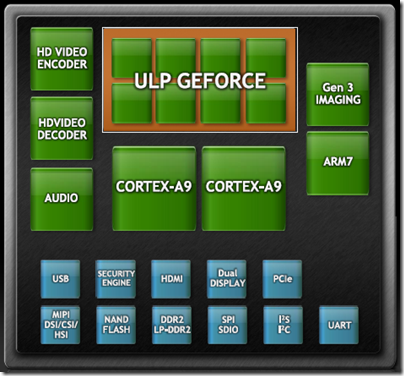
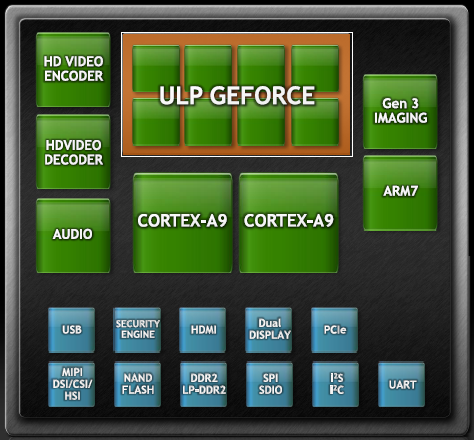
Smartphone power has made another jump forward with the announcement at CES in Las Vegas of new devices built on NVIDIA’s new Tegra 2 package – a System on a Chip (SoC) that includes dual-core CPU, GPU, and additional support for HD video encoding and decoding, audio, imaging, USB, PCIe and more:
image

The CPU is the ARM Cortex-A9 which has a RISC (Reduced Instruction Set Computer) architecture and a 32-bit instruction set. It also supports the Thumb-2 instruction set which is actually 16-bit. How is 16-bit an upgrade over 32-bit? Well, 16-bit instructions means smaller code, even though it gets translated to 32-bit instructions at runtime:

For performance optimised code Thumb-2 technology uses 31 percent less memory to reduce system cost, while providing up to 38 percent higher performance than existing high density code, which can be used to prolong battery-life or to enrich the product feature set.

The GPU is an “ultra low power” (ULP) 8-core GeForce. In essence, the package aims for high performance with low power consumption, exactly what is wanted for mobile computing.

Power is also saved by sophisticated power management features. The package uses a combination of suspending parts of the system, gating the clock speed, screen management, and dynamically adjusting voltage and frequency, in order to save power. The result is a system which NVIDIA claims is 25-50 times more efficient than a typical PC.

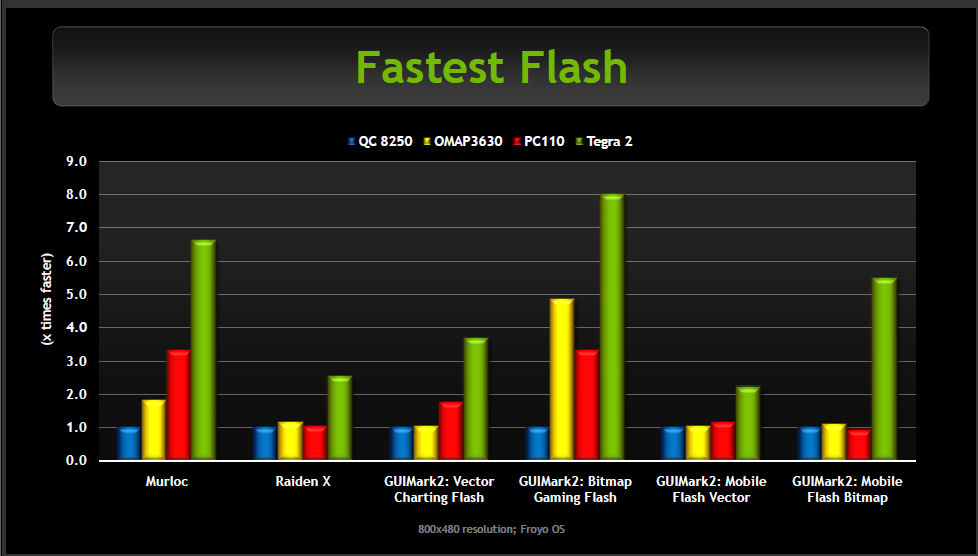
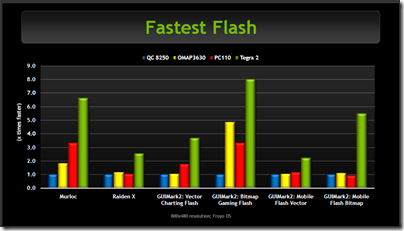
According to NVIDIA, Tegra 2 enables web browsing up to two times faster than competitors such as the Qualcomm Snapdragon 8250 or Texas Instruments OMAP 3630 – though of course these companies also have new SoCs in preparation.

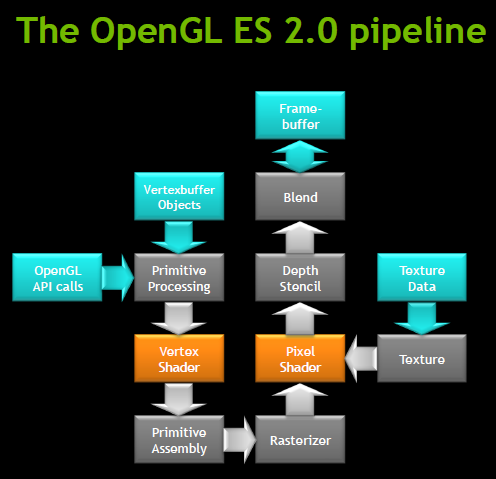
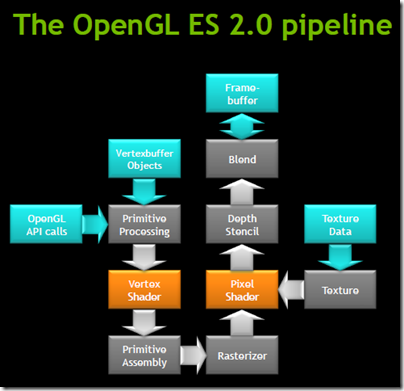
Tegra 2 is optimised for some specific software. One is the OpenGL graphics API. “The job of the GPU is to implement the logical pipeline defined by OpenGL”, I was told at an NVIDIA briefing.
image

I asked whether this meant that Tegra 2 is sub-optimal for Microsoft’s Direct X API; but NVIDIA says it is sufficiently similar that it makes no difference.

Nevertheless, Tegra 2 has been designed with Android in mind, not Windows. There are a couple of reasons for this. The main one is that Android has all the momentum in the market; but apart from that, Microsoft partnered with Qualcomm for Windows Phone 7, which runs on Snapdragon, shutting out NVIDIA at the initial launch. NVIDIA is a long-term Microsoft partner and the shift from Windows Mobile to Android has apparently cost NVIDIA a lot of time. The shift took place around 18 months ago, when NVIDIA saw how the market was moving. That shift “cost us a year to a year and a half of products to market”, I was told – a delay which must include changes at every level from hardware optimisation, to designing the kind of package that suits the devices Android vendors want to build, to building up knowledge of Android in order to market effectively to hardware vendors.

Despite this focus, Microsoft demonstrated Windows 8 running on Tegra during Steve Ballmer’s keynote, so this should not be taken to mean that Windows or Windows CE will not run. I still found it interesting to hear this example of how deeply the industry has moved away from Microsoft’s mobile platform.

Microsoft should worry. NVIDIA foresees that “all of your computing needs are ultimately going to be surfaced through your mobile device”. Tegra 2 is a step along the way, since HDMI support is built-in, enabling high resolution displays. If you want to do desktop computing, you sit down at your desk, pop your mobile into a dock, and get on with your work or play using a large screen and a keyboard. It seems plausible to me.

During the press conference at CES we were shown an example of simultaneous rich graphic gaming on PC, PlayStation 3, and Tegra 2 Smartphone.

image

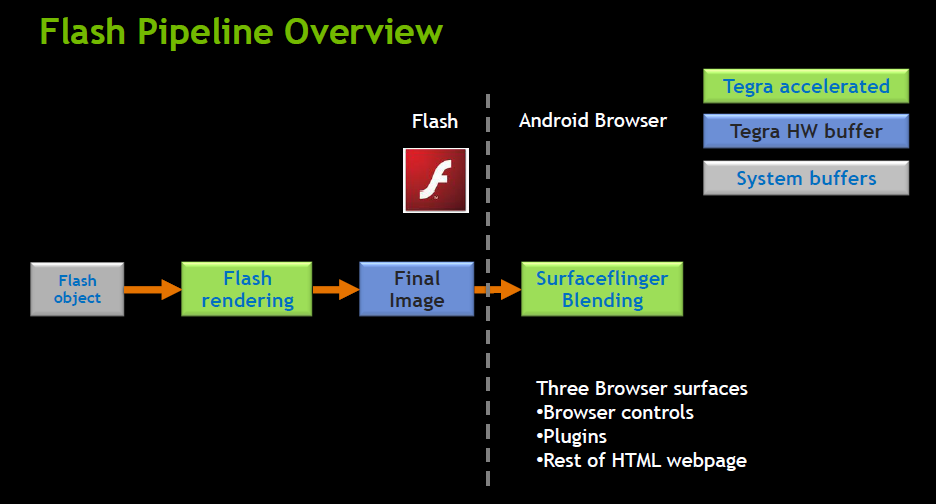
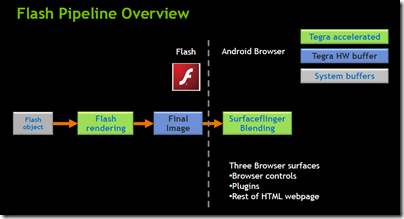
Alongside Android, Tegra 2 is optimised for Adobe Flash. NVIDIA has been given full access to the source of the Flash player in order to deliver hardware acceleration.
image

image

Actual devices

What about actual devices? Two that were shown at CES are the LG Optimus 2X:

image

and the Motorola Atrix 4G:

image

Both sport impressive specifications; though the Guardian’s Charles Arthur, who attended a briefing on the Atrix 4G, expresses some scepticism about whether HD video (which needs a large display) and the full desktop version of FireFox are really necessary on a phone. Apparently the claimed battery life is only 8 hours; some of us might be willing to sacrifice a degree of that capability for a longer battery life.

Still, while some manufacturers will get the balance between cost, features, size and battery life wrong, history tells that we will find good ways to use these all this new processing and graphics power, especially if we can get to the point where such a device, combined with cloud computing and a desktop dock, becomes the only client most of us need.

NVIDIA says that over 50 Android/Tegra 2 products are set to be released by mid-2011, in tablet as well as Smartphone form factors. I’m guessing that at least some of these will be winners.
What you read in 2010: top posts on ITWriting.com

With three days to go, traffic on ITWriting.com in 2010 is more than 50% up over that of 2009 with over 1 million unique visitors for the first time. Thank you for your attention in another crazy year in technology.

So what did you read? It is intriguing to look at the stats for the whole year, which are different in character from stats for a week or month. The reason is that over a short period, it is the news of the day that is most read – posts like The Java Crisis and what it means for developers. Over the year though, it is the in-depth technical posts like How to backup Small Business Server 2008 on Hyper-V that draw more readers, along with those posts that are a hit with people searching Google for help with an immediate problem like Cannot open the Outlook window – what sort of error message is that?

The most-read post in 2010 though is in neither category. In July I made a quick post noting that the Amazon Kindle now comes with a web browser based on WebKit and a free worldwide internet connection. Mainly thanks to some helpful comments from users it has become a place where people come for information on that niche subject.

On the programming side, posts about Microsoft’s changing developer story are high on the list:

Lessons from Evernote’s flight from .NET

Microsoft wrestles with HTML5 vs Silverlight futures

Microsoft’s Silverlight dream is over

Another post which is there in the top twenty is this one about Adobe Flash and web services:

SOA, REST and Flash/Flex – why Flash does not PUT

along with this 2009 post on the pros and cons of parallel programming:

Parallel Programming: five reasons for caution. Reflections from Intel’s Parallel Studio briefing

This lightweight post also gets a lot of hits:

Apple iPad vs Windows Tablet vs Google Chrome OS

It is out of date now and I should do a more considered update. Still, it touches on a big theme: the success of the Apple iPad. When you take that alongside the interest in Android tablets, perhaps we can say that 2010 was the year of the tablet. I first thought the tablet concept might take off back in 2003/2004 when I got my first Acer tablet. I was wrong about the timing and wrong about the operating system; but the reasons why tablets are a good idea still apply.

Watching these trends is a lot of fun and I look forward to more surprises in 2011.

Single sign-on from Active Directory to Windows Azure: big feature, still challenging

Microsoft has posted a white paper setting out what you need to do in order to have users who are signed on to a local Windows domain seamlessly use an Azure-hosted application, without having to sign in again.

I think this is a huge feature. Maintaining a single user directory is more secure and more robust than efforts to synchronise a local directory with a cloud-hosted directory, and this is a point of friction when it comes to adopting services such as Google Apps or Salesforce.com. Single sign-on with federated directory services takes that away. As an application developer, you can write code that looks the same as it would for a locally deployed application, but host it on Azure.

There is also a usability issue. Users hate having to sign in multiple times, and hate it even more if they have to maintain separate username/password combinations for different applications (though we all do).

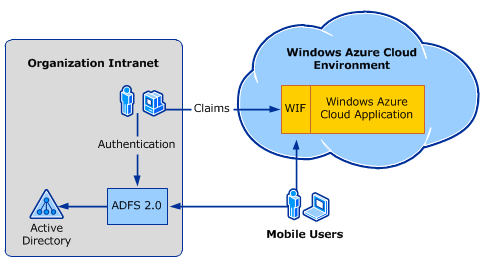
The white paper explains how to use Active Directory Federation Services (ADFS) and Windows Identity Foundation (WIF, part of the .NET Framework) to achieve both single sign-on and access to user data across local network and cloud.

image

The snag? It is a complex process. The white paper has a walk-through, though to complete it you also need this guide on setting up ADFS and WIF. There are numerous steps, some of which are not obvious. Did you know that “.NET 4.0 has new behavior that, by default, will cause an error condition on a page request that contains a WS-Federation authentication token”?

Of course dealing with complexity is part of the job of a developer or system administrator. Then again, complexity also means more to remember and more to troubleshoot, and less incentive to try it out.

One of the reasons I am enthusiastic about Windows Small Business Server Essentials (codename Aurora) is that it promises to do single sign-on to the cloud in a truly user-friendly manner. According to a briefing I had from SBS technical product manager Michael Leworthy, cloud application vendors will supply “cloud integration modules,” connectors that you install into your SBS to get instant single sign-on integration.

SBS Essentials does run ADFS under the covers, but you will not need a 35-page guide to get it working, or so we are promised. I admit, I have not been able to test this feature yet, and aside from Microsoft’s BPOS/Office 365 I do not know how many online applications will support it.

Still, this is the kind of thing that will get single sign-on with Active Directory widely adopted.

Consider FaceBook Connect. Register your app with Facebook; write a few lines of JavaScript and PHP; and you can achieve the same results: single sign-on and access to user account information. Facebook knows that to get wide adoption for its identity platform it has to be easy to implement.

On Microsoft’s platform, another option is to join your Azure instance to the local domain. This is a feature of Azure Connect, currently in beta.

Are you using ADFS, with Azure or another platform? I would be interested to hear how it is going.

Silverlight 5 unveiled: more power, more Windows

Microsoft has announced details of Silverlight 5, a major new release of its browser plug-in and desktop runtime for Windows and Mac. Silverlight is also the primary application runtime for Windows Phone 7, though this update does not apply to the phone yet. Silverlight 5 will go into beta in the first half of 2011, and release is planned for the second half of 2011 – no more than a year or so away.

So what’s in Silverlight 5?

On the media side, there is hardware decoding of H.264 video (an overdue feature) plus enhancements including TrickPlay which enables fast-forward and rewind. There is also remote control support of some kind. According to VP Scott Guthrie, you will be able to stream HD video to a netbook.

The bigger area of change is in Silverlight as an application runtime. Here are the highlights:

  • Text rendering is much improved, with multi-columns, OpenType support, and control of tracking and leading.
  • Postscript vector printing greatly improves printing support, and you can now create a dedicated print view different from what is on screen.
  • A new hardware-accelerated 3D graphics API, as well as immediate mode graphics which lets you render directly to the GPU.
  • There is a 64-bit version of Silverlight 5.
  • WS-Trust support for secure messaging in tandem with Windows Communication Foundation.
  • Databinding enhancements, and support for debugging a binding by setting a breakpoint on it.

Alongside these, trusted Silverlight applications have new capabilities. But what is a trusted application? In the past, Silverlight applications become trusted if they run out of the browser and the user gives permission via a dialog. In Silverlight 5 this changes. A Silverlight application can be trusted within the browser as well, though Microsoft says this only works “when enabled via a group policy registry key and an application certificate”. This implies that the feature is aimed at corporate environments rather than for applets with a broad reach.

Once trusted, an in-browser Silverlight applet has the following additional features:

  • A new web browser control lets you host HTML content within a Silverlight application.
  • Read and write access to My Documents
  • Ability to launch Microsoft Office applications – examples include creating an email message or opening a report in Word
  • Access to COM components – Microsoft gives the example of accessing a USB security key or a bar-code scanner
  • Ability to call native code vith PInvoke (Platform Invoke)

In addition, out of browser applications support multiple windows including child windows, so they can be made to behave even more like normal desktop Windows applications.

You can see the theme here: making trusted Silverlight applications more powerful so that a larger proportion of custom business applications can be implemented in the browser or as Silverlight out-of-browser applications, rather than as traditional Windows applications that require desktop deployment. Put this together with Office 365 and Windows Azure, and you can see how well Silverlight works as a component in Microsoft’s cloud stack – provided users do not have anything inconvenient like an Apple iPad.

But what about the Mac? All these “trusted” features appear to be Windows-only. I asked about Mac support and was told:

We’re evaluating mechanisms for enabling similar trusted applications on the mac.

Fair enough; but the way this is put does suggest that having retreated from any ambitions for broad device reach in statements at the recent PDC conference, it now seems that Microsoft is further retreating from Mac and Windows parity, and moving Silverlight more towards being an application runtime for Windows – though note that there will still be a Silverlight 5 for the Mac and which will have the features that do not require COM or PInvoke.

It is disappointing that there is still no built-in local database support, though there are third-party offerings.

There are a couple of ways to look at Silverlight. Microsoft’s lack of commitment to cross-platform parity and its unwillingness to address broad device support means it does not look good as a broad-reach browser plugin, despite its great features on systems that do support it.

On the other hand, as an alternative to desktop Windows applications Silverlight looks increasingly attractive as its capabilities increase.

More information on the new features here – though note it neglects to mention what will and will not work on a Mac.

Migrating from physical to virtual with Hyper-V and disk2vhd

I have a PC on which I did most of my work for several years. It runs Windows XP, and although I copied any critical data off it long ago, I still wheel it out from time to time because it has Visual Studio 6 and Delphi 7 projects with various add-ins installed, and it is easier to use the existing PC than to replicate the environment in a virtual machine.

These old machines are a nuisance though; so I thought I’d try migrating it to a virtual machine. There are numerous options for this, but I picked Microsoft Hyper-V because I already run several test servers on this platform with success. Having a VM on a server rather than on the desktop with Virtual PC, Virtual Box or similar means it is always easily available and can be backed up centrally.

The operation began smoothly. I installed the free Sysinternals utility Disk2vhd, which uses shadow copy so that it can create a VHD (virtual hard drive) from the system on which it is running. Next, I moved the VHD to the Hyper-V server and created a new virtual machine set to boot from that drive.

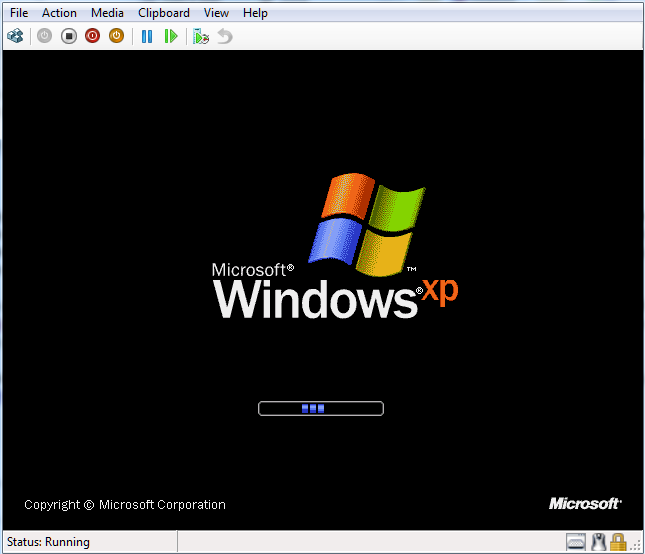
Windows XP started up first time without any blue screen problems, though it did ask to be reactivated.

image

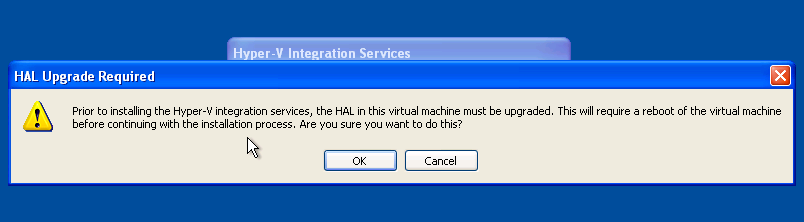
I could not activate yet though, because XP could not find a driver for the network card. The solution was to install the Hyper-V integration services, and here things started to go wrong. Integration services asked to upgrade the HAL (Hardware Abstraction Layer), a key system DLL:

image

However, on restart I got the very same dialog.

Fortunately I was not the first to have this problem. I was prepared for some hassle and had my XP with SP3 CD ready, so I copied and expanded halaacpi.dll from this CD to my system32 folder and amended boot.ini as suggested:

multi(0)disk(0)rdisk(0)partition(2)\WINDOWS=”Disk2vhd Microsoft Windows XP Professional” /FASTDETECT /NOEXECUTE=OPTIN /HAL=halaacpi.dll

I rebooted and now the integration services installed OK. However, if you do this then I suggest your delete the /HAL=halaacpi.dll argument before rebooting again, as with this in place Windows would not start for me.  In fact, you can delete the special Disk2vhd option in boot.ini completely; it is no longer needed.

After that everything was fine – integration worked, the network came to life and I activated Windows – but performance was poor. To be fair, it was not that good in hardware either. Still, I am working on it. I’ve given the Virtual Machine 1.5GB RAM and dual processors. Removing software made obsolete by the migration, things like the SoundMAX and NVIDIA drivers seemed to help quite a bit. It is usable, and will improve as I fine-tune the setup.

Overall, the process was easier than I expected and getting at my old developer setup is now much more convenient.

HTML 5 Canvas: the only plugin you need?

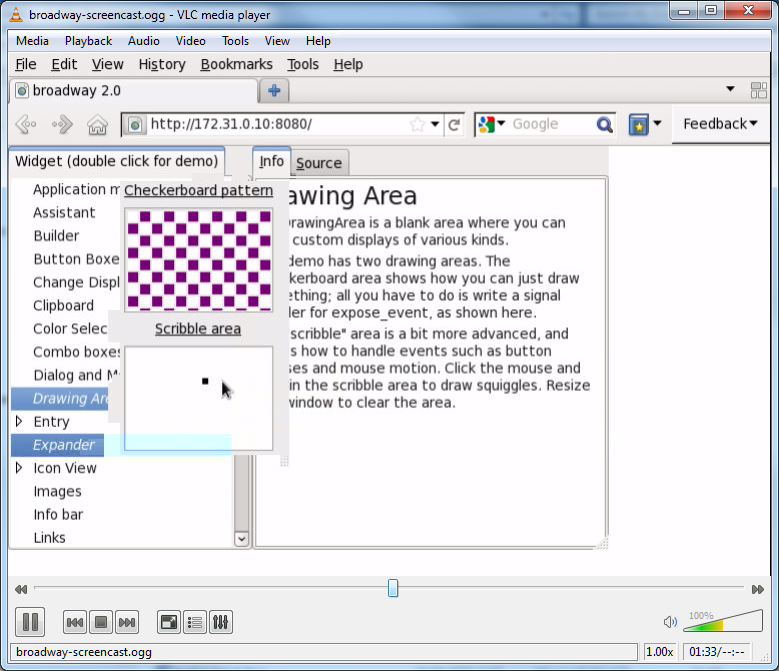
The answer is no, of course. And Canvas is not a plugin. That said, here is an interesting proof of concept blog and video from Alexander Larsson: a GTK3 application running in Firefox without any plugin.

image

GTK is an open source cross-platform GUI framework written in C but with bindings to other languages including Python and C#.

So how does C native code run the browser without a plugin? The answer is that the HTML 5 Canvas element, already widely implemented and coming to Internet Explorer in version 9, has a rich drawing API that goes right down to pixel manipulation if you need it. In Larsson’s example, the native code is actually running on a remote server. His code receives the latest image of the application from the server and transmits mouse and keyboard operations back, creating the illusion that the application is running in the browser. The client only needs to know what is different in the image as it changes, so although sending screen images sounds heavyweight, it is amenable to optimisation and compression.

It is the same concept as Windows remote desktop and terminal services, or remote access using vnc, but translated to a browser application that requires no additional client or setup.

There are downsides to this approach. First, it puts a heavy burden on the server, which is executing the application code as well as supplying the images, especially when there are many simultaneous users. Second, there are tricky issues when the user expects the application to interact with the local machine, such as playing sounds, copying to the clipboard or printing. Everything is an image, and not character-by-character text, for example. Third, it is not well suited to graphics that change rapidly, as in a game with fast-paced action.

On the other hand, it solves an immense problem: getting your application running on platforms which do not support the runtime you are using. Native applications, Flash and Silverlight on Apple’s iPad and iPhone, for example. I recall seeing a proof of concept for Flash at an Adobe MAX conference (not the most recent one) as part of the company’s research on how to break into Apple’s walled garden.

It is not as good as a true local application in most cases, but it is better than nothing.

Now, if Microsoft were to do something like this for Silverlight, enabling users to run Silverlight apps on their Apple and Linux devices, I suspect attitudes to the viability of Silverlight in the browser would change considerably.

The Java crisis and what it means for developers

What is happening with the Java language and runtime? Since Java passed into the hands of Oracle, following its acquisition of Sun, there has been a succession of bad news. To recap:

  • The JavaOne conference in September 2010 was held in the shadow of Oracle OpenWorld making it a less significant event than in previous years.
  • Oracle is suing Google, claiming that Java as used in the Android SDK breaches its copyright.
  • IBM has abandoned the Apache open source Harmony project and is committing to the Oracle-supported Open JDK. Although IBM’s Sutor claims that this move will “help unify open source Java efforts”, it seems to have been done without consultation with Apache and is as much divisive as unifying.
  • Apple is deprecating Java and ceasing to develop a Mac-specific JVM. This should be seen in context. Apple is averse to runtimes of any kind – note its war against Adobe Flash – and seems to look forward to a day when all or most applications delivered to Apple devices come via the Apple-curated and taxed app store. In mitigation, Apple is cooperating with the OpenJDK and OpenJDK for Mac OS X has been announced.
  • Apache has written a strongly-worded blog post claiming that Oracle is “violating their contractual obligation as set forth under the rules of the JCP”, where JCP is the Java Community Process, a multi-vendor group responsible for the Java specification but in which Oracle/Sun has special powers of veto. Apache’s complaint is that Oracle stymies the progress of Harmony by refusing to supply the test kit for Java (TCK) under a free software license. Without the test kit, Harmony’s Java conformance cannot be officially verified.
  • The JCP has been unhappy with Oracle’s handling of Java for some time. Many members disagree with the Google litigation and feel that Oracle has not communicated well with the JCP. JCP member Doug Lea stood down, claiming that “the JCP is no longer a credible specification and standards body”. Another member, Stephen Colebourne, has a series of blog posts in which he discusses the great war of Java and what he calls the “unravelling of the JCP”, and recently  expressed his view that Oracle was trying to manipulate the recent JCP elections.

To set this bad news in context, Java was not really in a good way even before the acquisition. While Sun was more friendly towards open source and collaboration, the JCP has long been perceived as too slow to evolve Java, and unrepresentative of the wider Java community. Further, Java’s pre-eminence as a pervasive cross-platform runtime has been reduced. As a browser plug-in it has fallen behind Adobe Flash, the JavaFX initiative failed to win wide developer support, and on mobile it has also lost ground. Java’s advance as a language has been too slow to keep up with Microsoft’s C#.

There are a couple of ways to look at this.

One is to argue that bad news followed by more bad news means Java will become a kind of COBOL, widely used forever but not at the cutting edge of anything.

The other is to argue that since Java was already falling behind, radical change to the way it is managed may actually improve matters.

Mike Milinkovich at the Eclipse Foundation takes a pragmatic view in a recent post. He concedes that Oracle has no idea how to communicate with the Java community, and that the JCP is not vendor-neutral, but says that Java can nevertheless flourish:

I believe that many people are confusing the JCP’s vendor neutrality with its effectiveness as a specifications organization. The JCP has never and will never be a vendor-neutral organization (a la Apache and Eclipse), and anyone who thought it so was fooling themselves. But it has been effective, and I believe that it will be effective again.

It seems to me Java will be managed differently after it emerges from its crisis, and that on the scale between “open” and “proprietary” it will have moved towards proprietary but not in a way that destroys the basic Java proposition of a free development kit and runtime. It is also possible, even likely, that Java language and technology will advance more rapidly than before.

For developers wondering what will happen to Java at a technical level, the best guide currently is still the JDK Roadmap, published in September. Some of its key points:

  • The open source Open JDK is the basis for the Oracle JDK.
  • The Oracle JDK and Java Runtime Environment (JRE) will continue to be available as free downloads, with no changes to the existing licensing models.
  • New features proposed for JDK 7 include better support for dynamic languages and concurrent programming. JDK 8 will get Lambda expression.

While I cannot predict the outcome of Oracle vs Google or even Apache vs Oracle, my guess is that there will be a settlement and that Android’s momentum will not be disrupted.

That said, there is little evidence that Oracle has the vision that Sun once had, to make Java truly pervasive and a defence against lock-in to proprietary operating systems. Microsoft seems to have lost that vision for .NET and Silverlight as well – though the Mono folk have it. Adobe still has it for Flash, though like Oracle it seems if anything to be retreating from open source.

There is therefore some sense in which the problems facing Java (and Silverlight) are good for .NET, for Mono and for Adobe. Nevertheless, 2010 has been a bad year for write once – run anywhere.

Update: Oracle has posted a statement saying:

The recently released statement by the ASF Board with regard to their participation in the JCP calling for EC members to vote against SE7 is a call for continued delay and stagnation of the past several years. We would encourage Apache to reconsider their position and work together with Oracle and the community at large to collectively move Java forward.  Oracle provides TCK licenses under fair, reasonable, and non-discriminatory terms consistent with its obligations under the JSPA.   Oracle believes that with EC approval to initiate the SE7 and SE8 JSRs, the Java community can get on with the important work of driving forward Java SE and other standards in open, transparent, consensus-driven expert groups.   This is the priority.   Now is the time for positive action.  Now is the time to move Java forward.

to which Apache replies succinctly:

The ball is in your court. Honor the agreement.