Looks like I’ll be missing out on Silverlight’s big moment – the NBC Olympics site.

Annoyingly, it was happy to display the pre-roll ad.
I’ll be interested to know how Silverlight and the streaming servers for this event perform.
Looks like I’ll be missing out on Silverlight’s big moment – the NBC Olympics site.
Annoyingly, it was happy to display the pre-roll ad.
I’ll be interested to know how Silverlight and the streaming servers for this event perform.
More details are emerging about the ODF converter which will be in Office 2007 SP2, set for release next year. Doug Mahugh’s post outlines the architecture and explains how the converter will deal with compatibility issues.
I want to highlight the section that describes how the converter is implemented:
Word, Excel and PowerPoint have a Model-View-Controller design. The in-memory representation of the document, or Model, is designed to facilitate document revision and display functions and includes concepts which are never saved to the file, such as the insertion point and the selection.
The persistence code converts this in-memory representation to and from some sort of the disk file based representation. Office 2007 already had code to support a number of angle-brackety persistence formats including HTML and OOXML. When we built in support for ODF, we added it in that area of our code.
That suggests deep integration, and a converter that has good chances of working smoothly and quickly – unlike the clunky open source translator which Microsoft sponsored, which is based on XSLT.
Users also have the option of Sun’s plug-in, which is based on Open Office code.
It seems that Microsoft is aiming to make Office 2007 a good ODF citizen. Will that impede adoption of Microsoft’s own OOXML format? Well, I guess OOXML will still be the default, and will have the best support for Office-specific features. Another thing to bear in mind is that OOXML was designed with Office specifically in mind. Potentially troublesome creatures like very large Excel spreadsheets may well perform best with OOXML. Another point is that Microsoft’s server products, where they exploit XML documents, are likely to work best with OOXML. In other words, there are likely to be advantages in OOXML within enterprises that use Microsoft’s platform.
Still, strong support for ODF by default in Office will be a significant boost for the OASIS format. Microsoft is protecting its very profitable Office sales against the risk of being dropped for lack of ODF compatibility.
I was asked to review an unusual system which lets multiple users run concurrent sessions on Windows XP. MiniFrame’s SoftXPand lets up to 8 users plug mice, keyboards and displays directly into a Windows PC, each with their own desktop. It makes a bit of a tangle of USB expanders and cables, but it’s wildly efficient, and unlike conventional thin clients it enables applications to use hardware accelerated graphics. Schools which thought they only had the budget for a single PC are able to support six users. News like this travels fast, and it has apparently been adopted by 20% of primary schools in Derbyshire, where the main UK distributor is based. My review for IT Pro is here.
But surely the EULA for Windows XP doesn’t allow that kind of use? By default XP won’t allow more than one session, though there are registry hacks which enable it. I asked Microsoft, which gave me a comment from Michala Wardell, head of licensing and anti-piracy, Microsoft UK:
According to Microsoft’s license agreement, each added work station represents a new way of interacting with the software. As such, using hardware and software to effectively extend a single license to cover multiple users is a clear violation of this agreement. We urge customers to stay clear of this as they run the risk of non-compliance.
MiniFrame’s CEO Eli Segal says this is all about new licensing models:
MiniFrame has not been approached by either Michala Wardell or by any other Microsoft representative. We are therefore obviously not working with them on any licensing issues, as being claimed by Michala Wardell. MiniFrame has a very clear third party licensing policy: each EULA (End User Licensing Agreement) of any third party software provider should be respected by users, and with no exception to Microsoft. Virtualization has become mainstream, and I’m sure that licensing issues are being considered by all industry players, as well as by Microsoft, trying to shape a new model of licensing (EULA).
I’m no lawyer so I’m just passing the comments on – they are also quoted in full in the review – though when I saw the system I was surprised that it used Windows XP and not Windows Server. Further, it is not really virtualization, it is much more like running multiple remote desktop sessions, but without the remote bit. MiniFrame even has an article explaining why SoftXPand is not a virtual machine.
Still, I hope Microsoft doesn’t try and squash it out of existence. In the right context the system saves power and long-term there is less hardware to scrap, both issues of increasing importance. This is not the moment for Microsoft to insist that an organization replaces one PC with six, or to disappoint all those primary school kids.
Wondering what exactly Microsoft’s “Oslo” is? Here’s a few hints from the PDC 2008 schedule:
"Oslo" is the family of new technologies that enable data-driven development and execution of services and applications. Come and learn how to capture all aspects of an application schematized in the "Oslo" repository and use "Oslo" directly to drive the execution of deployed applications.
“Oslo" provides a language for creating schemas, queries, views, and values. Learn the key features of the language, including its type system, instance construction, and query. Understand supporting runtime features such as dynamic construction and compilation, SQL generation, and deployment. Learn to author content for the "Oslo" repository and understand how to programmatically construct and process the content.
JavaFX is Sun’s answer to Flash and Silverlight, and it’s partially open source under the GPL. I’ve just downloaded the bundle of NetBeans plus JavaFX SDK. JavaFX Script is a new language for creating rich multimedia effects. I’ve also downloaded “Project Nile”, which includes “a set of Adobe PhotoShop and Adobe Illustrator plug-ins that allow graphics assets to be easily exported to JavaFX applications”. Unlike Microsoft, Sun is choosing to work with the designer’s existing favourite tools rather than trying to wrench them away to a brand new set (Expression).
According to Sun JavaFX is happening quickly: it is promising “Version 1.0 of JavaFX desktop runtime by the fall of 2008”.
The bit that makes me sceptical, aside from the speed of events, is that if I’m reading the following diagram right, users will require both the Java Runtime Environment (could be Java ME) and the JavaFX runtime in order to enjoy the results:
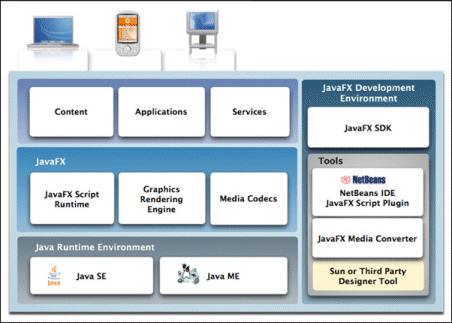
By contrast, Microsoft’s Silverlight does not require the full .NET runtime to be present, making it a much smaller download; and Flash has always been small.
The win for JavaFX is access to all the services of Java:
…JavaFX applications can leverage the power of Java by easily including any Java library within a JavaFX application to add advanced capabilities. This way application developers leverage their investments in Java.
On the other hand, it means a more complex and heavyweight install for users who do not have the right version of Java itself already installed. The Windows JRE is currently around 15MB for the offline version – there’s a 7MB “online” version but my guess is that it downloads more stuff during the install. I suspect that Adobe’s Flash would never have taken off if it had been that large a download.
When I spoke to Sun’s Rich Green earlier this year I recall that he agreed that a small download was important. Maybe I have this wrong, or a smaller runtime is planned for some future date.
It’s interesting that in his official blog post today, Josh Marinacci takes a Java-centric view:
So why am I excited about JavaFX? Because it gives us the freedom to create beautiful and responsive interfaces like never before. This isn’t to say you can’t do it in plain Java. If you’ve been to any of the last 4 JavaOne’s then you’ve seen great interfaces we’ve built. But these demos were a ton of work.
Right; but you could easily build these “beautiful and responsive interfaces” in Flash, both then and now. It’s a question of positioning. Is JavaFX just a new GUI library for Java – which will be welcome, but limited in appeal to the Java crowd? Or a serious alternative to Flash? At the moment, it looks more like the former.
Microsoft’s Mojave Experiment is now online. As I understand it, a group of people with negative perceptions of Windows Vista were shown a forthcoming version of OS code-named Mojave. In the cases Microsoft is choosing to present, they liked it much better – one woman scored Vista 0, and Mojave 10. Finally, it was revealed that Mojave was in fact Vista.
It’s a fun promotion and strikes me as a good effort in persuading people to take another look. Still, a few things puzzle me. The web page is somewhat frustrating, since to get all the content you have to click all of the little boxes – there are 55, but some repeat – but we still never see a complete video of what one of these subjects saw demonstrated.
I’ll describe one of them. Early on in her session (I presume), a woman is asked:
“Have you heard of Windows Vista?”
“Based on all the negative comments and frustrations I’ve seen my husband having to deal with I wouldn’t touch the thing,” she replies.
Now we get a snippet from the end of her session:
“Windows Mojave is actually Windows Vista”
“Oh is it [laughs] … Maybe it has more to do with the user than the application.”
I am going to defend her husband. Sure, users can be unpredictable and frustrating to deal with, but consumer software is meant to be “user-friendly” which means that if someone – and in Vista’s case, many people – have a negative and frustrating experience, then something is wrong with the software. That’s not necessarily Microsoft’s software; it could be third-party drivers, or lack of drivers, or the ugly stuff that gets bundled with a new computer.
Personally I moved to Vista back in 2006 and have never wanted to return to Windows XP. Then again, I did my own clean installs. I’ve also had problems including buggy display drivers flashing the screen, Windows Search causing painful delays in Explorer, stuttering sound with supposedly high-end audio cards, hours spent getting a new laptop ready for use, Explorer wrongly displaying files as music, Media Center corrupting itself, and network weirdness (today) which knocked me off the Internet. Finally, when I compared Vista and XP performance, XP came out noticeably faster.
Few computers operate entirely without problems. Even so, I’ve seen enough to understand why someone might get frustrated; and that’s with clean installs of the OS.
There’s not much wrong with the core of Vista, as demonstrated by the generally solid performance of Server 2008, and now by Mojave. That doesn’t excuse the numerous problems that have spoilt the release. Let’s hope lessons have been learned.
Mitch Barnett has had enough:
I can’t take it anymore. I am re-installing Office 2003 and forgetting about Office 2007. Why? It’s the ribbon man! For all of the usability design, I find it unusable. No offense to Jensen Harris or Microsoft, but for me, the consumer of the product, and after trying it for over a year, I just can’t get used to it.
It is a thoughtful post, mainly about Word, and worth a read if you are interested either in Office or in usability design. His main point is that there are too many features:
Honestly, Word should have been “refactored” into perhaps multiple products or features split into a desktop publishing application or a whole other suite of applications. But instead, the UX team went through an honorable and noble design process of solving the wrong problem.
Trouble is, users are conservative. Lotus tried to re-invent the spreadsheet with Improv, but despite good reviews it failed to compete with 1-2-3, let alone Excel. Another noble failure which comes to mind is OpenDoc:
OpenDoc is a revolutionary cross-platform technology that replaces conventional applications with user-assembled groups of software components. With OpenDoc, users can create virtually any kind of custom software solution.
Wikipedia also describes OpenDoc and why it failed. Evolution, or doing the same thing as before but slightly better, is easier to sell than revolution.
That brings me back to the ribbon. I recorded my first impressions just after the public announcement of the ribbon at PDC 2005:
It’s a bold move for Microsoft. Most people here seem to like the new look, but will the average office worker appreciate or resent these major changes? There is no "classic mode"; you have to use the new interface. If it catches on, it will make near-clones like Open Office look dated; if it’s just too different, it could boost the competition.
My reflection nearly three years later is that – despite Barnett’s comments – the ribbon has proved both less controversial and less revolutionary than I had expected. I’ve had the experience of introducing users to Office 2007, and generally they take a day or two to work out where their favourite features are hidden, and then carry on much as before. Only a minority seem to dislike it as much as Barnett, and Office 2007 seems to have been a success for Microsoft. The ribbon is good marketing, because users can easily tell the difference between this and earlier Office releases.
On the other hand, Microsoft has not convinced the world that the ribbon concept is the future of UI design; and I’ve not detected any great pressure on the developers of Open Office or other popular applications to change to the ribbon style. Here I am typing into Live Writer, which has conventional menus, and it is perfectly comfortable; I’d rather the Writer team worked on features other than a ribbon UI. Sorry, I mean other than an Office Fluent User Interface.
Personally I get on OK with the Office 2007 ribbon, thanks to the Quick Access Toolbar. I also like the way the ribbon is somewhat protected from customisation, so that it is the same from one profile to another. That said, I agree with Barnett that there is too much UI on display, though I am not sure of the solution, and some of the UI decisions seem strange.
I still believe that while the effort to improve usability was genuine, Microsoft was also determined to make Office 2007 distinctive from its rivals in some way that could be patented. The key question: did that constraint weaken the outcome?
Note that Microsoft has hinted at plans for the ribbon that go beyond Office. It may be a core part of the UI in Windows 7.
Hey, I know plenty of developers read this blog. Are you being pressed to implement a ribbon UI for your applications? Or is this top-down initiative passing you by?
What’s a reasonable price for Microsoft Office? An impossible question, of course. It’s mostly decent software (with the exception of Outlook 2007 and its disgraceful performance problems). It has its foibles, but is the best office suite in my opinion; and given the importance of office software to most of us, having the best is arguably worth it almost irrespective of price. No doubt gazillions of investment has gone into Office; but then again, gazillions have been sold.
In reality, Microsoft practices variable pricing. Just like travel companies, it aims to charge what the market will bear at any level. It also ensures that influencers – like software developers, partners or indeed journalists – get it for next to nothing. For example, registered Microsoft partners can get the Action Pack with mountains of software, including Exchange 2007 and 10 licenses for Microsoft Office Enterprise 2007, restricted to “internal-use software for internal business purposes, application development and testing”. The cost varies around the world: in the UK it is £199.00 plus VAT. A bargain.
Home users get a break too. I’ll quote prices from ebuyer.com, a UK retailer with generally keen prices. Office Home and Student 2007 comes with 3 licences for £64.59 plus VAT – that’s just £21.53 each before tax. Now let’s ride the escalator. Business prices start with Office Basic 2007 (just Excel, Word and Outlook) OEM edition. £96.09. OEM means you are only meant to buy it with a new PC, and the license is only valid for the PC on which it is installed; it dies with the PC. Office Small Business 2007 OEM is perhaps reasonable at £122.70 plus VAT – you get Excel, Powerpoint, Publisher, Word and Outlook.
How about an upgrade package? Office Standard 2007 Upgrade (no Access) is £175.41 plus VAT. Getting pricey; but then again Office Standard 2007 complete package (legal in any scenario) is £269.01. You want Access too? Your best unrestricted deal is Office Ultimate 2007 – Access, Excel, InfoPath, Powerpoint, Publisher, Word, Outlook, OneNote, Groove – at £314.39 plus VAT.
Curiously that costs less than what the customer probably asks for – Office Professional 2007 – Access, Excel, Powerpoint, Publisher, Word, Outlook but no OneNote or Groove, which comes in at an eye-watering £397.50 plus VAT.
Ah, but you should get a site license or even Software Assurance. Believe me, it is not much less – unless you are a megacorp or government department and negotiate a special deal.
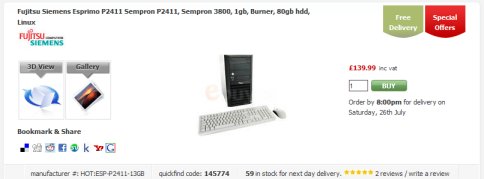
Just to put this into context, I can get a basic PC with Linux for just £119.14 plus VAT – pic below in case you don’t believe me – and an HP office-ready PC with XP Pro for £204.24 plus VAT.
If Office were specialist software with a niche market, I could understand the high prices. But this is commodity software; everyone uses it. In what universe it is worth £397.50 – and I’m sure you could pay more if you worked at it – more then three times the price of a PC which (after adding Windows) would happily run it?
You’d be an idiot to pay that, of course. Except – what choice do you have? If you accept the terms of Microsoft’s strange OEM license, which means that the software is not applicable to an existing PC – and that of the Home and Student license which forbids “commercial use” – then you are stuck with prices from £269.01 and up. Though given the popularity of the OEM editions I suspect that many people take a liberal attitude, or consider that they are “refurbishing” their PCs (which is allowed).
What this means is that the most conscientious or financially careless buyers are paying a price which strikes me as unreasonable. I can understand Microsoft’s reluctance to change this situation; but in time it will have no choice.
I wanted to adapt my Silverlight CRUD sample (which I also ported to Adobe Flex) to fix a glaring weakness, which is that any user can amend any entry.
I decided to add some logic that allows editing or deleting of only those rows created during the current session. The idea is that a user can amend the entry just made, but not touch any of the others.
WCF has its own session management but this is not supported by the BasicHttpBinding which is required by Silverlight.
Fortunately you can use ASP.NET sessions instead. This means setting your WCF web service for ASP.NET compatibility:
[AspNetCompatibilityRequirements(RequirementsMode = AspNetCompatibilityRequirementsMode.Required)]
Then you can write code using the HttpContext.Current.Session object.
This depends on cookies being enabled on the client. In my simple case it worked fine, in both Silverlight and Flex. In a real app you would probably want to use HTTPS.
I’d post the sample but unfortunately my Windows web space doesn’t support WCF.
I wrote up a simple example for The Reg.
As someone has commented, it should work; but I was still pleasantly surprised to find that it succeeded without needing to flatten the WSDL or perform other contortions.
This is essentially the same app as I did in Silverlight; but using Flex instead.