Category Archives: microsoft

Is Silverlight evil?

That’s really the question John Markoff is asking in this New York Times piece about the way the NBC Olympics streaming video is putting Microsoft’s browser plug-in on the map. Someone has even popped up to state that this is another go at technology monopoly:

“They’re still playing the same games,” said Michael R. Nelson, professor of Internet studies at Georgetown University. “It’s a way to lock up the content, and it’s not enabling as much innovation as we would like to see.”

It seems to me that Microsoft cannot win here. If the NBC servers were stuttering then it would prove that Silverlight isn’t up to the job and can’t compete. If Microsoft were not doing Silverlight, it would confirm that the company doesn’t grok the Internet and is still stuck in the world of Windows and Office.

As it is, the NBC Olympics streaming video seems to be working pretty well, judging by reports like this from CNET:

The picture quality is quite spectacular. The mist is so real it could not possibly have been photoshopped in there by the Chinese authorities to provide some extra menacing ambience. This makes YouTube seem like student video.

From a PR perspective, accusations of being evil is probably the best Microsoft can hope for.

But is Silverlight evil? I spoke to Dean Hachamovitch, the IE general manager, at the Mix conference in the Spring. My impression was that Microsoft has back-pedaled on improving browser-hosted JavaScript because it would rather see developers target Silverlight. There is some substance to the idea that Microsoft is promoting its own technology at the expense of open standards.

Still, without Silverlight would we all be using the OGG Theora format and the HTML 5 Video tag? In reality, the alternative is Adobe Flash; and the competition is if anything energising Adobe, which is not a bad thing.

Even if Silverlight achieves its aims, and becomes a widely used cross-platform runtime for web applications, I doubt we will see anything similar to the Windows/Office dominance of the nineties. Microsoft’s investment in Silverlight is conceding the point: that the future belongs to cross-platform clients, zero deployment, and both data and applications in the cloud.

According to Markoff’s piece, Adobe’s Kevin Lynch questions Microsoft’s cross-platform commitment, mentioning:

Microsoft’s decision to reserve certain features like 3-D effects and downloading for the company’s Windows Vista operating system.

I think this is a reference to the full WPF (Windows Presentation Foundation), which only runs on Vista and XP. I’m not sure what the “downloading” bit means; but Lynch is right, in that the relationship between WPF and Silverlight must be a subject of intense debate within Microsoft. Cross-platform .NET is a huge step to take, and there must be internal voices questioning why on earth the company is helping its customers to deploy applications that are not tied to the Windows client.

Still, I think that bridge has now been crossed. Nobody wants to build Internet applications that only work on Windows; it isn’t an option. Therefore I doubt that Microsoft will hobble Silverlight in order to promote WPF; doing so would only help competitors. I may be proved wrong; it’s smart of Lynch to draw attention to Microsoft’s conflicted interests.

Silverlight is great work, and only a little bit evil.

Microsoft Silverlight: 10 reasons to love it, 10 reasons to hate it

A year or so a go I wrote a post called Adobe AIR: 10 reasons to love it, 10 reasons to hate it. Here’s the same kind of list for Microsoft’s Silverlight, based on the forthcoming Silverlight 2.0 rather than the current version. The items are not in any kind of order; they also reflect my interest in application development rather than design. It is not a definitive list, so there are many more points you could make – by all means comment – and it will be interesting to have another look a year from now when the real thing has been out for a while.
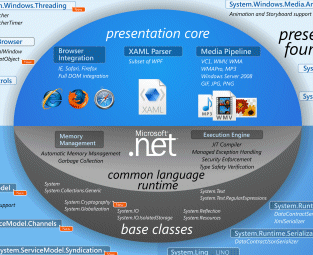
This Silverlight developer chart is available in full on Brad Abrams’ blog here, or in Joe Stegman’s Deep Zoom version here.

The pros…

1. The Silverlight plug-in means developers can target a single, consistent runtime for browser-based applications, rather than dealing with the complexity of multiple browsers in different versions. You also get video and multimedia effects that are hard or impossible with pure HTML and JavaScript; though Adobe’s Flash has the same advantages.

2. Execute .NET code without deploying the .NET runtime. Of course, the Silverlight plug-in does include a cut-down .NET runtime, but instead of dealing with a large download and the complexities of the Windows installer, the user has a small download of about 4MB, all handled within the browser. In my experience so far, installation is smooth and easy.

3. Performance is promising. Silverlight comes out well in this prime number calculator, thanks no doubt to JIT compilation to native code, though it may not compare so well for rendering graphics.

4. Support for Mono (Moonlight) means there will be an official open source implementation of Silverlight, mitigating the proprietary aspect.

5. Silverlight interprets XAML directly, whereas Adobe’s XML GUI language, MXML, gets converted to SWF at compile time. In fact, XAML pages are included as resources in the compiled .XAP binary used for deploying Silverlight applications. A .XAP file is just a ZIP with a different extension. This also means that search engines can potentially index text within a Silverlight application, just as they can with Flash.

6. Third-party component vendors are already well on with Silverlight add-ons. For example, Infragistics, ComponentOne and DevExpress.

7. Take your .NET code cross-platform. With Macs popping up everywhere, the ability to migrate VB or C# code to a cross-platform, browser-based Silverlight client will be increasingly useful. Clearly this only applies to existing .NET developers: I guess this is the main market for Silverlight, but it is a large one. The same applies to the next point:

8. Uses Visual Studio. Microsoft’s IDE is a mature and well-liked development environment; and since it is also the tool for ASP.NET, you can use it for server-side code as well as for the Silverlight client. For those who don’t get on with Visual Studio, the Silverlight SDK also supports command-line compilation.

9. Choose your language. Support for multiple languages has been part of .NET since its beginning, and having the .NET runtime in Silverlight 2.0 means you can code your client-side logic in C#, Visual Basic, or thanks to the DLR (Dynamic Language Runtime) Iron Ruby or Iron Python.

10. Isolated storage gives Silverlight applications local file access, but only in a protected location specific to the application, providing a relatively secure way to get this benefit.

The cons…

1. If Apple won’t even allow Flash on the iPhone, what chance is there for Silverlight?

2. Silverlight is late to the game. Flash is mature, well trusted and ubiquitous; Silverlight only comes out of beta in the Autumn (we hope) in the version we care about – the one that includes the .NET runtime – and will still lack support on mobile devices, even Windows Mobile, though this is promised at some unspecified later date.

3. The design tools are Expression Blend and Expression Design – but who uses them? The design world uses Adobe PhotoShop.

4. While having solution compatibility between Expression Blend and Visual Studio sounds good, it’s actually a hassle having to use two separate tools, especially when there are niggling incompatibilities, as in the current beta.

5. No support for the popular H.264 video codec. Instead hi-def video for Silverlight must be in VC-1, which is less common.

6. It’s another effort to promote proprietary technology rather than open standards.

7. Yes Linux will be supported via Moonlight, but when? It seems likely that the Linux implementation will always lag behind the Windows and Mac releases.

8. Silverlight supports SOAP web services, or REST provided you don’t use PUT or DELETE, but doesn’t have an optimized binary protocol like Adobe’s AMF (ActionScript Message Format), which likely means slower performance in some scenarios.

9. Silverlight is a browser-only solution, whereas Flash can be deployed for the desktop using AIR (Adobe Integrated Runtime). Having said that, yes I have seen this.

10. You have to develop on Windows. This is particularly a problem for the Expression design tools, since designers have a disproportionately high number of Macs.


SQL Server 2008 is done

Microsoft has announced that SQL Server 2008 is released to manufacturing – ie. the bits are done, even if you can’t buy it yet. MSDN subscribers can download it now.

This is the product that was “launched” back in February; it’s been a long delay but I get the impression that the SQL team likes to wait until its release really is ready.

SQL Server 2008 is more like a suite of products than a single product now. It has a large range of editions from Compact to Enterprise, and product areas like Analysis Services and Reporting Services are distinct from the core engine.

The pieces that interest me most are the spatial data types, sparse columns, FILESTREAM data type, and the various object-relational layers including LINQ, Entity Framework, ADO.NET Data Services, and the ongoing work with SQL Server Data Services (which is far from done yet).

DBAs will likely have a very different view of what is important, as will Business Intelligence specialists.

SQL Server has prospered by being cheaper than than the likes of Oracle and DB2, and by integrating smoothly with Windows and Active Directory. I wonder if it will feel pressure from even more cost-effective open source offerings like MySQL, as they become more Enterprise-ready?

Office 2007 ODF support: my guess is it will be good

More details are emerging about the ODF converter which will be in Office 2007 SP2, set for release next year. Doug Mahugh’s post outlines the architecture and explains how the converter will deal with compatibility issues.

I want to highlight the section that describes how the converter is implemented:

Word, Excel and PowerPoint have a Model-View-Controller design. The in-memory representation of the document, or Model, is designed to facilitate document revision and display functions and includes concepts which are never saved to the file, such as the insertion point and the selection.

The persistence code converts this in-memory representation to and from some sort of the disk file based representation. Office 2007 already had code to support a number of angle-brackety persistence formats including HTML and OOXML. When we built in support for ODF, we added it in that area of our code.

That suggests deep integration, and a converter that has good chances of working smoothly and quickly – unlike the clunky open source translator which Microsoft sponsored, which is based on XSLT.

Users also have the option of Sun’s plug-in, which is based on Open Office code.

It seems that Microsoft is aiming to make Office 2007 a good ODF citizen. Will that impede adoption of Microsoft’s own OOXML format? Well, I guess OOXML will still be the default, and will have the best support for Office-specific features. Another thing to bear in mind is that OOXML was designed with Office specifically in mind. Potentially troublesome creatures like very large Excel spreadsheets may well perform best with OOXML. Another point is that Microsoft’s server products, where they exploit XML documents, are likely to work best with OOXML. In other words, there are likely to be advantages in OOXML within enterprises that use Microsoft’s platform.

Still, strong support for ODF by default in Office will be a significant boost for the OASIS format. Microsoft is protecting its very profitable Office sales against the risk of being dropped for lack of ODF compatibility.

Technorati tags: , , , ,

Innovative multi-user Windows XP system may breach Microsoft license

I was asked to review an unusual system which lets multiple users run concurrent sessions on Windows XP. MiniFrame’s SoftXPand lets up to 8 users plug mice, keyboards and displays directly into a Windows PC, each with their own desktop. It makes a bit of a tangle of USB expanders and cables, but it’s wildly efficient, and unlike conventional thin clients it enables applications to use hardware accelerated graphics. Schools which thought they only had the budget for a single PC are able to support six users. News like this travels fast, and it has apparently been adopted by 20% of primary schools in Derbyshire, where the main UK distributor is based. My review for IT Pro is here.

But surely the EULA for Windows XP doesn’t allow that kind of use? By default XP won’t allow more than one session, though there are registry hacks which enable it. I asked Microsoft, which gave me a comment from Michala Wardell, head of licensing and anti-piracy, Microsoft UK:

According to Microsoft’s license agreement, each added work station represents a new way of interacting with the software. As such, using hardware and software to effectively extend a single license to cover multiple users is a clear violation of this agreement. We urge customers to stay clear of this as they run the risk of non-compliance.

MiniFrame’s CEO Eli Segal says this is all about new licensing models:

MiniFrame has not been approached by either Michala Wardell or by any other Microsoft representative. We are therefore obviously not working with them on any licensing issues, as being claimed by Michala Wardell. MiniFrame has a very clear third party licensing policy: each EULA (End User Licensing Agreement) of any third party software provider should be respected by users, and with no exception to Microsoft. Virtualization has become mainstream, and I’m sure that licensing issues are being considered by all industry players, as well as by Microsoft, trying to shape a new model of licensing (EULA).

I’m no lawyer so I’m just passing the comments on – they are also quoted in full in the review – though when I saw the system I was surprised that it used Windows XP and not Windows Server. Further, it is not really virtualization, it is much more like running multiple remote desktop sessions, but without the remote bit. MiniFrame even has an article explaining why SoftXPand is not a virtual machine.

Still, I hope Microsoft doesn’t try and squash it out of existence. In the right context the system saves power and long-term there is less hardware to scrap, both issues of increasing importance. This is not the moment for Microsoft to insist that an organization replaces one PC with six, or to disappoint all those primary school kids.

More Oslo hints in PDC schedule

Wondering what exactly Microsoft’s “Oslo” is? Here’s a few hints from the PDC 2008 schedule:

A lap around Oslo

"Oslo" is the family of new technologies that enable data-driven development and execution of services and applications. Come and learn how to capture all aspects of an application schematized in the "Oslo" repository and use "Oslo" directly to drive the execution of deployed applications.

Oslo: The language

“Oslo" provides a language for creating schemas, queries, views, and values. Learn the key features of the language, including its type system, instance construction, and query. Understand supporting runtime features such as dynamic construction and compilation, SQL generation, and deployment. Learn to author content for the "Oslo" repository and understand how to programmatically construct and process the content.

Technorati tags: ,

JavaFX – just for Java guys?

JavaFX is Sun’s answer to Flash and Silverlight, and it’s partially open source under the GPL. I’ve just downloaded the bundle of NetBeans plus JavaFX SDK. JavaFX Script is a new language for creating rich multimedia effects. I’ve also downloaded “Project Nile”, which includes “a set of Adobe PhotoShop and Adobe Illustrator plug-ins that allow graphics assets to be easily exported to JavaFX applications”. Unlike Microsoft, Sun is choosing to work with the designer’s existing favourite tools rather than trying to wrench them away to a brand new set (Expression).

According to Sun JavaFX is happening quickly: it is promising “Version 1.0 of JavaFX desktop runtime by the fall of 2008”.

The bit that makes me sceptical, aside from the speed of events, is that if I’m reading the following diagram right, users will require both the Java Runtime Environment (could be Java ME) and the JavaFX runtime in order to enjoy the results:

By contrast, Microsoft’s Silverlight does not require the full .NET runtime to be present, making it a much smaller download; and Flash has always been small.

The win for JavaFX is access to all the services of Java:

…JavaFX applications can leverage the power of Java by easily including any Java library within a JavaFX application to add advanced capabilities. This way application developers leverage their investments in Java.

On the other hand, it means a more complex and heavyweight install for users who do not have the right version of Java itself already installed. The Windows JRE is currently around 15MB for the offline version – there’s a 7MB “online” version but my guess is that it downloads more stuff during the install. I suspect that Adobe’s Flash would never have taken off if it had been that large a download.

When I spoke to Sun’s Rich Green earlier this year I recall that he agreed that a small download was important. Maybe I have this wrong, or a smaller runtime is planned for some future date.

It’s interesting that in his official blog post today, Josh Marinacci takes a Java-centric view:

So why am I excited about JavaFX? Because it gives us the freedom to create beautiful and responsive interfaces like never before. This isn’t to say you can’t do it in plain Java. If you’ve been to any of the last 4 JavaOne’s then you’ve seen great interfaces we’ve built. But these demos were a ton of work.

Right; but you could easily build these “beautiful and responsive interfaces” in Flash, both then and now. It’s a question of positioning. Is JavaFX just a new GUI library for Java – which will be welcome, but limited in appeal to the Java crowd? Or a serious alternative to Flash? At the moment, it looks more like the former.

Technorati tags: , , ,

Analysing Mojave: is Vista really that good?

Microsoft’s Mojave Experiment is now online. As I understand it, a group of people with negative perceptions of Windows Vista were shown a forthcoming version of OS code-named Mojave. In the cases Microsoft is choosing to present, they liked it much better – one woman scored Vista 0, and Mojave 10. Finally, it was revealed that Mojave was in fact Vista.

It’s a fun promotion and strikes me as a good effort in persuading people to take another look. Still, a few things puzzle me. The web page is somewhat frustrating, since to get all the content you have to click all of the little boxes – there are 55, but some repeat – but we still never see a complete video of what one of these subjects saw demonstrated.

I’ll describe one of them. Early on in her session (I presume), a woman is asked:

“Have you heard of Windows Vista?”

“Based on all the negative comments and frustrations I’ve seen my husband having to deal with I wouldn’t touch the thing,” she replies.

Now we get a snippet from the end of her session:

“Windows Mojave is actually Windows Vista”

“Oh is it [laughs] … Maybe it has more to do with the user than the application.”

I am going to defend her husband. Sure, users can be unpredictable and frustrating to deal with, but consumer software is meant to be “user-friendly” which means that if someone – and in Vista’s case, many people – have a negative and frustrating experience, then something is wrong with the software. That’s not necessarily Microsoft’s software; it could be third-party drivers, or lack of drivers, or the ugly stuff that gets bundled with a new computer.

Personally I moved to Vista back in 2006 and have never wanted to return to Windows XP. Then again, I did my own clean installs. I’ve also had problems including buggy display drivers flashing the screen, Windows Search causing painful delays in Explorer, stuttering sound with supposedly high-end audio cards, hours spent getting a new laptop ready for use,  Explorer wrongly displaying files as music, Media Center corrupting itself, and network weirdness (today) which knocked me off the Internet. Finally, when I compared Vista and XP performance, XP came out noticeably faster.

Few computers operate entirely without problems. Even so, I’ve seen enough to understand why someone might get frustrated; and that’s with clean installs of the OS.

There’s not much wrong with the core of Vista, as demonstrated by the generally solid performance of Server 2008, and now by Mojave. That doesn’t excuse the numerous problems that have spoilt the release. Let’s hope lessons have been learned.

Technorati tags: , , , ,

Nearly three years on, what’s the verdict on the Office 2007 ribbon?

Mitch Barnett has had enough:

I can’t take it anymore. I am re-installing Office 2003 and forgetting about Office 2007. Why? It’s the ribbon man! For all of the usability design, I find it unusable. No offense to Jensen Harris or Microsoft, but for me, the consumer of the product, and after trying it for over a year, I just can’t get used to it.

It is a thoughtful post, mainly about Word, and worth a read if you are interested either in Office or in usability design. His main point is that there are too many features:

Honestly, Word should have been “refactored” into perhaps multiple products or features split into a desktop publishing application or a whole other suite of applications. But instead, the UX team went through an honorable and noble design process of solving the wrong problem.

Trouble is, users are conservative. Lotus tried to re-invent the spreadsheet with Improv, but despite good reviews it failed to compete with 1-2-3, let alone Excel. Another noble failure which comes to mind is OpenDoc:

OpenDoc is a revolutionary cross-platform technology that replaces conventional applications with user-assembled groups of software components. With OpenDoc, users can create virtually any kind of custom software solution.

Wikipedia also describes OpenDoc and why it failed. Evolution, or doing the same thing as before but slightly better, is easier to sell than revolution.

That brings me back to the ribbon. I recorded my first impressions just after the public announcement of the ribbon at PDC 2005:

It’s a bold move for Microsoft. Most people here seem to like the new look, but will the average office worker appreciate or resent these major changes? There is no "classic mode"; you have to use the new interface. If it catches on, it will make near-clones like Open Office look dated; if it’s just too different, it could boost the competition.

My reflection nearly three years later is that – despite Barnett’s comments – the ribbon has proved both less controversial and less revolutionary than I had expected. I’ve had the experience of introducing users to Office 2007, and generally they take a day or two to work out where their favourite features are hidden, and then carry on much as before. Only a minority seem to dislike it as much as Barnett, and Office 2007 seems to have been a success for Microsoft. The ribbon is good marketing, because users can easily tell the difference between this and earlier Office releases.

On the other hand, Microsoft has not convinced the world that the ribbon concept is the future of UI design; and I’ve not detected any great pressure on the developers of Open Office or other popular applications to change to the ribbon style. Here I am typing into Live Writer, which has conventional menus, and it is perfectly comfortable; I’d rather the Writer team worked on features other than a ribbon UI. Sorry, I mean other than an Office Fluent User Interface.

Personally I get on OK with the Office 2007 ribbon, thanks to the Quick Access Toolbar. I also like the way the ribbon is somewhat protected from customisation, so that it is the same from one profile to another. That said, I agree with Barnett that there is too much UI on display, though I am not sure of the solution, and some of the UI decisions seem strange.

I still believe that while the effort to improve usability was genuine, Microsoft was also determined to make Office 2007 distinctive from its rivals in some way that could be patented. The key question: did that constraint weaken the outcome?

Note that Microsoft has hinted at plans for the ribbon that go beyond Office. It may be a core part of the UI in Windows 7.

Hey, I know plenty of developers read this blog. Are you being pressed to implement a ribbon UI for your applications? Or is this top-down initiative passing you by?