Category Archives: microsoft

Digg-style bug reports = great feedback

Long Zheng’s Windows UX Taskforce is notable for several reasons. Zheng devised the site in order to give Microsoft feedback on quirks and annoyances in the Windows Vista user interface. He hid it by designing an application that lets users promote or demote user reports, Digg-style. To give you an idea, top of the list right now is that bewildering dialog that appears when trying to safely remove a USB thumb drive card reader – with 262 votes.

So the site is notable, first, for what it says about the Windows Vista UI; second, for what it says about the number of people who care about it and are willing to submit detailed feedback; and third, because it shows what a great way this is for managing bug reports and feature requests.

Actually, Microsoft already has something along these lines, called Connect. It’s fascinating to contrast Zheng’s quickly-assembled but easy to use site, which is attracting lots of users, with Microsoft’s site that is slower, more complex, and less compelling. It’s incomplete too. How do I submit feedback for Microsoft Word, for example?

It strikes me that software vendors have just been shown a simple and effective way to improve their products. I wonder how many will take it up?

Simple CRUD with Silverlight

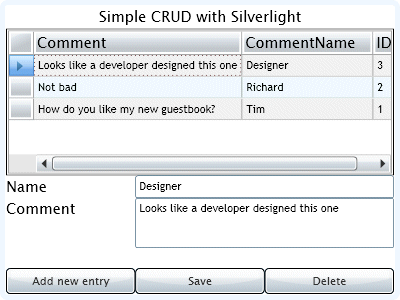
I spent a couple of hours putting together a simple CRUD (Create, Retrieve, Update, Delete) application with Silverlight 2.0 beta 2.

Most of the examples I’ve seen use LINQ to SQL; that’s fine, but I wanted to do something without that intermediate layer. Having said that, I ended up in effect writing my own object-relational mapper. Still, it’s nice to know exactly what the code is doing.

I’ve described the project in a little more detail here.

Silverlight developer reference poster shows off DeepZoom

The developer reference poster here shows off DeepZoom as well as providing a handy guide to what is in Silverlight 2.0. Thanks to Joe Stegman.

Tip: use the mouse scroll wheel to zoom in and out; click and drag to move round the poster.

What if you have no scroll wheel? I tried this on a Mac. You can actually single or double-click to zoom in. To zoom out without the scroll wheel … errrmm – you refresh the page. I can’t figure out an alternative.

One of the things I dislike about many Flash and Silverlight apps is the lack of a context menu on right-click. That is, you get a context menu, but it is for configuring the player. This is a case in point: it needs Zoom in and Zoom out on a right-click menu. And keyboard shortcuts. The problem isn’t inherent to DeepZoom, but needs a bit of extra work in the application code.

Technorati tags: , , ,

Bet on Entity Framework, not LINQ to SQL

So says Roger Jennings in his post Is the ADO.NET team abandoning LINQ to SQL? His main points in favour of ADO.NET Data Services (formerly Astoria) Entity Framework:

  • It is the focus of more energetic development
  • It already has richer features
  • It supports multiple database engines, not just SQL Server

As Andres Aguiar, software architect at Infragistics, notes in a comment, this has a lot to do with internal politics at Microsoft:

The Data Programmability Team never owned LinQ to SQL, it was owned by the C# team. That’s why we have two O/R mappers, both teams wanted to ship theirs. The C# team looks to be thinking about functional programming now. The Data Programmability will always be thinking about data. That’s why the EF [Entity Framework] is the safe choice.

Although LINQ to SQL is now (apparently) owned by the SQL Server team, it still doesn’t seem plausible or sensible that both will get equal attention. We also learn from Matt Warren that LINQ to SQL was deliberately tied to SQL Server only:

LINQ to SQL was actually designed to be host to more types of back-ends than just SQL server. It had a provider model targeted for RTM, but was disabled before the release. Don’t ask me why. Be satisfied to know that is was not a technical reason.

Note that this wasn’t necessarily a plot in favour of SQL Server world dominance; keeping the entire stack as a Microsoft stack no doubt makes support easier. That said, to me this is the big weakness of LINQ to SQL.

I was impressed by Astoria when I first saw it at the European Tech Ed in 2007. I am not surprised it is gaining ground.

Expression Blend 2.5 problems with Silverlight 2.0 Beta 2

I hit a worrying error in Expression Blend 2.5 June 2008 preview. In search of a good screenshot, I opened the new Clock sample, and got this result:

The same XAML compiles and runs fine in Visual Studio 2008 with the latest Silverlight 2.0 Beta 2 tools.

Note that if Expression can’t render the XAML, none of its design tools can be used at all.

So what is going on here? Don’t Expression Blend and Visual Studio share the same parser? This kind of problem would soon torpedo any notion of designers and developers working seamlessly on the same code.

I got my screenshot by temporarily modifying the offending code.

Fixing a Silverlight 2.0 WCF reference in a VB application

Another in my recent series on getting Silverlight 2.0 beta 2 working.

If you create a WCF web service for Silverlight, it’s well known that on the server side you have to change the binding to basicHttpBinding (or use the new Silverlight-enabled WCF service). Then you can use the Add Reference wizard in your Silverlight application and code against the generated ServiceClient.

This works in C#, but in VB you may hit this error at runtime:

The error is “Could not find endpoint element” etc, and it refers to your “client configuration section”.

I fixed this by comparing the ServiceReferences.ClientConfig file generated in a VB project with that for a C# project. Check the Contract attribute of the endpoint element. It should be qualified with the full namespace, by default the name of your app. In this example, it would be:

contract="RegSilverlightDemoApp.RegService.IRegService"

However, the VB wizard omits the first part of the namespace; then at runtime, it can’t find the service.

Evidence, perhaps, that C# is the language of choice in Microsoft’s developer division.

More Silverlight, Visual Studio setup hassles

I thought I’d fixed my Silverlight 2 Beta 2 installation; but I had not.

I ran into the issues described here, specifically:

  1. Error “Object reference not set to an instance of an object” when adding a WCF service
  2. Silverlight app cannot see WCF services in same solution
  3. Error “Unable to find ‘DynamicTypeService’” when clicking the Advanced button in the Add Service Reference dialog.
  4. Visual Studio crashing on exit

Here’s what fixed it for me. First, I attempted to debug Visual Studio while adding a WCF service and spotted an exception related to version control. I discovered that Visual Studio was set to use Team Foundation Server as the Source Control plug-in, even though my Team Foundation Server is offline. I don’t know if the Silverlight install somehow reset this, as I thought I’d set it to None in Tools – Options – Source Control – Plug-in Selector; but I changed it back to None and that fixed the Object Reference error.

Unfortunately it did not fix the second problem. Following a tip in the thread mentioned above, I moved the file:

\Program Files\Microsoft Visual Studio 9.0\Common7\IDE\Microsoft.VisualStudio.ServicesProxy.dll

Then I uninstalled Microsoft Silverlight Tools Beta 2 for Visual Studio 2008. Then I reinstalled it (no reboot). Everything works.

The Microsoft.VisualStudio.ServicesProxy.dll is replaced with a new version.

An indicator of this problem is the size of your Silverlight Tools install in Control Panel – Programs and Features. If it is 1.14MB you may have the problem. If it is 1.17 or 1.18MB you probably do not have the problem. The size of my install increased from 1.14MB to 1.17MB on reinstall. A theory is that if the Silverlight Tools installer sees the ServicesProxy.dll, it doesn’t install some other stuff that in fact it should install.

Upgrading to Silverlight 2.0 Beta 2? Proceed with care

I dived straight into the Silverlight 2.0 Beta 2 download, and soon hit this dialog:

I discovered that I should have read this guide to installation by Microsoft’s Bradley Bartz. It is a little arduous: remove KB949325 (which requires the Visual Studio installation media) as well as any previous Silverlight SDK and tools, apply Visual Studio 2008 SP1 Beta if you have not yet done so, then install Silverlight. Otherwise you may get an error relating to silverlight_uninstallrtmpatches.exe as I did.

I’m grateful to BradleyB. I admit, the issue is also noted on the download page:

If you have previously installed Silverlight Tools Beta 1, you must uninstall KB949325 before installing Visual Studio 2008 SP1 Beta.

I should have read it more carefully.

Update

In my case, it was worse than that. I could not find KB949325 in the list of installed programs, but the Visual Studio SP1 Beta install still failed. I found this post by Heath Stewart. I had to follow the manual steps with reg.exe; the utility did not work for me. I also found that KB945140, which is the SP1 Beta, was actually listed as installed in Programs in Control Panel, but only for the Visual Studio 2008 Shell (Integrated mode). I removed that too. Eventually, SP1 Beta installed successfully, following which the Silverlight SDK and Blend 2.5 installed without further issue.

Stewart has not responded to Will Dean’s comment on his post:

It sometimes feels that VS + .NET FX are in a death-spiral of an ever-increasing prevalence of this sort of issue.   

For more evidence, see Aaron Stebner’s worrying posts about problems with the installation of .NET Framework 3.5 Client Profile. Apparently this beta, once installed, makes it hard to install other versions of .NET or applications which depend on them; and uninstall is a multi-step process that has to be done in a certain order.

The only positive thought I can muster from all these complications is that this is the kind of issue that running apps in the browser avoids, at least for users rather than developers. That assumes that the install for the Silverlight runtime is bulletproof; I’ve been impressed with it so far, though I’ve heard of some users having problems. The Flash runtime isn’t immune either; I’ve had issues installing the latest security update and resorted to Adobe’s Flash uninstaller.

Missing from Bill Gates Tech Ed keynote: Live Mesh

I watched the video of Bill Gates keynote at Tech Ed yesterday. You can also read the transcript.

I enjoyed the second half more than the first. Gates can rarely resist giving a potted history of computing in his keynotes – maybe because of his own role in that history – but I find it a snooze. It also tends to reinforce the impression that Microsoft is yesterday’s company.

Gates shaped his keynote, which was on the subject of application development, around four themes:  Presentation, Business Logic, Data Access and Web Services. In presentation we got a plug for WPF and Silverlight – more the latter, with a nice demo by Soma Somasegar but nothing we haven’t seen before from Mix08 and the like.

On the business logic theme, we got a demo of a new tool called the Architecture Explorer, said by Brian Harry to be part of the Oslo wave. Microsoft will be pushing Oslo strongly at PDC later this year. Separately, I noticed that the Microsoft’s software factories guy, Jack Greenfield, has recently posted about how his team has moved from Visual Studio Team Architect to Developer and Platform Evangelism. Now I may be wrong here; but my guess is that Microsoft had a huge internal debate about whether to bet on software factories or modelling as the next step in enterprise application development, and that software factories is being sidelined in favour of Oslo. Hence statements like this:

Visual Studio Team Architect team remains actively committed to supporting Software Factories, as do the rest of Visual Studio Team System, the Visual Studio Ecosystem team and patterns & practices.

Phrases like “actively committed” usually mean the opposite of what they say. We’ll see; but note that we got Oslo in the Gates keynote, not factories.

Then we got data access, with Dave Campbell on SQL Server Data Services and the Sync framework. I think this is cool stuff; but having seen it at Mix (where I talked to Campbell and liked what he had to say) it was not new to me.

Finally,  web services. This is where Gates talks about Live Mesh, right? Wrong. Gates gave a nod to cloud computing as the future:

I can run Exchange on premise, or I can connect up to it as a service. But even at the BizTalk level, we’ll have BizTalk Services. For SQL, we’ll have SQL Server Data Services, and so you can connect up, build the database. It will be hosted in our cloud with the big, big data center, and geo-distributed automatically.

but that was it, it was on to fun robotics. I found this a surprising omission. As I see it, Mesh + Silverlight (plus of course things like SSDS) forms Microsoft’s cloud computing development platform. However, I imagine that like modelling vs software factories this is a matter of debate within the company as well as outside; perhaps we are seeing the Gates view vs the Ozzie view here.

By the way, I got my official Mesh sign-up invite this morning and I have the impression anyone can sign up now; why not try it?