Category Archives: microsoft

Tech Ed news: Silverlight 2.0 goes live, more Oslo hype

I’m not at Tech Ed in Orlando, but was ready to watch the Bill Gates keynote which this web site tells me starts at 8.30am Eastern – trouble is, that was 45 minutes ago, and the webcast still just plays a pretty tune and then stops. Not a great way to showcase Silverlight live streaming.

Fortunately the press release has gone up. Gates has announced Silverlight 2 beta 2 (this is the one with .NET runtime included), complete with a Go Live license. Microsoft has also released Expression Blend 2.5 June 2008 Preview and Microsoft Silverlight Tools beta 2 for Visual Studio 2008, so we should be all set to code and go.

Other highlights: IE 8 Beta 2 in August, new preview code of project “Velocity” for caching high-scale apps, and more hype for Oslo, Microsoft’s “unified modeling platform”:

Oslo will include visual modeling and composition tools, a foundational repository built on SQL Server 2008 for managing application metadata, and a new, declarative modeling language to enable interoperability of models between tools and domain-specific modeling notations.

I don’t doubt that Microsoft is serious about Oslo; others at Microsoft has confirmed that this is a major initiative. However, I am naturally sceptical about whether Oslo will achieve its goals. Most other grand model-driven development products have failed; why will this be different?

Adobe’s Acrobat.com connects with online storage, collaboration

Adobe has launched Acrobat.com, a free collaboration service now in beta. On the site, you can store up to 5GB of files, create documents with the Buzzword online word processor, share documents either with the world or with specified email addresses (the recipient must sign in with an Adobe account), and convert documents to PDF online. The PDF conversion is a trial limited to 5 documents, unless you subscribe to an online service, or buy Acrobat 9 and convert on the desktop (of course, there are plenty of other ways to convert to PDF these days). There is also an online conferencing application called Connect Now, which you can use for meetings with up to two other participants.

Connect Now is brilliant; I’m now yet convinced by the other services. Don’t get me wrong; 5GB of free online space is a fantastic offer, though it happens to be the same as Microsoft offers in Skydrive. However, everything is implemented in Flash, and this can be annoying. I find myself trying to right-click items to get a context menu; this doesn’t work, and I just get the Flash player settings menu. Right-click works OK in Google Docs, which also lets you create spreadsheets and presentations online, not just word processor documents. What is the compelling reason to use Acrobat.com, as opposed to these other services? And what is the business model – will Adobe go full tilt at the online productivity market, and offer Acrobat.com subscriptions for the Enterprise? And finance the free consumer/small biz services with advertising? I guess that is likely; but it is not good enough for those kinds of moves yet.

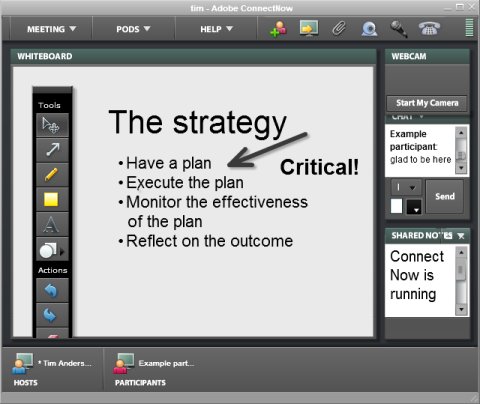
Connect Now on the other hand is a great conferencing system; Flash makes sense here, because it removes much of the friction that I’ve seen with other systems. You get chat; whiteboard with elegant drawing tools; webcam; shared notes; and screen sharing. The application can run with within or outside the browser. I presume it a cut down version of Connect Pro, formerly Breeze. I can see wide take-up for this; useful in its own right, and a good taster for the full version.

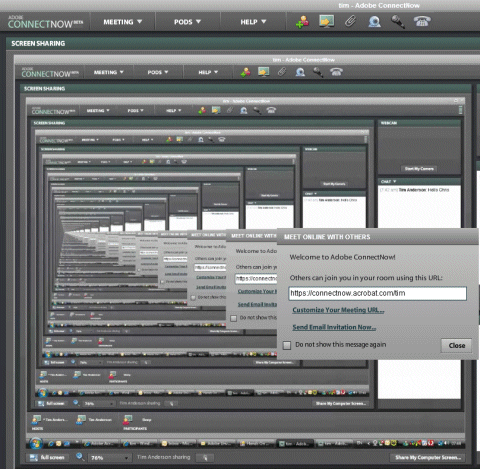
Screen sharing is a powerful feature, though I had a few problems on my first attempt, pretty though:


My second attempt worked fine.

Google App Engine line endings snaglet exposes Windows/Unix disconnect

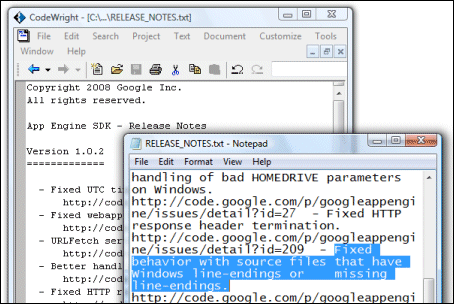
This amused me:

In case you can’t see the image, it shows the release notes for the Google App Engine SDK, which I’m trying right now. The notes say:

Fixed behavior with source files that have Windows line-endings or missing line-endings.

With a nice self-referential touch, the notes reveal the very problem they are describing. On Windows, a line ending is usually encoded by two characters (carriage return and line feed), whereas on Unix (and similar systems like Linux and Mac OS 10) a single line feed character is used. Notepad is the default viewer for text files on Windows, and displays these Google release notes with scrambled formatting. A programmer’s editor like CodeWright1 understands both conventions and the file displays fine.

It is a minor annoyance, but exposes a deeper problem. There are two factors at play here. One is that the open source world has tended to use Unix-like operating systems (maybe because open source operating systems are Unix-like); the other is that the favourite client OS among Web 2.0 geeks is the Mac. It’s likely therefore that most or all the folk working on App Engine do not use Windows and do not see this issue. They have taken the trouble to support Windows, but the Windows platform is just a little alien. The poor experience you get when double-clicking a readme is a symptom.

Another example is in the notes describing the options for the dev_appserver.py script, used to run the SDK. It says:

–datastore_path=PATH      Path to use for storing Datastore file stub data. (Default /tmp/dev_appserver.datastore)

What was that default again? There is no /tmp directory on Windows. I am sure the script uses a sensible default on Windows; but it will be different from what these notes say.

Let me add that the Unix directory structure is generally nicer to work with than Windows, with its archaic drive letters; and that I see little sense in the carriage return character being needed to end a line (it’s a throwback to the typewriter). Windows is also more wrong that right about using the backslash as a path divider (all IBM’s fault, apparently).

As a developer, I perceive these things as a small nudge that I might not be using the best OS for the task in hand. That’s unfortunate for Microsoft, and I’m not sure how it can fix it – though getting Notepad to respect Unix line endings would be a start.

1CodeWright is/was an excellent editor that was acquired and killed by Borland; unfortunately it does not work properly on Vista though I still find it handy occasionally.

Ruby on Rails on .NET

Microsoft’s John Lam reports:

IronRuby dispatched some simple requests through an unmodified copy of Rails a few days ago. Today, we’re going to show off our progress live at RailsConf.

He adds that performance is terrible; so you might not want to migrate your project just yet. Why bother? Mainly, to get Rails productivity plus access to .NET libraries – in other words, integration with Microsoft’s platform.

Technorati tags: , , , ,

Microsoft’s Misunderstood Misunderstandings

Microsoft has revised its document describing Five Misunderstood features in Windows Vista.

I’m not going to analyse the revisions, as others have done that, though I will mention in passing that Adobe Acrobat’s Compare Documents feature does a nice job of showing the revisions:


However, I would like to highlight this comment to Steven Poole’s post, from Microsoft’s Brandon Paddock:

Those changes were made because the original article was written without the involvement of the engineering teams and so it contained a great deal of inaccuracy.

Quite a confession.

The trouble is, even fixing inaccuracies doesn’t rescue the document from its faulty presumption that Vista’s poor public image is all down to misunderstandings. That ain’t straight talking. That’s spin.

The irony is that some features of Vista are misunderstood – UAC especially. Here’s some real straight talking on the subject, from Marc Russinovitch:

The bottom line is that elevations were introduced as a convenience that encourages users who want to access administrative rights to run with standard user rights by default. Users wanting the guarantees of a security boundary can trade off convenience by using a standard user account for daily tasks and Fast User Switching (FUS) to a dedicated administrator account to perform administrative operations. On the other hand, users who want to forgo security in favor of convenience can disable UAC on a system in the User Accounts dialog in the Control Panel, but should be aware that this also disables Protected Mode for Internet Explorer.

Perfect.

Technorati tags: , , , ,

Danny Thorpe back at Microsoft

Danny Thorpe, best known for his work on Delphi at Borland, is returning to Microsoft:

I will soon be jumping back into the Microsoft maelstrom, this time in the Visual Studio / Developer Division (devdiv) team. I will again be telecommuting from Santa Cruz. I’ll be part of a new incubation team composed of Chuck and a few other legendary devdiv veterans (I’m not sure I can say who yet) working on stuff to make accessing Windows Live services easier for developers.

I have had great respect for Thorpe ever since reading his book on Delphi Component Design, which despite its age is still a good read if you want to know how the Visual Component Library in Delphi hangs together. His career has been a bit butterfly of late – from Delphi to Google to work on Gears, then Microsoft developing Live Services, then working on browser plugins at cooliris (makers of PicLens); and now back to Microsoft.

If Microsoft is to bring its Live Services into wide use, strong Visual Studio integration is a must; I guess this may be what his new role is all about.

Microsoft wants to end the Windows release circus?

I’ve just received a press release summarizing what Microsoft is willing to say about Windows 7. Perhaps the most interesting comment is this one:

  • Microsoft’s goal looking forward is to focus on building Optimized Desktop infrastructures including an OS versus single point-in-time OS releases.

That sounds sensible. It also suggests that Microsoft is beginning to treat its client OS as mature, at least when it comes to the kernel and core. The problem with big OS releases, as we saw with Vista, is getting the drivers lined up and working properly. Treating OS upgrades more casually is fine as long as the drivers continue to work.

What else? Here are a few more snippets:

  • Windows 7 will ship around January 2010. Actually, the release says “approximately three years after the general availability of Windows Vista (January 30, 2007)”. Of course January is a terrible month to release a new OS; Vista ended up there by mistake. More likely is September 2009 (optimistic) or say  June 2010 (realistic).
  • Windows 7 will be available in both 32 and 64-bit.
  • Microsoft “will be baking touch right into the OS …the user interface is designed to make touch a natural part of the user experience – even on the smallest laptops.”
  • The goal with Windows 7 is that it will run on the same hardware as Windows Vista and that the applications and devices that work with Windows Vista will also be compatible with Windows 7.

What’s coming in Windows? Check the PDC 2008 agenda

Microsoft’s Professional Developer’s Conference is traditionally where it shows developers its forward plans. Sometimes these do not work out as expected. Notorious examples include Hailstorm web services, and pre-reset Vista, in which Windows Presentation Foundation was more at the core, and which included the WinFS smart file system.

It follows that the just published session list for the PDC should not be treated as an infallible guide to the future. Still, there are interesting snippets here:

  • .NET and ASP.NET for Windows Server Core
  • Silverlight for Mobile devices
  • Touch computing in Windows 7
  • A “new networking API with support for building SOAP based web services in native code”
  • and of course the Live Mesh developer platform

Mac users refusing to install Silverlight

The New York Times has run into a hail of criticism from Mac users over its use of Microsoft’s Silverlight plug-in for its offline reader, Times Reader, in its new Mac version, now in beta.

I took a careful look at the comments. There are 122 at the time of writing, of which around half are complaints about the choice of Silverlight. Here’s a few:

Nope. Not going to use *anything* from Microsoft. If reading the NYT requires MS products then, for this reader, goodbye NYT.

Silverlight? Why? I’m using Mac to escape Microsft’s crappy technology.
No thanks

PLEASE listen to your readers. Macs have a long, successful history of superior page layout, design, and rendering of published content. There is absolutely no reason to require a Microsoft plugin to display text and graphics on a Mac.

Silverlight will not install on Firefox on an Intel Mac (all versions current.) Why, O, why did you choose to go with a proprietary Microsoft technology with all the predictable Microsoft flaws and prejudices?

I was really looking forward to this, but I cannot support Microsoft’s Silverlight platform. Not only is it proprietary, but it runs more slowly than any alternative (Java, Flash) and it does not support end-user choice of browsers (Firefox, Safari not supported).

By way of balance, there are some dissenting voices:

Sometimes I find it hard to admit I’m a mac user. What a community of loud close-minded drama queens. “I’m canceling my subscription because you built an app that requires silverlight.” Please.

I took a look. My Mac is running Leopard (OS 10.5) and Safari is the default browser. I downloaded the beta and ran the installer. It duly invited me to install Silverlight:

Clicking the button took me to Microsoft’s download page, where I clicked the big button:

Downloaded, opened the download, and Silverlight installed:

Installation was quick, and at the end invited me to restart the browser – though it seemed to do so automatically. Microsoft’s web page now informed me that Silverlight was installed and showed an animation.

At this point, I was able to continue the Times Reader installation, which said “A suitable version of Silverlight has been found”. A couple of clicks later, I was up and running:

The application worked well in my brief test. The most obvious difference from the Windows version is that there are four fixed window sizes, rather than on-the-fly reflowing of text. It will be interesting to see if the more advanced Silverlight 2.0 can come closer to the full WPF (Windows Presentation Foundation) version; if it can, there would be a good case for implementing both versions in Silverlight. It is an interesting project, since it runs Silverlight within a desktop application, rather in the manner of Adobe’s AIR.

Maybe Flash would have been as good or better, though as I understand it the New York Times finds XAML, the layout language in Silverlight, an excellent fit for what it wants to achieve. Nevertheless, my experience suggests that blanket hostility to Silverlight on the Mac is hard to justify from a technical perspective. In fact, Microsoft has done a good job in respect of keeping the download size small and making installation smooth. Admin rights were requested, but no restart was needed.

Still, if Silverlight attracts so much bile from readers of the NY Times it suggests Microsoft has a considerable problem on its hands. I’d imagine it is off-putting to others who are considering the development of Silverlight apps, since Mac support is a critically important feature.

News: Steven Sinofsky says nothing about Windows 7

I feel for CNET’s Inet Fried, who got an interview with Microsoft’s Steven Sinofsky to talk about Windows 7, but got nothing of substance out of him, even though he is the right person to ask. I quite enjoyed this bit of circumlocution though. Sinofsky is talking about how Microsoft “re-plumbed” the graphics in Vista:

The team worked super hard with the partners in graphics to really do a great job, but the schedule challenges that we had, and the information disclosure weren’t consistent with the realities of the project, which made it all a much trickier end point when we got to the general availability in January.

Who are the “partners in graphics”? Sinofsky is talking about third-party vendors of graphics cards, mostly ATI, NVIDIA and Intel. What is the relevance of “information disclosure”? Sinofsky is talking about how the information delivered by Microsoft to these vendors was insufficiently accurate, complete or consistent for them to create robust drivers in time. What is a “trickier end point”? Well, problems like this driver error I guess – an earlier post which has just clocked up its 244th comment.

So now we are getting a few confessions about Vista, but that does not tell us much about Windows 7; except that there will be less re-plumbing and more high-level changes. Maybe.

If you are still curious about Windows 7, there are always the rumours about Ribbon, Jewel, and the new “markup based UI and a small, high performance, native code runtime” to chew on.