Category Archives: microsoft

ODF support in Microsoft Office: a sign of strength, or weakness?

Big news in the document format wars today. Microsoft is (as far as I can tell) properly supporting ODF in Office. The press release states that both ODF and PDF will be fully integrated into Word, Excel and PowerPoint. This means Save As, not Export; and the possibility of setting ODF as a default save format.

The release adds:

Microsoft will join the Organization for the Advancement of Structured Information Standards (OASIS) technical committee working on the next version of ODF and will take part in the ISO/IEC working group being formed to work on ODF maintenance.

Reading the release, and comments by Doug Mahugh, it looks as if this is different code from the hopeless CleverAge translator, an open source project on SourceForge. That uses XSLT, which is inefficient for large documents and always seemed to me the wrong approach to take.

It seems that despite achieving ISO standardization for its own Open XML format, Microsoft is responding to pressure from large customers, especially in government and education, who want full ODF support.

Having said that, there are bound to be technical issues over the import and export. We have to wait to see the list of what may be converted incorrectly, or is not supported.

Let’s presume Microsoft has done a good job. Is this good for the company, or bad? Open Office does not support Open XML (don’t you love how everything is called “Open”), so this boosts ODF and therefore Open Office by making it more widely compatible. On the other hand, it could avoid lost sales to customers who would otherwise abandon Microsoft Office for lack of ODF support, which helps Microsoft. In the end, it’s hard to say how this will play out in terms of market share.

That said, it is undoubtedly good for users. Kudos to Microsoft for doing something to make their lives easier.

Technorati tags: , , , ,

Microsoft Access needs a complete rethink – or retirement

Microsoft Access is now thoroughly out of sync with the company’s wider database technology. I’m writing an introductory piece on database applications, and the failure of Access to keep pace with what is happening elsewhere is glaringly apparent.

Let’s look at what database formats Access understands. There is its own native .MDB format, now ACCDB. ACCDB is the updated and incompatible form of MDB introduced in Access 2007. Then there is SQL Server via the Access Data Project, now deprecated, which connects with OLEDB. Then there is the possibility of linking to external data via an MDB or ACCDB, which means ODBC or ancient drivers for things like dBase and Paradox. Finally, there are some special drivers for Excel and for Sharepoint, which do not interest me greatly in this context.

What’s missing from this picture? Primarily ADO.NET, the core database technology in the .NET Framework. For example, what if you want to connect to a SQL Server Compact Edition database using Access? Microsoft in its wisdom does not provide an ODBC driver for SQL Server Compact Edition. There is an OLEDB driver, but you can only use this from VBA, not with the interactive Access user interface. In effect, Access is hopeless for working with SQL Server Compact Edition, which is a shame because this is an otherwise attractive choice for a file-based desktop database. There is an ADO.NET provider of course; but Access cannot use it because it does not understand .NET.

Microsoft gets grief from time to time over why it does not use the .NET Framework for its own Office applications. Although the Visual Studio Tools for Office (VSTO) link Office somewhat effectively with Word, Excel and Outlook, the core applications are native code, and the core macro language for them is Visual Basic for Applications (VBA), essentially the same language Microsoft retired for general development back in 2001 when VB.NET appeared. Access also has its own form engine, also ancient; it does even use standard VBA forms.

While there are good reasons why Office remains native code, it is Access that has suffered the most from the lack of .NET. It seems to me that Microsoft should either rebuild the product using the .NET Framework; or retire it. I suppose it could also do some clever integration work, adding .NET language and forms to the product, but for the effort involved it hardly seems worth it.

I have never much enjoyed programming with Access, but used to like it for interactive work and reports. I rarely use it now, for the reasons stated above.

The problems with Access hit home and small business users who start off with Microsoft Office and build a custom database, most likely an MDB or ACCDB. At some point they want to take it to the next step, maybe as it becomes a more sophisticated application, or needs to support more users, or be migrated to the Web. They then need to abandon most of their work, exporting the data and starting again. It’s become an embarrassment; it needs a complete rethink, or retirement.

Who needs AIR? NY Times does desktop Silverlight app for Mac

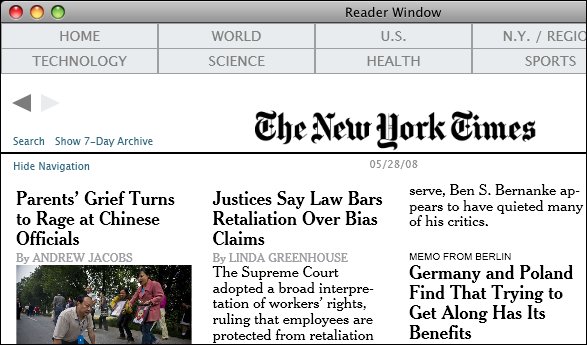
The New York Times is porting its excellent Times Reader application to the Mac using Silverlight 1.0:

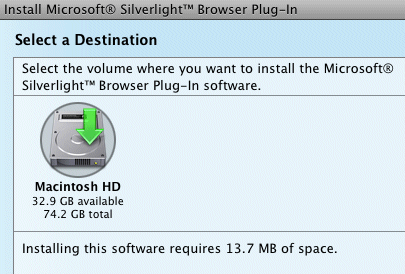
Times Reader for the Mac is a native Cocoa application, which uses the Safari toolkit and Silverlight to render the pages.

Follow the link for some screengrabs. Adobe’s AIR (which also uses the Safari toolkit) is the obvious choice for this kind of online app; it’s interesting to see the NY Times adapting Silverlight in a similar manner.

I spoke to developer Nick Thuesen about this at Mix07, so this is not news for readers of this blog; though I’d become sceptical about whether it would be delivered because of the delay. Now, I’m surprised that the NY Times is still using Silverlight 1.0 rather than waiting for 2.0.

The Silverlight version appears to have some compromises. In particular, it cannot flow text on the client:

We paginate the pages for the Mac version on our servers (the Windows version does this on the PC). When you sync, we send you pages for the four window and three font sizes described above.

Still, the screens look good and I look forward to trying it – especially as the public beta will be free, whereas you need a subscription for the full release.

There is a high level of hostility towards Silverlight in the comments to the post. Mostly these appear to be religious in nature – ie. Mac users hate all things Microsoft. It does illustrate the difficulty the company has in persuading the world to take its cross-platform ambitions seriously.

Thanks to Ryan Stewart for the link.

Microsoft: forget the Live Search Cashback, just improve the engine

Microsoft is paying users to use its search engine with a new search cashback scheme. Looks like an affiliate scheme where the commission is paid back to the customer. US only.

I think Microsoft should focus on improving its search engine. This morning, I needed to call a local electrician and figured that search would be quicker than using a phone book. I entered the name of the retailer and the town. For some reason, this stymied Live Search: the result I was looking for was not on the first 10 pages. Identical search on Google: the first four results matched, and the address and telephone number were at the top of the page with a little map.

In a poll last year 51% thought Google delivered the best results for an example search, while 35% preferred Live Search and 31% Yahoo. That’s an inconclusive result, and this is not an exact science; but personally I find Google almost always delivers better results, sometimes (as in the case this morning) dramatically so.

If Microsoft managed to reverse this I would switch to Live Search in a heartbeat.

Technorati tags: , , , ,

Why we don’t talk about Zune

Brandon LeBlanc comments on last week’s Guardian article on DRM and says:

What is interesting to me is the article neglects to look at what Microsoft is doing with Zune in regards to DRM. Just like Apple and Amazon – the Zune Marketplace also offers DRM-free music.

According to this page on the Zune Marketplace:

Browse over three million songs you can preview and download—most are now available as MP3s that’ll play on your Zune device or any other MP3 player. Or get an instant music collection: Zune Pass gets you millions of downloads for just $14.99 a month.

Answering LeBlanc, one reason is that Microsoft has not made Zune available internationally, so its visibility in the UK is rather minimal. Nevertheless, the Zune developments are interesting. In fact, the Zune now has pretty much the business model many expect Apple’s iTunes and iPod/iPhone to have in the future – all-you-can-eat subscription, with a premium download option.

Still, Microsoft has a marketing problem with Zune. First, it’s perceived as a me-too answer to iTunes/iPod. Second, the branding is focused firmly on the Zune device, which has only a small market share. Amazon on the other hand makes great play of the iPod compatibility of its MP3 store. How can Microsoft promote Zune marketplace as a source for DRM-free iPod music, without undermining the whole Zune concept in which device and store are tied tightly together?

Technorati tags: , , , , ,

Installing .NET, PowerShell on Windows 2008 Server Core: it can be done

Dmitry Sotnikov explains how to install .NET and PowerShell on Windows Server 2008 in its Server Core configuration. It is necessary to tweak the .NET setup with Orca, a low-level editor for Microsoft Installer files. Note this is unsupported.

The lack of PowerShell is an annoyance; the lack of .NET is a major obstacle to making use of Server Core, so this is interesting work. Sotnikov does not say whether ASP.NET springs to life; I presume it may be possible.

I imagine that one of the issues with .NET on Server Core is that some parts of the Framework will not work because dependencies are missing. Server Core has little in the way of a GUI, so I would not expect System.Windows.Forms or Windows Presentation Foundation to work; yet the .NET runtime is all or nothing. This is changing; Microsoft has announced a Client Profile Setup to reduce the runtime size in .NET 3.5 SP1, for client applications.

What we now need is a Server Profile, tailored to work on Server Core.

WinFS reborn: SQL Server as a file system

Fascinating interview with Quentin Clark, who led the cancelled WinFS project at Microsoft. Jon Udell is the interviewer.

Clark talks about how technology from WinFS is now emerging as the Entity Framework in ADO.NET (part of .NET 3.5 SP1) and the FileStream column type in SQL Server 2008 – a connection I’d already made at the Barcelona TechEd last year. He also mentions the new HierarchyID column type that enables fast querying of paths, the concept of rows which contain other rows. He adds that a future version of SQL Server will support the Win32 API so that it can support a file system:

In the next release we anticipate putting those two things together, the filesystem piece and the hierarchical ID piece, into a supported namespace. So you’ll be able to type //machinename/sharename, up pops an Explorer window, drag and drop a file into it, go back to the database, type SELECT *, and suddenly a record appears.

Put that together with the work Microsoft is doing on synchronization, and you get offline capability too – something more robust than offline files in Vista. Clark says SharePoint will also benefit from SQL Server’s file system features.

Note that Live Mesh does some of this too. I guess SQL Server is there in the Live Mesh back end, but it strikes me Microsoft is at risk of developing too many ways to do the same thing.

The piece of WinFS that shows no sign of returning is the shared data platform, which was meant to enable applications to share data:

… all that stuff is gone. The schemas, and a layer that we internally referred to as base, which was about the enforcement of the schemas, all that stuff we’ve put on the shelf. Because we didn’t need it.

Misunderstanding Vista

Microsoft has posted a 9-page document on Five Misunderstood Features in Windows Vista. Apparently these “cause confusion and slow Windows Vista adoption for many folks.” Here they are:

  1. User Account Control
  2. Image Management
  3. Display Driver Model
  4. Windows Search
  5. 64 bit architecture

I thought I did understand User Account Control, but now I’m not so sure. I understand the long-term goal of UAC, which is to move Windows to the position enjoyed by Unix-like operating systems, where users run with limited rights. Fixing this means fixing applications that require local administrator rights; but making third-party app vendors change their practice is hard. UAC takes a multi-pronged approach. It makes it safer to run as local administrator; it makes it possible to run some applications that used to require admin rights without really having those rights; and it is sufficiently annoying that app vendors will feel under some pressure to fix their next release.

This statement caused me to pause:

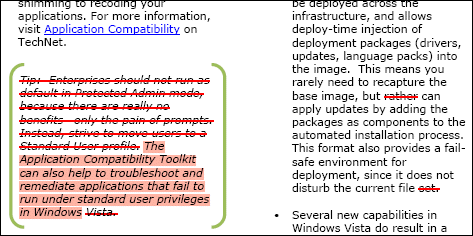
Enterprises should not run as default in Protected Admin mode, because there are really no benefits—only the pain of prompts. Instead, strive to move users to a Standard User profile.

The highlighting is mine. If there are no benefits, it seems odd that most Vista installations I see are set up in this way. I realise that in this context UAC is not a security boundary. Nevertheless, I figure there are some benefits, in that the user is running most of the time with standard user credentials. If there are no benefits … why does the feature exist?

I’m not sure the Image Management is “widely misunderstood”; it mostly matters only to network administrators whose business it is to understand it. Windows Display Driver Model … again, not sure; I think it is Desktop composition which is misunderstood; people dismiss this as eye-candy, when in fact it “fundamentally changes the way applications display pixels on the screen”, as the referenced article explains.

Windows Search is an interesting one. I think it is misunderstood, but not in the way explained by this new paper. People have questions like, “why does it not index all my files?”

What about performance? In my view, this is far and away the primary problem users have with Vista. It is not in any sense a misunderstanding, however Microsoft spins it. It is bewilderment: why does my new machine, which should be fast, spend so much time spinning its little bagel when I want to get on with my work?

Here’s what this document says:

We’ve heard some of you say that Windows Vista runs slower than Windows XP on a given PC. So what‘s really happening here? First, we need to avoid comparing apples to oranges – Windows Vista is doing a lot more than Windows XP, and it requires resources to conduct these tasks.

It goes on to say that:

On machines configured with the appropriate specifications for their operating system, the speed of most operations and tasks between Windows Vista and Windows XP is virtually on parity. Which is pretty remarkable when you consider one key thing Windows Vista is doing that Windows XP isn’t: indexing for near instantaneous search results for desktop files, even embedded in email messages. The result is users can find information significantly faster (measured in minutes), increasing productivity far in excess of the loss in speed of operations (measured in milliseconds).

Microsoft is off-target here, despite the sleight of hand about “appropriate specifications”. First, search can be a big drain on performance; sorry, not just a few milliseconds. Second, Vista can be dramatically slower than XP, often thanks to poor configuration by OEMs. See Ed Bott’s discussion about fixing a Sony laptop.

There’s recently been discussion about Windows Server 2008, which performs very well, versus Vista, which tends to perform badly. It’s all to do with configuration and disabling unnecessary processes. This is the core of Vista’s problems, not a series of “misunderstandings”.

Update: the document is no longer online. Perhaps it will reappear with amendments?

Further postscript: The Guardian has posted the document here.

Small Business Server 2008: less for more?

The announced prices for SBS 2008 are substantially higher than those for SBS 2003. Client Access Licenses (CALS) for standard edition users are slightly lower than before, but a new CAL for premium users is remarkably expensive: $189.00, on top of the cost of the client Windows OS itself. In the old scheme, an SBS CAL applied to both Standard and Premium users and had a single price of $97.80.

How price sensitive is SBS? From what I see, the cost of installing and configuring SBS is usually more than the license cost, presuming a business gets a specialist to do this. In addition, the announced figures do not cover cheaper OEM editions. In other words, probably not very price sensitive.

This still strikes me as a surprising move. SBS 2008 has removed some features, including the ISA Server firewall. Further, SBS has more competition than before, both from Linux and from cloud-based offerings. Is this really the moment to hoist prices? Google will be pleased.

Visual Basic returning to Mac Office

Microsoft will restore VBA to Mac Office:

The Mac BU [Business Unit] announced it is bringing VBA-language support back to the next version of Office for Mac. Sharing information with customers as early as possible continues to be a priority for the Mac BU to allow customers to plan for their software needs. Although the Mac BU increased support in Office 2008 with alternate scripting tools such as Automator and AppleScript — and also worked with MacTech Magazine to create a reference guide, available at http://www.mactech.com/vba-transition-guide — the team recognizes that VBA-language support is important to a select group of customers who rely on sharing macros across platforms. The Mac BU is always working to meet customers’ needs and already is hard at work on the next version of Office for Mac.

There’s a couple of ways to take announcements like this. The positive: the company is listening. The negative: what was it thinking when it cut the feature?

By the time Mac Office vNext is out of the door, I imagine many potential VBA users will have found other solutions.

The other point of interest: while Microsoft’s Mac BU is benefiting from Apple’s strength, I doubt that is enough to compensate for the lost Windows sales which are also implied.