Category Archives: .net

How to print in Silverlight out of the browser

Trick question, you can’t, or not in any sane way that I’ve discovered. When an app using Microsoft Silverlight is running in the browser you at least have the browser’s print features, but a SLOOB (Silverlight Out of Browser, a new feature in Silverlight 3) does not even have that to fall back on.

This is unfortunate for business applications, though of course many applications are fine without print features.

Workarounds: well, you can press Alt+PrintScreen and paste into Paint…

Another idea is to generate a document in code, then let the user “download” it from your SLOOB to somewhere on the desktop, since finding a document in the app’s isolated storage would be a challenge. The user can then print the document at his or her leisure.

What this illustrates is that even in version 3.0, Silverlight is not altogether mature, especially for this new out-of-browser feature. I’m told that print support is planned in some future version – Silverlight 4.0 I guess. Software is always a waiting game.

Note this post is based on the Silverlight 3.0 beta; it’s just possible something could be added in the final version.

Technorati Tags: ,,

F#, Enterprise JavaScript at QCon London

The best sessions here at QCon London have been the small ones, not the big ones. Yesterday the slot I enjoyed most was from Attila Szegedi on JavaScript in the Enterprise. He uses Mozilla Rhino for server-side development. It’s not a mainstream choice; but he made a case for it, saying that continuations in JavaScript bring huge benefits, that there is a ready supply of developers with JavaScript skills (albeit mostly browser-based), and JavaScript is so flexible that he can work around any limitations.

One example is that JavaScript has no namespaces; but it does support function pointers, so he adds a bunch of function pointers as members of an object, and then that object works like a namespace.

Szegedi says he has little interest in ECMAScript 4.0 – once thought to be the future of JavaScript – because there is no community consensus around it.

Today I’ve just attended a session on Microsoft F# given by Amanda Laucher. F# is a functional language that will be released as part of Visual Studio 2010. I knew little about it until today. Laucher gave a code-heavy presentation looking at how the ease of concurrency in F# can greatly increase speed of execution, using an example from the car insurance industry.

Laucher said that threading in C# is horrible in comparison.

Developers are not going to abandon C# or Visual Basic in favour of F#. Rather, they will encapsulate pieces of functionality in F# where they can get benefit, and call them from their C# or VB application.

Technorati Tags: ,,,,,

QCon London 2009

I’m at QCon London and covering it on Twitter as wi-fi and battery power allows. The focus of the conference is enterprise development, and it spans Java and .NET, SOAP and REST, but with a bias towards Agile methodology.

I was here last year, and my observation is that last year there was considerable angst about the idea that the SOAP stack was failing to deliver and that new stacks based on REST were the thing to do.

This year this same statement feels more widely accepted and people are moving on, based on that assumption.

One delegate stuck his hand up and asked, “is this a fad, or will it last”? Sounds like a cry of pain from someone who invested heavily in something now condemned. History tells that in five or ten years time we may well be equally enthusiastic about some new thing and observing all the weaknesses in the bad stuff we used to do.

Still, these trends don’t form overnight. We have to choose what looks like the best model at the time.

I’m typing this during a session on test-driven development. Personally I think TDD is a more profound improvement in the software development process than REST vs SOAP; the detail of TDD will continue to evolve and be debated; but its basic ideas are hard to challenge.

As an aside, this is one factor in why ASP.NET MVC is so important for developers on Microsoft’s web platform. Reason: it’s testable.

Mono creeping into the mainstream?

For those of you who have not already seen this link on Twitter: I’ve posted a short piece on Mono, the open source implementation of Microsoft .NET. The piece was prompted by my own experience writing a simple .NET application in Visual Studio and deploying it to Linux. Admittedly I anticipated the move by using MySQL rather than SQL Server as the database; but even so, I was impressed by how easy it was – I spent more time recently deploying an application from Visual Studio 2008 to Windows Server 2008, thanks to some issues with SQL Server Express.

Don’t Miguel de Icaza’s comment about scalability and garbage collection, two of the factors that have deterred some from real-world Mono deployments.

Hands on with ASP.Net Membership, SQL Express and Server 2008

Is it worth using the built-in membership framework in your ASP.Net application, or should you roll your own? I’ve been trying it out recently, and I have mixed feelings.

On the plus side, it does get you up and running quickly with user login and role-based permissions, saving time and possibly achieving more reliable results, on the grounds that Microsoft and countless other users should have found and fixed any bugs by now.

One the negative side, there are annoying limitations. The most obvious one is that a user as defined in the framework only has a minimal number of fields, not including information you probably want to store like first and last name. You are meant to fill this gap by using profiles, another ASP.Net feature which lets you store arbitrary name-value pairs in a database as a kind of persistent session. That works, but the way profile properties are stored makes it hard to do things like sorting users by last name. Therefore, you will probably end up managing your own user database and joining it to the membership system with the user ID, at which point you begin to lose some of the benefits.

Some of the supplied controls, like the CreateUserWizard, seem rough-and-ready too.

Still, the real fun began when I tried to deploy my demo app to Server 2008 and SQL Server Express 2008. By the way, make sure you install .NET Framework 3.5 SP1 and Windows Installer 4.5 before installing the latest SQL Server Express, otherwise the setup spends ages unpacking its files and then exits with a brief message. I got there eventually, copied my application across, and optimistically tried to run it.

When you debug a web application in Visual Studio, it defaults to a SQL Express database in the App_Data folder within the web site, attached on demand. In theory, that should make it easy to deploy to another machine with SQL Express installed: just copy it across, right? There must be a way of getting this to  work, but it seems a lot of people have problems. I got the message:

Login failed for user ‘NT AUTHORITY\NETWORK SERVICE’.

This makes sense, insofar as ASP.NET runs as this user. I temporarily attached the database and added the login, to be rewarded with a different and more perplexing error:

Failed to generate a user instance of SQL Server due to a failure in starting the process for the user instance.

A quick Google shows that many users have suffered from these errors, and that a large number of remedies have been proposed. I abandoned the idea of attaching the database on demand and set up a new database, made ready with Aspnet_regsql. I still got one or other of these errors.

Eventually I realised that my application was using more than one connection string. The problem is that the membership framework uses three different "providers", one for membership, one for roles, and one for profiles. By default in IIS 7.0, these all use an attach-on-demand connection string, defined as LocalSqlServer, and inherited from machine.config buried deep within your Microsoft .NET Framework system folder. In order to prevent ASP.Net membership from using this, you have to override all three providers in the web.config for your application. There’s an example in this article from ISP MaximumASP. I wish I’d come across it sooner; but my demo works fine now.

Programming language trends: Flash up, AJAX down?

I’m fascinated by the O’Reilly reports on the state of the computer book market in 2008, particularly the one relating to programming languages.

Notable facts and speculations:

C# is the number one language, overtaking Java (which is down 12%), and was consistently so throughout 2008. Although the .NET platform is no longer new and exciting, I’m guessing this reflects Microsoft’s success in corporate development, plus the fact that the language is changing fast enough to stimulate book purchases. Absolute growth is small though: just 1%.

Objective-C is growing massively (965%). That’s probably stimulated by iPhone app development more than anything else. It’s a perfect topic for a programming book, since the platform is important and popular, and attracting developers who were previously ignorant of Objective-C.

ActionScript is growing (33%). That’s Adobe’s success in establishing Flex and the Flash platform.

PHP is up 3%. I’m not surprised; it’s usually the P in LAMP, everyone’s favourite free and open source web platform. That said, the online documentation and community support for PHP is so good that a book is less necessary than for some other languages.

JavaScript is down 24%. I’m a little surprised, as JavaScript is still a language everyone has to grapple with to some degree. It may be a stretch; but I wonder if this is a symptom of AJAX losing developer mindshare to Flash/Flex (ActionScript) and maybe Silverlight (C#)? Another factor is that JavaScript is not changing much; last year’s JavaScript book is still good enough.

Visual Basic is down 15%. Exactly what I would expect; slow-ish decline but still popular.

Ruby is down 51%. This is a surprise; though it was well up in 2007 so you could be kind and describe this as settling. The problem with Ruby though is lack of a major sponsor; plus the migration from PHP to Ruby that seemed possible a couple of years ago just has not happened. It may be intimidating to casual developers who find PHP more approachable; plus of course, Ruby probably is not installed on your low-cost shared web hosting package.

Python is down 14%. Google sponsors Python, in that it is the language of App Engine, but apparently this has not been enough to stimulate grown in book sales. I guess App Engine is still not mainstream; or maybe there just aren’t enough good Python books out there.*

It will be interesting to see the 2009 report in a year or so. Meanwhile, I’m off to write an Objective C tutorial (joke!).

*Update: I was reading the charts too quickly; it looks as if the percentages above are only for the last quarter; the annual figures are similar except that Python actually grew over the year as a whole.

SharpDevelop 3.0: everything .NET from Boo to F#

I’ve been researching open source .NET and noticed that SharpDevelop, the free IDE for .NET on Windows, completed version 3.0 earlier this month. Congratulations to the team. Along with Windows Forms and ASP.NET applications in C# or Visual Basic, you get extras like support for F#, Boo and Python. Another welcome feature is built-in support for Subversion version control. There’s even an ASCII table in the IDE, which brings back memories: 15 years ago every programming manual had one at the back.

SharpDevelop has two major challenges. One is keeping up with Microsoft; right now there are discussions about improving WPF support, for example. The other is that Microsoft offers free Express versions of Visual Studio, which leaves SharpDevelop with those niche users for whom the Express products are unsuitable, but who do not want to pay for a full version, or who are wedded to some exclusive SharpDevelop feature.

In favour of SharpDevelop, it installs more easily and loads more quickly than Microsoft’s effort, and certainly proves the point that native C# applications do not have to be slow.

A more interesting though less complete product is the forked MonoDevelop, which is cross platform and targets Mono, the open source implementation of .NET. Mono now looks good on Linux; but the idea of WORA (Write Once Run Anywhere) has never really caught on in the .NET world. How many significant Mono applications for Windows have you seen? My guess is that if it happens at all, it will be in the form of Silverlight/Moonlight running in the browser.

Technorati tags: , , , ,

First screenshots of Visual Studio 2010 UI

Jason Zander has posted some screenshots and info about the new WPF-based UI for Visual Studio 2010.

An early build of VS 2010 was handed out at PDC last year, but lacked the new UI.

Floating document windows is a great new feature. That said, Visual Studio 2008 works rather well; I hope the new version is equally fast and stable.

Technorati tags: , ,

OpenID embedded into Windows 7?

While reviewing Windows 7 I noticed an interesting new option when sharing files or folders in a homegroup – the ad-hoc network intended for home users, equivalent to the old peer-to-peer workgroup. In this scenario there is no central user directory, so it is difficult to set fine-grained permissions, such as when you want Sally to have read-write access to a document, but Joe read-only access. The messy workaround is to create user accounts for each user on each computer.

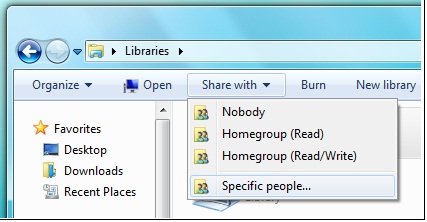
At least, that’s how it used to be. In Windows 7 there is a new option, though it is not fully enabled in Beta 1 (what was that about feature complete?). Users in a homegroup can be identified by an “online ID” instead of a Windows username. In effect, this makes the internet-based ID provider into the central directory for your homegroup, and enables sharing with “specific people” rather than entire homegroups:
The further advantage is that this identity persists across different networks, as the documentation makes clear:

If you have an online account, such as an e‑mail account, you can link that account with your Windows user account. Linking these accounts lets other people share files with you on a homegroup using your online account name (or ID) instead of your Windows user name. This makes it easier for people to share files with you, because they can use the online ID they are familiar with instead of adding your Windows user account to their computer. For example, if you have an e‑mail account that your friends and family use to communicate with you, such as molly_clark@example.com, they can use that online ID to share files with you on a network. You can also use that online ID to access your information on other computers on a network, such as accessing files on a home computer from your work computer.

Linking your account is a two-part process. First, you need to add your online ID provider, and then you need to link your online ID with your Windows user account.

So what is this online ID provider? My immediate assumption was that it meant a Live ID. You have always been able to link a Windows account with a Live ID (formerly Passport), which gives you instant sign-in to Windows Live properties. However, the language here is different, suggesting a variety of ID providers rather than just Microsoft.

Here is another snippet of documentation:

To add an online ID provider

1. Click to open User Accounts.

2. Click Link online ID.

3. Click Add an online ID provider.

4. Select your online ID provider from the list and follow the instructions.

To link your online ID with your Windows user account

1. Click to open User Accounts.

2. Click Link online IDs.

3. Next to the online ID that you want to link your user account with, click Add linked ID.

4. Type your user name and password for the online ID and then click OK.
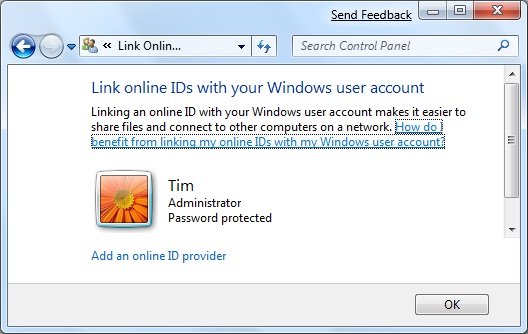
 

Unfortunately if you attempt to do this in the beta the list of providers redirects to the Windows home page. I was intrigued though – what technology is this, and who can be an online ID provider for Windows 7?

I asked Microsoft and got this answer:

Any service can choose to be an OpenID provider or a relying party. Customers of web sites that support OpenID can sign in with any OpenID provider.

Note that I did not ask about OpenID, only about online ID providers for Windows 7. Is Microsoft really hooking Windows 7 user identities to OpenID?

I was sceptical so I asked again. Here’s what I was told:

Regarding your Windows 7 question around Online ID in the beta, the online providers are an ISV opportunity and are not currently enabled in the beta. With regard to Windows Live, please find the link here <http://dev.live.com/blogs/devlive/archive/2008/10/27/421.aspx> that discusses Windows Live becoming an OpenID provider with its recent release.

Something less than a clear-cut answer; but again directing me to OpenID and to last year’s announcement that Windows Live will be an OpenID provider.

Still a few unanswered questions then; but I like the idea of linking local network sharing and online directories, which makes a lot of sense for home users that have no Active Directory. Actually it makes sense beyond that as well. I also like the idea of being able to select an OpenID provider as my preferred online identity provider, rather than having to choose Windows Live. It opens up the possibility of smooth integration across the local network and across a number of internet properties.

Do note though the lack of clarity in the answers I received, and that all the documentation is headed:

This content is preliminary and subject to change.

SharePoint – the good, the bad and the ugly

I’ve been messing around with SharePoint. When it works, it is a beautiful product. It is a smart file system with versioning, check-in and check-out, point-and-click workflow (eg document approval), offline support via Outlook, direct open and save from Office 2007, and more. It is an instant intranet with blogs, wikis, discussion forums, surveys, presence information, easy page authoring, and more. It is an application platform with all the features of ASP.NET combined with those of SharePoint. It is a content management system capable of supporting a public web site as well as an intranet. It is a search server capable of crawling the network, with a good-looking and sophisticated web UI. And in the high-end Enterprise version you get a server-side Excel engine and all sorts of Business Intelligence features. Fantastic.

Even better, the base product – Windows SharePoint Services 3.0 – comes free with Windows server. Search Server Express is also free and delivers all the search capability a small organization is likely to need.

What’s wrong with this picture? Here’s a few things:

  • Gets very expensive once you move to MOSS (Microsoft Office SharePoint Server) rather than the free WSS.
  • Deeply confusing. Working out the difference between WSS and MOSS is just the start. If you want to deploy it, you had better learn about site collections, applications, operations, farm topologies, web parts, workspaces, and the rest.
  • Complex to deploy. Make sure you read Planning and Architecture for Office SharePoint 2007 Part 1 (616pp); the good news is that part 2 is only 52pp. SharePoint is all that is bad about Microsoft deployments: a massive product with many dependencies, including IIS, ASP.NET and the .NET Framework, SQL Server in particular configurations, and of course hooks with Office 2007, Exchange and Active Directory.
  • Generates horrible source code. Try opening a page in SharePoint designer and viewing the source. Ugh.
  • Challenging to back up and restore, thanks to being spread across IIS and SQL Server.

I am out of sorts with SharePoint right now, after a difficult time with Search Server Express (SSX). I have a working WSS 3.0 installation, and I tried to install SSX on the same server. My setup is just slightly unusual, since I have both SharePoint and a default web site on port 80, using the host headers feature in IIS to direct traffic. The SSX install seemed to proceed reasonably well, expect for two things.

First, I puzzled for some time over what account to use as the default account for services. Setup asks you to specify this; and the documentation is a classic case of unhelpful help:

In the Default Account For Services section, type the user name and password for the default services account.

In the Search Center Account section, type the user name and password for the account for the application pool identity of the default Search Center site

Well, thanks, but I could have figured out that I have to type a user name where it says “User name”. But I would like help on how to create or select a suitable account. What permissions does it need? What are the security implications? The temptation is to use an administrator account just because it will most likely work.

Then there was the problem of creating the search site application manually. I had a go at this, helped by these notes from Ian Morrish. I set up a crawl rule and successfully indexed some content. Then I made a search, to be greeted by this error:

Your license for Microsoft Search Server has expired.

Well hang on, this is Search Server Express and meant to be free! A quick Google turns up this depressing recommendation from Microsoft:

To solve your immediate problem, however, it is suggested you uninstall WSS, MSS Express, repave your machine with a clean OS, and reinstall only MSS Express (WSS is installed with it).

Thanks but no thanks. See this thread for a more informative analysis. The user yanniemx reckons, after 10 reinstalls, that he has worked it out:

I realized it was due to using the Express version of Search and then not using the SQL install that is included in the install.  From what I can tell if you use another SQL instance it thinks you are using multiple servers and that is not allowed for the Express version.

I think I’ll just uninstall. I did another install of the full MOSS on its own server, and that one works fine. Running on a virtual machine is another good idea.

I hate the way certain Microsoft server products like to be installed on their own dedicated server. That makes sense in an Enterprise, but what about small organizations? I don’t see any inherent reason why something like SSX shouldn’t install neatly and in a reasonably isolated manner alongside other products and web applications. Equally, I am sure it can be done, just as I used the host headers trick to get WSS installed alongside another web site on port 80; but working out how to do it can be a considerable effort.