Category Archives: software development

Delphi moving towards cross-platform, 64-bit

Embarcadero’s Delphi Live conference is running this week, and there are some interesting reports coming out. Robert Love has the best summary I’ve found so far. As I understand it, the next Delphi is codenamed “Weaver” and adds Windows 7 support, including the Touch APIs. More interesting is that this will be followed at some point by “Project X”, a cross-platform native code compiler for Windows, Mac and Linux. There is also mention of “Project Commodore”, which brings full 64-bit support.

Project X is the one that particularly grabs my attention. Cross-platform Delphi has been tried before, with Kylix, Delphi for Linux. Although promising, Kylix suffered on the technical side from Wine dependencies and on the marketing side from lack of demand for Delphi desktop applications. I do not have any technical information about Project X yet, but on the marketing side Mac OS X (and perhaps iPhone) is a great deal more promising than Linux.

After suffering from under-investment for many years, it is great to see Delphi now getting a new lease of life in its new home, and I’m looking forward to finding out more.

Yahoo’s mindshare problem

Last weekend I attended Yahoo’s Open Hack Day in London.

It was excellent. I wasn’t hacking myself; but enjoyed the tech talks. I also had an opportunity to interview execs including co-founder David Filo, Cody Simms who does Product Management for Yahoo Open Strategy, and Sophie Major the head of the International Developer Network.

Highlights for me were Rasmus Lerdorf talking about smart PHP tricks, and a session on the amazing Yahoo Query Language which really does make the Internet look like one giant database which you can query.

I wrote up some of my interview for The Register, concluding:

Open Hack Day certainly showcased some impressive technology. The question is whether Yahoo! still has the marketing muscle to reverse its declining influence and truly to unsettle the likes of Google and Facebook and disrupt the market.

Events this week proved this exact point. During Open Hack Day there were talks on Microformats, RDFa and Yahoo Search Monkey. Search Monkey reads data on your site that includes semantic mark-up in order to present more meaningful search results.

On Tuesday Google announced Rich Snippets:

To display Rich Snippets, Google looks for markup formats (microformats and RDFa) that you can easily add to your own web pages.

So were the headlines “Google catches up with Yahoo”? Not at all; most of the world apparently thought Google had invented something new and amazing. Timothy O’Brien reported on it for O’Reilly and apparently was not aware of Yahoo’s earlier initiative. He added a postscript:

We’ve had some response about failing to mention Yahoo’s SearchMonkey which also supports RDFa and Microformats. Google is certainly not the first search engine to support RDFa and Microformats, but it certainly has the most influence on the search market. With 72% of the search market, Google has the influence to make people pay attention to RDFa and Microformats.

Correct; though I also suspect Yahoo could do a better job of marketing its technology. Talk of disrupting Google seems fanciful at this point. Having said that, Twitter is doing it just a little bit: somehow it is easier for a tiny organization with a bright idea than for a giant from the past.

In the meantime, take a look at YQL. It’s brilliant.

New York Times switches from WPF/Silverlight to Flash and AIR for Reader 2

The New York Times has released Version 2 of its Times Reader, for seamless online/offline viewing of its content. It’s interesting from a media perspective, but hardly a breakthrough, since it is not new. What’s more interesting to me is that the Times switched from a hybrid approach using WPF (Windows Presentation Framework) on Windows and Silverlight on the Mac, to Adobe AIR. Switches like this are bad PR for Microsoft, since it gives the impression that the developers were sufficiently unhappy with WPF/Silverlight, or so strongly attracted to AIR, that they were willing to throw away much of their previous development effort.

I’ve been tracking Times Reader for some years. It was presented at Microsoft Mix07 and I wrote up a panel discussion on the subject:

I asked about the cross-platform issue. According to Bodkin a Silverlight implementation is on the way, which includes most of the features in the full version, in “a matter of months.”

That was optimistic; but a Silverlight version was delivered and I used it successfully on the Mac; though it lacked some features of the WPF edition. It also attracted hostility from Mac users who are Microsoft-averse, as I reported here, and apparently ran into further problems because of incompatibility with Safari 4.

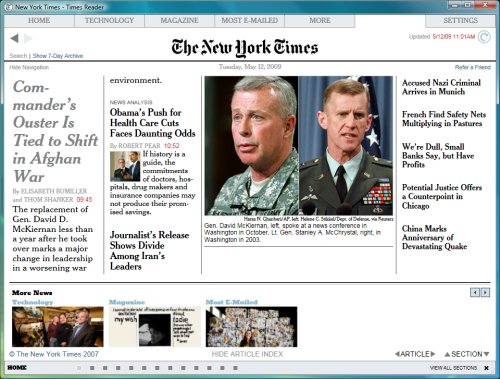
I tried the new AIR edition and it seems pretty good, though my impression is that it is not quite as smooth as the old WPF version. I might be wrong, since I could not install both on the same machine. The new version does add video support. Here’s the old one:

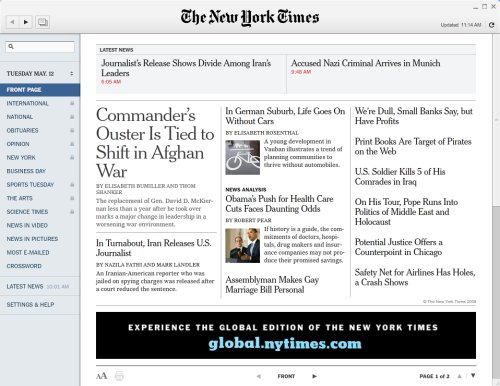
and this is the new effort:

I think this is a fascinating case study which demonstrates a number of things.

First, that cross-platform support is not an optional feature any more (if it ever was) for this kind of public application. Let’s assume here that the WPF version was just fine for Windows users, but was not viable long-term for lack of cross-platform support. It was inevitable that the Times would eventually either use Silverlight on both Windows and Mac, or abandon both WPF and Silverlight for a cross-platform alternative.

Second, that Silverlight is not yet mature enough for this kind of application. Although the Times developers were able to deliver a Silverlight version, it required a bit of hackery for offline support (embedded Safari on the Mac) and apparently ran into version problems when Apple upgraded Safari. Silverlight is also known to be poor for text rendering – a Google search for “blurry text Silverlight” brings back plenty of hits. Adobe also made a big improvement to text handling in Flash player 10, with the new flash.text.engine.

Third, that offline support really is a big deal. Would Silverlight 3.0 have been good enough? Possibly, though I haven’t seen any suggestion that Silverlight 3.0 offline apps will be able to run in the background while showing just an icon in the notification area, to support continuous synchronization.

It is possibel that these problems may be fixed in Silverlight 4.0. That’s a long time to wait though, when you need your application out now (and your industry is in crisis).

It would be silly to extrapolate this case study into a broader statement about the superiority of Flash over Silverlight. For the specific needs of the New York Times though, it is easy to see why Adobe AIR appeals.

Is Zend really the PHP company?

I’m at Yahoo! Hack day in London – not hacking, but here for sessions on topics such as YUI (Yahoo! User Interface Library) and PHP.

I had a brief chat with Rasmus Lerdorf who is speaking later. I asked him about Zend, which presents itself as the PHP company (that is actually the slogan on its web site). Is it really?

Lerdorf says Zend has no special status. While acknowledging its contribution, he says there are 1300 PHP committers, and only 6 work for Zend. He emphasises that PHP is a community project and that decisions are made by consensus, influenced by who is actually willing to write the code, not by Zend or any company.

I also asked about PDT (PHP Development Tools), the Eclipse-based open source IDE. Lerdorf says there are lots of PHP IDEs, and people who use generic editors for PHP, and none has any more status than any other; he doesn’t use PDT.

From my perspective as press, there are only two organizations who ever encourage me to write about PHP. One is Zend; the other is Microsoft, keen to establish Windows as a credible PHP platform (Lerdorf says PHP on Windows has made enormous progress in the last couple of years). Zend does seem to do more than any other company to promote PHP for commercial and corporate development.

Lerdorf is not surprised. We’re developers, he says, we don’t do PR.

Zend’s effort is broadly beneficial to the PHP community – provided that it does not give a false impression of who owns PHP.

Silverlight: developer win, designer fail?

I posed this question in a post over on itjoblog. There are several reasons why Silverlight struggles to get designer attention, including:

1. Designers are pragmatic and target the runtime that is already deployed most broadly, ie. Flash.

2. Flash is already good enough so why bother?

3. The tools: Adobe’s designer tools are a de facto standard, target Flash, and run on the Mac.

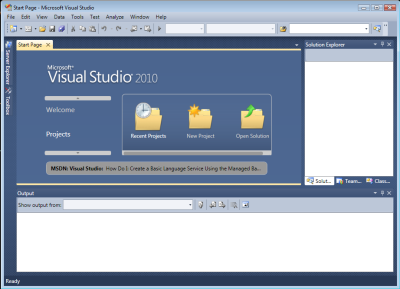
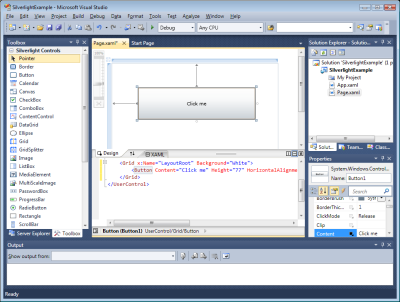
Developer is another matter. The cross-platform .NET runtime is Silverlight’s big advantage; and this time the tools tip the balance towards Microsoft (Visual Studio) – not for everyone, but for the substantial Microsoft platform community. That’s going to be further reinforced by Visual Studio 2010 which gets full visual designer support, plus of course Silverlight 3.0.

Microsoft does have a problem with Silverlight out of the browser. Developers need a way to have these run with more local permissions, subject to user consent, otherwise they will turn to Adobe AIR. Actually the whole Silverlight on the desktop story is confused, since you can also do Silverlight Mesh-Enabled Web Applications, or stick Silverlight content in a desktop gadget or other embedded browser. No, not the one in AIR (nice idea though): Adobe only includes Flash support and the PDF plug-in.

The tension behind this is that ultimately developers and designers need to work on the same applications, so this remains a fascinating contest.

First baby steps for Moonlight 2.0: Silverlight for Linux

Miguel de Icaza has announced the first preview release of Moonlight 2.0. This is the one that counts, in that it brings the .NET runtime to Silverlight applets running on Linux:

This is the ECMA VM running inside the browser and powering C# and any other CIL-compatible languages like Ruby, Python, Boo and others. You can use Moonlight/Silverlight as a GUI (this is what most folks do) or you can use it as the engine to power your Python/Ruby scripting in the browser.

The download page has plenty of health warnings:

Keep in mind this preview release is not feature complete. Most importantly not all security features are present or fully enabled in this release. Even existing security features have, at this stage, received only minimal testing and no security audit of the source code (mono or moonlight) has yet been done.

Undeterred, I installed it into FireFox 3.0, running on Ubuntu Linux. The download is under 9 MB. My first effort was unsuccessful; the plug-in appeared to load OK, but no Silverlight apps displayed. My second attempt in a VM worked. Naturally I went along to my Silverlight database example which as it happens runs on Mono. Here it is:

This is what it should look like (Silverlight on Windows):

Well, it is only an alpha preview, and it shows. On the plus side, the data is displayed, the search works, and the buttons operate. It is a considerable achievement. But don’t plan to move your users onto Moonlight applications just yet.

Flex Builder for Linux on hold: another sign of financial stress at Adobe?

On 21st April Adobe’s Ben Forta told a user group that Flex Builder 3 for Linux is on hold, citing lack of requisition, which is corp-speak for lack of demand.

Note that the Flex SDK does run on Linux. It is just the official IDE that is in question.

Linux is a free operating system, and this could be evidence that users of a free OS are less likely to purchase software than users of a paid-for OS. Or it could simply reflect poor market share for Linux outside servers. Even if it has just hit 1%, as hitslink reports, it is still barely more than 10% of the Mac share and a little over 1% of the Windows share. Some of those Linux machines will also be netbooks – secondary systems for users with a Windows or Mac for serious work such as design and development.

Nevertheless, I suspect there is more to it than that. I suspect Adobe would like to support Linux, because it wants to portray Flex as an open platform – the SDK is open source, though managed by Adobe, but the runtime engine is closed-source and proprietary. This may be another sign of Adobe’s financial stress. The company reported reduced quarter-on-quarter revenue for the the 3 months ending February 2009, and has been cutting staff numbers.

The backdrop to this, in contrast, is that Adobe is having great success with its Flash platform. There is no sign of Microsoft’s Silverlight denting the popularity of Flash on web sites, either for applets or media streaming.

The recession then? Partly; but this is also about Adobe’s business model. Adobe does not break out its figures in detail as far as I know: the last financial statement merely shows that its revenue is nearly 95% from product sales, the rest being services and support. Still, I’d guess that the largest component of its product sales must be Creative Suite. In other words, its business model is based on selling tools and giving away runtimes. When 47 million people watch Susan Boyle on YouTube, Adobe doesn’t make a penny, even though they are almost all using Flash to do so.

The tools market is a difficult one for various reasons, including competition from free products and the fact that the number of people needing development or design tools is always much smaller than the number needing runtimes. In a recession, deferring a tools upgrade is a obvious way for businesses to save money. Remaining primarily a tools company is a limit to Adobe’s growth and ultimately its profitability.

This is of concern to all Flash platform users. Adobe has proved to date a good steward of the technology. Some of us would like the balance of proprietary vs open tilted further towards open, but I doubt many would welcome a takeover or merger such as we have seen with Sun and Oracle (and there are a few parallels there).

There would also be many cries of “foul” if Adobe sought to further monetize Flash by starting to sell, say, a premium version of the Flash runtime.

Adobe is still a profitable company, and maybe when the economy recovers all this stress will be forgotten. Still, I’d guess that long-term Adobe will want to shift away from its dependency on sales of tools; and how and what it does to achieve that will have a big influence on the future of its RIA (Rich Internet Application) platform.

A Silverlight database application with image upload

I’ve been amusing myself creating a simple online database application using Silverlight. I had this mostly working a while back, but needed to finish off some pieces in order to get it fully functional.

This is created using Silverlight 2.0 and demonstrates the following:

  • A bound DataGrid (as you can see, work is still needed to get the dates formatted sensibly).
  • Integration with ASP.NET authentication. You have to log in to see the data, and you have to log in with admin rights to be able to update it.
  • Create,Retrieve,Update,Delete using ASP.NET web services.
  • Image upload using Silverlight and an ASP.NET handler.
  • Filter a DataGrid (idea taken from here).
  • Written in Visual Studio 2008, and hosted on this site, which runs Debian Linux, hence Mono and MySQL. Would you have known if I had not told you?

You can try it here. I’ll post the code eventually, but it will be a couple of months as it links in with another article.

MVP Ken Cox notes in a comment to Jesse Liberty’s blog:

Hundreds of us are scouring the Internet for a realistic (but manageable and not over-engineered) sample of manipulating data (CRUD operations) in a Silverlight 2 application. There are promising pieces of the puzzle scattered all over the place. Unfortunately, after investing time in a sample, we discover it lacks a key element – like actually saving changed data back to the database.

I can safely say that mine is not over-engineered, and that yes, it does write data.

Parallel Programming: five reasons for caution. Reflections from Intel’s Parallel Studio briefing.

I’m just back from an Intel software conference in Salzburg where the main topic was Parallel Studio, a new suite which adds Intel’s C/C++ compiler, debugging and profiling tools into Visual Studio. To some extent these are updates to existing tools like Thread Checker and VTune, though there are new features such as memory checking in Parallel Inspector (the equivalent to Thread Checker) and a new user interface for Parallel Amplifier (the equivalent to VTune). The third tool in the suite, Parallel Composer, is comprised of the compiler and libraries including Threading Building Blocks and Intel Integrated Performance Primitives.

It is a little confusing. Mostly Parallel Studio replaces the earlier products for Windows developers using Visual Studio; though we were told that there are some advanced features in products like VTune that meant you might want to stick with them, or use both.

Intel’s fundamental point is that there is no point in having multi-core PCs if the applications we run are unable to take advantage of them. Put another way, you can get remarkable performance gains by converting appropriate routines to use multiple threads, ideally as many threads as there are cores.

James Reinders, Intel’s Chief Evangelist for software products, introduced the products and explained their rationale. He is always worth listening to, and did a good job of summarising the free lunch is over argument, and explaining Intel’s solution.

That said, there are a few caveats. Here are five reasons why adding parallelism to your code might not be a good idea:

1. Is it a problem worth solving? Users only care about performance improvements that they notice. If you have a financial analysis application that takes a while to number-crunch its data, then going parallel is a big win. If your application is a classic database forms client, it is probably a waste of time from a performance perspective. You care much more about how well your database server is exploiting multiple threads on the server, because that is likely to be the bottleneck.

There is a another reason to do background processing, and that is in order to keep the user interface responsive. This matters a lot to users. Intel said little about this aspect; Reinders told me it is categorised as convenience parallelism. Nevertheless, it is something you probably should be doing, but requires a different approach than parallelising for performance.

2. Will it actually speed up your app? There is an overhead in multi-threading, as you now have to manage the threads as well as performing your calculations. The worst case, according to Reinders, is a dual-core machine, where you have all the overhead but only one additional core. If the day comes when we routinely have, say, 64 cores on our desktop or laptop, then the benefit becomes overwhelming.

3. Is it actually desirable on a multi-tasking operating system? Consider this: an ideally parallelised application, from a performance perspective, is one that uses 100% CPU across all cores until it completes its task. That’s great if it is the only application you are running, but what if you started four of these guys (same or different applications) simultaneously on a quad-core system? Now each application is contending with others, there’s no longer a performance benefit, and most likely the whole system is going to slow down. There is no perfect solution here: sometimes you want an application to go all-out and grab whatever CPU it needs to get the job done as quickly as possible, while sometimes you would prefer it to run with lower priority because there are other things you care about more, such as a responsive operating system, other applications you want to use, or energy efficiency.

This is where something like Microsoft’s concurrency runtime (which Intel will support) could provide a solution. We want concurrent applications to talk to the operating system and to one another, to optimize overall use of resources. This is more promising than simply maxing out on concurrency in every individual application.

4. Will your code still run correctly? Edward Lee argues in a well-known paper, The Problem with Threads, that multi-threading is too dangerous for widespread use:

Many technologists are pushing for increased use of multithreading in software in order to take advantage of the predicted increases in parallelism in computer architectures. In this paper, I argue that this is not a good idea. Although threads seem to be a small step from sequential computation, in fact, they represent a huge step. They discard the most essential and appealing properties of sequential computation: understandability, predictability, and determinism. Threads, as a model of computation, are wildly nondeterministic, and the job of the programmer becomes one of pruning that nondeterminism. Although many research techniques improve the model by offering more effective pruning, I argue that this is approaching the problem backwards. Rather than pruning nondeterminism, we should build from essentially deterministic, composable components. Nondeterminism should be explicitly and judiciously introduced where needed, rather than removed where not needed.

I put this point to Reinders at the conference. He gave me a rather long answer, saying that it is partly a matter of using the right libraries and tools (Parallel Studio, naturally), and partly a matter of waiting for something better:

Law articulates the dangers of threading. Did we magically fix it or do we really know what we’re doing in inflicting this on the masses? It really come down to determinism. If programmers make their program non-deterministic, getting out of that mess is something most programmers can’t do, and if they can it’s horrendously expensive.

He’s right, if we stayed with Windows threads and Pthreads and programming at that level, we’re headed for disaster. What you need to see is tools and programming templates that avoid that. The evil thing is what we call shared mutable state. When you have things happening in parallel, the safest thing you can do is that they’re totally independent. This is one of the reasons that parallelism on servers works so well, in that you do lots and lots of transactions and they don’t bump into each other, or they only interface through the database.

Once we start opening up shared mutable state, encouraging threading, we set ourselves up for disaster. Parallel Inspector can help you figure out what disasters you create and get rid of them, but ultimately the answer is that you need to encourage people to use programming like OpenMP or Threading Building Blocks. Those generally guide you away from those mistakes. You can still make them.

One of the open questions is can you come up with programming techniques that completely avoid the problem? We do have one that that we’ve just started talking about called Ct … but I think we’re at the point now where OpenMP and Threading Building Blocks have proven that you can write code with that and get good results.

Reinders went on to distinguish between three types of concurrent programming, referring to some diagrams by Microsoft’s David Callaghan. The first is explicit, unsafe parallelism, where the developer has to do it right. The second is explicit, safe parallelism. The best approach according to Reinders would be to use functional languages, but he thinks it unlikely that they will catch on in the mainstream. The third type is implicit parallelism that’s safe, where the developer does not even have to think about it. An example is the math kernel library in IPP (Intel Integrated Performance Primitives) where you just call an API that returns the right answers, and happens to use concurrency for its work.

Intel also has a project called Ct (C/C++ for Throughput) which is a dynamic runtime for data parallelism, which Reinders considers also falls into the implicit parallelism category.

It was a carefully nuanced answer, but proceed with caution.

5. Will your application need a complete rewrite? This is a big maybe. Intel’s claim is that many applications can be updated for parallelism with substantial benefits. A guy from Nero did a presentation though, and said that an attempt to parallelise one of their applications, a media transcoder, had failed because the architecture was not right, and it had to be completely redone. So I guess it depends.

This brings to mind another thing which everyone agrees is a hard challenge: how to design an application for effective parallelism. Intel has a tool in preparation called Parallel Advisor, to be part of Parallel Studio at a future date, which is meant to identify candidates for parallelism, but that will not be a complete answer.

Go parallel, or not?

None of the above refutes Intel’s essential point: that effective concurrent programming is essential to the future of computing. This is an evolutionary process though, and at this point there is every reason to be cautious rather than madly parallelising every piece of code you touch.

Additional Links

Microsoft has a handy Parallel Computing home page.

David Callaghan: Design considerations for Parallel Programming