Tried the BBC’s AIR application for the Olympics.

It has three skins – yes, they are all that bad.
Adobe is doing well in getting AIR apps out there; but I’m still not seeing many that are worth installing.
Tried the BBC’s AIR application for the Olympics.
It has three skins – yes, they are all that bad.
Adobe is doing well in getting AIR apps out there; but I’m still not seeing many that are worth installing.
Looks like I’ll be missing out on Silverlight’s big moment – the NBC Olympics site.

Annoyingly, it was happy to display the pre-roll ad.
I’ll be interested to know how Silverlight and the streaming servers for this event perform.
Jack Schofield at The Guardian links to Matthew Paul Thomas’ post on Why Free Software has poor usability.
For most of his points you could drop the free from his title.
Thomas makes the point about most programmers not being good designers:
Some programmers are also great designers, but most aren’t. Programming and human interface design are separate skills, and people good at both are rare. So it’s important for software to have dedicated designers.
True; but software can be over-designed too – I guess this happens more in the commercial world. Sometimes usability is sacrificed for the sake of good looks.
Mega-budgets don’t always help. How did Office 2007 get through its usability testing, when there is no indication that you have to click on the “Office button” to access essential features like New, Save As and Print? What about Outlook 2007, with one of the world’s most obscure and difficult UIs? Opening another user’s mailbox – how many clicks is that, and how would you possibly find it without being told?
Good code is hard; good design is harder.
Wondering what exactly Microsoft’s “Oslo” is? Here’s a few hints from the PDC 2008 schedule:
"Oslo" is the family of new technologies that enable data-driven development and execution of services and applications. Come and learn how to capture all aspects of an application schematized in the "Oslo" repository and use "Oslo" directly to drive the execution of deployed applications.
“Oslo" provides a language for creating schemas, queries, views, and values. Learn the key features of the language, including its type system, instance construction, and query. Understand supporting runtime features such as dynamic construction and compilation, SQL generation, and deployment. Learn to author content for the "Oslo" repository and understand how to programmatically construct and process the content.
JavaFX is Sun’s answer to Flash and Silverlight, and it’s partially open source under the GPL. I’ve just downloaded the bundle of NetBeans plus JavaFX SDK. JavaFX Script is a new language for creating rich multimedia effects. I’ve also downloaded “Project Nile”, which includes “a set of Adobe PhotoShop and Adobe Illustrator plug-ins that allow graphics assets to be easily exported to JavaFX applications”. Unlike Microsoft, Sun is choosing to work with the designer’s existing favourite tools rather than trying to wrench them away to a brand new set (Expression).
According to Sun JavaFX is happening quickly: it is promising “Version 1.0 of JavaFX desktop runtime by the fall of 2008”.
The bit that makes me sceptical, aside from the speed of events, is that if I’m reading the following diagram right, users will require both the Java Runtime Environment (could be Java ME) and the JavaFX runtime in order to enjoy the results:
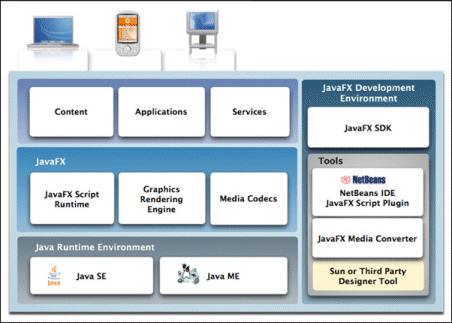
By contrast, Microsoft’s Silverlight does not require the full .NET runtime to be present, making it a much smaller download; and Flash has always been small.
The win for JavaFX is access to all the services of Java:
…JavaFX applications can leverage the power of Java by easily including any Java library within a JavaFX application to add advanced capabilities. This way application developers leverage their investments in Java.
On the other hand, it means a more complex and heavyweight install for users who do not have the right version of Java itself already installed. The Windows JRE is currently around 15MB for the offline version – there’s a 7MB “online” version but my guess is that it downloads more stuff during the install. I suspect that Adobe’s Flash would never have taken off if it had been that large a download.
When I spoke to Sun’s Rich Green earlier this year I recall that he agreed that a small download was important. Maybe I have this wrong, or a smaller runtime is planned for some future date.
It’s interesting that in his official blog post today, Josh Marinacci takes a Java-centric view:
So why am I excited about JavaFX? Because it gives us the freedom to create beautiful and responsive interfaces like never before. This isn’t to say you can’t do it in plain Java. If you’ve been to any of the last 4 JavaOne’s then you’ve seen great interfaces we’ve built. But these demos were a ton of work.
Right; but you could easily build these “beautiful and responsive interfaces” in Flash, both then and now. It’s a question of positioning. Is JavaFX just a new GUI library for Java – which will be welcome, but limited in appeal to the Java crowd? Or a serious alternative to Flash? At the moment, it looks more like the former.
Adobe’s Andrew Shorten contacted me following my piece on consuming .NET SOAP with Flex.
He mentioned two free products which integrate Flex with .NET.
Fluorine “provides an implementation of Flex/Flash Remoting, Flex Data Services and real-time messaging functionality for the .NET framework.”
WebORB from Midnight Coders “supports Action Message Format (AMF) version 0 and 3 and can be used to process Flex and Flash Remoting requests. Additionally, WebORB provides an implementation of the RTMP protocol and supports the following real-time messaging and streaming features: Flash Video streaming, video recording, data push, server-to-client invocation and remote shared objects.” There are also implementations of WebORB for Java, PHP and Ruby.
These look useful if you want to take advantage of the faster AMF protocol or use other features like RTMP. The disadvantage: more server-side gunk.
On reading this morning that Google has opened Knol to everyone, I thought I should have a go. There seems to be a predominance of medical Knols right now, so my Knol redresses the balance by covering a programming topic. Here it is:
I deliberately did not look at whatever Wikipedia already has on the subject; knowing how good Wikipedia is on technical topics I am sure it is much longer and better than mine, and probably less opinionated.
Now I’m going to sit back and let the world improve my Knol.
But will anyone find my Knol? Oddly, if I try a search for Visual Basic on the Knol home page, my article doesn’t come up, although I’ve published it:
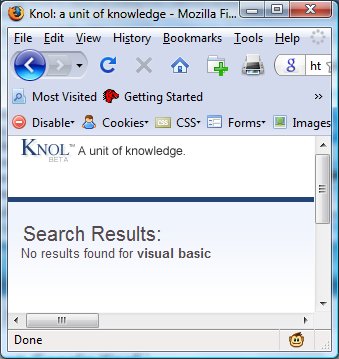
Oh well, maybe it is still being indexed.
It seems to me that the rating system is key here, and one to which I gave too little attention last time I thought about Knol. The thing is, there’s nothing to stop someone else writing an article about VB, and if it gets rated higher (sniff), my contribution will be lost at the bottom of the Knol dustbin – because I suspect Google will use the ratings heavily when ranking Knols in searches.
Other points of interest: I started creating my Knol in IE7, but gave up because of script errors and continued in FireFox. Second, I tried to verify my identity by telephone, but this only works for USA telephone numbers. It’s a beta.
Update: Danny Sullivan has a good commentary. I agree with him about credit cards. I declined.
I wanted to adapt my Silverlight CRUD sample (which I also ported to Adobe Flex) to fix a glaring weakness, which is that any user can amend any entry.
I decided to add some logic that allows editing or deleting of only those rows created during the current session. The idea is that a user can amend the entry just made, but not touch any of the others.
WCF has its own session management but this is not supported by the BasicHttpBinding which is required by Silverlight.
Fortunately you can use ASP.NET sessions instead. This means setting your WCF web service for ASP.NET compatibility:
[AspNetCompatibilityRequirements(RequirementsMode = AspNetCompatibilityRequirementsMode.Required)]
Then you can write code using the HttpContext.Current.Session object.
This depends on cookies being enabled on the client. In my simple case it worked fine, in both Silverlight and Flex. In a real app you would probably want to use HTTPS.
I’d post the sample but unfortunately my Windows web space doesn’t support WCF.
I wrote up a simple example for The Reg.
As someone has commented, it should work; but I was still pleasantly surprised to find that it succeeded without needing to flatten the WSDL or perform other contortions.
This is essentially the same app as I did in Silverlight; but using Flex instead.
Not long ago I created a simple CRUD example using Silverlight 2.0 beta 2. I used Visual Studio 2008 and the ASP.NET Development Server. I wanted to test the same WCF web service with a different client (more on that soon), so I decided to deploy it to the instance of IIS 7.0 which comes with Windows Vista. I created a new web site on a different port than the default.
Nothing worked. Reason: although I have installed .NET 3.5 SP1 beta and Vista SP1 – which should do this automatically – the IIS 7 mime types and handler mappings were not configured for Silverlight and WCF. How to fix the mime type is here and the handler mappings, here.
The web service still didn’t work. I got:
A first chance exception of type ‘System.ServiceModel.ProtocolException’ occurred in System.ServiceModel.dll.
I changed the debug options to break on all managed exceptions, and got this further detail:
The remote server returned an unexpected response: (404) Not Found.
Problem: Silverlight is looking for a cross-domain policy file. The reason was that at this point I was still running the Silverlight app from the ASP.NET Development server, and it considered IIS to be on a separate domain. The 404 error does not make this obvious; but a quick Google for Silverlight 404 shows that this is a common problem.
Silverlight is designed to support cross-domain policy files in either Microsoft’s format (clientaccesspolicy.xml) or Adobe’s format (crossdomain.xml). If the service is just for Silverlight, use Microsoft’s format; otherwise I suggest adding both.
Nearly there; but I still had to fix SQL Server authentication. I normally use Windows authentication, and if you are using the ASP.NET Development server this just works. Move to IIS though, and it does not work unless you set up ASP.NET impersonation, or create a SQL Server login for the account under which the application pool is running. Oddly, when I tried the app without fixing the SQL Server login I still got a 404 exception; I’m not sure why.
Incidentally, I noticed that if you configure ASP.NET impersonation for a web site, the username and password gets written to web.config in plain text (bad). If you configure the application pool to run under a different account, the password is encrypted in applicationHost.config (better). In the end I decided to use good old SQL Server authentication.
One last tip: when debugging a web service, put the following attribute on the class which implements your ServiceContract:
[ServiceBehavior(IncludeExceptionDetailInFaults = true)]
Otherwise you get generic fault messages that don’t help much with debugging. Remove it though for release builds.
Once I’d fixed the SQL server login, everything was fine.