Category Archives: software development

The RIA dilemma: open vs predictable

There’s recently been a bit of hype (RoughlyDrafted.com) for Charles Jolley’s Sproutcore, yet another JavaScript framework, mainly because Apple is using it as its “Cocoa for the Web”, according to AppleInsider.

I tried the sample controls demo in IE7 but it didn’t work quite right. For example, the Picker pane opened but would not close. Tried again in Firefox 3.0 and everything was fine.

I’ve got no idea what the problem is with IE7; it is probably because of weak standards support in IE. However, it illustrates the advantages of a plug-in like Flash, Silverlight or Java. With these platforms, the application is largely insulated from differences between browsers.

The snag with the proprietary plug-in approach is that the vendor may not support every platform equally. Microsoft is entrusting the bulk of Silverlight Linux support to a third party. There are also issues of control. Apple most likely does not want any runtimes on iPhone because they open up a route to application deployment that bypasses its App Store and 30% revenue share. Google seems wary of Flash; RoughlyDrafted says that is because of the risk of content being turned into “opaque binaries” that are beyond the reach of its contextual advertising analysis, but it may just be  reluctance to cede such an important part of its platform to a third party.

Still, as a developer in search of a predictable app platform I’d rather target a plug-in than trust the browser vendors to be sufficiently consistent, and the Javascript libraries sufficiently smart, to enable my code to run reliably everywhere. It is easier to get away with a requirement for, say, Flash 9, than to insist that users choose a particular browser or operating system.

There are other factors of course. On the Javascript + HTML side, there are advantages in that it extends rather than replaces the HTML model. Things like clipboard support just work. Plus, it runs on iPhone.

On the plug-in side, you get the fast execution of a JIT compiler, and easy use of graphical and multimedia effects that take effort to do in JavaScript, or can’t be done at all.

I would be interested in comments from developers about what RIA platform you are choosing, and why.

Why developers don’t write apps for Vista

From Evans Data we get this statistic (email address required):

Only eight percent of North American software developers are currently writing applications to run on Microsoft’s Vista operating system, while half are still writing programs for XP, according to Evans Data’s Spring 2008, North American Development Survey. These same developers forecast a fragmented Windows market in 2009 with only 24 percent expecting to target Vista and 29% expecting to continue with XP.

Matt Asay picks this up, saying that 92 percent of developers are ignoring Vista.

Sorry, this is silly. Sane Windows developers are writing apps that work on both XP and Vista. Writing an app that only works on Vista is equally as short-sighted as writing an app that only works on XP. Even WPF apps work on XP. So what are these 8% of Vista-only developers doing? Targeting DirectX 10?

Or did they get a somewhat ambiguous questionnaire and were collectively inconsistent over which boxes they ticked?

I agree that Vista has some problems, but this is not a useful analysis.

Two more interesting questions would be:

1. What proportion of developers are starting new projects that are cross-platform rather than Windows-only?

2. What proportion of developers are starting new projects that run from the Internet with zero desktop install, or maybe just a plug-in dependency?

There is a reason why Microsoft is fighting to establish Silverlight, and why Flex and Flash are suddenly so interesting to developers.

Technorati tags: , , , , ,

Quick code performance test for Flash vs Silverlight

Quick performance test for Flash vs Silverlight. This just counts prime numbers and doesn’t touch graphics or multimedia. See Bubblemark and GUIMark for some more comprehensive tests; I just put this one together to satisfy my own curiosity. More details, and the code to scrutinize, here.

Please don’t take this too seriously. I may have messed up the test; it is only one small aspect of performance; and there are lots of other factors to think about. I just find this sort of thing interesting.

Update: Note that both Flash and Silverlight have just-in-time compilers that dramatically speed this type of code.

Comments are welcome here.

Technorati tags: , ,

UK official tax CD caught by Vista’s virtual store

In the UK, HM Revenue and Customs issues an Employer CD-ROM which calculates tax and national insurance. Small businesses can use it to enter pay details through the year; then at the end of the tax year the application allows uploading of the data as the company’s formal annual submission.

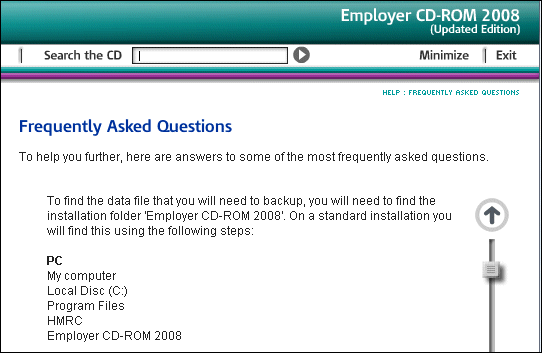
Very handy; but clearly it’s important to backup the data. There is an entry on this in the CD’s online Help:

We recommend that you backup the data after each pay period and keep it separate from the computer.

Good advice; but the instructions puzzled me. It says all the data is in the program files folder (in breach of Microsoft’s guidelines, even though this is a 2008 CD), and that to backup:

Copy the folder named ‘Data’ to your chosen means of backup. (To copy, right click the folder and select ‘Send to’).

I found this surprising because on Vista the Program Files directory is read-only. I checked; and there is no user data in this folder on Vista. Instead, the data is in Vista’s Virtual Store, and you can find it at:

C:\Users\[Username]\AppData\Local\VirtualStore\Program Files\HMRC\Employer CD-ROM 2008\data

There’s a couple of issues here. First, why is the UK government sending out CDs that are not properly compatible with Windows Vista, more than a year after its release? The Virtual Store is a compatibility feature; it is not intended for long-term use.

More important, the backup instructions are plain wrong for Vista users. How many businesses out there have got carefully made backups of a folder that does not in fact contain their data?

In an official application used by many thousands of businesses, it’s a significant blunder.

Digg-style bug reports = great feedback

Long Zheng’s Windows UX Taskforce is notable for several reasons. Zheng devised the site in order to give Microsoft feedback on quirks and annoyances in the Windows Vista user interface. He hid it by designing an application that lets users promote or demote user reports, Digg-style. To give you an idea, top of the list right now is that bewildering dialog that appears when trying to safely remove a USB thumb drive card reader – with 262 votes.

So the site is notable, first, for what it says about the Windows Vista UI; second, for what it says about the number of people who care about it and are willing to submit detailed feedback; and third, because it shows what a great way this is for managing bug reports and feature requests.

Actually, Microsoft already has something along these lines, called Connect. It’s fascinating to contrast Zheng’s quickly-assembled but easy to use site, which is attracting lots of users, with Microsoft’s site that is slower, more complex, and less compelling. It’s incomplete too. How do I submit feedback for Microsoft Word, for example?

It strikes me that software vendors have just been shown a simple and effective way to improve their products. I wonder how many will take it up?

Simple CRUD with Silverlight

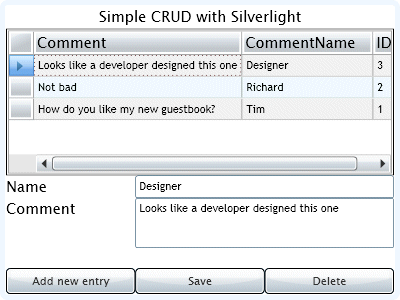
I spent a couple of hours putting together a simple CRUD (Create, Retrieve, Update, Delete) application with Silverlight 2.0 beta 2.

Most of the examples I’ve seen use LINQ to SQL; that’s fine, but I wanted to do something without that intermediate layer. Having said that, I ended up in effect writing my own object-relational mapper. Still, it’s nice to know exactly what the code is doing.

I’ve described the project in a little more detail here.

Expression Blend 2.5 problems with Silverlight 2.0 Beta 2

I hit a worrying error in Expression Blend 2.5 June 2008 preview. In search of a good screenshot, I opened the new Clock sample, and got this result:

The same XAML compiles and runs fine in Visual Studio 2008 with the latest Silverlight 2.0 Beta 2 tools.

Note that if Expression can’t render the XAML, none of its design tools can be used at all.

So what is going on here? Don’t Expression Blend and Visual Studio share the same parser? This kind of problem would soon torpedo any notion of designers and developers working seamlessly on the same code.

I got my screenshot by temporarily modifying the offending code.

Fixing a Silverlight 2.0 WCF reference in a VB application

Another in my recent series on getting Silverlight 2.0 beta 2 working.

If you create a WCF web service for Silverlight, it’s well known that on the server side you have to change the binding to basicHttpBinding (or use the new Silverlight-enabled WCF service). Then you can use the Add Reference wizard in your Silverlight application and code against the generated ServiceClient.

This works in C#, but in VB you may hit this error at runtime:

The error is “Could not find endpoint element” etc, and it refers to your “client configuration section”.

I fixed this by comparing the ServiceReferences.ClientConfig file generated in a VB project with that for a C# project. Check the Contract attribute of the endpoint element. It should be qualified with the full namespace, by default the name of your app. In this example, it would be:

contract="RegSilverlightDemoApp.RegService.IRegService"

However, the VB wizard omits the first part of the namespace; then at runtime, it can’t find the service.

Evidence, perhaps, that C# is the language of choice in Microsoft’s developer division.

More Silverlight, Visual Studio setup hassles

I thought I’d fixed my Silverlight 2 Beta 2 installation; but I had not.

I ran into the issues described here, specifically:

  1. Error “Object reference not set to an instance of an object” when adding a WCF service
  2. Silverlight app cannot see WCF services in same solution
  3. Error “Unable to find ‘DynamicTypeService’” when clicking the Advanced button in the Add Service Reference dialog.
  4. Visual Studio crashing on exit

Here’s what fixed it for me. First, I attempted to debug Visual Studio while adding a WCF service and spotted an exception related to version control. I discovered that Visual Studio was set to use Team Foundation Server as the Source Control plug-in, even though my Team Foundation Server is offline. I don’t know if the Silverlight install somehow reset this, as I thought I’d set it to None in Tools – Options – Source Control – Plug-in Selector; but I changed it back to None and that fixed the Object Reference error.

Unfortunately it did not fix the second problem. Following a tip in the thread mentioned above, I moved the file:

\Program Files\Microsoft Visual Studio 9.0\Common7\IDE\Microsoft.VisualStudio.ServicesProxy.dll

Then I uninstalled Microsoft Silverlight Tools Beta 2 for Visual Studio 2008. Then I reinstalled it (no reboot). Everything works.

The Microsoft.VisualStudio.ServicesProxy.dll is replaced with a new version.

An indicator of this problem is the size of your Silverlight Tools install in Control Panel – Programs and Features. If it is 1.14MB you may have the problem. If it is 1.17 or 1.18MB you probably do not have the problem. The size of my install increased from 1.14MB to 1.17MB on reinstall. A theory is that if the Silverlight Tools installer sees the ServicesProxy.dll, it doesn’t install some other stuff that in fact it should install.

Upgrading to Silverlight 2.0 Beta 2? Proceed with care

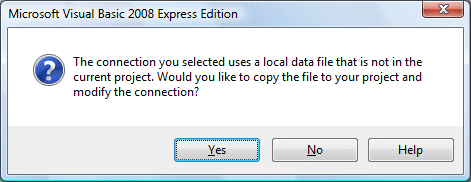
I dived straight into the Silverlight 2.0 Beta 2 download, and soon hit this dialog:

I discovered that I should have read this guide to installation by Microsoft’s Bradley Bartz. It is a little arduous: remove KB949325 (which requires the Visual Studio installation media) as well as any previous Silverlight SDK and tools, apply Visual Studio 2008 SP1 Beta if you have not yet done so, then install Silverlight. Otherwise you may get an error relating to silverlight_uninstallrtmpatches.exe as I did.

I’m grateful to BradleyB. I admit, the issue is also noted on the download page:

If you have previously installed Silverlight Tools Beta 1, you must uninstall KB949325 before installing Visual Studio 2008 SP1 Beta.

I should have read it more carefully.

Update

In my case, it was worse than that. I could not find KB949325 in the list of installed programs, but the Visual Studio SP1 Beta install still failed. I found this post by Heath Stewart. I had to follow the manual steps with reg.exe; the utility did not work for me. I also found that KB945140, which is the SP1 Beta, was actually listed as installed in Programs in Control Panel, but only for the Visual Studio 2008 Shell (Integrated mode). I removed that too. Eventually, SP1 Beta installed successfully, following which the Silverlight SDK and Blend 2.5 installed without further issue.

Stewart has not responded to Will Dean’s comment on his post:

It sometimes feels that VS + .NET FX are in a death-spiral of an ever-increasing prevalence of this sort of issue.   

For more evidence, see Aaron Stebner’s worrying posts about problems with the installation of .NET Framework 3.5 Client Profile. Apparently this beta, once installed, makes it hard to install other versions of .NET or applications which depend on them; and uninstall is a multi-step process that has to be done in a certain order.

The only positive thought I can muster from all these complications is that this is the kind of issue that running apps in the browser avoids, at least for users rather than developers. That assumes that the install for the Silverlight runtime is bulletproof; I’ve been impressed with it so far, though I’ve heard of some users having problems. The Flash runtime isn’t immune either; I’ve had issues installing the latest security update and resorted to Adobe’s Flash uninstaller.