Category Archives: software development

By the way, your website is down

Ever had that, in an email or phone call, and thought: if only I’d known earlier?

There are plenty of ways to monitor a web site’s availability, but I thought it should be simple to do a custom monitoring application in Visual Basic. Here it is, as described in the August 2008 Personal Computer World. One advantage of this approach is that you can write your own rules for what counts as available. For example, you can set the acceptable response time; or check the content of a page.

It’s very basic. For example, the alert just calls the FlashWindow API. You’d probably want to change it, maybe fire off an email or two. I may improve it over time, but no promises.

Technorati tags: , ,

VirtualBox is amazing, 50% faster than Virtual PC on my PC

It was only when Sun acquired it that I got round to trying VirtualBox, a free open source virtualization utility. I was immediately impressed, not least by its performance. It just felt snappy, something I’ve never been able to say about Microsoft’s Virtual PC, useful though it is. When I needed to set up a new virtual machine in order to do some Delphi 7 development, I decided to use VirtualBox rather than Virtual PC. Again, I’ve been very impressed. I thought it would be interesting to see if my perception of good performance would be verified by a test suite, so I dug out the PassMark suite and ran a few tests.

Note that both Virtual PC and VirtualBox can use Intel’s Virtualization Technology CPU extensions (AMD have similar extensions, but I’m running on an Intel Core 2 Quad). I ran PassMark on XP Pro with SP3, under both Virtual PC and VirtualBox, with hardware virtualization first enabled, and then disabled. I ran it full screen, with as little as possible running on the underlying OS (Vista 32-bit). PC additions were installed. Both virtual machines were given 512MB RAM. Here are the surprising (to me) results:

  • Virtual PC 2007 with hardware virtualization: 399.6
  • Virtual PC 2007 without hardware virtualization: 345.9
  • VirtualBox 1.5.6 with hardware virtualization:  542.9
  • VirtualBox 1.5.6 without hardware virtualization: 616.4

So on my machine (your results may vary) VirtualBox is faster without hardware virtualization, and more than 50% faster than the best result from Virtual PC.

I drilled into the results a little. On the CPU tests there was not a big difference; in some cases Virtual PC was ahead. On the Graphics 2D tests though, VirtualBox was dramatically faster – more than twice as fast on the GUI test, for example. It was also dramatically faster on disk I/O. For example:

Disk- Sequential Read: VirtualBox 143.4 MB per second vs Virtual PC 90.8 MB per second

Disk – Sequential Write: VirtualBox 97.4 MB per second vs Virtual PC 6.8 MB per second

I’m not surprised that this makes a big difference to perceived performance, since Windows spends much of its time reading and writing temporary files. This may also be why VirtualBox seems to start up and shut down much more quickly.

I don’t claim that my informal tests prove that VirtualBox is a faster performer in every case. Maybe there is some setting I could change that would improve Virtual PC’s speed; or maybe Virtual PC likes some hardware better than others. Still, it is a real-world experience, and enough to make me suggest that you give VirtualBox a try if you have yet to do so. By the way, both these products are free.

Finally, let me note that Vista running directly on the hardware scores a PassMark of around 1100 on this machine. Even VirtualBox is a lot slower than the real thing, as it were.

Update: If you try VirtualBox, make sure you get at least version 1.6.2 (6th June 2008), as 1.6.0 has broken networking on Windows.
Missing from Bill Gates Tech Ed keynote: Live Mesh

I watched the video of Bill Gates keynote at Tech Ed yesterday. You can also read the transcript.

I enjoyed the second half more than the first. Gates can rarely resist giving a potted history of computing in his keynotes – maybe because of his own role in that history – but I find it a snooze. It also tends to reinforce the impression that Microsoft is yesterday’s company.

Gates shaped his keynote, which was on the subject of application development, around four themes:  Presentation, Business Logic, Data Access and Web Services. In presentation we got a plug for WPF and Silverlight – more the latter, with a nice demo by Soma Somasegar but nothing we haven’t seen before from Mix08 and the like.

On the business logic theme, we got a demo of a new tool called the Architecture Explorer, said by Brian Harry to be part of the Oslo wave. Microsoft will be pushing Oslo strongly at PDC later this year. Separately, I noticed that the Microsoft’s software factories guy, Jack Greenfield, has recently posted about how his team has moved from Visual Studio Team Architect to Developer and Platform Evangelism. Now I may be wrong here; but my guess is that Microsoft had a huge internal debate about whether to bet on software factories or modelling as the next step in enterprise application development, and that software factories is being sidelined in favour of Oslo. Hence statements like this:

Visual Studio Team Architect team remains actively committed to supporting Software Factories, as do the rest of Visual Studio Team System, the Visual Studio Ecosystem team and patterns & practices.

Phrases like “actively committed” usually mean the opposite of what they say. We’ll see; but note that we got Oslo in the Gates keynote, not factories.

Then we got data access, with Dave Campbell on SQL Server Data Services and the Sync framework. I think this is cool stuff; but having seen it at Mix (where I talked to Campbell and liked what he had to say) it was not new to me.

Finally,  web services. This is where Gates talks about Live Mesh, right? Wrong. Gates gave a nod to cloud computing as the future:

I can run Exchange on premise, or I can connect up to it as a service. But even at the BizTalk level, we’ll have BizTalk Services. For SQL, we’ll have SQL Server Data Services, and so you can connect up, build the database. It will be hosted in our cloud with the big, big data center, and geo-distributed automatically.

but that was it, it was on to fun robotics. I found this a surprising omission. As I see it, Mesh + Silverlight (plus of course things like SSDS) forms Microsoft’s cloud computing development platform. However, I imagine that like modelling vs software factories this is a matter of debate within the company as well as outside; perhaps we are seeing the Gates view vs the Ozzie view here.

By the way, I got my official Mesh sign-up invite this morning and I have the impression anyone can sign up now; why not try it?

Tech Ed news: Silverlight 2.0 goes live, more Oslo hype

I’m not at Tech Ed in Orlando, but was ready to watch the Bill Gates keynote which this web site tells me starts at 8.30am Eastern – trouble is, that was 45 minutes ago, and the webcast still just plays a pretty tune and then stops. Not a great way to showcase Silverlight live streaming.

Fortunately the press release has gone up. Gates has announced Silverlight 2 beta 2 (this is the one with .NET runtime included), complete with a Go Live license. Microsoft has also released Expression Blend 2.5 June 2008 Preview and Microsoft Silverlight Tools beta 2 for Visual Studio 2008, so we should be all set to code and go.

Other highlights: IE 8 Beta 2 in August, new preview code of project “Velocity” for caching high-scale apps, and more hype for Oslo, Microsoft’s “unified modeling platform”:

Oslo will include visual modeling and composition tools, a foundational repository built on SQL Server 2008 for managing application metadata, and a new, declarative modeling language to enable interoperability of models between tools and domain-specific modeling notations.

I don’t doubt that Microsoft is serious about Oslo; others at Microsoft has confirmed that this is a major initiative. However, I am naturally sceptical about whether Oslo will achieve its goals. Most other grand model-driven development products have failed; why will this be different?

Google App Engine line endings snaglet exposes Windows/Unix disconnect

This amused me:

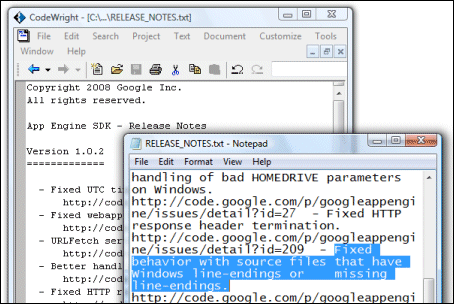
In case you can’t see the image, it shows the release notes for the Google App Engine SDK, which I’m trying right now. The notes say:

Fixed behavior with source files that have Windows line-endings or missing line-endings.

With a nice self-referential touch, the notes reveal the very problem they are describing. On Windows, a line ending is usually encoded by two characters (carriage return and line feed), whereas on Unix (and similar systems like Linux and Mac OS 10) a single line feed character is used. Notepad is the default viewer for text files on Windows, and displays these Google release notes with scrambled formatting. A programmer’s editor like CodeWright1 understands both conventions and the file displays fine.

It is a minor annoyance, but exposes a deeper problem. There are two factors at play here. One is that the open source world has tended to use Unix-like operating systems (maybe because open source operating systems are Unix-like); the other is that the favourite client OS among Web 2.0 geeks is the Mac. It’s likely therefore that most or all the folk working on App Engine do not use Windows and do not see this issue. They have taken the trouble to support Windows, but the Windows platform is just a little alien. The poor experience you get when double-clicking a readme is a symptom.

Another example is in the notes describing the options for the dev_appserver.py script, used to run the SDK. It says:

–datastore_path=PATH      Path to use for storing Datastore file stub data. (Default /tmp/dev_appserver.datastore)

What was that default again? There is no /tmp directory on Windows. I am sure the script uses a sensible default on Windows; but it will be different from what these notes say.

Let me add that the Unix directory structure is generally nicer to work with than Windows, with its archaic drive letters; and that I see little sense in the carriage return character being needed to end a line (it’s a throwback to the typewriter). Windows is also more wrong that right about using the backslash as a path divider (all IBM’s fault, apparently).

As a developer, I perceive these things as a small nudge that I might not be using the best OS for the task in hand. That’s unfortunate for Microsoft, and I’m not sure how it can fix it – though getting Notepad to respect Unix line endings would be a start.

1CodeWright is/was an excellent editor that was acquired and killed by Borland; unfortunately it does not work properly on Vista though I still find it handy occasionally.

Ruby on Rails on .NET

Microsoft’s John Lam reports:

IronRuby dispatched some simple requests through an unmodified copy of Rails a few days ago. Today, we’re going to show off our progress live at RailsConf.

He adds that performance is terrible; so you might not want to migrate your project just yet. Why bother? Mainly, to get Rails productivity plus access to .NET libraries – in other words, integration with Microsoft’s platform.

Technorati tags: , , , ,

Danny Thorpe back at Microsoft

Danny Thorpe, best known for his work on Delphi at Borland, is returning to Microsoft:

I will soon be jumping back into the Microsoft maelstrom, this time in the Visual Studio / Developer Division (devdiv) team. I will again be telecommuting from Santa Cruz. I’ll be part of a new incubation team composed of Chuck and a few other legendary devdiv veterans (I’m not sure I can say who yet) working on stuff to make accessing Windows Live services easier for developers.

I have had great respect for Thorpe ever since reading his book on Delphi Component Design, which despite its age is still a good read if you want to know how the Visual Component Library in Delphi hangs together. His career has been a bit butterfly of late – from Delphi to Google to work on Gears, then Microsoft developing Live Services, then working on browser plugins at cooliris (makers of PicLens); and now back to Microsoft.

If Microsoft is to bring its Live Services into wide use, strong Visual Studio integration is a must; I guess this may be what his new role is all about.

What’s coming in Windows? Check the PDC 2008 agenda

Microsoft’s Professional Developer’s Conference is traditionally where it shows developers its forward plans. Sometimes these do not work out as expected. Notorious examples include Hailstorm web services, and pre-reset Vista, in which Windows Presentation Foundation was more at the core, and which included the WinFS smart file system.

It follows that the just published session list for the PDC should not be treated as an infallible guide to the future. Still, there are interesting snippets here:

  • .NET and ASP.NET for Windows Server Core
  • Silverlight for Mobile devices
  • Touch computing in Windows 7
  • A “new networking API with support for building SOAP based web services in native code”
  • and of course the Live Mesh developer platform

Who needs AIR? NY Times does desktop Silverlight app for Mac

The New York Times is porting its excellent Times Reader application to the Mac using Silverlight 1.0:

Times Reader for the Mac is a native Cocoa application, which uses the Safari toolkit and Silverlight to render the pages.

Follow the link for some screengrabs. Adobe’s AIR (which also uses the Safari toolkit) is the obvious choice for this kind of online app; it’s interesting to see the NY Times adapting Silverlight in a similar manner.

I spoke to developer Nick Thuesen about this at Mix07, so this is not news for readers of this blog; though I’d become sceptical about whether it would be delivered because of the delay. Now, I’m surprised that the NY Times is still using Silverlight 1.0 rather than waiting for 2.0.

The Silverlight version appears to have some compromises. In particular, it cannot flow text on the client:

We paginate the pages for the Mac version on our servers (the Windows version does this on the PC). When you sync, we send you pages for the four window and three font sizes described above.

Still, the screens look good and I look forward to trying it – especially as the public beta will be free, whereas you need a subscription for the full release.

There is a high level of hostility towards Silverlight in the comments to the post. Mostly these appear to be religious in nature – ie. Mac users hate all things Microsoft. It does illustrate the difficulty the company has in persuading the world to take its cross-platform ambitions seriously.

Thanks to Ryan Stewart for the link.