Category Archives: software development

MFC not dead – “massive update” planned

Herb Sutter refers to a comment by Bill Dunlap, a product manager for Visual C++, on the future of MFC:

MFC – we are working on a huge update to MFC that should knock your socks off.  I can’t tell you too much right now, but this is closer than you might thing <g>.

Intriguing, since with ATL and then the whole .NET thing, including managed C++ and C++/CLI, I’d assumed that MFC was all-but deprecated.

I can see the value of this for maintaining existing projects, but for new ones? I like this comment by Dan Shappir:

The only reason I can see for doing significant UI development in C++ is for cross-platform support, and in that case I would probably choose Qt.

Actually I can think of a few other reasons, such as performance and compatibility with older versions of Windows, but then again why not use Delphi?

Talking of Delphi, it’s interesting that according to Shappir’s post referenced above, Microsoft’s Visual C++ team had similar feedback to Borland/Codegear:

Damien Watkins, a Program Manager on the Visual C++ team, stated quite frankly that the feedback they have received from C++ developers is that they prefer to use C# for developing managed code for .NET. So what is the new positioning for C++? Apparently it’s:

  • A strong emphasis on developing unmanaged, native applications
  • Tool for achieving interop between existing native code and new managed code

I guess this ties in with renewed investment in MFC.

Technorati tags: , , , , ,

Recreating iTunes in Silverlight

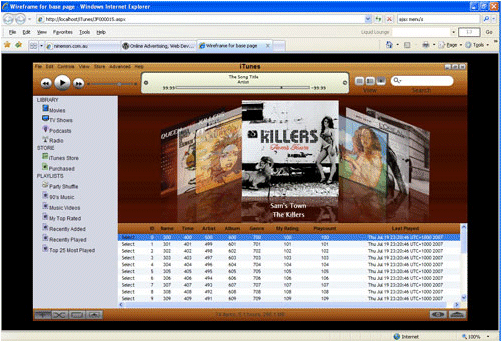
Browsing through Codeplex I came across this project to recreate iTunes as a Silverlight application. What’s remarkable is that author Jose Fajardo has kept a kind of developer’s diary on his blog, complete with YouTube videos here, here and here showing how he is recreating Apple’s music app as a Silverlight/Ajax web application.

The videos are not exactly gripping unless you are interested in the nitty-gritty of how to create a control in Microsoft’s Expression Blend and integrate it into a Silverlight application. If you are, then this sort of hands-on demo gives a great picture of real-world use. It’s a also an intriguing example of how to replicate another company’s expensive design efforts with just a few minutes in a suitable tool.

It looks like Fajardo is having a lot of fun with Silverlight, though if he completes the project I’m not sure what Apple will make of it. How’s the DRM piece coming along?

Tafiti: search as a rich internet application

Tafiti is fascinating. Imagine what Google search would look like, if re-designed as a Flash application. This is it, except that it’s Live Search, not Google, and Silverlight, not Flash.

Let’s start with the good stuff. I ran this on a machine without Silverlight installed, and the installation of the plug-in was fast and smooth (though it restarts IE without remembering the open tabs, which is mildly annoying). The Tahiti app looks good and scales nicely. I searched for Silverlight, and results came back fast. You can easily filter the results, or drag and item onto a “shelf” for future reference, and the shelf persists between sessions.

The best feature is a carousel at bottom left. This modifies the search by different types: books, news, feeds, web or images. The layout of the search results changes to match the type of search, so you get book covers and a print-like font for the book search, big headlines for a news search, and so on.

What’s bad about Tafiti? The biggest irritation comes when you actually want to navigate to a site you’ve found. The generic problem here is that you typically want to keep the list of results as well. I normally solve this by right-clicking and opening the site in a new tab. But this is an application, not HTML, so when you right-click you get a single menu option, “Silverlight configuration.” If you left-click it is even worse:

Tafiti is trying to show the site you chose. Please disable your popup blocker to see your selection.

It wants to open the site in a new window, see, and that triggers the popup blocker. Easily fixed with “Always allow popups from this site”, but still a jarring experience.

These are actually minor quibbles. The more fundamental issue is, do you want search as an RIA? The problem is that search is a basic utility. What I want is quick results and easy navigation, never mind the frills, so I will take some persuading. Still, it could work if the application adds real value. Maybe a way of displaying more results on a page, without clutter, or categorising the results in some sensible way. It’s difficult, because attempts to be helpful often end up being counter-productive – and Microsoft is a specialist in over-helpful UIs, sadly.

Despite these reservations, I think Tafiti is a great Silverlight demo, because the technology is nearly invisible. On my system at least, it just works, and at this stage that is what counts for most.

PS: I am not sure what Tafiti is meant to mean, but according to Wikipedia it is a dialect of a Polynesian language and means the strangers, or people from a distance. Perhaps Microsoft is talking about its search market share vs Google?

Update: in the comments here and on the official faq it is said that Tafiti means “do research” in Swahili, and that the app is specifically aimed at “research projects that span multiple search queries and sessions”.

Technorati tags: , , ,

The Samsung i600 and Windows Mobile

I’ve been looking for a new Smartphone for a while, and decided to try the Samsung i600, a Windows Mobile device with strong connectivity (GPRS,Bluetooth,UMTS,HSDPA,wi-fi) and a tiny QWERTY keyboard. It is not a touch screen, which to me is a good thing in a mobile phone. I’ve not tried the finger-driven iPhone yet, but I did use a Palm Treo for a while and found the stylus a nuisance. For me, email and web access are just as important as voice, and I’ve already found the keyboard useful. You can find the specs of the i600 elsewhere; but here are my observations so far.

Pros

I like the feel of the device. The central button and joystick is a pleasure to use, and the backlit keyboard is pretty good considering its size. The 320 x 240 screen is excellent (dust aside, see below), and browsing the web is a realistic proposition provided that you are not paying something ludicrous like £4.00 per MB (yes, that’s what some operators charge in the UK). I’ve not tried all the features yet, but I’ve had success with IMAP email, wi-fi, Bluetooth, and playing MP3 music.

The i600 has a neat “card wheel” UI on its home screen, which provides quick access to most of the features. Using the joystick or scroll wheel, you first find the card you want, and then scroll within the card to find what you want. For example, the Profile card lets you select a profile such as Normal, Silent, or Vibrate. The Now Playing card is particularly good, letting you pause, play and skip songs without leaving the home screen.

The camera is decent for a mobile, but still nowhere near good enough to replace a separate camera even for my limited use. You can also capture a jerky little video. There are actually two cameras, one on the back for taking pictures, and one on the front for video calls.

Others have found battery life a problem, but Samsung has solved it by bundling an extended battery and external charger in the box. Fitting the extended battery makes the phone a little thicker, but not excessively so. You also get a standard battery, which you can use as an emergency backup. I’ve found this more than sufficient. Apparently not all bundles include the extra battery, so it’s worth checking this point if you are considering the phone.

This is also a good device for developers, provided you are happy with Visual Studio. I was up and running quickly once I’d worked out the security issue (separate post coming soon). I did purchase an unlocked device, as I hate the whole contract circus. A Micro SD storage card is also essential.

Cons

Windows Mobile is still not as easy as it should be. I really think Microsoft should have ActiveSync sorted by now, but apparently not. When I first connected to my Vista desktop PC, Windows Installer started up, thrashed around for a bit, then declared it was quitting because a newer version was installed. After that, nothing. I connected the device with USB, there was no error, but the Mobile Device Center could not see the phone. I fixed this by downloading Mobile Device Center 6.1. That mostly works, but I still have strange problems syncing with Exchange. This works through wi-fi provided I set the connection to “work” rather than “internet”, but not through USB. Perhaps I’ll work out why, but this sort of thing is frustrating and difficult, and online help is a masterpiece of polite unhelpfulness. Try a search for “cannot connect with current connection” (with the quotes) if you really want to know more.

More generally, I find navigation with Windows Mobile unpredictable at times. Example: I click Start, then Organizer, then Calendar. This fires up the Calendar, which defaults to the monthly view. I select a day, and click OK to view an appointment. Then I click the Back button. I should be back at the monthly view, but I’m not: I’ve exited Calendar and I’m back on the Organizer group in the Start menu.

I find the email client similarly confusing. No matter how hard I try, I seem to end up switching out of the app completely when I don’t mean to.

A crazy omission in Windows Mobile for Smartphone is cut, copy and paste. I couldn’t believe this at first, on a device with a keyboard, but it is true. I believe there are third-party solutions. I’ve also installed the trial of Documents To Go, which does support the clipboard, though this won’t fix Mobile Outlook.

No Flash support in Pocket IE.

I have a few complaints about the i600 itself. No socket for a standard headphone jack, so you have to use the supplied ear buds. Dangly plastic covers for the data cable and Micro SD ports, which are bound to break off in time. No support for Micro SDHC, which means a 2GB limit on the storage card. I’ve also applied the official Windows Mobile 6.0 upgrade (pretending to be from the Netherlands) and was disappointed to find no Mobile Office – having said which, Documents To Go is probably better in any case.

Most seriously, I can already see dust behind the screen. It’s not yet a big problem, but how much worse will it get in prolonged use? There appears to be no fix other than returning the unit for service or replacement. 

Overall

Despite the cons, this is easily the best mobile I’ve used.

Technorati tags: , , , ,

ThoughtWorks Mingle: is JRuby always this slow?

I’ve set up ThoughtWorks Mingle on Ubuntu 7.04.

No significant problems so far, though a couple of observations. The system requirements are substantial – 2GHz processor, 2GB RAM – which is OK for a new server, but rules out ideas like installing on a VM on the Internet.

It’s easy to see the reason for the high system requirements. Mingle feels slow, even with just a dummy project that has hardly any content. Maybe that’s the price of being first to market with a commercial product built in JRuby. Trouble is, performance is a feature, and exactly the kind of detail ThoughtWorks needs to get right in order to attain high usability.

Second disappointment: Mingle integrates with Subversion, but the repository needs to be on the same machine. Mine is out on the Internet, on one of those VMs that’s not up to running Mingle. Apparently this will be fixed in a later release. In the meantime, I guess I’ll have to set up a local Subversion for testing.

This is the first release, and no doubt ThoughtWorks will find ways to improve performance. I’m looking forward to trying it out.

Technorati tags: , ,

Amazon FPS – is this the micropayment revolution?

Amazon.com has announced the beta release of the Flexible Payment Service, an addition to the range of web services which already includes on-demand computing (Elastic Compute Cloud) and Simple Storage (Amazon S3).

At first glance, this looks like big news for the Internet. It bears all the Amazon hallmarks: low price, developer-friendly, and easy to adopt. Here’s the pricing:

For Transactions >= $10:

  • 1.5% + $0.01 for Amazon Payments balance transfers
  • 2.0% + $0.05 for bank account debits
  • 2.9% + $0.30 for credit card

For Transactions < $10:

  • 1.5% + $0.01 for Amazon Payments balance transfers
  • 2.0% + $0.05 for bank account debits
  • 5.0% + $0.05 for credit card

For Amazon Payments balance transfers < $0.05:

  • 20% of the transaction amount, with a minimum fee of $0.0025

There is no up-front fee. All these prices are reasonable, but the last one deserves particular scrutiny. If both buyer and seller have an Amazon Payments account, then you can receive a tiny payment at a realistic cost. You could even pay me a single cent, three-quarters of which I would get to keep.

Now look at PayPal’s fees. $0.30 fee plus a percentage for any transaction. Google Checkout? Complex, because Google wants to hook you into its AdWords advertising by giving free transactions up to a proportion of your AdWords spend, and because it is subsidizing the service to buy market share from PayPal. But the fees include $0.20 per transaction plus a percentage, which means you cannot do micropayments.

Amazon FPS is based on web services, so that developers can easily build it into their web applications.

FPS is interesting to me as a writer. It means I could self-publish and change a small amount per article – maybe just a few pennies. It is also interesting as a means of monetizing web services. A neat feature is that buyers can limit their risk by specifying both transaction limits and the total amount transferred over a period, for a particular recipient.

If Amazon FPS takes off, then Amazon becomes a major identify provider (because you will use your Amazon ID for payments to third-party sites) as well as becoming an Internet bank.

I think Amazon is a sufficiently well-trusted name that this could work. I should add, though, that nobody is sure of the significance of micropayments – we’ve just speculated that they might be a key enabler of (ugh) Business 2.0. See Wikipedia for a discussion and links. So far, it has been advertising rather than micropayments that has changed the game. But that was before Amazon FPS. What do you think?

PS – see Jeff Barr’s post for more information and early adopter examples.

ThoughtWorks Mingle is released

ThoughtWorks has released Mingle, an agile software collaboration tool.

I spoke to Martin Fowler from ThoughtWorks about this and other topics earlier this month; I will be reporting in more detail on this shortly. As I understood it, Mingle was born out of frustration with other collaboration products that were found to be inflexible or lacking in usability. It is one of the first software products from ThoughtWorks, which in the past has focused on software development and consultancy.

Usability in this context is not a matter of “if you’re smart, you can figure out how to use it”. Rather, it is about minimising effort so that the balance tips in favour of people wanting to use it, rather than doing it because they have to. I do not know yet if Mingle achieves this, but I think this is the intention. See 10 reasons why Mingle.

Mingle optionally integrates with the Subversion source code repository. It is based on the concept of all-purpose items called cards, and also includes wiki pages.

Mingle is a commercial product, but free for small teams (up to 5 users) and not-for-profit organizations.

I’ll be installing later today, on a new Ubuntu server (which has given me a few RAID problems).

Technorati tags: , , ,

PHP Zend Framework will go visual

I spoke to some of the guys at Zend on the launch of the Zend Framework, a class library for PHP. I wrote this up for The Register.

The Zend Framework is a non-visual library, but I asked whether it will handle visual controls in future. I was told that it will: Zend’s Zeev Suraski spoke about a forthcoming “Visual Component Model” along with “WYSIWYG tools” (though WYSIWYG is always a stretch with web applications).

Of course I was reminded of Delphi for PHP and its Visual Component Library. If Zend achieves its aim of making the Zend Framework something of a standard in the PHP community, that will be a blow for CodeGear’s product, unless somehow it could be re-worked to become a Zend Framework IDE. It seems to me that Zend’s framework has better chances than CodeGear’s. The documentation is incomparably better, and my early experiments suggest that the quality is good.

It is also interesting to see that the Zend Framework has built-in support for Google services.

Family.Show – an excellent WPF demo app

Microsoft’s Tim Sneath drew my attention to Family.Show, which he describes as “our first end-to-end reference sample for WPF”. This genealogy application was made public three months ago, but I had not tried it before. Source code is available, and there is a white paper [XPS] about how it was developed.

The application feels a little unfinished, but nevertheless it is excellent. I started the application and without reading any documentation started entering my family details. I enjoyed the results and carried on longer than I had intended. It scales beautifully, both when you resize the main window, and when you use the zoom control. Another neat feature is the time slider, which lets you change the current year. As you go back in time, everyone’s age goes down and people not yet born fade into the background.

WFP applications are unlike what we know as Windows applications. This is partly because they don’t use standard Windows controls, and partly because WPF encourages a different approach. It is more like a Flash application, and requires design skills to build.

The paper is also a good read. Family.Show apparently uses XML Serialization to persist its genealogy files. I’m not sure this is wise, though I’m open to being convinced. I’d be inclined to use an old-fashioned relational database, which I suspect would perform better with large files. Another problem with XML Serialization is that it can be brittle when you want to revise the objects.

I am always interested in performance, and a tip from the paper is worth highlighting. This is the huge benefit of virtualizing the ListView control, which means it doesn’t bother instantiating elements that are not visible. The team found sorting 32 times faster, filtering 70 times faster, and memory use 75% less when using a virtual list.